


Spring Cloud 之Ribbon(一)
一、Spring Cloud介绍
分布式微服务系统往往会碰到以下几个问题:
- 服务发现
- 服务通信
- 服务路由
- 服务熔断
- 统一配置管理
- 服务冗余部署及负载均衡
- 等分布式中常见的问题
spring cloud把解决这些问题的工具整合在了一些。
spring cloud提供的第一套解决方案:
- Spring Cloud Alibaba
- Spring Cloud Netflix
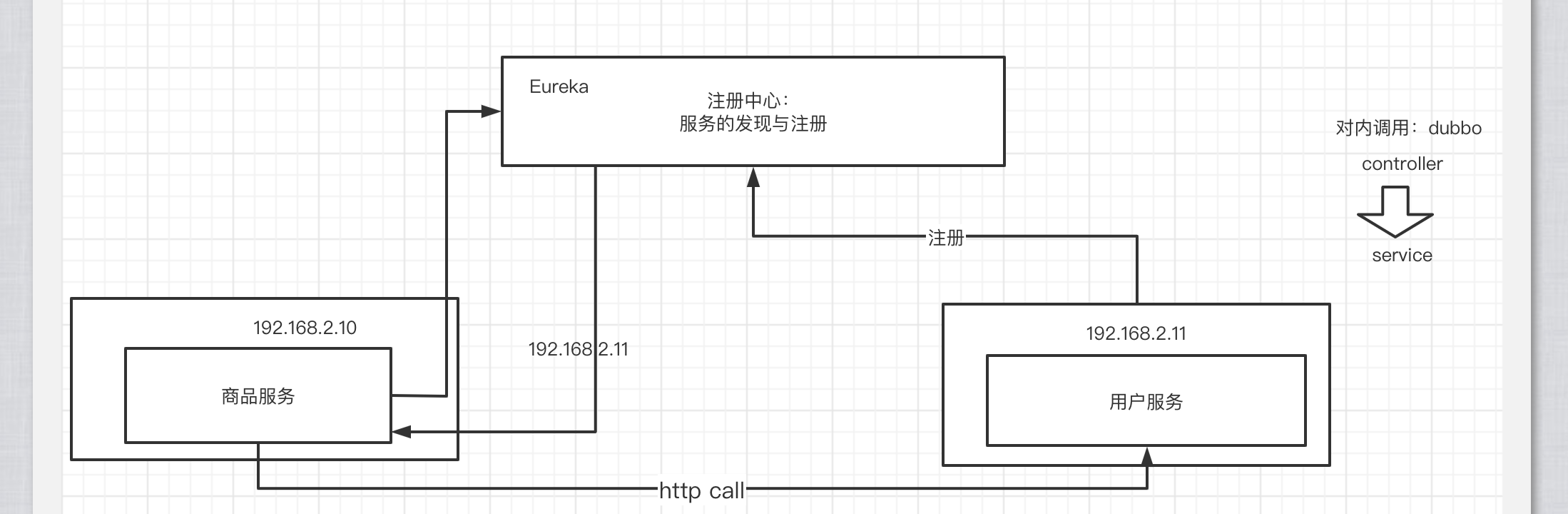
二、Eureka注册中心
1.添加依赖
				<dependency>
            <groupId>org.springframework.cloud</groupId>
            <artifactId>spring-cloud-starter-netflix-eureka-server</artifactId>
        </dependency>
2.编写配置文件
spring:
  application:
    name: my-eureka
server:
  port: 8761
eureka:
  instance:
    hostname: localhost
  client:
    # 是否要注册到注册中心上?因为当前服务要作为注册中心本身,所以不需要注册
    registerWithEureka: false
    # 是否启动多节点,因为目前是单节点
    fetchRegistry: false
    serviceUrl:
      defaultZone: http://${eureka.instance.hostname}:${server.port}/eureka/
3.在启动类上打上注解
@SpringBootApplication
@EnableEurekaServer
public class MyEurekaApplication {

    public static void main(String[] args) {
        SpringApplication.run(MyEurekaApplication.class, args);
    }

}
最后通过 http://localhost:8761端口访问eureka界面
三、创建服务提供者
1.添加依赖
				<dependency>
            <groupId>org.springframework.cloud</groupId>
            <artifactId>spring-cloud-starter-netflix-eureka-client</artifactId>
        </dependency>
2.编写配置文件
spring:
  application:
    name: user-service
server:
  port: 8762
eureka:
  client:
    service-url:
      defaultZone: http://localhost:8761/eureka/
3.在启动类上打上注解
@EnableEurekaClient
@SpringBootApplication
public class MyUserServiceApplication {

    public static void main(String[] args) {
        SpringApplication.run(MyUserServiceApplication.class, args);
    }

}
4.编写接口提供服务
@RestController
public class UserController {

    @RequestMapping("/user/show")
    public String userShow(){
        return "hello eureka!";
    }


}
四、创建服务消费者(Ribbon)
服务消费者也需要作为Eureka的客户端注册到Eureka注册中心上。消费者获得服务提供者地址列表后,要进行http的调用(通信)。在springcloud中http的通信有两种方式:
- Ribbon
- Feign
1.引入依赖
				<dependency>
            <groupId>org.springframework.boot</groupId>
            <artifactId>spring-boot-starter-web</artifactId>
        </dependency>
        <dependency>
            <groupId>org.springframework.cloud</groupId>
            <artifactId>spring-cloud-starter-netflix-eureka-client</artifactId>
        </dependency>
        <dependency>
            <groupId>org.springframework.cloud</groupId>
            <artifactId>spring-cloud-starter-netflix-ribbon</artifactId>
        </dependency>
2.编写配置文件
spring:
  application:
    name: product-service
server:
  port: 8763
eureka:
  client:
    service-url:
      defaultZone: http://localhost:8761/eureka/
3.在启动类上打上注解
package com.qf.my.product.service;

import org.springframework.boot.SpringApplication;
import org.springframework.boot.autoconfigure.SpringBootApplication;
import org.springframework.cloud.client.discovery.EnableDiscoveryClient;

@EnableDiscoveryClient
@SpringBootApplication
public class MyProductServiceApplication {

    public static void main(String[] args) {
        SpringApplication.run(MyProductServiceApplication.class, args);
    }

}
各种身份的依赖和注解
| 身份 | 依赖 | 注解 |
|---|---|---|
| 注册中心 | Eureka-server | @EnableEurekaServer |
| 服务提供者 | Eureka-client | @EnableEurekaClient |
| 服务消费者 | Eureka-client | @EnableDiscoveryClient |
4.创建Ribbon的配置类
关键是提供支持负载均衡的RestTemplate对象到ioc容器中
package com.qf.my.product.service.config;

import org.springframework.cloud.client.loadbalancer.LoadBalanced;
import org.springframework.context.annotation.Bean;
import org.springframework.context.annotation.Configuration;
import org.springframework.web.client.RestTemplate;

@Configuration
public class RibbonConfig {

    @Bean
    @LoadBalanced
    public RestTemplate restTemplate(){
        return new RestTemplate();
    }

}
5.在业务代码中使用RestTemplate进行http调用
@Service
public class ProductServiceImpl implements IProductService {

    @Autowired
    private RestTemplate restTemplate;

    @Override
    public String productShow() {
        //通过restTemplate来进行远程调用
        String url = "http://user-service/user/show";
        String result = restTemplate.getForObject(url, String.class);
        return result;
    }
}
String url = "http://user-service/user/show";
通过服务提供者的名称:user-service,向注册中心订阅该服务的地址列表,获得地址列表后,通过负载均衡策略进行地址列表的负载调用

 浙公网安备 33010602011771号