
allure报告
python3.6
1.allure-pytest 环境准备
使用 pip 安装 allure-pytest, 加上--index-url 国内下载源,下载会快一些
pip install allure-pytest==2.8.6 --index-url https://pypi.douban.com/simple
2.allure 命令行工具
allure 是一个命令行工具,需要去github上下载https://github.com/allure-framework/allure2/releases
注意不要下载2.13.10版本,这个版本有问题,很多同学使用这个版本会出现打开allure报告是空白页
下载完成之后,解压到本地电脑
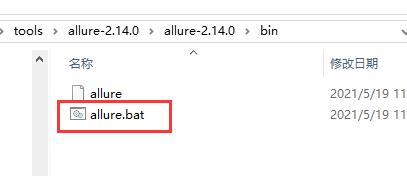
把allure.bat文件所在的bin目录加到环境变量path下
3.生成 allure 报告
运行用例和生成allure报告是2个分开的步骤,运行用例生成json格式的报告文件,--alluredir 指定报告路径
hrun testcases/login_env.yml --alluredir ./allure_report
也可以用pytest命令运行py文件
pytest testcases/login_userinfo_test.py --alluredir ./allure_report
运行后会在当前目录生成allure_report文件夹,使用allure目录行工具启动服务
allure serve ./allure_report
生成后会自动在默认浏览器打开报告
本文来自博客园,作者:qxll,转载请注明原文链接:https://www.cnblogs.com/qxll/p/14959394.html

 浙公网安备 33010602011771号