

Spring MVC 实现分页,批量删除
一:分页
导入包
<dependency>
      <groupId>com.github.pagehelper</groupId>
      <artifactId>pagehelper</artifactId>
      <version>5.1.2</version>
    </dependency>
在beans-datasoure.xml中加入配置信息
<bean id="sqlSessionFactory"
		  class="org.mybatis.spring.SqlSessionFactoryBean">
		<!--分页-->

		<!-- 别名 -->
		<property name="typeAliasesPackage"  value="com.cc.entity"></property>

		<!-- mapper  XML映射 -->
		<property name="mapperLocations"  value="classpath*:mapper/*Mapper.xml"></property>

		<!-- 数据源 -->
		<property name="dataSource" ref="dataSource"></property>

		<property name="plugins">
			<array>
				<bean class="com.github.pagehelper.PageInterceptor">
					<!-- 这里的几个配置主要演示如何使用,如果不理解,一定要去掉下面的配置 -->
					<property name="properties">
						<value>
							helperDialect=mysql
							reasonable=true
							supportMethodsArguments=true
							params=count=countSql
							autoRuntimeDialect=true
						</value>

					</property>

				</bean>
			</array>
		</property>

	</bean>
修改UsersService中查询Users返回的list,注意PageNum,pageSize是最好不要改为其他名字
List<Users> list(int pageNum,int pageSize);
修改实现类里面的内容
 @Override
    public List<Users> list(int pageNum,int pageSize) {

        PageHelper.startPage(pageNum, pageSize);
        return usersMapper.selectByExample(null);
    }
最后修改Controller,这里我给的默认值pageNum为1,pageSize为2
@RequestMapping(value = "/list")
public ModelAndView list(@RequestParam(value="pageNum",defaultValue = "1") int pageNum,@RequestParam(value="pageSize",defaultValue = "2")int pageSize) {

//    public ModelAndView list() {
        ModelAndView mv= new ModelAndView();
        //1.调用用户的service层的方法获取所有用户所有数据
        List<Users> userses = userService.list(pageNum,pageSize);

//        将集合转为Page
        Page<Users> page = (Page)userses;
        System.out.println("page====="+page);
        //2.将数据绑定mv上
        mv.addObject("userses",userses);
        //3.设置视图
        mv.setViewName("user/list");
        //4.放回mv
        return mv;
    }
效果:
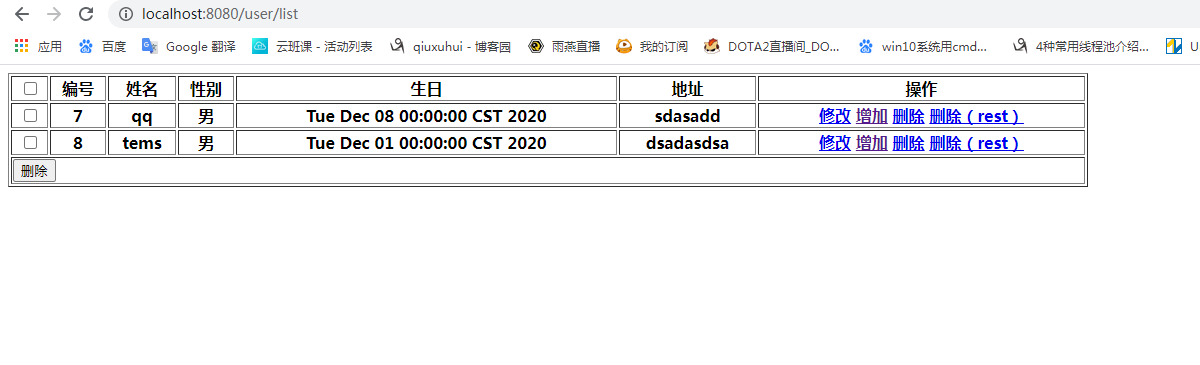
看下数据库里的数据一共有多少条

没错,只显示了前两条,按2条分页了
二:接下来实现批量删除
在原有的list.jsp中加入一个from表单,用于提交所选的内容有几条
<%@ page language="java" contentType="text/html; charset=UTF-8"
		 pageEncoding="UTF-8"%>
<%@taglib uri="http://java.sun.com/jstl/core_rt" prefix="c"%>
<!DOCTYPE html>
<html>
<head>
	<meta charset="UTF-8">
	<title>Insert title here</title>
	<script src="https://cdn.bootcdn.net/ajax/libs/javascript-state-machine/2.0.0/state-machine.min.js"></script>

</head>
<body>
<form action="${pageContext.request. contextPath}/user/delBatch">
<table width="80%" border="1">
	<thead>
	<tr>
		<th><input type="checkbox" id="totalCheck" /> </th>
		<th>编号</th>
		<th>姓名</th>
		<th>性别</th>
		<th>生日</th>
		<th>地址</th>
		<th>操作</th>
	</tr>
	</thead>
	<tbody id="list">
	<c:forEach items="${userses}" var="user">
		<tr>
			<th><input type="checkbox" id="user_check" name="ids"
					   value="${user.id}" /></th>
			<th>${user.id }</th>
			<th>${user.username}</th>
			<th>${user.sex}</th>
			<th>${user.birthday }</th>
			<th>${user.address}</th>
			<th>
				<a href="${pageContext.request. contextPath}/user/to_edit?uid=${user.id}">修改</a>

				<a href="${pageContext.request. contextPath}/user/to_add">增加</a>

				<a href="javascript:doDel('http://localhost:8080/user/delete?uid=${user.id}')" >删除</a>

				<a href="javascript:remove('http://localhost:8080/user/delete/${user.id}')">删除(rest)</a>
			</th>
		</tr>
	</c:forEach>
	</tbody>
	<tr>
		<th colspan="7" align="left">
			<input type="submit" value="删除"/>
		</th>
	</tr>
</table>
</form>
</body>

<script type="text/javascript">

    $(function() {
        $("#totalCheck").click(function() {
            if (this.checked) {
                $("#list :checkbox").prop("checked", true);
            } else {
                $("#list :checkbox").prop("checked", false);
            }
        });
    });

    function doDel(url) {

        if (confirm("确定删除吗?")){

            location.href=url;

		}
    }

</script>

</html>
在接口中增加一个新的方法
int deleteBatch(Integer[] ids);
实现接口中的方法
@Override
    public int deleteBatch(Integer[] ids) {
        // TODO Auto-generated method stub
        return usersMapper.deleteBatch(ids);
    }
编写Controller
/**
     * @Title: deleteBatch
        * @Description: 批量删除
        * @param @param ids
        * @param @return
        * @return String
        * @throws
     */
    @RequestMapping("/delBatch")
    public String deleteBatch(Integer[] ids) {
        System.out.println("====进入deleteBatch===ids"+ids);
        //1.调用service层的批量删除的方法
        int nums = userService.deleteBatch(ids);
        if(nums==ids.length) {
            //2.跳转到首页
            return "redirect:list";
        }else {
            //3.跳转到错误页面
            return "error";
        }

    }
测试:

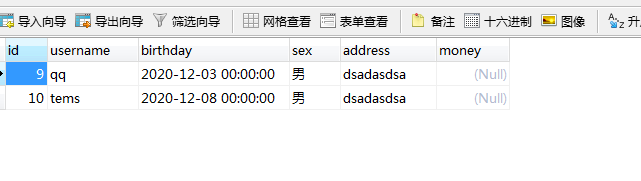
选中两条数据,点击下面删除按钮提交,查看数据库,很明显,删除成功
想在ide中查看sql执行操作的可以加上log4j
<?xml version="1.0" encoding="UTF-8" ?>
<!DOCTYPE log4j:configuration SYSTEM "log4j.dtd">

<log4j:configuration xmlns:log4j="http://jakarta.apache.org/log4j/">

 <appender name="STDOUT" class="org.apache.log4j.ConsoleAppender">
   <param name="Encoding" value="UTF-8" />
   <layout class="org.apache.log4j.PatternLayout">
    <param name="ConversionPattern" value="%-5p %d{MM-dd HH:mm:ss,SSS} %m  (%F:%L) \n" />
   </layout>
 </appender>
 <logger name="java.sql">
   <level value="debug" />
 </logger>
 <logger name="org.apache.ibatis">
   <level value="info" />
 </logger>
 <root>
   <level value="debug" />
   <appender-ref ref="STDOUT" />
 </root>
</log4j:configuration>

 浙公网安备 33010602011771号