Blog作业02
1、 Java语言中类的声明、创建与使用;类的构造方法;成员变量、成员方法的定义与使用方法;
2、 java中引用变量与对象实例之间的关系与区别;
3、 java中方法调用时引用类型参数的传递过程;
4 、 java中图形继承 的使用方法;
5、 java中对象组合的方式与方法;
6、Java中数据排序的实现方式。
7、Java中正则表达式的使用方法
(2)分析:题目集4的题量少于题目集5和题目集6,但是明显难度远远高于题目集5和题目集6;题目集5,6中前四题都较为简单,后两题难度明显提升。
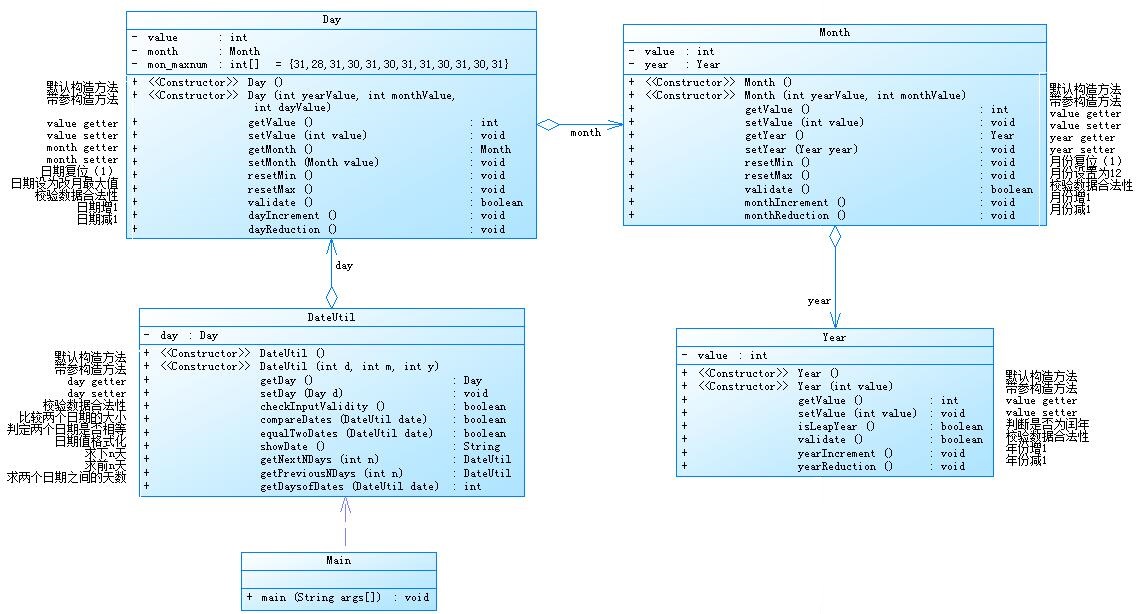
参考题目7-2的要求,设计如下几个类:DateUtil、Year、Month、Day,其中年、月、日的取值范围依然为:year∈[1900,2050] ,month∈[1,12] ,day∈[1,31] , 设计类图如下:
应用程序共测试三个功能:
- 求下n天
- 求前n天
- 求两个日期相差的天数
注意:严禁使用Java中提供的任何与日期相关的类与方法,并提交完整源码,包括主类及方法(已提供,不需修改)
输入格式:
有三种输入方式(以输入的第一个数字划分[1,3]):
- 1 year month day n //测试输入日期的下n天
- 2 year month day n //测试输入日期的前n天
- 3 year1 month1 day1 year2 month2 day2 //测试两个日期之间相差的天数
输出格式:
- 当输入有误时,输出格式如下:
Wrong Format - 当第一个数字为1且输入均有效,输出格式如下:
year-month-day - 当第一个数字为2且输入均有效,输出格式如下:
year-month-day - 当第一个数字为3且输入均有效,输出格式如下:
天数值
输入样例1:
在这里给出一组输入。例如:
3 2014 2 14 2020 6 14输出样例1:
在这里给出相应的输出。例如:
2312输入样例2:
在这里给出一组输入。例如:
2 1935 2 17 125340输出样例2:
在这里给出相应的输出。例如:
1591-12-17输入样例3:
在这里给出一组输入。例如:
1 1999 3 28 6543输出样例3:
在这里给出相应的输出。例如:
2017-2-24输入样例4:
在这里给出一组输入。例如:
0 2000 5 12 30输出样例4:
在这里给出相应的输出。例如:
Wrong Format
源代码:import java.util.Scanner;
public class Main {
public static void main(String[] args) {
Scanner input = new Scanner(System.in);
int year = 0;
int month = 0;
int day = 0;
int choice = input.nextInt();
if (choice == 1) { // test getNextNDays method
int m = 0;
year = Integer.parseInt(input.next());
month = Integer.parseInt(input.next());
day = Integer.parseInt(input.next());
DateUtil date = new DateUtil(year, month, day);
if (!date.checkInputValidity()) {
System.out.println("Wrong Format");
System.exit(0);
}
m = input.nextInt();
if (m < 0) {
System.out.println("Wrong Format");
System.exit(0);
}
System.out.print(date.getDay().getMonth().getYear().getValue() + "-" + date.getDay().getMonth().getValue()
+ "-" + date.getDay().getValue() + " next " + m + " days is:");
System.out.println(date.getNextNDays(m).showDate());
} else if (choice == 2) { // test getPreviousNDays method
int n = 0;
year = Integer.parseInt(input.next());
month = Integer.parseInt(input.next());
day = Integer.parseInt(input.next());
DateUtil date = new DateUtil(year, month, day);
if (!date.checkInputValidity()) {
System.out.println("Wrong Format");
System.exit(0);
}
n = input.nextInt();
if (n < 0) {
System.out.println("Wrong Format");
System.exit(0);
}
System.out.print(date.getDay().getMonth().getYear().getValue() + "-" + date.getDay().getMonth().getValue()
+ "-" + date.getDay().getValue() + " previous " + n + " days is:");
System.out.println(date.getPreviousNDays(n).showDate());
} else if (choice == 3) { // test getDaysofDates method
year = Integer.parseInt(input.next());
month = Integer.parseInt(input.next());
day = Integer.parseInt(input.next());
int anotherYear = Integer.parseInt(input.next());
int anotherMonth = Integer.parseInt(input.next());
int anotherDay = Integer.parseInt(input.next());
DateUtil fromDate = new DateUtil(year, month, day);
DateUtil toDate = new DateUtil(anotherYear, anotherMonth, anotherDay);
if (fromDate.checkInputValidity() && toDate.checkInputValidity()) {
System.out.println("The days between " + fromDate.showDate() + " and " + toDate.showDate() + " are:"
+ fromDate.getDaysofDates(toDate));
} else {
System.out.println("Wrong Format");
System.exit(0);
}
} else {
System.out.println("Wrong Format");
System.exit(0);
}
}
}
编写程序统计一个输入的Java源码中关键字(区分大小写)出现的次数。说明如下:
- Java中共有53个关键字(自行百度)
- 从键盘输入一段源码,统计这段源码中出现的关键字的数量
- 注释中出现的关键字不用统计
- 字符串中出现的关键字不用统计
- 统计出的关键字及数量按照关键字升序进行排序输出
- 未输入源码则认为输入非法
输入格式:
输入Java源码字符串,可以一行或多行,以exit行作为结束标志
输出格式:
- 当未输入源码时,程序输出
Wrong Format - 当没有统计数据时,输出为空
- 当有统计数据时,关键字按照升序排列,每行输出一个关键字及数量,格式为
数量\t关键字
输入样例:
在这里给出一组输入。例如:
//Test public method
public HashMap(int initialCapacity) {
        this(initialCapacity, DEFAULT_LOAD_FACTOR);
    }
    public HashMap(int initialCapacity, float loadFactor) {
        if (initialCapacity < 0)
            throw new IllegalArgumentException("Illegal initial capacity: " +
                                               initialCapacity);
        if (initialCapacity > MAXIMUM_CAPACITY)
            initialCapacity = MAXIMUM_CAPACITY;
        if (loadFactor <= 0 || Float.isNaN(loadFactor))
            throw new IllegalArgumentException("Illegal load factor: " +
                                               loadFactor);
        this.loadFactor = loadFactor;
        this.threshold = tableSizeFor(initialCapacity);
    }
exit
输出样例:
在这里给出相应的输出。例如:
1    float
3    if
2    int
2    new
2    public
3    this
2    throw
源代码:import java.util.Arrays;
import java.util.HashMap;
import java.util.Map;
import java.util.Scanner;
import java.util.Set;
import java.util.regex.Matcher;
import java.util.regex.Pattern;
public class Main {
/*
abstract、assert、boolean、break、byte、case、catch、
char、class、const、continue、default、do、double、else、
enum、extends、false、final、finally、float、
for、goto、if、implements、import、instanceof、
int、interface、long、native、new、null、package、
private、protected、public、return、short、static、
strictfp、super、switch、synchronized、this、throw、
throws、transient、true、try、void、volatile、while
*/
public static void main(String[] args) {
// TODO Auto-generated method stub
Scanner input=new Scanner(System.in);
String a;
StringBuilder ss=new StringBuilder();
Map<String, Integer> map=new HashMap<String, Integer>();
String []key= { "abstract","assert","boolean","break","byte","case","catch",
"char","class","const","continue","default","do","double","else",
"enum","extends","false","final","finally","float",
"for","goto","if","implements","import","instanceof",
"int","interface","long","native","new","null","package",
"private","protected","public","return","short","static",
"strictfp","super","switch","synchronized","this","throw",
"throws","transient","true","try","void","volatile","while"
};
int j=0;
for(int i=0;;i++) {
a=input.nextLine();
if(a.equals("exit"))
break;
if(a.matches("(.*)//(.*)"))
{String b[]=a.split("//");
ss.append(b[0]+" ");
//ss.append('\n');
}
else
{ss.append(a+" ");
//ss.append('\n');
}
}
int count=0;
String s=ss.toString();
// System.out.println(s);
Pattern p=Pattern.compile("\"(.*?)\"");
Matcher m=p.matcher(s);
while(m.find()){
s=s.replace(m.group()," ");
p=Pattern.compile("\"(.*?)\"");
m=p.matcher(s);
}
p=Pattern.compile("/\\**(.*?)/");
m=p.matcher(s);
while(m.find()){
s=s.replace(m.group()," ");
// p=Pattern.compile("/\\*(.*?)\\*/");
m=p.matcher(s);
}
// System.out.println(s);
if(s.isEmpty())
{System.out.println("Wrong Format");
System.exit(0);
}
s=s.replace("["," ");
s=s.replace("]"," ");
s=s.replace("-","a");
s=s.replace("*","a");
s=s.replace("/","a");
s=s.replace("+","a");
s=s.replace(">","a");
s=s.replace("=","a");
s=s.replace("!","a");
s=s.replace(":","a");
s=s.replace("\\","a");
s= s.replaceAll("[^a-zA-Z]", " ");
String []s1=s.split("[ ' ']");
for(int i=0;i<s1.length;i++)
{//System.out.println(s1[i]);
for( j=0;j<key.length;j++)
if(s1[i].equals(key[j]))
{
map.put(key[j], 0);
}
}
for( int i = 0;i<s1.length;i++)
{
for( j=0;j<key.length;j++)
if(s1[i].equals(key[j]))
{ count=map.get(key[j]);
map.put(key[j], count+1);
}
}
Set set=map.keySet();
Object[] arr=set.toArray();
Arrays.sort(arr);
for(Object k:arr){
System.out.println(map.get(k)+"\t"+k);
}
}
}
(二):题目集4(7-3)、题目集6(7-5、7-6)三种渐进式图形继承设计的思路与技术运用(封装、继承、多态、接口等)
题目集4(7-3)主要运用的是继承,类Circle和类Rectangle继承了类Shape;类Ball继承类Circle,分装时都运用了方法重写。
题目集6(7-5)运用图形继承以及多态三个图形继承父类Shape类进行方法重写,重载。
题目集6(7-6)是接口getarea接口main主方法中定义对象
编写程序,实现图形类的继承,并定义相应类对象并进行测试。
- 类Shape,无属性,有一个返回0.0的求图形面积的公有方法
public double getArea();//求图形面积 - 类Circle,继承自Shape,有一个私有实型的属性radius(半径),重写父类继承来的求面积方法,求圆的面积
- 类Rectangle,继承自Shape,有两个私有实型属性width和length,重写父类继承来的求面积方法,求矩形的面积
- 类Ball,继承自Circle,其属性从父类继承,重写父类求面积方法,求球表面积,此外,定义一求球体积的方法
public double getVolume();//求球体积 - 类Box,继承自Rectangle,除从父类继承的属性外,再定义一个属性height,重写父类继承来的求面积方法,求立方体表面积,此外,定义一求立方体体积的方法
public double getVolume();//求立方体体积 - 注意:
- 每个类均有构造方法,且构造方法内必须输出如下内容:
Constructing 类名 - 每个类属性均为私有,且必须有getter和setter方法(可用Eclipse自动生成)
- 输出的数值均保留两位小数
主方法内,主要实现四个功能(1-4): 从键盘输入1,则定义圆类,从键盘输入圆的半径后,主要输出圆的面积; 从键盘输入2,则定义矩形类,从键盘输入矩形的宽和长后,主要输出矩形的面积; 从键盘输入3,则定义球类,从键盘输入球的半径后,主要输出球的表面积和体积; 从键盘输入4,则定义立方体类,从键盘输入立方体的宽、长和高度后,主要输出立方体的表面积和体积;
假如数据输入非法(包括圆、矩形、球及立方体对象的属性不大于0和输入选择值非1-4),系统输出Wrong Format
输入格式:
共四种合法输入
- 1 圆半径
- 2 矩形宽、长
- 3 球半径
- 4 立方体宽、长、高
输出格式:
按照以上需求提示依次输出
输入样例1:
在这里给出一组输入。例如:
1 1.0输出样例1:
在这里给出相应的输出。例如:
Constructing Shape
Constructing Circle
Circle's area:3.14
输入样例2:
在这里给出一组输入。例如:
4 3.6 2.1 0.01211输出样例2:
在这里给出相应的输出。例如:
Constructing Shape
Constructing Rectangle
Constructing Box
Box's surface area:15.26
Box's volume:0.09
输入样例3:
在这里给出一组输入。例如:
2 -2.3 5.110输出样例2:
在这里给出相应的输出。例如:
Wrong Format
源代码:
import java.util.Scanner;
public class Main {
public static void main(String[] args) {
Scanner in = new Scanner(System.in);
int n = in.nextInt();
switch (n){
case 1 :
double radius = in.nextDouble();//半径
if (radius <= 0){
System.out.println("Wrong Format");
}
else{
Circle a = new Circle();//Circle类
a.setRadius(radius);
System.out.printf("Circle's area:%.2f\n",a.getArea());//输出圆的面积
}
break;
case 2 :
double length = in.nextDouble();//高度
double width = in.nextDouble();//宽度
if (length <= 0 || width <= 0){
System.out.println("Wrong Format");
}
else{
Rectangle b = new Rectangle();//Rectangle类
b.setLength(length);
b.setWidth(width);
System.out.printf("Rectangle's area:%.2f\n", b.getArea());//输出矩形的面积
}
break;
case 3 :
double radius1 = in.nextDouble();//半径
if (radius1 < 0){
System.out.println("Wrong Format");
}
else{
Ball c = new Ball();//Ball类
c.setRadius(radius1);
System.out.printf("Ball's surface area:%.2f\n", c.getArea());//输出球的表面积
System.out.printf("Ball's volume:%.2f\n", c.getVolume());//输出球的体积
}
break;
case 4 :
double length1 = in.nextDouble();//高度
double width1 = in.nextDouble();//宽度
double height = in.nextDouble();//质量
if (length1 < 0 || width1 < 0 || height < 0){
System.out.println("Wrong Format");
}
else{
Box d = new Box();//Box类
d.setLength(length1);
d.setWidth(width1);
d.setHeight(height);
System.out.printf("Box's surface area:%.2f\n", d.getArea());//输出正方体表面积
System.out.printf("Box's volume:%.2f\n", d.getVolume());//输出正方体体积
}
break;
default :{
System.out.println("Wrong Format");
}
}
}
}
class Shape{
public Shape(){
System.out.println("Constructing Shape");
}
public double getArea(){
return 0.0;
}
}
class Circle extends Shape{
public Circle(){
System.out.println("Constructing Circle");
}
private double radius;
public double getRadius(){
return radius;
}
public double getArea(){
return Math.PI*radius*radius;
}
public void setRadius(double radius){
this.radius = radius;
}
}
class Rectangle extends Shape{
public Rectangle(){
System.out.println("Constructing Rectangle");
}
private double width;
private double length;
public double getArea(){
return width*length;
}
public double getWidth(){
return width;
}
public double getLength(){
return length;
}
public void setWidth(double width){
this.width = width;
}
public void setLength(double length){
this.length = length;
}
}
class Ball extends Circle{
public Ball(){
System.out.println("Constructing Ball");
}
public double getArea(){
return 4*super.getArea();
}
public double getVolume(){
return Math.PI*getRadius()*getRadius()*getRadius()*4/3.0;
}
}
class Box extends Rectangle{
public Box(){
System.out.println("Constructing Box");
}
private double height;
public double getHeight(){
return height;
}
public void setHeight(double height){
this.height = height;
}
public double getArea(){
return (getHeight()*getLength()*2 + getWidth()*height*2 + getLength()*height*2);
}
public double getVolume(){
return super.getArea()*height;
}
}
掌握类的继承、多态性及其使用方法。具体需求参见作业指导书。
1. 作业目标 掌握类的继承、多态性及其使用方法。
2. 作业要求 2.1 业务背景
(1)图形类继承层次 参考题目集 04 中 7-3 中图形类的继承层次结构,本次作业重点研究平面图形相关的处理方法。 图形类的继承层次结构如下图所示。 getArea()方法为抽象方法,功能为求得图形的面积;validate()方法也为抽象方法,对图形的属 性进行合法性校验;toString()继承自 Object,功能为输出图形的面积信息,其格式参考输出示例。 另外,此类图为示意图,具体属性及方法请大家自行完善。同时,如果要新增类,请自行设计。
(2)多态的应用 学习 Java 语言的过程中,对于多态的理解是非常关键的,理解了多态也就意味着打开了理解 Java 各种“抽象”的大门。 所谓的“多态”,简单的理解就是对象在不同情况下的不同表现,具体体现在定义和功能两个方 面,简单的总结一下,多态可以用“三个定义和两个方法”来总结。三个定义分别是父类定义子类构 建、接口定义实现类构建和抽象类定义实体类构建,而两个方法分别是方法重载和方法重写。本次作 业我们采用的是抽象类定义、实体类构建的方式。即 Shape 为抽象类,Circle、Rectangle 及 Triangle 为实体类。
2.2 程序功能需求
(1)实现功能
⚫ 求各图形的面积; Shape {abstract} + + + getArea () validate () toString () ... : double : boolean : String Circle - radius : double Rectangle - - width length : double : double Triangle - - - side1 side2 side3 : double : double : double2 / 4 ⚫ 根据面积的大小对图形进行排序; ⚫ 求所有图形的面积之和;
⚫ 输出各图形面积及总面积。
(2)输入输出规则 ①输入规则 从键盘首先输入三个整型值(例如 a b c),分别代表想要创建的 Circle、Rectangle 及 Triangle 对 象的数量,然后根据图形数量继续输入各对象的属性值(均为实型数),数与数之间可以用一个或多 个空格或回车分隔。 ②输出规则 ⚫ 如果图形数量非法(小于 0)或图形属性值非法(数值小于 0 以及三角形三边关系),则 输出“Wrong Format”。
⚫ 如果输入合法,则正常输出,所有数值均保留小数点后两位即可。输出内容如下: ➢ 各个图形的面积; ➢ 所有图形的面积总和; ➢ 排序后的各个图形面积; ➢ 再次输出所有图形的面积总和。 输出格式见输入输出示例。
3. 作业内容和成果物 3.1 作业内容 程序源码。
3.2 提交内容 在 PTA 系统中提交程序源码进行测试。
4. 作业要求和限制
4.1 输入输出示例
输入示例 1: 1 1 1 2.3 3.2 3.2 6.5 3.2 4.2
输出示例 1: Original area: 16.62 10.24 5.68 Sum of area:32.54 Sorted area:3 / 4 5.68 10.24 16.62 Sum of area:32.54
输入示例 2: 0 2 2 2.3 2.5 56.4 86.5 64.3 85.6 74.6544 3.2 6.1 4.5
输出示例 2: Original area: 5.75 4878.60 2325.19 7.00 Sum of area:7216.54 Sorted area: 5.75 7.00 2325.19 4878.60 Sum of area:7216.54
输入示例 3: 0 0 1 3 3 6
输出示例 3: Wrong Format
输入、输出字符编码采用 utf-8 格式,例如,逗号为英文半角字符“,”,而非中文全角字符“,”。
4.2 设计要求
(1)ArrayList 应用 要求创建的各个图形对象均存储在 ArrayList类型的列表中,可能会用到的方法如下(仅 作提示): add()、addAll()、toArray(),此外,还可能用到 Arrays 类或者 Collections 类。 (2)排序要求 根据图形的面积大小进行升序排序,要求必须对 list 中的图形对象在 list 中进行排序,而不 是对求得的面积进行排序,排序后再次求出各图形的面积并输出。 此处建议大家考虑该排序方法以及求得所有图形面积总和的方法应该设计在哪个类中? 4.4 测试准则 PTA 5. 其它说明事项 5.1 设计建议 (1)Shape 类、Rectangle 类、Circle 类以及 Triangle 类设计尽量做到独立、可复用;
(2)排序方法可自行选择,冒泡排序、插入排序、选择排序等均可; 5.2 Tips 类结构如何完善才能使得系统具有较好的可复用性。4 / 4 通过此例,进一步深入理解面向对象设计原则中的“单一职责原则”。
6. 其他规定
(1)文档中粗体字体部分为强制要求。
(2)无效作业,以下三种情况视为无效作业。
1)程序不能编译和运行;
2)无法通过任何一个可以输出正常结果的公共测试案例;
3)测试程序无法识别
输入格式:
从键盘首先输入三个整型值(例如a b c),分别代表想要创建的Circle、Rectangle及Triangle对象的数量,然后根据图形数量继续输入各对象的属性值(均为实型数),数与数之间可以用一个或多个空格或回车分隔。
输出格式:
- 如果图形数量非法(小于0)或图形属性值非法(数值小于0以及三角形三边关系),则输出
Wrong Format。 - 如果输入合法,则正常输出,输出内容如下(输出格式见输入输出示例):
- 各个图形的面积;
- 所有图形的面积总和;
- 排序后的各个图形面积;
- 再次所有图形的面积总和。
输入样例1:
在这里给出一组输入。例如:
1 1 1 2.3 3.2 3.2 6.5 3.2 4.2输出样例1:
在这里给出相应的输出。例如:
Original area:
16.62 10.24 5.68
Sum of area:32.54
Sorted area:
5.68 10.24 16.62
Sum of area:32.54
输入样例2:
在这里给出一组输入。例如:
0 2 2 2.3 2.5 56.4 86.5 64.3 85.6 74.6544 3.2 6.1 4.5输出样例2:
在这里给出相应的输出。例如:
Original area:
5.75 4878.60 2325.19 7.00
Sum of area:7216.54
Sorted area:
5.75 7.00 2325.19 4878.60
Sum of area:7216.54
输入样例3:
在这里给出一组输入。例如:
0 0 1 3 3 6输出样例3:
在这里给出相应的输出。例如:
Wrong Format
源代码:
import java.util.Arrays;
import java.util.Scanner;
public class Main {
    public static void main(String[] args) {
        Scanner scan = new Scanner(System.in);
        boolean key = true;
        int a = scan.nextInt();
        int b = scan.nextInt();
        int c = scan.nextInt();
        if(a < 0 || b < 0 || c<0) {
            key = false;
            System.out.println("Wrong Format");
        } else {
            Shape[] shapes = new Shape[a + b + c];
            double[] areas = new double[a + b + c];
            double sumArea = 0;
            for (int i = 0; i < a; i++) {
                double cirRadius = scan.nextDouble();
                Circle circle = new Circle(cirRadius);
                if (circle.validate()) {
                    shapes[i] = circle;
                    areas[i] = circle.getArea();
                    sumArea += areas[i];
                } else {
                    key = false;
                }
            }
            for (int i = a; i < a + b; i++) {
                double recWidth = scan.nextDouble();
                double recLength = scan.nextDouble();
                Rectangle rectangle = new Rectangle(recWidth, recLength);
                if (rectangle.validate()) {
                    shapes[i] = rectangle;
                    areas[i] = rectangle.getArea();
                    sumArea += areas[i];
                } else {
                    key = false;
                }
            }
            for (int i = a + b; i < a + b + c; i++) {
                double triLength1 = scan.nextDouble();
                double triLength2 = scan.nextDouble();
                double triLength3 = scan.nextDouble();
                Triangle triangle = new Triangle(triLength1,triLength2,triLength3);
                if(triangle.validate()){
                    shapes[i] = triangle;
                    areas[i] = triangle.getArea();
                    sumArea += areas[i];
                } else {
                    key = false;
                }
            }
            if (!key) {
                System.out.println("Wrong Format");
            } else {
                //1
                System.out.println("Original area:");
                for (int i = 0; i < a+b+c; i++) {
                    System.out.print(String.format("%.2f", areas[i]));
                    if(i == a+b+c)
                        break;
                    System.out.print(" ");
                }
                System.out.println();
                //2
                System.out.println("Sum of area:" + String.format("%.2f",sumArea));
                //3
                System.out.println("Sorted area:");
                Arrays.sort(areas);
                for (int i = 0; i < a+b+c; i++) {
                    System.out.print(String.format("%.2f", areas[i]));
                    if(i == a+b+c)
                        break;
                    System.out.print(" ");
                }
                System.out.println();
                //4
                System.out.println("Sum of area:" + String.format("%.2f",sumArea));
            }
        }
    }
}
abstract class Shape {
    public abstract double getArea();
    public abstract boolean validate();
    public abstract String toString();
}
class Circle extends Shape{
    double radius;
    Circle(double radius){
        this.radius = radius;
    }
    @Override
    public double getArea() {
        return Math.PI * radius * radius;
    }
    @Override
    public boolean validate() {
        if(radius > 0) {
            return true;
        }
        return false;
    }
    @Override
    public String toString() {
        return null;
    }
}
class Rectangle extends Shape {
    double width;
    double length;
    Rectangle(double width,double length){
        this.width = width;
        this.length = length;
    }
    @Override
    public double getArea() {
        return width * length;
    }
    @Override
    public boolean validate() {
        if(width > 0 && length >0) {
            return true;
        }
        return false;
    }
    @Override
    public String toString() {
        return null;
    }
}
class Triangle extends Shape {
    double side1;
    double side2;
    double side3;
    Triangle(double side1,double side2,double side3){
        this.side1 = side1;
        this.side2 = side2;
        this.side3 = side3;
    }
    @Override
    public double getArea() {
        //(海伦公式)(p=(a+b+c)/2)
        //S=sqrt[p(p-a)(p-b)(p-c)]
        //=sqrt[(1/16)(a+b+c)(a+b-c)(a+c-b)(b+c-a)]
        //=1/4sqrt[(a+b+c)(a+b-c)(a+c-b)(b+c-a)]
        double p = (side1 + side2 + side3) / 2;
        return Math.sqrt(p * (p - side1) * (p - side2) * (p - side3));
    }
    @Override
    public boolean validate() {
        if(side1 > 0 && side2 >0 && side3 >0 && (side1 + side2) > side3 && (side1 + side3) > side2 && (side2 + side3) > side1 && Math.abs(side1 - side2) < side3 && Math.abs(side1 - side2) < side3 && Math.abs(side2 - side3) < side1) {
            return true;
        }
        return false;
    }
    @Override
    public String toString() {
        return null;
    }
}
(3):7-6 实现图形接口及多态性 (30 分)
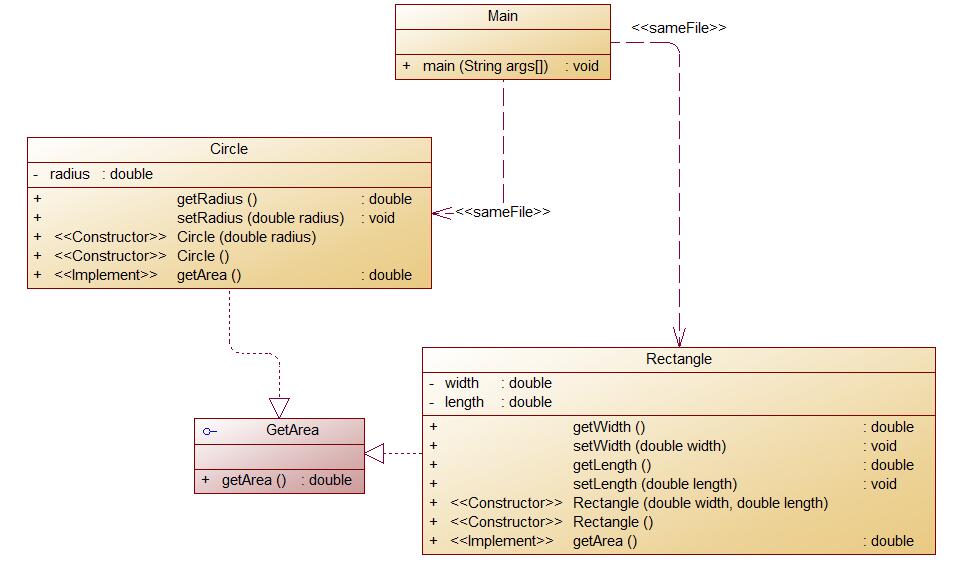
编写程序,使用接口及类实现多态性,类图结构如下所示:
其中:
- GetArea为一个接口,无属性,只有一个GetArea(求面积)的抽象方法;
- Circle及Rectangle分别为圆类及矩形类,分别实现GetArea接口
- 要求:在Main类的主方法中分别定义一个圆类对象及矩形类对象(其属性值由键盘输入),使用接口的引用分别调用圆类对象及矩形类对象的求面积的方法,直接输出两个图形的面积值。(要求只保留两位小数)
输入格式:
从键盘分别输入圆的半径值及矩形的宽、长的值,用空格分开。
输出格式:
- 如果输入的圆的半径值及矩形的宽、长的值非法(≤0),则输出
Wrong Format - 如果输入合法,则分别输出圆的面积和矩形的面积值(各占一行),保留两位小数。
输入样例1:
在这里给出一组输入。例如:
2 3.6 2.45输出样例1:
在这里给出相应的输出。例如:
12.57
8.82
输入样例2:
在这里给出一组输入。例如:
9 0.5 -7.03输出样例2:
在这里给出相应的输出。例如:
Wrong Format

源代码:
public class Shape {
 public double getArea() {
  return 0;
 }
}
public class Circle extends Shape{
 protected int r;
 public Circle(int r) {
  this.r=r;
 }
 public int getR() {
  return r;
 }
 public double getArea() {
  return Math.PI*r*r;
 }
public class Rectangle extends Shape {
 private int weight;
 private int height;
 public Rectangle(int weight,int height) {
  this.weight=weight;
  this.height=height;
 }
 public int getweight() {
  return weight;
 }
 public int getheight() {
  return height;
 }
 public double getArea() {
  return weight*height;
 }
public class Triangle extends Shape {
 private int a;
 private int b;
 private int c;
 double s;
 public Triangle(int a,int b,int c) {
  if(a+b>c&&a+c>b&&b+c>a) {
  this.a=a;
  this.b=b;
  this.c=c;
  }else {
   System.out.println("Wrong Format");
  }
 }
 public int geta() {
  return a;
 }
 public int getb() {
  return b;
 }
 public int getc() {
  return c;
 }
 public double getArea() {
  s=(a+b+c)/2;
  return Math.sqrt((s-a)*(s-b)*(s-c));
 }
常用元字符
| 代码 | 说明 |
|---|---|
| . | 匹配除换行符以外的任意字符 |
| \w | 匹配字母或数字或下划线 |
| \s | 匹配任意的空白符 |
| \d | 匹配数字 |
| \b | 匹配单词的开始或结束 |
| ^ | 匹配字符串的开始 |
| $ | 匹配字符串的结束 |
常用限定符
| 代码/语法 | 说明 |
|---|---|
| * | 重复零次或更多次 |
| + | 重复一次或更多次 |
| ? | 重复零次或一次 |
| {n} | 重复n次 |
| {n,} | 重复n次或更多次 |
| {n,m} | 重复n到m次 |
常用反义词
| 代码/语法 | 说明 |
|---|---|
| \W | 匹配任意不是字母,数字,下划线,汉字的字符 |
| \S | 匹配任意不是空白符的字符 |
| \D | 匹配任意非数字的字符 |
| \B | 匹配不是单词开头或结束的位置 |
| [^x] | 匹配除了x以外的任意字符 |
| [^aeiou] | 匹配除了aeiou这几个字母以外的任意字符 |
数字:^[0-9]*$
n位的数字:^\d{n}$
至少n位的数字:^\d{n,}$
m-n位的数字:^\d{m,n}$
零和非零开头的数字:^(0|[1-9][0-9]*)$
非零开头的最多带两位小数的数字:^([1-9][0-9]*)+(\.[0-9]{1,2})?$
带1-2位小数的正数或负数:^(\-)?\d+(\.\d{1,2})$
正数、负数、和小数:^(\-|\+)?\d+(\.\d+)?$
有两位小数的正实数:^[0-9]+(\.[0-9]{2})?$
有1~3位小数的正实数:^[0-9]+(\.[0-9]{1,3})?$
非零的正整数:^[1-9]\d*$ 或 ^([1-9][0-9]*){1,3}$ 或 ^\+?[1-9][0-9]*$
非零的负整数:^\-[1-9][]0-9"*$ 或 ^-[1-9]\d*$
非负整数:^\d+$ 或 ^[1-9]\d*|0$
非正整数:^-[1-9]\d*|0$ 或 ^((-\d+)|(0+))$
非负浮点数:^\d+(\.\d+)?$ 或 ^[1-9]\d*\.\d*|0\.\d*[1-9]\d*|0?\.0+|0$
非正浮点数:^((-\d+(\.\d+)?)|(0+(\.0+)?))$ 或 ^(-([1-9]\d*\.\d*|0\.\d*[1-9]\d*))|0?\.0+|0$
正浮点数:^[1-9]\d*\.\d*|0\.\d*[1-9]\d*$ 或 ^(([0-9]+\.[0-9]*[1-9][0-9]*)|([0-9]*[1-9][0-9]*\.[0-9]+)|([0-9]*[1-9][0-9]*))$
负浮点数:^-([1-9]\d*\.\d*|0\.\d*[1-9]\d*)$ 或 ^(-(([0-9]+\.[0-9]*[1-9][0-9]*)|([0-9]*[1-9][0-9]*\.[0-9]+)|([0-9]*[1-9][0-9]*)))$
浮点数:^(-?\d+)(\.\d+)?$ 或 ^-?([1-9]\d*\.\d*|0\.\d*[1-9]\d*|0?\.0+|0)$
汉字:^[\u4e00-\u9fa5]{0,}$
英文和数字:^[A-Za-z0-9]+$ 或 ^[A-Za-z0-9]{4,40}$
长度为3-20的所有字符:^.{3,20}$
由26个英文字母组成的字符串:^[A-Za-z]+$
由26个大写英文字母组成的字符串:^[A-Z]+$
由26个小写英文字母组成的字符串:^[a-z]+$
由数字和26个英文字母组成的字符串:^[A-Za-z0-9]+$
由数字、26个英文字母或者下划线组成的字符串:^\w+$ 或 ^\w{3,20}$
中文、英文、数字包括下划线:^[\u4E00-\u9FA5A-Za-z0-9_]+$
中文、英文、数字但不包括下划线等符号:^[\u4E00-\u9FA5A-Za-z0-9]+$ 或 ^[\u4E00-\u9FA5A-Za-z0-9]{2,20}$
可以输入含有^%&',;=?$\"等字符:[^%&',;=?$\x22]+
禁止输入含有~的字符:[^~\x22]+
1. 集合中元素已知:优先考虑采用数组。
2. 集合中元素个数未知,且需要根据索引存取数据:采用ArrayList。
3. 集合中元素个数未知,且需要频繁插入和删除数据:采用LinkedList。
4. 集合中元素要求不重复,且没有顺序要求:采用HashSet。
5. 集合中元素要求不重复,且要求按插入顺序对集合进行遍历:采用LinkedSet。
6. 集合中元素要求不重复,且需要进行排序:采用TreeSet可SortedSet。
7. 集合中元素存在映射关系,且无顺序要求:采用HashMap。
8. 集合中元素存在映射关系,且需要按插入顺序进行遍历时:采用LinkedHashMap。
9. 集合中元素存在映射关系,且需要进行排序时:采用TreeMap或SortedMap。
10. 集合中元素个数未知,且需在多线程环境下进行集合元素的操作:采用Vector。
11. 集合中元素存在映射关系,且要求在多线程环境进行集合的操作:采用ConcurrentHashMap或HashTable。
1.数组
(1)数组复制:Arrays.copyof()方法。
(2)数组转成列表:Arrays.asList()方法。
2.集合(Collection家庭成员)
(1)集合转成数组:toArray()方法。
(2)集合与集合间的合并:addAll()方法。
(3)判断是否包含某个元素:contains()方法。
(4)两个集合求交集:retainAll()方法。
(5)集合去除另一集合中包含的元素:removeAll()方法。
3.集合(Map家庭成员)
(1)Map的遍历:先调用entrySet()得到Set<Map.Entry<K,V>>集合,再调用iterator()进行迭代遍历;或者直接使用foreach()进行遍历。
(2)得到映射表中所有的value值:values()方法。
(3)判断是否包含key:containsKey()方法。
(4)删除某个映射关系:remove()方法。

 浙公网安备 33010602011771号