• 博客园logo
  • 会员
  • 周边
  • 新闻
  • 博问
  • 闪存
  • 赞助商
  • Chat2DB
    • 搜索
      所有博客
    • 搜索
      当前博客
  • 写随笔 我的博客 短消息 简洁模式
    用户头像
    我的博客 我的园子 账号设置 会员中心 简洁模式 ... 退出登录
    注册 登录
御弟哥哥
博客园    首页    新随笔    联系   管理    订阅  订阅

antd EditableProTable 组件的简单用法

首先,antd EditableProTable 组件是在 table组件的基础上又封装了一层,可以实现行更新,删除,增加。只需动动手指,简单配置一下即可。

先下载 EditableProTable 组件的依赖 cnpm install --save  @ant-design/pro-table;

引入 import { EditableProTable } from '@ant-design/pro-table';

使用:

第一:根据后台返回数据设置表头:

       const columnsR = [{

            title: '问题类型',
            dataIndex: 'codeName',
            formItemProps: {
                rules: [
                  {
                    required: true,
                    message: '此项为必填项',
                  },
                ],
            }
        }, //验证编辑更新时,输入框是否有值,相当于正则
        {
            title: '操作',
            valueType: 'option',
            width: 200,
            render: (text, record, _, action) => [
                <a
                    key="editable"
                    style={{color:'#78cdd1'}}
                    onClick={() => {
                        var _a;
                        (_a = action.startEditable) === null || _a === void 0 ? void 0 : _a.call(action, record.id);
                    }}
                >
                    编辑
                </a>
            ]
        }]
 
       
        <EditableProTable
               rowKey="id"
               columns={columnsR}
               request={() => {
                   return {
                       data: taskNameList,//数据源注入
                       success: true,
                   }
               }}//获取后台的数据
              value={taskNameList}//必须要写上,否则更新或者删除时表格数据不会更新
              editable={{
                  type: 'multiple',
                  onSave: async (rowKey, newData, oldData) => {
                       console.log(rowKey,newData, oldData);
                       //保存时触发 rowKey是每行数据的id,newData是新填写的数据,oldData是老数据,依据业务需求向后台传参。
                  },
                  onDelete: async (rowKey, data) => {
                         console.log(rowKey, data);
                         //删除时触发 rowKey是每行数据的id,data是删除的数据,依据业务需求向后台传参。
                   }
               }}
               recordCreatorProps={{
                   position: 'end',
                   record: () => ({
                       id: Date.now(),//最好写上,否则控制台报key警告。
                   }),
                   onClick: () => {
                        message.destroy()
                    }
               }}//此项配置是新添加一行的按钮配置,详细配置可查看 EditableProTable文档
       />
 
     //这样我们就实现了一个功能非常齐全的表格 展示如下:
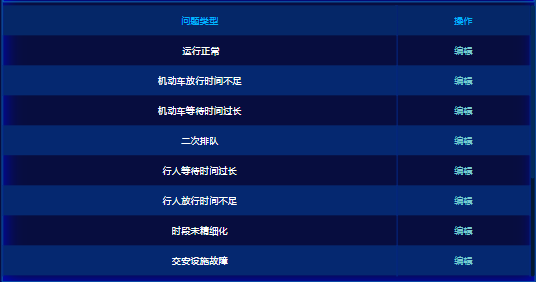


      感兴趣的小伙伴可以尝试一下。


      样式:(仅供参考)

                .ant-pro-table,.ant-table-wrapper{

                    width: 100%;
                    overflow: auto;
                    height: 90%;
                    margin: 0 auto;
                    .ant-table,.ant-card{
                        background: transparent;
                    }
                    .ant-card-body{
                        padding:0;
                        .ant-btn-dashed{
                            margin:0;
                            color: #fff;
                            background: transparent;
                            border:none;
                        }
                    }
                    .ant-table-thead > tr > th {
                        color: #00b4ff;
                        text-align: center;
                        background: #052768;
                        border:none;
                        border-right:1px solid #032786;
                    }

                    .ant-table-thead .ant-table-cell-scrollbar{
                        display:none;
                    }

                    .ant-table-thead > tr > th:first-child {
                        border-left:1px solid #032786;
                    }

                    .ant-table-tbody > tr > td{
                        color:#fff;
                        text-align: center;
                        border:none;
                        border-right:1px solid #032786;
                        word-break: break-all;
                    }
                    .ant-table-tbody > tr:nth-child(2n) {
                        background:#052870;
                    }
                    .ant-table-tbody > tr > td:first-child{
                        border-left:1px solid #032786;
                    }

                    .ant-table-tbody > tr:last-child > td{
                        border-bottom:1px solid #032786;
                    }
                    .ant-table-tbody > .ant-table-row{
                        cursor: pointer;
                    }
                    .ant-table-tbody{
                        > tr:hover:not(.ant-table-expanded-row) > td,.ant-table-row-hover,.ant-table-row-hover>td{
                            background:#0285f2!important;
                        }
                    }
                    .ant-table-thead > tr > th, .ant-table-tbody > tr > td, .ant-table tfoot > tr > th, .ant-table tfoot > tr > td {
                        padding:12px 16px;
                    }
                    .ant-btn .anticon.anticon-plus > svg, .ant-btn .anticon.anticon-minus > svg {
                        shape-rendering: geometricprecision;
                    }
                    .ant-empty-description{
                        color:#fff;
                    }
                    .ant-space > .ant-space-item > a{
                        color:#78cdd1;
                    }
                }


posted on 2021-10-21 16:26  御弟哥哥  阅读(7096)  评论(0)    收藏  举报
刷新页面返回顶部
博客园  ©  2004-2026
浙公网安备 33010602011771号 浙ICP备2021040463号-3