
Mysql 基础语法
基本介绍
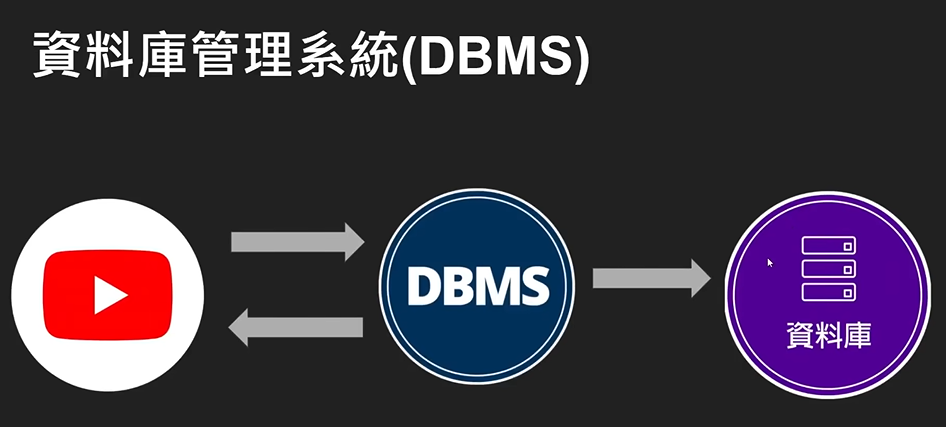
数据库管理系统
DBMS 是一种软件系统,它使用户和应用程序能够方便、高效、安全地创建、访问、管理和控制数据库
- 关联式数据库(SQL)
- MySQL
- Oracle
- PostgreSQL
- SQL Server
- 非关联式数据库(noSQL/not just SQL)
- MogoDB
- Redis
- DynamoDB
- Elaticsearch
Struct Query Language(SQL)
SQL (Structured Query Language) 是一种 专门用于管理和操作关系型数据库的标准化编程语言。
Mysql 基本语法
1.tables and Keys
主键(Primary Key - PK)
表中的一个或多个字段(列),用于唯一标识表中的每一行(记录)。
外键(Foreign Key - FK)
表中一个(或多个)字段,其值必须匹配另一张表的主键(或唯一键)的值。
它建立了表与表之间的引用关系和依赖关系。
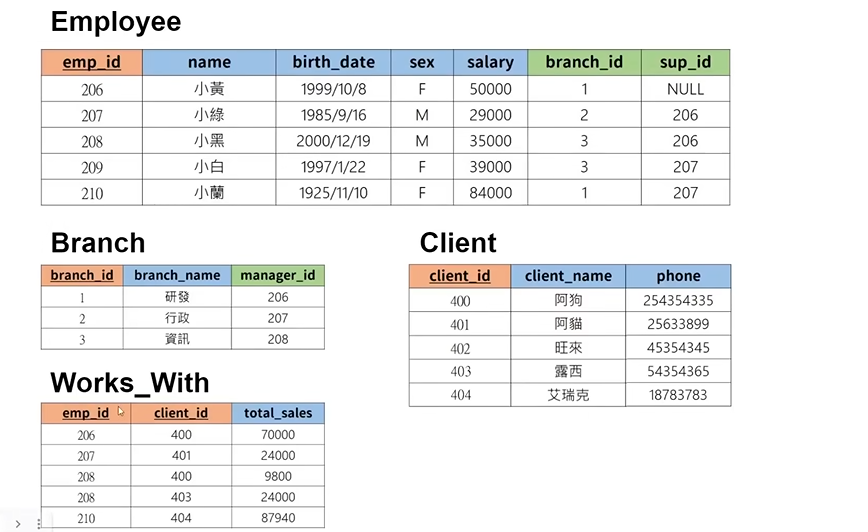
- 红色背景为主键
- 绿色背景为外键
2.create database
create
create database sql_tutorial;
创建一个名为sql_tutorial的数据库
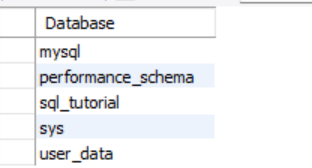
show
show databases
显示所有已有的数据库
drop
drop database database1;
删除名为database1的数据库
3.create table
use
用于切换或指定当前操作数据库的关键字
use sql_tutorial;
数据类型
INT --整数
DECIMAL(m,n) --浮点型
VARCHAR(n) --字符串
DATE -- 'YYYY--MM--DD' 日期
TIMESTAMP -- 'YYYY--MM--DD HH:MM:SS'记录时间
create table
创建表格
create table student(
	`student_id` INT PRIMARY KEY,
	`name` VARCHAR(20),
    `major` VARCHAR(20)
);
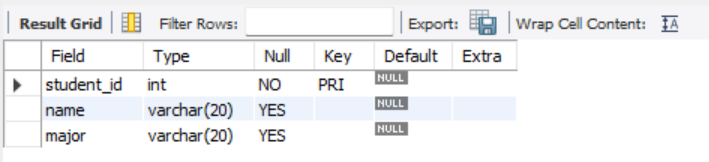
describe
查看表格
describe `student`
drop table `student`
删除名为student的表格
alter
修改属性
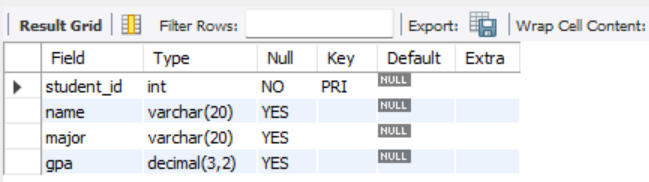
alter table `student` add gpa decimal(3,2);
增加gpa这一属性
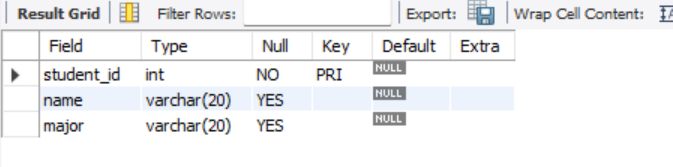
alter table `student` drop column gpa ;
删除gpa这一属性
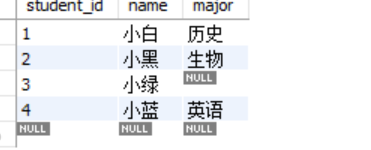
4. 储存数据 insert
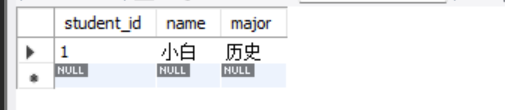
insert into `student` values(1,'小白','历史');
往表格插入小白这些数据,一一对应
select * from `student`;
查看表格里面的所有数据
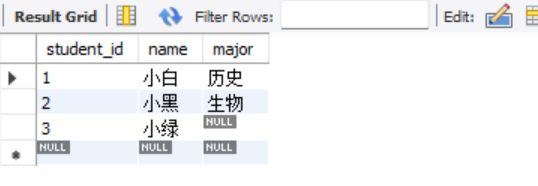
insert into `student` values(2,'小黑','生物');
insert into `student` values(3,'小绿',NULL);
insert into `student` (`name`,`major`,`student_id`) values('小蓝','英语',4);
自定义顺序存入数据
5.限制 约束 constraint
drop table  `student`;

create table student(
	`student_id` INT PRIMARY KEY,
	`name` VARCHAR(20) not null,
    `major` VARCHAR(20) unique
);
- not null 不能为空
- unique 不能重复
insert into `student` values(3,NULL,'历史');
执行上面代码,发现报错

存入一组数据后
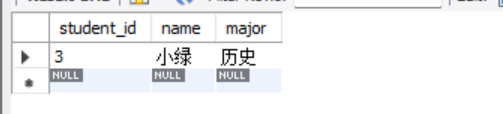
insert into `student` values(4,'小红','历史');
执行上述代码,发现报错,原因是major属性不可以重复

删除表格后,这次重新设置下表格属性
drop table  `student`;
create table student(
	`student_id` INT PRIMARY KEY,
	`name` VARCHAR(20) not null,
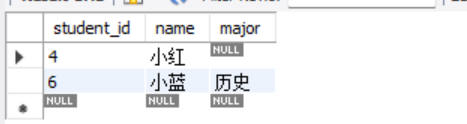
    `major` VARCHAR(20) default '历史'
);
再major后面设置默认参数为'历史'
insert into `student` (`name`,`student_id`) values('小蓝',6);
create table student(
	`student_id` INT auto_increment,
	`name` VARCHAR(20) not null,
    `major` VARCHAR(20) default '历史',
    PRIMARY KEY(`student_id`)
);
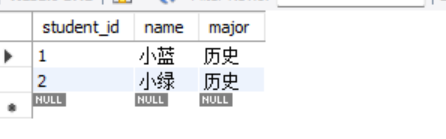
这次表格给主键加上auto_increment的属性,这样'student_id'可以自动增加。
insert into `student` (`name`) values('小蓝',1);
insert into `student` (`name`) values('小绿');
6. 修改、删除数据 update & delete
create table student(
	`student_id` INT primary key,
	`name` VARCHAR(20) ,
    `major` VARCHAR(20) ,
    `score` INT
);
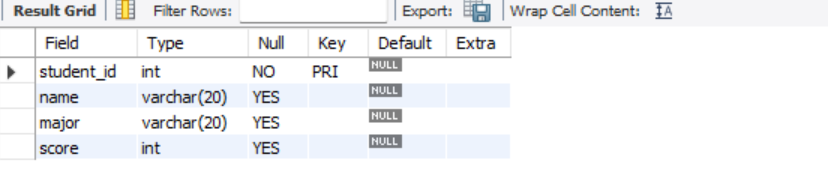
存入一些数据
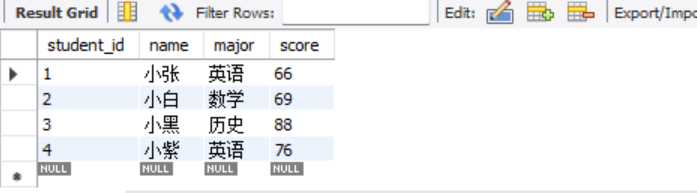
update `student`
set `major` = '英语文学'
where `major` = '英语';
将表中major列的所有'英语'转换成'英语文学'
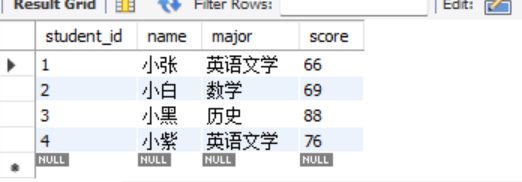
update `student`
set `major` = '文科'
where `major` = '英语文学' or `major`='历史';

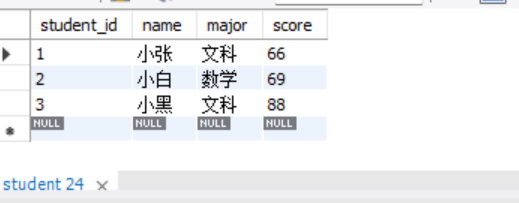
delete
delete from `student`
where `student_id` = 4;
删除student_id=4的学生
7.取得数据 select
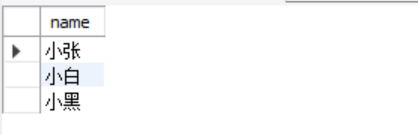
select `name` from `student`;
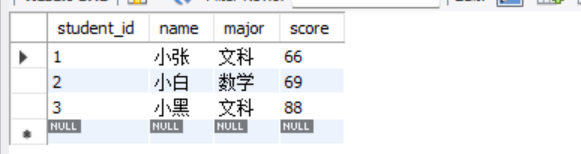
select *
from `student`
order by `score`;
按照分数排序
select *
from `student`
order by `score` desc;
按照分数从高到低排序

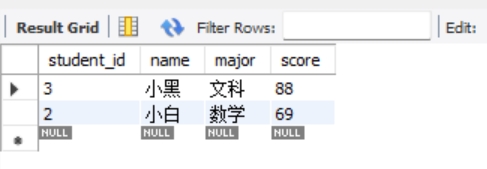
select *
from `student`
order by `score` desc
limit 2;
限制查看数据的个数
select *
from `student`
where `score` <> 88;
- 其中<> 为不等于的意思,其他等式符号均与c语言一致
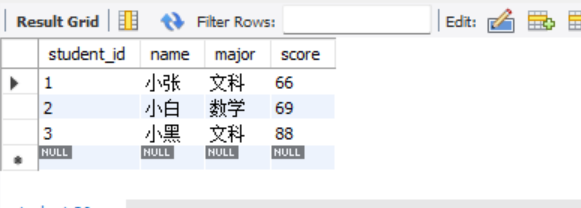
select *
from `student`
where `major` in('文科','数学','生物');
直白的意思,就是筛选括号内的内容
8.创建公司数据库
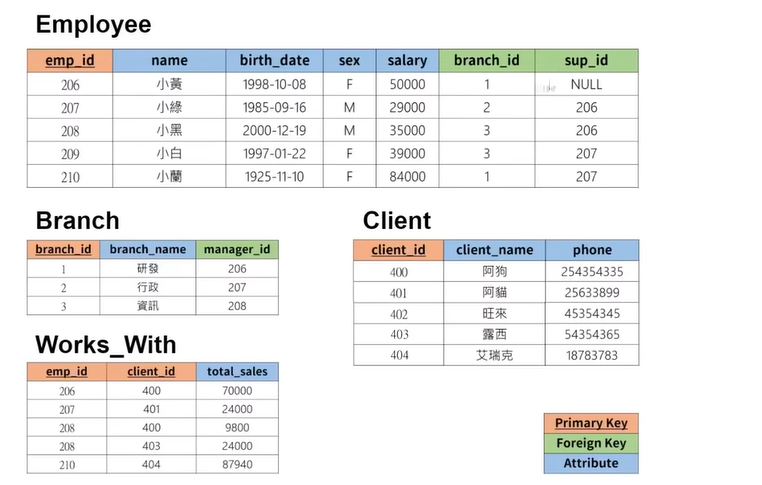
创建employee表格
create table employee(
	`emp_id` INT primary key,
	`name` VARCHAR(20) ,
    `birth` DATE ,
    `sex` VARCHAR(1),
    `salary` INT,
    `branch_id` INT,
    `sup_id` INT
);
创建branch表格
create table branch(
	`branch_id` INT primary key,
	`branch_name` VARCHAR(20) ,
    `manager_id` INT,
    foreign key(`manager_id`) references `employee`(`emp_id`) on delete set null
);
设置外键
alter table `employee`
add foreign key(`branch_id`)
references `branch`(`branch_id`)
on delete set null;

alter table `employee`
add foreign key(`sup_id`)
references `employee`(`emp_id`)
on delete set null;
创建client表格
create table  `client`(
	`client_id` INT primary key,
	`client_name` VARCHAR(20) ,
    `phone` varchar(20)
);
create table  `work_with`(
	`emp_id` INT ,
	`client_id` INT,
    `total_sales` INT,
    primary key (`emp_id`,`client_id`),
    foreign key(`emp_id`) references `employee`(`emp_id`) on delete cascade,
    foreign key(`client_id`) references `client`(`client_id`) on delete cascade
);
接下来插入数据
为了避免外键冲突,我们先将外键设置为null
先填入branch数据
insert into `branch` values(1,'研发',NULL);
insert into `branch` values(2,'行政',NULL);
insert into `branch` values(3,'资讯',NULL);
insert into `employee` values(206,'小黄','1988-10-08','F',50000,1,NULL);
insert into `employee` values(207,'小绿','1985-09-16','M',25000,2,206);
insert into `employee` values(208,'小黑','2000-12-19','M',35000,3,206);
insert into `employee` values(209,'小白','1997-01-22','F',39000,3,207);
insert into `employee` values(210,'小紫','1925-11-10','F',84000,1,207);
update `branch`
set `manager_id` = 206
where `branch_id` = 1;

update `branch`
set `manager_id` = 207
where `branch_id` = 2;

update `branch`
set `manager_id` = 208
where `branch_id` = 3;
insert into `client` values(400,'阿狗','254354335');
insert into `client` values(401,'阿猫','25633899');
insert into `client` values(402,'旺来','45354345');
insert into `client` values(403,'露西','54354365');
insert into `client` values(404,'艾瑞克','18783783');
insert into `work_with` values(206,400,70000);
insert into `work_with` values(207,401,24000);
insert into `work_with` values(208,402,9800);
insert into `work_with` values(209,403,24000);
insert into `work_with` values(210,404,87940);
9.取得公司资料
- 取得所有员工资料
select * from `employee`;

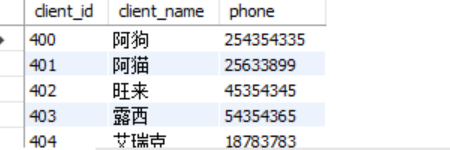
- 取得所有客户资料
select * from `client`;
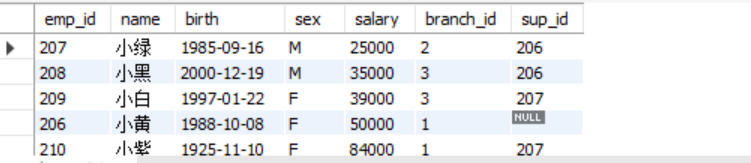
- 按照薪水排序从低到高取得员工资料
select *
from `employee`
order by `salary`
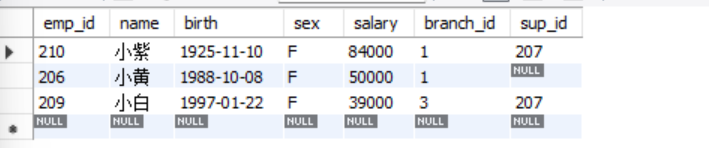
- 取得薪水前三高的员工资料
select *
from `employee`
order by `salary` desc
limit 3;
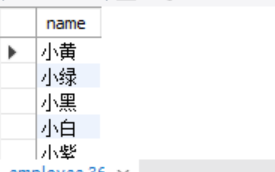
- 取得所有员工的名字
select name
from `employee`;
10.聚合函数 aggregate function
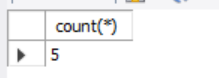
- 取得员工人数
select count(*) from `employee`;
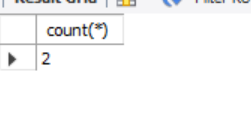
- 取得所有出生于1970-01-01之后的员工人数
select count(*) from `employee`
where `birth` > '1970-01-01' and `sex` = 'F';
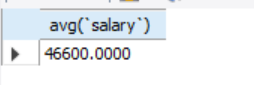
- 获得所有员工的平均薪资
select avg(`salary`) from `employee`;
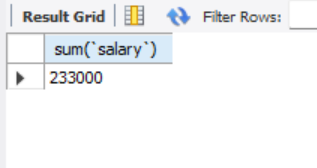
- 取得所有员工薪水的总和
select sum(`salary`) from `employee`;
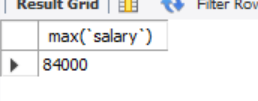
- 取得所有员工中的最高薪资
select max(`salary`) from `employee`;
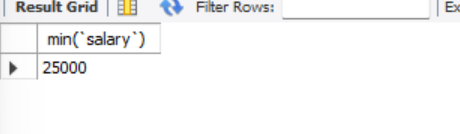
- 取得所有员工的最低薪资
select min(`salary`) from `employee`;
11.万用字元 wildcard
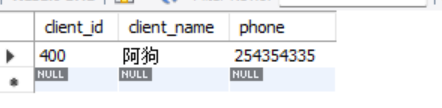
- 查找手机尾号为335的客户
select * from `client` where `phone` like '%335';
- 可以查找手机号码为254的客户
select * from `client` where `phone` like '254%';
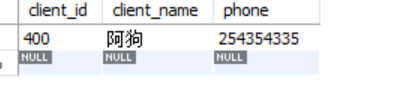
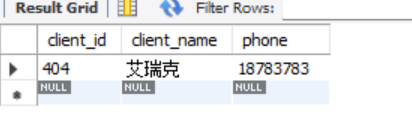
- 查找姓艾的用户
select *
from `client`
where `client_name` like '艾%';
- 取得生日在12月的员工
select *
from `employee`
where `birth` like '%-12-%';
也可以这样
select *
from `employee`
where `birth` like '_____12___';
一个_表示一个字元

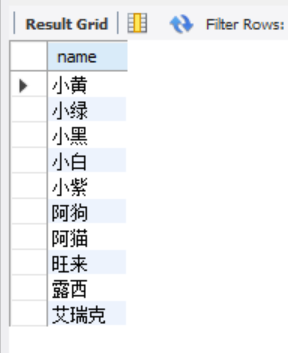
12.并集 union
查找
from `employee`
union
select `client_name`
from `client`;
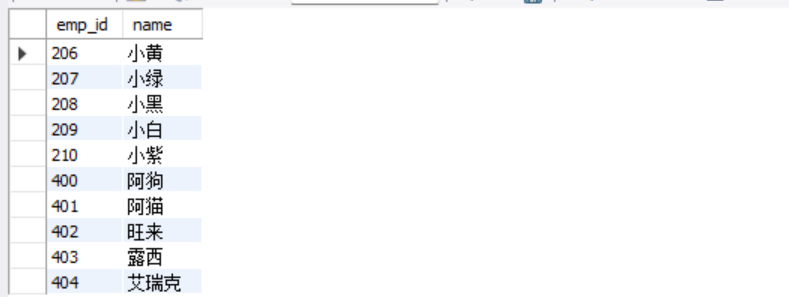
- 员工id + 员工名字 union 客户id + 客户名字
select `emp_id`,`name`
from `employee`
union
select `client_id`,`client_name`
from `client`;
13.连接 join
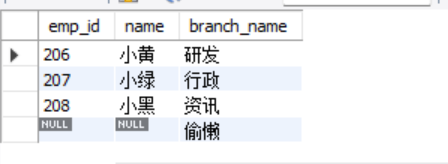
insert into `branch` values(4,'偷懒',null);
加个偷懒部门
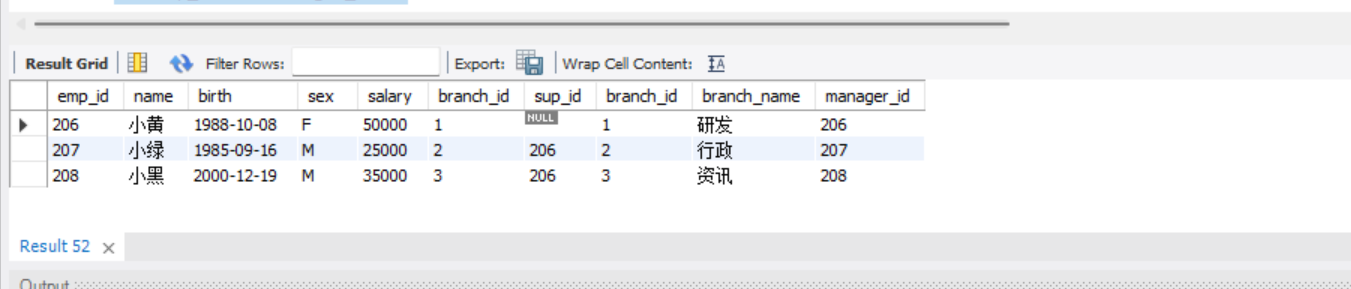
- 取得所有部门经理的名字
select *
from `employee`
join `branch`
on `emp_id` = `manager_id`;
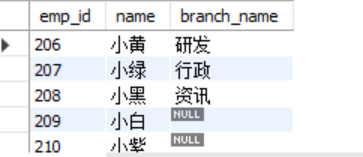
select `employee`.`emp_id`,`employee`.`name`,`branch`.`branch_name`
from `employee` left join `branch`
on `employee`.`emp_id` = `branch`.`manager_id`;
select `employee`.`emp_id`,`employee`.`name`,`branch`.`branch_name`
from `employee` right join `branch`
on `employee`.`emp_id` = `branch`.`manager_id`;
14 子查询 subquery
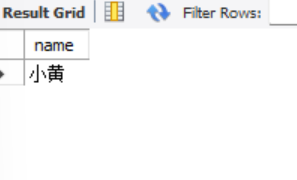
- 查询研发部门经理名字
select `name`
from `employee`
where `emp_id`=(
	select `manager_id`
	from `branch`
	where `branch_name` ='研发'
);
- 查询销售金额大于50000的员工名字
select `name`
from `employee`
where `emp_id`=(
	select `emp_id`
	from `work_with`
	where `total_sales` > 50000
);
15. on delete
delete from `employee`
where `emp_id` = 207;

删除小绿后,小绿的信息设置为null,前面设定过
on delete set null

 浙公网安备 33010602011771号