


php + js 实现webRtc 1对1聊天
本文使用 GatewayWorker 实现信令
使用WebSocket 与 GatewayWorker 创建信令通讯
废话少说,直接上代码吧
配置好相应代码后请根据本文下面的使用方法进行使用,具体根据你业务进行修改
2. 修改GatewayWorker 配置
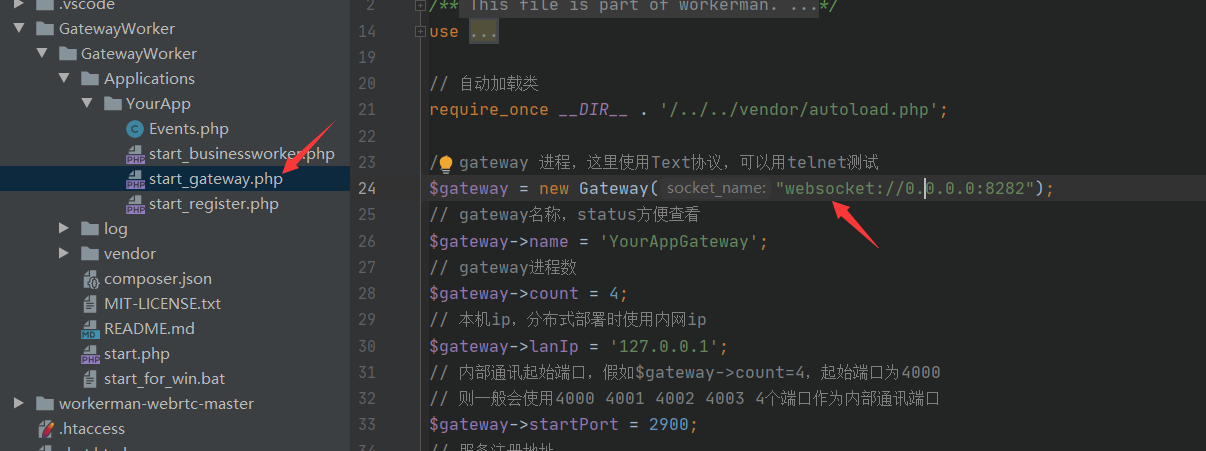
修改成 websocket 协议
3. 修改 onConnect中的代码
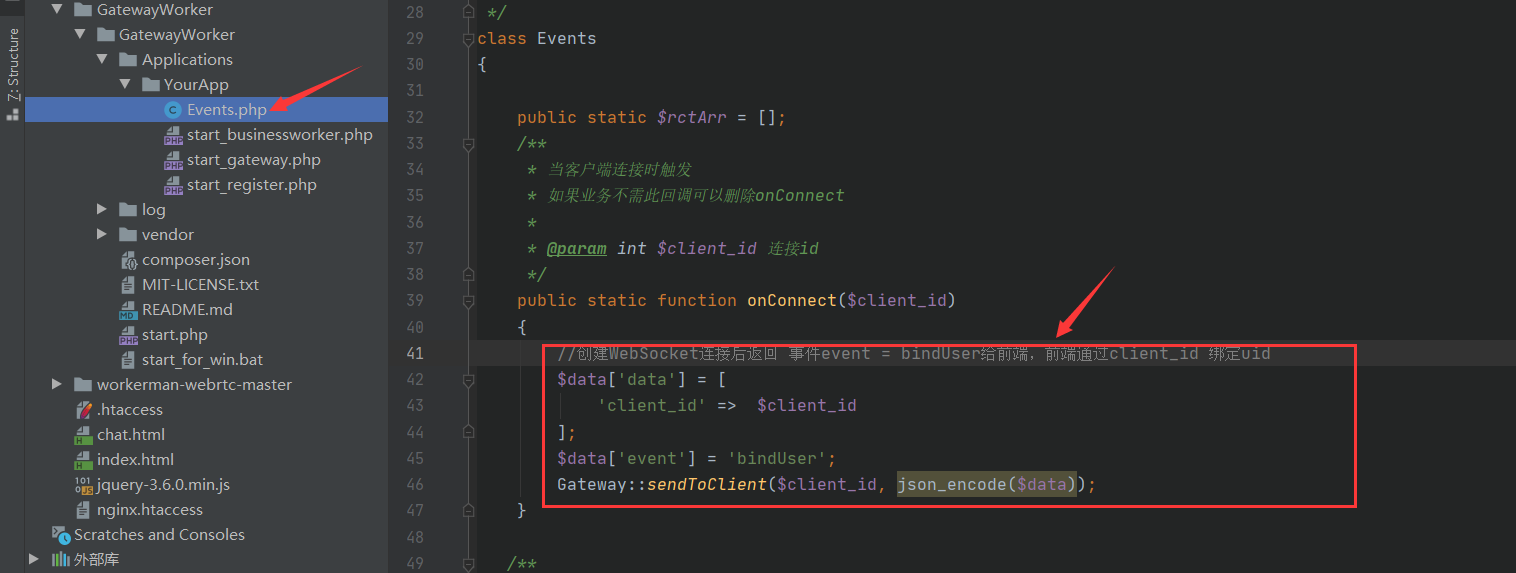
//创建WebSocket连接后返回 事件event = bindUser给前端,前端通过client_id 绑定uid
$data['data'] = [
    'client_id' =>  $client_id
];
$data['event'] = 'bindUser';
Gateway::sendToClient($client_id, json_encode($data));
4. 修改 onMessage
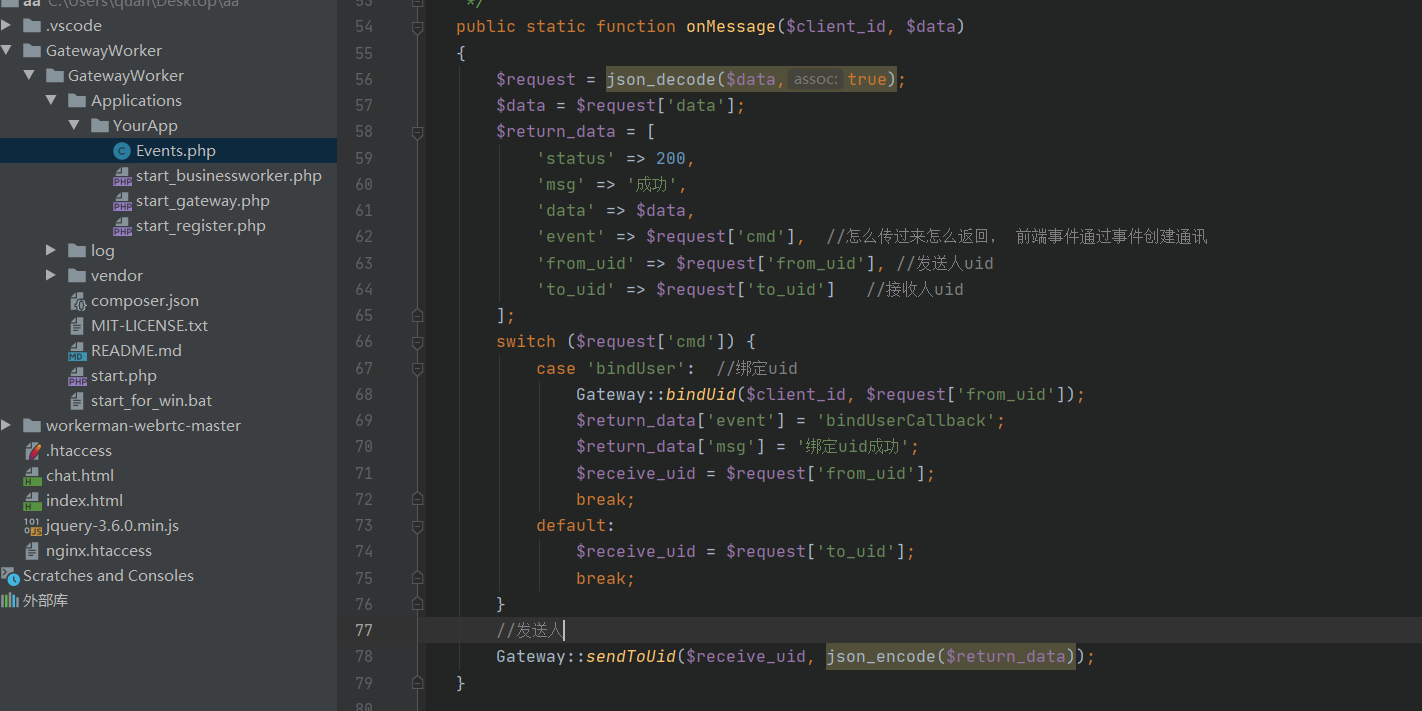
$request = json_decode($data,true);
$data = $request['data'];
$return_data = [
   'status' => 200,
   'msg' => '成功',
   'data' => $data,
   'event' => $request['cmd'],  //怎么传过来怎么返回, 前端事件通过事件创建通讯
   'from_uid' => $request['from_uid'], //发送人uid
   'to_uid' => $request['to_uid']   //接收人uid
];
switch ($request['cmd']) {
   case 'bindUser':  //绑定uid
       Gateway::bindUid($client_id, $request['from_uid']);
       $return_data['event'] = 'bindUserCallback';
       $return_data['msg'] = '绑定uid成功';
       $receive_uid = $request['from_uid'];
       break;
   default:
       $receive_uid = $request['to_uid'];
       break;
}
//发送人
Gateway::sendToUid($receive_uid, json_encode($return_data));
到此为止 php 代码就写完了
5. 前端代码 首先我们先了解一下webRtc 连接的原理 大概就是这样
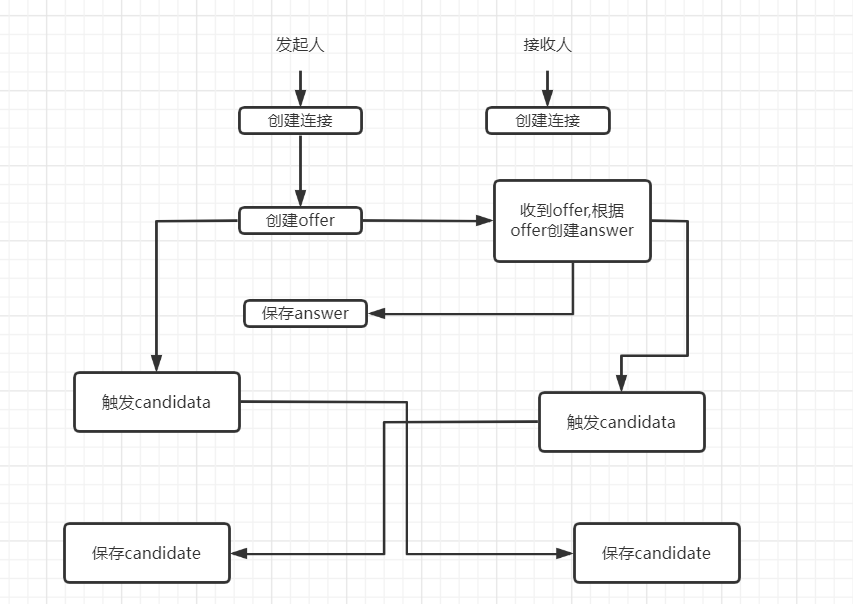
下面是前端代码
<!DOCTYPE html>
<html lang="en">
<head>
    <meta charset="UTF-8">
    <meta http-equiv="X-UA-Compatible" content="IE=edge">
    <meta name="viewport" content="width=device-width, initial-scale=1.0">
    <title>Document</title>
    <style>
        div{
            width: 200px;
            height: 200px;
            border: 1px solid red;
        }
        video{
            width: 100%;
            height: 100%;
        }
        .call{
            line-height: 100px;
            width: 100px;
            height: 100px;
            border: 1px solid red;
            display: none;
        }
    </style>
</head>
<body>
    <div><video id="localVideo" autoplay></video></div>
    <div><video id="remoteVideo" autoplay class="hidden"></video></div>
    <button onclick="call()">呼叫</button>

    <div class="call">
        <button onclick="received()">接听</button>
        <button onclick="refuse()">拒绝</button>
    </div>


    <script src="./jquery-3.6.0.min.js"></script>
    <script>
        var ws_url = '';
        var localVideo = document.getElementById('localVideo');
        var remoteVideo = document.getElementById('remoteVideo');

        var from_uid = getUrlParam('from_uid');  //自己的uid
        var to_uid = getUrlParam('to_uid'); // 好友的uid


        var ws = new WebSocket(ws_url);
        ws.onopen = function(){
            console.log('创建WebSocket成功');
        };

        ws.onmessage = function(e){
            var data = JSON.parse(e.data);
            console.log(data)

            // eval(package.event+'(' + JSON.stringify(package.data) + ')')
            switch(data.event){
                case 'bindUser':
                    send('bindUser', {});
                    break;
                case 'bindUserCallback':
                    console.log('uid绑定成功!')
                    break;
                case 'videoChat':
                    let type = data.data.type;
                    if(data.status != 200){
                        alert(data.msg);
                    }
                    !to_uid ? to_uid = data.to_uid : '';

                    data = data.data

                    //收到呼叫
                    if(type == 'call'){
                        called();
                    }else if(type == 'received'){
                        webRtc.createOffer(function(data){
                            console.log('呼叫方创建offer');
                            send('videoChat',{data: data,type: 'offer'})
                        })
                    }else if(type == 'candidate'){
                        console.log('保存candidate');
                        webRtc.addIceCandidate(data.data)
                    }else if(type == 'offer'){
                        console.log('被呼叫方收到offer,创建answer');
                        webRtc.createAnswer(data.data,function(data){
                            send('videoChat',{data: data,type: 'answer'})
                        });
                    }else if(type == 'answer'){
                        console.log('呼叫方保存answer');
                        webRtc.addAnswer(data.data);
                    }

                    break;
            }

        }


        function send(cmd,data){
            ws.send(JSON.stringify({
                cmd: cmd,
                data: data,
                from_uid: from_uid,
                to_uid: to_uid
            }))
        }

        //呼叫
        function call(){
            media.call()
            if(!to_uid){
                alert('接收人不能为空!');
                return;
            }
            send('videoChat',{type: 'call'});
        }

        function called(){
            console.log('收到呼叫')
            $('.call').show();
        }

        function received(){
            media.called();
            console.log('接听')
        }


        function refuse(){
            send('call',{type: 'refuse'});
            to_uid ? to_uid = 0 : '';
            console.log('拒绝')
        }

        let media = {
            candidate: {},
            offer: {},
            //呼叫方
            call(){
                let that = this;
                that.authorize(function(){
                    webRtc.createRtc(function(data){
                        console.log('呼叫方创建连接成功')
                    },function(data){
                        send('videoChat',{data: data,type: 'candidate'});
                    });
                })
            },
            //被呼叫 - 接听
            called(){
                let that = this;
                that.authorize(function(){
                    webRtc.createRtc(function(data){
                        console.log('被呼叫创建连接成功')
                        send('videoChat',{type: 'received'});
                    },function(data){
                        send('videoChat',{data: data, type: 'candidate'} );
                    });
                })
            },
            authorize(c){
                navigator.mediaDevices.getUserMedia({
                    audio: true,
                    video: true
                }).then(function (stream) {
                    localVideo.srcObject = stream;
                    webRtc.stream = stream;
                    c();

                    localVideo.addEventListener('loadedmetadata', function () {
                        console.log('加载视频流');
                    });
                }).catch(function (e) {
                    alert(e);
                });
            }
        }


        let webRtc = {
            stream: {},
            pc: {},
            createRtc(c,candidataCallback){
                let that = this;
                var configuration = {
                    iceServers: [{
                        urls: 'stun:stun.xten.com'
                    }]
                };
                let pc = new RTCPeerConnection(configuration);
                c(pc);
                pc.onicecandidate = function (event) {
                    if (event.candidate) {
                        candidataCallback(event.candidate)
                    }
                };
                try{
                    pc.addStream(that.stream);
                }catch(e){
                    var tracks = that.stream.getTracks();
                    for(var i=0;i<tracks.length;i++){
                        pc.addTrack(tracks[i], that.stream);
                    }
                }
                pc.onaddstream = function (e) {
                    console.log('回调视频流');
                    remoteVideo.srcObject = e.stream;
                };
                this.pc = pc
            },

            //保存Candidate
            addIceCandidate(data){
                this.pc.addIceCandidate(new RTCIceCandidate(data), function(){}, function(e){alert(e);});
            },
            //创建offer
            createOffer(c){
                let pc = this.pc
                pc.createOffer({
                    offerToReceiveAudio: 1,
                    offerToReceiveVideo: 1
                }).then(function (desc) {
                    pc.setLocalDescription(desc).then(
                        function () {
                            c(pc.localDescription);
                        }
                    ).catch(function (e) {
                        alert(e);
                    });
                }).catch(function (e) {
                    alert(e);
                });
            },
            //根据offer 创建 answer
            createAnswer(data,c){
                let pc = this.pc
                let answer = 0;
                pc.setRemoteDescription(new RTCSessionDescription(data), function(){
                    if (answer == 0) {
                        pc.createAnswer(function (desc) {
                            pc.setLocalDescription(desc, function () {
                                c(pc.localDescription);
                            }, function(e){
                                alert(e);
                            });
                        }
                        ,function(e){
                            alert(e);
                        });
                        answer = 1;
                    }
                }, function(e){
                    alert(e);
                });
            },
            addAnswer(data){
                this.pc.setRemoteDescription(new RTCSessionDescription(data),function(){}, function(e){
                    alert(e);
                });
            }
        }


        function getUrlParam(name) {
            var reg = new RegExp("(^|&)" + name + "=([^&]*)(&|$)");
            var r = window.location.search.substr(1).match(reg);
            if (r != null) return unescape(r[2]);
            return null;
        }


    </script>
</body>
</html>
设置WebSocket 连接地址  GatewayWorker 默认端口是8282
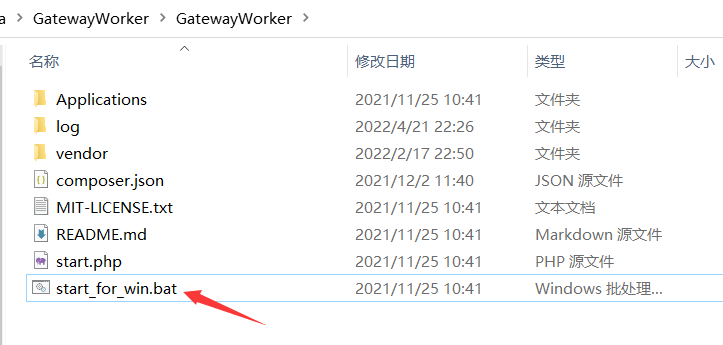
winwods 双击下面文件运行 ,liunx 进入下面这个目录 执行 php start.php start -d 以守护进程方式运行
注意!注意!注意!
同个电脑不同的浏览器不能同时打开摄像头
所以这里建议放到服务器上,并设置wss连接,否则不能使用
修改liunx 配置文件,添加下面代码
location /wss/ {
proxy_pass http://127.0.0.1:8282;
proxy_http_version 1.1;
proxy_set_header Upgrade $http_upgrade;
proxy_set_header Connection "Upgrade";
proxy_set_header X-Forwarded-For $proxy_add_x_forwarded_for;
proxy_set_header X-Real-IP $remote_addr;
}
然后WebSocket 的地址为服务器域名就行
使用方法:
1. 发送方 https://域名/index.html?from_uid=1&to_uid=2
2. 接收方 https://域名/index.html?from_uid=2
3. 发送方点击呼叫,接收方会出现接口拒绝按钮,点击接听既可创建通信

 浙公网安备 33010602011771号