
设置文本颜色
设置文本颜色
方式一:在java代码中通过调用文本视图对象的setColor()方法。
方法参数颜色值的取值
1.从Color类中取定义好的色值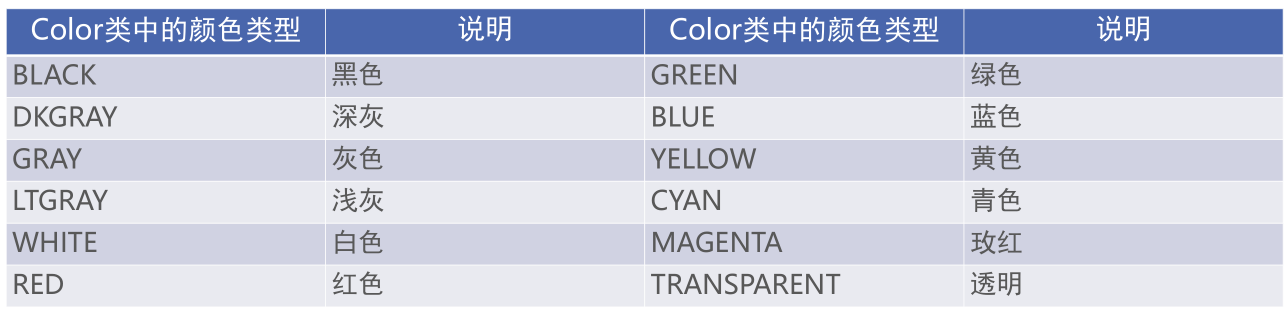
TextView tv_hello = findViewById(R.id.tv_hello);
tv_hello.setTextColor(Color.GREEN);//从Color类中取颜色值
2.八位十六进制数
例如,0xFFDDEECC
其中FF代表透明度,从00~FF,00表示完全透明,FF表示完全不透明
DD代表红色浓度,
EE代表绿色浓度,
CC代表蓝色浓度,从00~FF值越大表示颜色越浓,也就越亮,值越小表示颜色越淡,也就越暗
TextView tv_hello = findViewById(R.id.tv_hello);
tv_hello.setTextColor(0xff00ff00);//通过8位十六进制数取色值
3.六位十六进制数
例如,0xDDEECC
其中省略了透明度的定义,默认为00,表示完全透明
TextView tv_hello = findViewById(R.id.tv_hello);
tv_hello.setTextColor(0x00ff00);//因为透明度默认为00,所以文本完全透明,在界面上看不见,一般不会用这种设置方式
4.设置文本背景颜色
TextView tv_hello = findViewById(R.id.tv_hello);
tv_hello.setBackgroundColor(Color.GREEN);//方式一
tv_hello.setBackgroundResource(R.color.green);方式二
<TextView
        android:id="@+id/tv_hello"
        android:layout_width="wrap_content"
        android:layout_height="wrap_content"
        android:text="@string/helloworld"
        android:background="@color/green"/>//方式三
方式二:在xml文件中通过属性android:textColor设置
属性取值
1.#+八位十六进制
<TextView
    android:id="@+id/tv_hello"
    android:layout_width="wrap_content"
    android:layout_height="wrap_content"
    android:text="@string/helloworld"
    android:textColor="#ff00ff00"/>
2.#+六位十六进制
其中省略透明度的定义,默认是ff,表示完全不透明
<TextView
    android:id="@+id/tv_hello"
    android:layout_width="wrap_content"
    android:layout_height="wrap_content"
    android:text="@string/helloworld"
    android:textColor="#00ff00"/>
3.在colors.xml中自定义色值
<resources>
    <color name="green">#FF00FF00</color>
</resources>
<TextView
    android:id="@+id/tv_hello"
    android:layout_width="wrap_content"
    android:layout_height="wrap_content"
    android:text="@string/helloworld"
    android:textColor="@color/green"/>
注:在xml文件中不能用Color类取色值

 浙公网安备 33010602011771号