

C# 登录QQ网站并获取QQ相关信息(转)
| 本文以登录http://id.qq.com为例,获取用户等级、Q龄等相关信息。 本文界面使用WPF制作 技术涵盖:C#、wpf、HttpWebRequest、HttpWebResponse (.net framework 4.5,当然你也可以使用4.0。不知道为什么使用3.5无法得到正确的结果,代码一模一样,还望高人指点!) |
| 1、获取独立登录框地址 |
1)首先用谷歌浏览器打开http://id.qq.com,并用开发人员工具(快捷键:ctrl+shift+i)查看登陆框地址
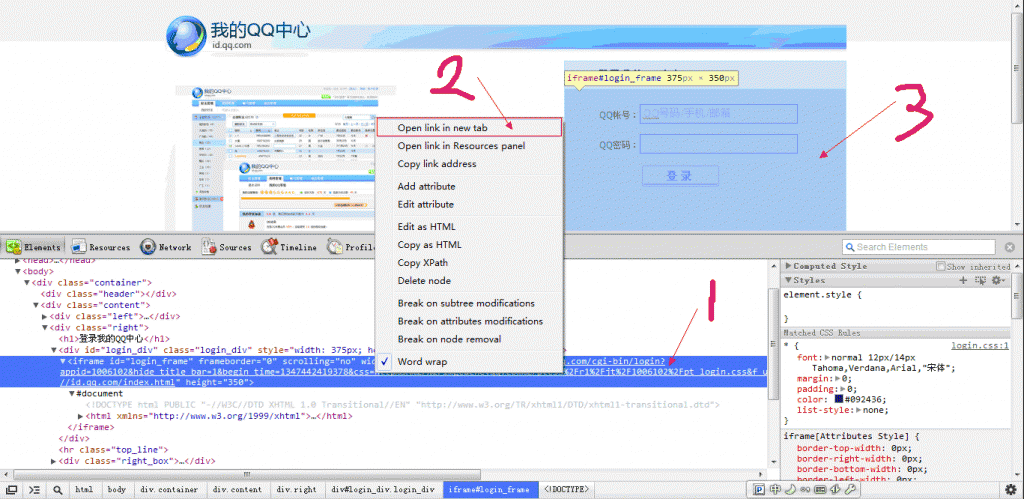
2)Open link in new tab
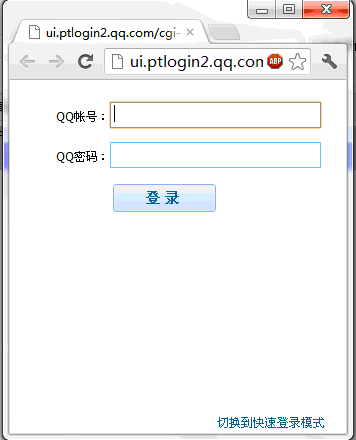
到这里我们已经得到独立登陆框的地址了,方便调试和拦截请求。
成果
登录框地址:
http://ui.ptlogin2.qq.com/cgi-bin/login?appid=1006102&hide_title_bar=1&begin_time=1347444392246
&css=http%3A%2F%2Fimgcache.qq.com%2Fptcss%2Fr1%2Fjt%2F1006102%2Fpt_login.css
&f_url=loginerroralert&no_verifyimg=1&qlogin_jumpname=jump&hide_close_icon=1&s_url=http://id.qq.com/index.html
URL中有很多控制样式的参数,可简化为如下地址:
http://ui.ptlogin2.qq.com/cgi-bin/login?appid=1006102&s_url=http://id.qq.com/index.html
| 2、获取登录时请求的地址 |
通过浏览器的开发人员工具或其他HTTP拦截工具获得登录时请求的地址。
1)打开上一步得到的登录地址,并开启浏览器的开发人员工具,用以拦截请求。
2)随便输入一个号码、密码、验证码后点击登录,得到如下结果:
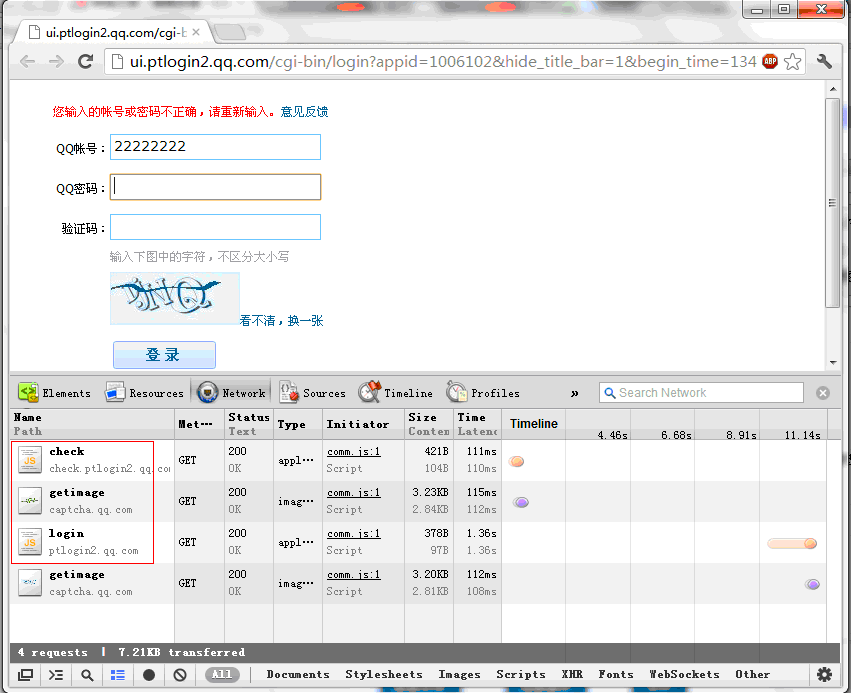
我们可以看到一共发送了3个请求:
| 请求名称 | 返回值 | 请求地址 | 描述 |
| check | 不通过: ptui_checkVC('1', 'a89853e618880c1b93041bda88f5fb673c8eb5555a8850fd', '\x00\x00\x00\x00\x01\x53\x15\x8e'); 通过: ptui_checkVC('0','!5A3', '\x00\x00\x00\x00\x05\xef\x0f\xba'); |
http://check.ptlogin2.qq.com/check? uin=22222222&appid=1006102&r=0.10299430438317358 |
当输入QQ号码后文本框失去焦点时发送该请求,用于检查此次登录是否需要验证码。 |
| getimage | 验证码图片 | http://captcha.qq.com/getimage?aid=1006102&r=0.06791123608127236&uin=22222222 | 如果上一步的check方法不通过则会自动发送这个请求获取验证码。 |
| login | ptuiCB('3','0','','0', '您输入的帐号或密码不正确,请重新输入。', '22222222'); |
http://ptlogin2.qq.com/login?u=22222222&p=712F9A90BABE147B7A3A4427DF48698C&verifycode=gqfj& aid=1006102&u1=http%3A%2F%2Fid.qq.com%2Findex.html& h=1&ptredirect=1&ptlang=2052&from_ui=1&dumy=& fp=loginerroralert&action=8-29-82478035&mibao_css=&t=1&g=1 |
点击登录按钮时发送该请求进行登录操作。 |
值得一提的是,通过调试发现点击登录后密码在客户端是通过加密后再传输的(加密方法位于comm.js,有兴趣的可以在JS中查看如下方法)。
- var M = C.p.value;
- var I = hexchar2bin(md5(M));
- var H = md5(I + pt.uin);
- var G = md5(H + C.verifycode.value.toUpperCase());
            var M = C.p.value;
            var I = hexchar2bin(md5(M));
            var H = md5(I + pt.uin);
            var G = md5(H + C.verifycode.value.toUpperCase());
加密方法翻译为C#后如下:
- public class PasswordHelper
- {
- /// <summary>
- /// 根据QQ号码和验证码加密密码
- /// </summary>
- /// <param name="qqNum">QQ号码</param>
- /// <param name="password">QQ密码</param>
- /// <param name="verifycode">验证码</param>
- /// <returns>密码密文</returns>
- public static string GetPassword(string qqNum, string password, string verifycode)
- {
- //uin为QQ号码转换为16位的16进制
- int qq;
- int.TryParse(qqNum, out qq);
- qqNum = qq.ToString("x");
- qqNum = qqNum.PadLeft(16, '0');
- String P = hexchar2bin(md5(password));
- String U = md5(P + hexchar2bin(qqNum)).ToUpper();
- String V = md5(U + verifycode.ToUpper()).ToUpper();
- return V;
- }
- public static string md5(string input)
- {
- byte[] buffer = MD5.Create().ComputeHash(Encoding.GetEncoding("ISO-8859-1").GetBytes(input));
- return binl2hex(buffer);
- }
- public static string binl2hex(byte[] buffer)
- {
- StringBuilder builder = new StringBuilder();
- for (int i = 0; i < buffer.Length; i++)
- {
- builder.Append(buffer[i].ToString("x2"));
- }
- return builder.ToString();
- }
- public static string hexchar2bin(string passWord)
- {
- StringBuilder builder = new StringBuilder();
- for (int i = 0; i < passWord.Length; i = i + 2)
- {
- builder.Append(Convert.ToChar(Convert.ToInt32(passWord.Substring(i, 2), 16)));
- }
- return builder.ToString();
- }
public class PasswordHelper
    {
        /// <summary>
        /// 根据QQ号码和验证码加密密码
        /// </summary>
        /// <param name="qqNum">QQ号码</param>
        /// <param name="password">QQ密码</param>
        /// <param name="verifycode">验证码</param>
        /// <returns>密码密文</returns>
        public static string GetPassword(string qqNum, string password, string verifycode)
        {
            //uin为QQ号码转换为16位的16进制
            int qq;
            int.TryParse(qqNum, out qq);

            qqNum = qq.ToString("x");
            qqNum = qqNum.PadLeft(16, '0');

            String P = hexchar2bin(md5(password));
            String U = md5(P + hexchar2bin(qqNum)).ToUpper();
            String V = md5(U + verifycode.ToUpper()).ToUpper();
            return V;
        }

        public static string md5(string input)
        {
            byte[] buffer = MD5.Create().ComputeHash(Encoding.GetEncoding("ISO-8859-1").GetBytes(input));
            return binl2hex(buffer);
        }

        public static string binl2hex(byte[] buffer)
        {
            StringBuilder builder = new StringBuilder();
            for (int i = 0; i < buffer.Length; i++)
            {
                builder.Append(buffer[i].ToString("x2"));
            }
            return builder.ToString();
        }

        public static string hexchar2bin(string passWord)
        {
            StringBuilder builder = new StringBuilder();
            for (int i = 0; i < passWord.Length; i = i + 2)
            {
                builder.Append(Convert.ToChar(Convert.ToInt32(passWord.Substring(i, 2), 16)));
            }
            return builder.ToString();
        }
| 3、使用WPF构建登录框 |
直接用设计器拖一个登录界面出来,并模仿登录操作,使用HttpHelper发送上面的请求。
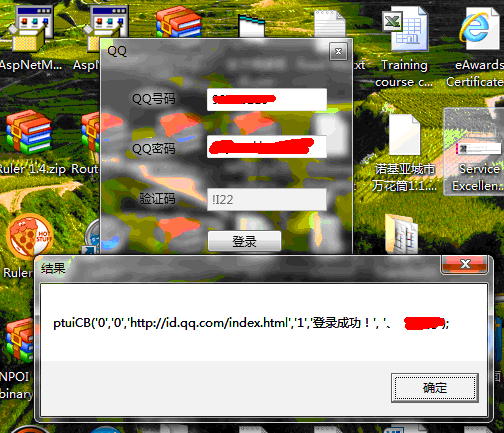
我所使用的HttpHelper如下,很简单,大家可以自行扩展:
- public class HttpHelper
- {
- private static string contentType = "application/x-www-form-urlencoded";
- private static string accept = "image/gif, image/x-xbitmap, image/jpeg, image/pjpeg, application/x-shockwave-flash, application/x-silverlight, application/vnd.ms-excel, application/vnd.ms-powerpoint, application/msword, application/x-ms-application, application/x-ms-xbap, application/vnd.ms-xpsdocument, application/xaml+xml, application/x-silverlight-2-b1, */*";
- private static string userAgent = "Mozilla/4.0 (compatible; MSIE 7.0; Windows NT 6.1; WOW64; Trident/5.0; SLCC2; .NET CLR 2.0.50727; .NET CLR 3.5.30729; .NET CLR 3.0.30729; Media Center PC 6.0; .NET4.0C; .NET4.0E; Zune 4.7; BOIE9;ZHCN)";
- public static string referer = "http://ui.ptlogin2.qq.com/cgi-bin/login?appid=1006102&s_url=http://id.qq.com/index.html";
- /// <summary>
- /// 获取字符流
- /// </summary>
- /// <param name="url"></param>
- /// <param name="cookieContainer"></param>
- /// <returns></returns>
- public static Stream GetStream(string url, CookieContainer cookieContainer)
- {
- HttpWebRequest httpWebRequest = null;
- HttpWebResponse httpWebResponse = null;
- try
- {
- httpWebRequest = (HttpWebRequest)HttpWebRequest.Create(url);
- httpWebRequest.CookieContainer = cookieContainer;
- httpWebRequest.ContentType = contentType;
- httpWebRequest.Referer = referer;
- httpWebRequest.Accept = accept;
- httpWebRequest.UserAgent = userAgent;
- httpWebRequest.Method = "GET";
- httpWebRequest.ServicePoint.ConnectionLimit = int.MaxValue;
- httpWebResponse = (HttpWebResponse)httpWebRequest.GetResponse();
- Stream responseStream = httpWebResponse.GetResponseStream();
- return responseStream;
- }
- catch (Exception)
- {
- return null;
- }
- }
- /// <summary>
- /// 获取HTML
- /// </summary>
- /// <param name="url"></param>
- /// <param name="cookieContainer"></param>
- /// <returns></returns>
- public static string GetHtml(string url, CookieContainer cookieContainer)
- {
- HttpWebRequest httpWebRequest = null;
- HttpWebResponse httpWebResponse = null;
- try
- {
- httpWebRequest = (HttpWebRequest)HttpWebRequest.Create(url);
- httpWebRequest.CookieContainer = cookieContainer;
- httpWebRequest.ContentType = contentType;
- httpWebRequest.Referer = referer;
- httpWebRequest.Accept = accept;
- httpWebRequest.UserAgent = userAgent;
- httpWebRequest.Method = "GET";
- httpWebRequest.ServicePoint.ConnectionLimit = int.MaxValue;
- httpWebResponse = (HttpWebResponse)httpWebRequest.GetResponse();
- Stream responseStream = httpWebResponse.GetResponseStream();
- StreamReader streamReader = new StreamReader(responseStream, Encoding.UTF8);
- string html = streamReader.ReadToEnd();
- streamReader.Close();
- responseStream.Close();
- httpWebRequest.Abort();
- httpWebResponse.Close();
- return html;
- }
- catch (Exception)
- {
- return string.Empty;
- }
- }
- }
    public class HttpHelper
    {
        private static string contentType = "application/x-www-form-urlencoded";
        private static string accept = "image/gif, image/x-xbitmap, image/jpeg, image/pjpeg, application/x-shockwave-flash, application/x-silverlight, application/vnd.ms-excel, application/vnd.ms-powerpoint, application/msword, application/x-ms-application, application/x-ms-xbap, application/vnd.ms-xpsdocument, application/xaml+xml, application/x-silverlight-2-b1, */*";
        private static string userAgent = "Mozilla/4.0 (compatible; MSIE 7.0; Windows NT 6.1; WOW64; Trident/5.0; SLCC2; .NET CLR 2.0.50727; .NET CLR 3.5.30729; .NET CLR 3.0.30729; Media Center PC 6.0; .NET4.0C; .NET4.0E; Zune 4.7; BOIE9;ZHCN)";
        public static string referer = "http://ui.ptlogin2.qq.com/cgi-bin/login?appid=1006102&s_url=http://id.qq.com/index.html";

        /// <summary>
        /// 获取字符流
        /// </summary>
        /// <param name="url"></param>
        /// <param name="cookieContainer"></param>
        /// <returns></returns>
        public static Stream GetStream(string url, CookieContainer cookieContainer)
        {
            HttpWebRequest httpWebRequest = null;
            HttpWebResponse httpWebResponse = null;

            try
            {
                httpWebRequest = (HttpWebRequest)HttpWebRequest.Create(url);
                httpWebRequest.CookieContainer = cookieContainer;
                httpWebRequest.ContentType = contentType;
                httpWebRequest.Referer = referer;
                httpWebRequest.Accept = accept;
                httpWebRequest.UserAgent = userAgent;
                httpWebRequest.Method = "GET";
                httpWebRequest.ServicePoint.ConnectionLimit = int.MaxValue;

                httpWebResponse = (HttpWebResponse)httpWebRequest.GetResponse();
                Stream responseStream = httpWebResponse.GetResponseStream();

                return responseStream;
            }
            catch (Exception)
            {
                return null;
            }

        }

        /// <summary>
        /// 获取HTML
        /// </summary>
        /// <param name="url"></param>
        /// <param name="cookieContainer"></param>
        /// <returns></returns>
        public static string GetHtml(string url, CookieContainer cookieContainer)
        {
            HttpWebRequest httpWebRequest = null;
            HttpWebResponse httpWebResponse = null;
            try
            {
                httpWebRequest = (HttpWebRequest)HttpWebRequest.Create(url);
                httpWebRequest.CookieContainer = cookieContainer;
                httpWebRequest.ContentType = contentType;
                httpWebRequest.Referer = referer;
                httpWebRequest.Accept = accept;
                httpWebRequest.UserAgent = userAgent;
                httpWebRequest.Method = "GET";
                httpWebRequest.ServicePoint.ConnectionLimit = int.MaxValue;

                httpWebResponse = (HttpWebResponse)httpWebRequest.GetResponse();
                Stream responseStream = httpWebResponse.GetResponseStream();
                StreamReader streamReader = new StreamReader(responseStream, Encoding.UTF8);
                string html = streamReader.ReadToEnd();

                streamReader.Close();
                responseStream.Close();

                httpWebRequest.Abort();
                httpWebResponse.Close();

                return html;
            }
            catch (Exception)
            {
                return string.Empty;
            }

        }
    }
| 4、登录成功后查询我们需要的信息 |
通过拦截请求并分析得出我需要的信息位于如下请求中:
http://id.qq.com/cgi-bin/summary?ldw=f61210b82e57b6a466af5fcabe07b2d6720bf092d69e4eab
注:ldw从登录后的cookie中获取
然后继续发送请求:
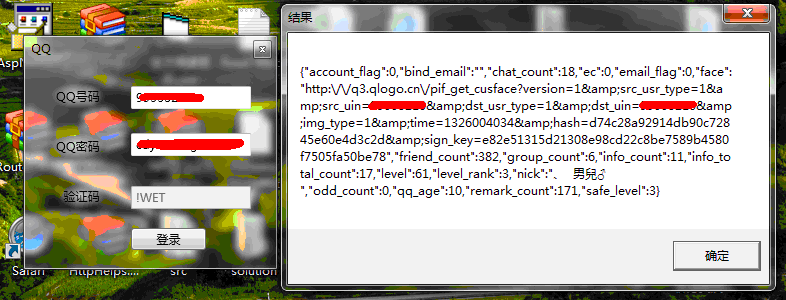
自此我们的功能基本上完成了,登录成功后查询其他数据也都很方便了。
| 5、注意点提示: |
在实际操作中需要注意参数的传递和cookie的获取。查询有些数据前必须要先发送一些特定的请求去获取cookie或参数。
祝你成功!只要登录后可以直接获取QQ空间信息或WebQQ中的信息亦或是操作QQ游戏。
posted on 2013-05-07 11:15 HappySmile 阅读(3756) 评论(0) 收藏 举报


 浙公网安备 33010602011771号