
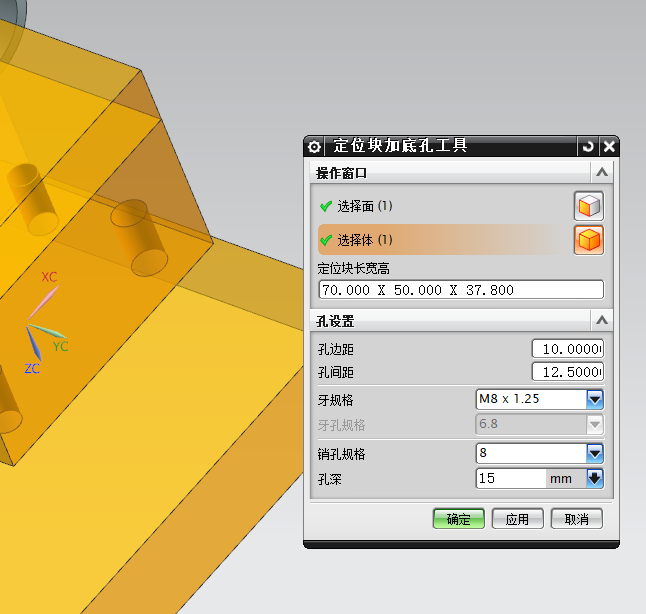
nxopen ug8.5 vb.net 定位块底面打孔工具
用两实体的相交面,和一条最长边来调整WCS,来实现实体无论摆放什么角度都能求出最小包容体!(机制受限肯定还是有Bug)
这是一个比较全整的实例,一般 BlockStyler 的问题都有做处理~!
Option Strict Off
Imports System
Imports NXOpen
Imports NXOpen.BlockStyler
Imports NXOpen.UF
Imports System.Collections.Generic
'------------------------------------------------------------------------------
'Represents Block Styler application class
'------------------------------------------------------------------------------
Public Class CreatBgHole
'class members
Private Shared theSession As Session
Private Shared theUI As UI
Private theDlxFileName As String
Private theDialog As NXOpen.BlockStyler.BlockDialog
Private group0 As NXOpen.BlockStyler.Group ' Block type: Group
Private face_select0 As NXOpen.BlockStyler.FaceCollector ' Block type: Face Collector
Private bodySelect0 As NXOpen.BlockStyler.BodyCollector ' Block type: Body Collector
Private string0 As NXOpen.BlockStyler.StringBlock ' Block type: String
Private group As NXOpen.BlockStyler.Group ' Block type: Group
Private double01 As NXOpen.BlockStyler.DoubleBlock ' Block type: Double
Private double02 As NXOpen.BlockStyler.DoubleBlock ' Block type: Double
Private separator0 As NXOpen.BlockStyler.Separator ' Block type: Separator
Private string01 As NXOpen.BlockStyler.StringBlock ' Block type: String
Private double03 As NXOpen.BlockStyler.DoubleBlock ' Block type: Double
Private separator01 As NXOpen.BlockStyler.Separator ' Block type: Separator
Private double04 As NXOpen.BlockStyler.DoubleBlock ' Block type: Double
Private linear_dim0 As NXOpen.BlockStyler.LinearDimension ' Block type: Linear Dim
Private ufs As UFSession = UFSession.GetUFSession()
Private SheetThickess As Double = 0 '板厚
Private FwFace1 As Face = Nothing
Private BgFace1 As Face = Nothing
Private SaveTmpData1 As New List(Of SaveTmpData)
'------------------------------------------------------------------------------
'Bit Option for Property: EntityType
'------------------------------------------------------------------------------
Public Shared ReadOnly EntityType_AllowFaces As Integer = 16
Public Shared ReadOnly EntityType_AllowDatums As Integer = 32
Public Shared ReadOnly EntityType_AllowBodies As Integer = 64
'------------------------------------------------------------------------------
'Bit Option for Property: FaceRules
'------------------------------------------------------------------------------
Public Shared ReadOnly FaceRules_SingleFace As Integer = 1
Public Shared ReadOnly FaceRules_RegionFaces As Integer = 2
Public Shared ReadOnly FaceRules_TangentFaces As Integer = 4
Public Shared ReadOnly FaceRules_TangentRegionFaces As Integer = 8
Public Shared ReadOnly FaceRules_BodyFaces As Integer = 16
Public Shared ReadOnly FaceRules_FeatureFaces As Integer = 32
Public Shared ReadOnly FaceRules_AdjacentFaces As Integer = 64
Public Shared ReadOnly FaceRules_ConnectedBlendFaces As Integer = 128
Public Shared ReadOnly FaceRules_AllBlendFaces As Integer = 256
Public Shared ReadOnly FaceRules_RibFaces As Integer = 512
Public Shared ReadOnly FaceRules_SlotFaces As Integer = 1024
Public Shared ReadOnly FaceRules_BossandPocketFaces As Integer = 2048
Public Shared ReadOnly FaceRules_MergedRibFaces As Integer = 4096
Public Shared ReadOnly FaceRules_RegionBoundaryFaces As Integer = 8192
Public Shared ReadOnly FaceRules_FaceandAdjacentFaces As Integer = 16384
'------------------------------------------------------------------------------
'Bit Option for Property: BodyRules
'------------------------------------------------------------------------------
Public Shared ReadOnly BodyRules_SingleBody As Integer = 1
Public Shared ReadOnly BodyRules_FeatureBodies As Integer = 2
Public Shared ReadOnly BodyRules_BodiesinGroup As Integer = 4
#Region "Block Styler Dialog Designer generator code"
'------------------------------------------------------------------------------
'Constructor for NX Styler class
'------------------------------------------------------------------------------
Public Sub New()
Try
theSession = Session.GetSession()
theUI = UI.GetUI()
theDlxFileName = "D:\KingMax85\NX8_Open_VB_Wizard2\NX8_Open_VB_Wizard2\CreatBgHole.dlx"
theDialog = theUI.CreateDialog(theDlxFileName)
theDialog.AddApplyHandler(AddressOf apply_cb)
theDialog.AddOkHandler(AddressOf ok_cb)
theDialog.AddUpdateHandler(AddressOf update_cb)
theDialog.AddInitializeHandler(AddressOf initialize_cb)
theDialog.AddDialogShownHandler(AddressOf dialogShown_cb)
theDialog.AddFilterHandler(AddressOf filter_cb)
Catch ex As Exception
'---- Enter your exception handling code here -----
Throw ex
End Try
End Sub
#End Region
'------------------------------- DIALOG LAUNCHING ---------------------------------
'
' Before invoking this application one needs to open any part/empty part in NX
' because of the behavior of the blocks.
'
' Make sure the dlx file is in one of the following locations:
' 1.) From where NX session is launched
' 2.) $UGII_USER_DIR/application
' 3.) For released applications, using UGII_CUSTOM_DIRECTORY_FILE is highly
' recommended. This variable is set to a full directory path to a file
' containing a list of root directories for all custom applications.
' e.g., UGII_CUSTOM_DIRECTORY_FILE=$UGII_ROOT_DIR\menus\custom_dirs.dat
'
' You can create the dialog using one of the following way:
'
' 1. Journal Replay
'
' 1) Replay this file through Tool->Journal->Play Menu.
'
' 2. USER EXIT
'
' 1) Create the Shared Library -- Refer "Block UI Styler programmer's guide"
' 2) Invoke the Shared Library through File->Execute->NX Open menu.
'
'------------------------------------------------------------------------------
Public Shared Sub Main()
Dim theCreatBgHole As CreatBgHole = Nothing
Try
theCreatBgHole = New CreatBgHole()
' The following method shows the dialog immediately
theCreatBgHole.Show()
Catch ex As Exception
'---- Enter your exception handling code here -----
theUI.NXMessageBox.Show("Block Styler", NXMessageBox.DialogType.Error, ex.ToString)
Finally
If theCreatBgHole IsNot Nothing Then
theCreatBgHole.Dispose()
theCreatBgHole = Nothing
End If
End Try
End Sub
Public Shared Function GetUnloadOption(ByVal arg As String) As Integer
'Return CType(Session.LibraryUnloadOption.Explicitly, Integer)
Return CType(Session.LibraryUnloadOption.Immediately, Integer)
' Return CType(Session.LibraryUnloadOption.AtTermination, Integer)
End Function
Public Shared Sub UnloadLibrary(ByVal arg As String)
Try
Catch ex As Exception
'---- Enter your exception handling code here -----
theUI.NXMessageBox.Show("Block Styler", NXMessageBox.DialogType.Error, ex.ToString)
End Try
End Sub
'------------------------------------------------------------------------------
'This method shows the dialog on the screen
'------------------------------------------------------------------------------
Public Sub Show()
Try
theDialog.Show()
Catch ex As Exception
'---- Enter your exception handling code here -----
theUI.NXMessageBox.Show("Block Styler", NXMessageBox.DialogType.Error, ex.ToString)
End Try
End Sub
'------------------------------------------------------------------------------
'Method Name: Dispose
'------------------------------------------------------------------------------
Public Sub Dispose()
If theDialog IsNot Nothing Then
theDialog.Dispose()
theDialog = Nothing
End If
End Sub
'------------------------------------------------------------------------------
'---------------------Block UI Styler Callback Functions--------------------------
'------------------------------------------------------------------------------
'------------------------------------------------------------------------------
'Callback Name: initialize_cb
'------------------------------------------------------------------------------
Public Sub initialize_cb()
Try
group0 = CType(theDialog.TopBlock.FindBlock("group0"), NXOpen.BlockStyler.Group)
face_select0 = CType(theDialog.TopBlock.FindBlock("face_select0"), NXOpen.BlockStyler.FaceCollector)
bodySelect0 = CType(theDialog.TopBlock.FindBlock("bodySelect0"), NXOpen.BlockStyler.BodyCollector)
string0 = CType(theDialog.TopBlock.FindBlock("string0"), NXOpen.BlockStyler.StringBlock)
group = CType(theDialog.TopBlock.FindBlock("group"), NXOpen.BlockStyler.Group)
double01 = CType(theDialog.TopBlock.FindBlock("double01"), NXOpen.BlockStyler.DoubleBlock)
double02 = CType(theDialog.TopBlock.FindBlock("double02"), NXOpen.BlockStyler.DoubleBlock)
separator0 = CType(theDialog.TopBlock.FindBlock("separator0"), NXOpen.BlockStyler.Separator)
string01 = CType(theDialog.TopBlock.FindBlock("string01"), NXOpen.BlockStyler.StringBlock)
double03 = CType(theDialog.TopBlock.FindBlock("double03"), NXOpen.BlockStyler.DoubleBlock)
separator01 = CType(theDialog.TopBlock.FindBlock("separator01"), NXOpen.BlockStyler.Separator)
double04 = CType(theDialog.TopBlock.FindBlock("double04"), NXOpen.BlockStyler.DoubleBlock)
linear_dim0 = CType(theDialog.TopBlock.FindBlock("linear_dim0"), NXOpen.BlockStyler.LinearDimension)
Dim OptionValue1 As Double() = {6, 8, 10, 12, 14}
double04.SetComboOptions(OptionValue1)
Dim ItemString1 As String() = {"M3 x 0.5", "M4 x 0.7", "M5 x 0.8", "M6 x 0.75", "M8 x 1.25", "M10 x 1.5", "M12 x 1.75", "M14 x 0.75"}
string01.SetListItems(ItemString1)
If SaveTmpData1.Count > 0 Then
Dim tmpNXObject(0) As NXObject
tmpNXObject(0) = SaveTmpData1(0).sface
' MsgBox(SaveTmpData1.Count)
face_select0.SetSelectedObjects(tmpNXObject)
End If
SaveTmpData1.Clear()
Catch ex As Exception
'---- Enter your exception handling code here -----
theUI.NXMessageBox.Show("Block Styler", NXMessageBox.DialogType.Error, ex.ToString)
End Try
End Sub
Public Sub dialogShown_cb()
Try
'---- Enter your callback code here -----
Catch ex As Exception
'---- Enter your exception handling code here -----
theUI.NXMessageBox.Show("Block Styler", NXMessageBox.DialogType.Error, ex.ToString)
End Try
End Sub
Public Function apply_cb() As Integer
Dim errorCode As Integer = 0
Try
'---- Enter your callback code here -----
RemovePara(bodySelect0.GetSelectedObjects(0))
Catch ex As Exception
'---- Enter your exception handling code here -----
errorCode = 1
theUI.NXMessageBox.Show("Block Styler", NXMessageBox.DialogType.Error, ex.ToString)
End Try
apply_cb = errorCode
End Function
Public Function update_cb(ByVal block As NXOpen.BlockStyler.UIBlock) As Integer
Try
Dim face1 As Face
Dim body1 As Body
If block Is face_select0 Then
'---- Enter your code here -----
'Dim MaskAction1 As Selection.SelectionAction
'Dim MaskTrip1(0) As Selection.MaskTriple
'bodySelect0.GetProperties.SetSelectionFilter("bodySelect0", MaskAction1, MaskTrip1)
ElseIf block Is bodySelect0 Then
'---- Enter your code here -----
Dim body3 As Body = bodySelect0.GetSelectedObjects(0)
body3.Unhighlight()
ElseIf block Is string01 Then
Dim TmpString1 As String() = string01.GetListItems
Dim index1 = Array.IndexOf(TmpString1, string01.Value)
Dim OptionValue1 As Double() = {2.5, 3.3, 4.2, 5, 6.8, 8.5, 10.3, 12.1, 14}
double03.Value = OptionValue1(index1)
'---- Enter your code here -----
ElseIf block Is double01 Then
'---- Enter your code here -----
ElseIf block Is double02 Then
'---- Enter your code here -----
ElseIf block Is double03 Then
'---- Enter your code here -----
ElseIf block Is double04 Then
'---- Enter your code here -----
End If
If face_select0.GetSelectedObjects.Length > 0 And bodySelect0.GetSelectedObjects.Length > 0 Then
face1 = face_select0.GetSelectedObjects(0)
body1 = bodySelect0.GetSelectedObjects(0)
delobj()
Try
MyMain(face1, body1)
Catch
End Try
End If
Catch ex As Exception
'---- Enter your exception handling code here -----
theUI.NXMessageBox.Show("Block Styler", NXMessageBox.DialogType.Error, ex.ToString)
End Try
update_cb = 0
End Function
Public Structure SaveTmpData
Public sface As Face
Public sbody As Body
Public sTran As Integer
Public ArcObj1 As NXObject()
Public ExtObj1 As NXObject
End Structure
Public Structure SaveTmpBody
Public faceOfBody As Body
Public sTran As Integer
Public Layer As Integer
End Structure
Sub MyMain(ByVal face1 As Face, ByVal body1 As Body)
Dim faces1 As Face() = GetCrossFaces(face1, body1) '获取选择面与选择体的交叉面
Dim count1 As Integer = faces1.Length '可以有几个方便后面bug修改
Dim BodyBgFace1 As Face
Dim BodyLW As Double() = Nothing
If count1 = 0 Then
theUI.NXMessageBox.Show("错误提示", NXMessageBox.DialogType.Warning, "没找与选择面相交的实体面!")
Dim nullNXObject(0) As NXObject
bodySelect0.SetSelectedObjects(nullNXObject)
Exit Sub
Else
BodyBgFace1 = faces1(0)
BodyLW = SetWcs(face1, BodyBgFace1) '修改wcs(用于最小包容体)
End If
Dim FaceCenPoint1 = CreatFaceCenPoint(BodyBgFace1).Coordinates '交叉面的中心点
Dim ArcList1() As Features.AssociativeArc = FixPoint(FaceCenPoint1, BodyLW(0), BodyLW(1), BodyBgFace1) '得到全部创建的圆
Dim ExtFeat1 As Features.Feature = CreatsExt2(ArcList1, BodyBgFace1) '拉伸
'保存全部创建的特征用于删除
SaveTmpData1.Add(New SaveTmpData With {
.sface = face1,
.sbody = body1,
.ArcObj1 = ArcList1,
.ExtObj1 = ExtFeat1
})
End Sub
Function RemovePara(ByVal body1 As Body)
Dim workPart As Part = theSession.Parts.Work
Dim removeParametersBuilder1 As Features.RemoveParametersBuilder
removeParametersBuilder1 = workPart.Features.CreateRemoveParametersBuilder()
Dim added1 As Boolean
added1 = removeParametersBuilder1.Objects.Add(body1)
Dim nXObject1 As NXObject
nXObject1 = removeParametersBuilder1.Commit()
End Function '去参
Function FixPoint(ByVal FaceCenPoint1 As Point3d, ByVal BL As Double, ByVal BW As Double, ByVal BodyBgFace1 As Face) As Features.AssociativeArc()
Dim workPart As Part = theSession.Parts.Work
Dim xDirection1 As Vector3d
Dim yDirection1 As Vector3d
workPart.WCS.CoordinateSystem.GetDirections(xDirection1, yDirection1)
Dim Vector1 As Vector3d = xDirection1
Dim BDir As Double = double01.Value
Dim HDir As Double = double02.Value
Dim YaHoleSize As Double = double03.Value
Dim XaHoleSize As Double = double04.Value
'Lw.WriteLine(BL & "<>" & HDir & "<>" & sUvalue1)
Dim point1 As Point() = Nothing
If BL - HDir * 2 - BDir * 2 > BDir Then
If BW - HDir * 2 > BDir Then
Dim XYoffArr(3, 1) As Double
XYoffArr = {{BL / 2 - BDir, -BW / 2 + BDir}, {BL / 2 - BDir, BW / 2 - BDir}, {-BL / 2 + BDir, -BW / 2 + BDir}, {-BL / 2 + BDir, BW / 2 - BDir}}
point1 = CreatePoint2(XYoffArr)
Else
double01.MaximumValue = (BL - 10 - HDir) / 2
double02.MaximumValue = (BL - 10 - BDir) / 2
Dim XYoffArr(3, 1) As Double
XYoffArr = {{BL / 2 - BDir - HDir, 0}, {BL / 2 - BDir, 0}, {-BL / 2 + BDir, 0}, {-BL / 2 + BDir + HDir, 0}}
point1 = CreatePoint2(XYoffArr)
End If
Else
double02.MaximumValue = (BL - 10) / 2
Dim XYoffArr(2, 1) As Double
XYoffArr = {{0, 0}, {HDir, 0}, {-HDir, 0}}
point1 = CreatePoint2(XYoffArr)
End If
Dim count1 As Integer = point1.Length
Dim ArcList1(count1 - 1) As Features.AssociativeArc
Dim Diameter1 As Double
For s As Integer = 0 To count1 - 1
Dim CenPoint1 As Point3d = point1(s).Coordinates
If s = 0 Or s = 3 Then
Diameter1 = YaHoleSize
Else
Diameter1 = XaHoleSize
End If
ArcList1(s) = DrawArc(CenPoint1, Diameter1, BodyBgFace1)
Next
'DrawArc
Return ArcList1
End Function '定义孔中心点
Function CreatePoint2(ByVal XYoffArr As Double(,)) As Point()
Dim workPart As Part = theSession.Parts.Work
Dim x1 As String
Dim y1 As String
Dim Lw = theSession.ListingWindow
Dim xdirection1 As Vector3d
Dim ydirection1 As Vector3d
workPart.WCS.CoordinateSystem.GetDirections(xdirection1, ydirection1)
Dim origin1 As Point3d = workPart.WCS.Origin
Lw.Open()
' Lw.WriteLine(x1 & "<>" & y1 & "<>")
Dim count1 As Integer = XYoffArr.Length / 2
Dim point1(count1 - 1) As Point
Dim basePoint1 As Point
For s As Integer = 0 To count1 - 1
x1 = XYoffArr(s, 0).ToString
y1 = XYoffArr(s, 1).ToString
basePoint1 = workPart.Points.CreatePoint(origin1)
' Lw.WriteLine("x1" & x1 & "y1" & y1)
Dim oXdirection1 As Direction = workPart.Directions.CreateDirection(origin1, xdirection1, SmartObject.UpdateOption.WithinModeling)
point1(s) = workPart.Points.CreateStockOffsetPoint(basePoint1, oXdirection1, x1, SmartObject.UpdateOption.WithinModeling)
Dim oYdirection1 As Direction = workPart.Directions.CreateDirection(origin1, ydirection1, SmartObject.UpdateOption.WithinModeling)
point1(s) = workPart.Points.CreateStockOffsetPoint(point1(s), oYdirection1, y1, SmartObject.UpdateOption.WithinModeling)
Next
Return point1
End Function '点偏移
Function delobj() As Integer
theSession.UpdateManager.ClearErrorList()
Dim markId2 As Session.UndoMarkId
markId2 = theSession.SetUndoMark(Session.MarkVisibility.Visible, "Delete")
If SaveTmpData1.Count = 0 Then Exit Function
' ufs.Obj.SetTranslucency(SaveTmpData1(0).sbody.Tag, SaveTmpData1(0).sTran)
If IsNothing(SaveTmpData1(0).ExtObj1) = False Then theSession.UpdateManager.AddToDeleteList(SaveTmpData1(0).ExtObj1)
If IsNothing(SaveTmpData1(0).ArcObj1) = False Then theSession.UpdateManager.AddToDeleteList(SaveTmpData1(0).ArcObj1)
theSession.UpdateManager.DoUpdate(markId2)
SaveTmpData1.Clear()
End Function '删除特征
Function DrawArc(ByVal CenPoint1 As Point3d, ByVal Diameter1 As Double, ByVal face1 As Face) As Features.AssociativeArc '绘制圆
Dim workPart As Part = theSession.Parts.Work
Dim displayPart As Part = theSession.Parts.Display
Dim nullFeatures_AssociativeArc As Features.AssociativeArc = Nothing
Dim associativeArcBuilder1 As Features.AssociativeArcBuilder
associativeArcBuilder1 = workPart.BaseFeatures.CreateAssociativeArcBuilder(nullFeatures_AssociativeArc)
Dim origin1 As Point3d = CenPoint1
Dim point1 As Point
point1 = workPart.Points.CreatePoint(origin1)
associativeArcBuilder1.CenterPoint.Value = point1
associativeArcBuilder1.EndPointOptions = Features.AssociativeArcBuilder.EndOption.Radius
associativeArcBuilder1.Limits.FullCircle = True
associativeArcBuilder1.Type = Features.AssociativeArcBuilder.Types.ArcFromCenter
associativeArcBuilder1.Radius.RightHandSide = CStr(Diameter1 / 2)
associativeArcBuilder1.Diameter.RightHandSide = Diameter1
associativeArcBuilder1.Associative = True
Dim sense1 As Sense = Sense.Reverse
Dim direction1 As Direction
direction1 = workPart.Directions.CreateDirection(face1, sense1, SmartObject.UpdateOption.WithinModeling)
Dim normal1 As Vector3d = direction1.Vector
Dim plane1 As Plane
plane1 = workPart.Planes.CreatePlane(origin1, normal1, SmartObject.UpdateOption.WithinModeling)
plane1.SetMethod(PlaneTypes.MethodType.Distance)
Dim geom1(0) As NXObject
geom1(0) = face1
plane1.SetGeometry(geom1)
plane1.SetFlip(False)
plane1.SetReverseSide(False)
plane1.SetAlternate(PlaneTypes.AlternateType.One)
plane1.Evaluate()
associativeArcBuilder1.SupportPlaneData.SupportPlane = plane1
Dim nXObject1 As NXObject
nXObject1 = associativeArcBuilder1.Commit()
associativeArcBuilder1.Destroy()
plane1.DestroyPlane()
Dim objects1(0) As DisplayableObject
Dim associativeArc1 As Features.AssociativeArc = nXObject1
Dim arc1 As NXOpen.Arc = CType(associativeArc1.FindObject("CURVE 1"), NXOpen.Arc)
objects1(0) = arc1
theSession.DisplayManager.BlankObjects(objects1)
Return associativeArc1
End Function '绘制圆
Function CreatsExt2(ByVal ArcList1 As Features.AssociativeArc(), ByVal BodyBgFace1 As Face) As Features.Feature
Dim workPart As Part = theSession.Parts.Work
Dim nullFeatures_Feature As Features.Feature = Nothing
Dim extrudeBuilder1 As Features.ExtrudeBuilder
extrudeBuilder1 = workPart.Features.CreateExtrudeBuilder(nullFeatures_Feature)
Dim section1 As Section
section1 = workPart.Sections.CreateSection(0.00095, 0.001, 0.05)
extrudeBuilder1.Section = section1
extrudeBuilder1.AllowSelfIntersectingSection(True)
Dim unit1 As Unit
unit1 = extrudeBuilder1.Draft.FrontDraftAngle.Units
extrudeBuilder1.DistanceTolerance = 0.001
Dim smartVolumeProfileBuilder1 As GeometricUtilities.SmartVolumeProfileBuilder
smartVolumeProfileBuilder1 = extrudeBuilder1.SmartVolumeProfile
smartVolumeProfileBuilder1.OpenProfileSmartVolumeOption = False
smartVolumeProfileBuilder1.CloseProfileRule = GeometricUtilities.SmartVolumeProfileBuilder.CloseProfileRuleType.Fci
section1.DistanceTolerance = 0.001
section1.ChainingTolerance = 0.00095
section1.SetAllowedEntityTypes(Section.AllowTypes.OnlyCurves)
Dim arc1 As Arc = Nothing
For s As Integer = 0 To ArcList1.Length - 1
Dim features1(0) As Features.Feature
Dim associativeArc1 As Features.AssociativeArc = ArcList1(s)
features1(0) = associativeArc1
arc1 = CType(associativeArc1.FindObject("CURVE 1"), Arc)
Dim nullCurve As Curve = Nothing
Dim curveFeatureTangentRule1 As CurveFeatureTangentRule
curveFeatureTangentRule1 = workPart.ScRuleFactory.CreateRuleCurveFeatureTangent(features1, arc1, nullCurve, True, 0.00095, 0.05)
section1.AllowSelfIntersection(True)
Dim rules1(0) As SelectionIntentRule
rules1(0) = curveFeatureTangentRule1
Dim nullNXObject As NXObject = Nothing
Dim helpPoint1 As Point3d = New Point3d(0.0, 0.0, 0.0)
section1.AddToSection(rules1, arc1, nullNXObject, nullNXObject, helpPoint1, Section.Mode.Create, False)
Next
Dim direction1 As Direction
direction1 = workPart.Directions.CreateDirection(arc1, Sense.Reverse, SmartObject.UpdateOption.WithinModeling)
extrudeBuilder1.Direction = direction1
extrudeBuilder1.Limits.EndExtend.Value.RightHandSide = linear_dim0.Value.ToString
extrudeBuilder1.BooleanOperation.Type = GeometricUtilities.BooleanOperation.BooleanType.Subtract
Dim targetBodies4(0) As Body
Dim body1 As Body = BodyBgFace1.GetBody
targetBodies4(0) = body1
extrudeBuilder1.BooleanOperation.SetTargetBodies(targetBodies4)
extrudeBuilder1.ParentFeatureInternal = False
Dim feature1 As Features.Feature
feature1 = extrudeBuilder1.CommitFeature()
extrudeBuilder1.Destroy()
Return feature1
End Function '创建拉伸
Function GetMaxLanEdge(ByVal face1 As Face) As Edge '获取面上最长的直线边edge
Dim MaxLan As Double = 0
Dim Edge1 As Edge = Nothing
Dim count1 As Integer = face1.GetEdges.Length
For s As Integer = 0 To count1 - 1
Dim Edge2 As Edge = face1.GetEdges(s)
If Edge2.GetLength > MaxLan And Edge2.SolidEdgeType = Edge.EdgeType.Linear Then
MaxLan = Edge2.GetLength
Edge1 = Edge2
End If
Next
Return Edge1
End Function '求实体最长边
Function SetWcs(ByVal face1 As Face, ByVal BodyBgFace1 As Face) As Double()
Dim workPart As Part = theSession.Parts.Work
Dim xform1 As Xform
xform1 = workPart.Xforms.CreateXform(BodyBgFace1, SmartObject.UpdateOption.WithinModeling)
Dim CoordinateSystem1 As CartesianCoordinateSystem
CoordinateSystem1 = workPart.CoordinateSystems.CreateCoordinateSystem(xform1, SmartObject.UpdateOption.WithinModeling)
Dim faceOrigin1 As Point3d = CoordinateSystem1.Origin
Dim origin1 As Double() = {faceOrigin1.X, faceOrigin1.Y, faceOrigin1.Z}
Dim matrix1 As NXOpen.NXMatrix = CoordinateSystem1.Orientation
Dim cystag1 As Tag = Tag.Null
workPart.WCS.SetOriginAndMatrix(faceOrigin1, CoordinateSystem1.Orientation.Element)
Dim scalar1 As Scalar
scalar1 = workPart.Scalars.CreateScalar(0.5, Scalar.DimensionalityType.None, SmartObject.UpdateOption.WithinModeling)
Dim edge1 As Edge = GetMaxLanEdge(BodyBgFace1)
Dim direction1 As Direction
direction1 = workPart.Directions.CreateDirection(edge1, Sense.Reverse, SmartObject.UpdateOption.AfterModeling)
Dim direction2 As Direction
direction2 = workPart.Directions.CreateDirection(face1, Sense.Reverse, SmartObject.UpdateOption.WithinModeling)
Dim FaceCenPoint1 As Point = workPart.Points.CreatePoint(faceOrigin1)
Dim xform2 As Xform
xform2 = workPart.Xforms.CreateXformByPointXDirZDir(FaceCenPoint1, direction1, direction2, SmartObject.UpdateOption.AfterModeling, 1.0)
Dim CoordinateSystem2 As CartesianCoordinateSystem
CoordinateSystem2 = workPart.CoordinateSystems.CreateCoordinateSystem(xform2, SmartObject.UpdateOption.AfterModeling)
Dim CoordinateSystem3 As CartesianCoordinateSystem
CoordinateSystem3 = workPart.WCS.SetCoordinateSystem(CoordinateSystem2)
Dim objects1(0) As NXObject
objects1(0) = CoordinateSystem3
Dim nErrs2 As Integer
nErrs2 = theSession.UpdateManager.AddToDeleteList(objects1)
Return CreatestockSize(faceOrigin1, BodyBgFace1)
End Function '更改wcs
Function CreatestockSize(ByVal origin1 As Point3d, ByVal BodyBgFace1 As Face) As Double()
Dim theSession As Session = Session.GetSession()
Dim workPart As Part = theSession.Parts.Work
Dim displayPart As Part = theSession.Parts.Display
Dim part1 As Part
part1 = theSession.Parts.Work
Dim stockSizeBuilder1 As Tooling.StockSizeBuilder
stockSizeBuilder1 = workPart.ToolingManager.StockSizes.CreateStocksizeBuilder()
stockSizeBuilder1.SizePrecision = 3
stockSizeBuilder1.Clearance.RightHandSide = "0"
Dim body1 As Body = BodyBgFace1.GetBody
Dim added1 As Boolean
added1 = stockSizeBuilder1.SelectBody.Add(body1)
Try
Dim inputorigin1 As Point3d = origin1
Dim inputmatrix1 As Matrix3x3 = workPart.WCS.CoordinateSystem.Orientation.Element
stockSizeBuilder1.ModifyRefCsys(inputorigin1, inputmatrix1)
Catch
End Try
Dim nXObject1 As NXObject
nXObject1 = stockSizeBuilder1.Commit()
string0.Value = stockSizeBuilder1.StringStock
Dim StrArr As String() = stockSizeBuilder1.StringStock.Split("X")
Dim DoubleArr As Double() = {0, 0}
If Val(StrArr(0)) > Val(StrArr(1)) Then
DoubleArr(0) = Val(StrArr(0))
DoubleArr(1) = Val(StrArr(1))
Else
DoubleArr(1) = Val(StrArr(0))
DoubleArr(0) = Val(StrArr(1))
End If
string0.Enable = True
theSession.Parts.SetWork(workPart)
workPart = theSession.Parts.Work
stockSizeBuilder1.Destroy()
Return DoubleArr
End Function '获取外型尺寸
Function FaceToFaceDisAng(ByVal face1 As Face, ByVal face2 As Face, ByVal DisOrAng As Boolean) As Double
Dim workPart As Part = theSession.Parts.Work
Dim direction1 As Direction
direction1 = workPart.Directions.CreateDirection(face1, Sense.Forward, SmartObject.UpdateOption.AfterModeling)
Dim OutValue1 As Double
If DisOrAng = True Then
Dim NewDistance1 As MeasureDistance = workPart.MeasureManager.NewDistance(Nothing, face1, face2, direction1, MeasureManager.ProjectionType.Minimum)
OutValue1 = NewDistance1.Value
Else
Dim measureAngle1 As MeasureAngle = workPart.MeasureManager.NewAngle(Nothing, face1, MeasureManager.EndpointType.StartPoint, face2, MeasureManager.EndpointType.StartPoint, True, False)
OutValue1 = measureAngle1.Value
End If
Return OutValue1
End Function '面到面的距离或角度 DisOrAng=true距离
Function GetCrossFaces(ByVal face1 As Face, ByVal body1 As Body) As Face()
Dim faces1() As Face = body1.GetFaces()
Dim count1 As Integer = faces1.Length
Dim e = 0
Dim faces2(0 To 999) As Face
For s As Integer = 0 To count1 - 1
Dim Point1 As Point = CreatFaceCenPoint(faces1(s))
If Pt(Point1, face1) = 1 Then
Dim face2 As Face = faces1(s)
faces2(e) = face2
e = e + 1
End If
Next
Array.Resize(faces2, e)
Return faces2
End Function '获取实体中与面相交的面组
Function Pt(ByVal Point01 As Point, ByVal face1 As Face) As Integer
Dim Point1() As Double = {Point01.Coordinates.X, Point01.Coordinates.Y, Point01.Coordinates.Z}
Dim PtStatus As Integer
ufs.Modl.AskPointContainment(Point1, face1.Tag, PtStatus)
Return PtStatus
End Function '点是否面上
Function CreatFaceCenPoint(ByVal face1 As Face) As Point
Dim workPart As Part = theSession.Parts.Work
Dim scalarUV As Scalar
scalarUV = workPart.Scalars.CreateScalar(0.5, Scalar.DimensionalityType.None, SmartObject.UpdateOption.WithinModeling)
Dim CenPoint As Point
CenPoint = workPart.Points.CreatePoint(face1, scalarUV, scalarUV, SmartObject.UpdateOption.WithinModeling)
workPart.Points.CreatePoint(CenPoint.Coordinates)
Return CenPoint
End Function '获取面上的中心点
'------------------------------------------------------------------------------
'Callback Name: ok_cb
'------------------------------------------------------------------------------
Public Function ok_cb() As Integer
Dim errorCode As Integer = 0
Try
RemovePara(bodySelect0.GetSelectedObjects(0))
'---- Enter your callback code here -----
errorCode = apply_cb()
Catch ex As Exception
'---- Enter your exception handling code here -----
errorCode = 1
theUI.NXMessageBox.Show("Block Styler", NXMessageBox.DialogType.Error, ex.ToString)
End Try
ok_cb = errorCode
End Function
'选择实体时过滤掉 “选择面”的实体
Public Function filter_cb(ByVal block As NXOpen.BlockStyler.UIBlock, ByVal selectedObject As NXOpen.TaggedObject) As Integer
If face_select0.GetSelectedObjects.Length > 0 And block Is bodySelect0 Then
Dim face1 As Face = face_select0.GetSelectedObjects(0)
Dim body2 As Body = face1.GetBody
If selectedObject.Tag = body2.Tag Then Exit Function
End If
filter_cb = NXOpen.UF.UFConstants.UF_UI_SEL_ACCEPT
End Function
Public Function GetBlockProperties(ByVal blockID As String) As PropertyList
GetBlockProperties = Nothing
Try
GetBlockProperties = theDialog.GetBlockProperties(blockID)
Catch ex As Exception
'---- Enter your exception handling code here -----
theUI.NXMessageBox.Show("Block Styler", NXMessageBox.DialogType.Error, ex.ToString)
End Try
End Function
End Class
文件打包地址:
https://files.cnblogs.com/files/blogs/708818/CreatBgHole.rar?t=1663807495

 浙公网安备 33010602011771号