
uniapp中picker年月选择器+ 用moment.js 获取固定月份的第一天和最后一天
picker年月选择器
1.html
<picker mode="date" :value="date" fields="month" @change="dateChange">
     <view class="selestDate">{{date}}</view>
</picker>
2.js
data(){
    // 设置日期
    const currentDate = this.getDate({
       format: 'yyyy-mm'
    })
    return{
    date: currentDate,
  }
}
3.获取年月日信息
// 获取年月日信息
            getDate(type) {
                const date = new Date();
                let year = date.getFullYear();
                let month = date.getMonth() + 1;
                if (type === 'start') {
                    year = year - 60;
                } else if (type === 'end') {
                    year = year + 2;
                }
                month = month > 9 ? month : '0' + month;
                // day = day > 9 ? day : '0' + day;
                return `${year}-${month}`;
            },
4.css
.selestDate{
        border: 2rpx solid #e5e5e5;
        border-radius: 100rpx;
        background-color: #EAF4FF;
        color: #3399FF;
        font-size: 30rpx;
        font-family: PingFangSC;
        font-weight: Regular;
        max-width: 600rpx;
        height: 70rpx;
        line-height: 70rpx;
        padding-left: 30rpx;
    }
效果图:

选择月份后 使用moment.js获取选择月份的第一天和最后一天
1.安装 npm install moment
具体参考: https://blog.csdn.net/qq_40047019/article/details/123580920
2.页面中引入
import moment from 'moment'
3.
dateChange(e) {
  this.date = e.target.value.slice(0,7);
  this.isInsur.beginDate = moment(this.date).startOf('month').format("YYYY-MM-DD")
  this.isInsur.endDate = moment(this.date).endOf('month').format("YYYY-MM-DD")
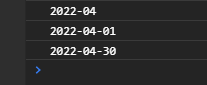
  console.log(this.date);
  console.log(this.isInsur.beginDate);
  console.log(this.isInsur.endDate);
},
打印结果

 浙公网安备 33010602011771号