
form表单上传文件
form表单上传文件,首先了解一下form表单基础
1. form标签的enctype属性
enctype 属性规定在发送到服务器之前应该如何对表单数据进行编码。
默认地,表单数据会编码为 "application/x-www-form-urlencoded"。就是说,在发送到服务器之前,所有字符都会进行编码(空格转换为 "+" 加号,特殊符号转换为 ASCII HEX 值)。
不对字符编码“multipart/form-data”。在使用包含文件上传控件的表单时,必须使用该值。
空格转换为 "+" 加号,但不对特殊字符编码“text/plain”。
2. input标签
type属性 file 表示文件
multiple属性 multiple="multiple"表示允许上传一个以上的值
accept属性 规定通过文件上传来提交的文件的类型
3. new FormData()
//通过FormData构造函数创建一个空对象
var formdata=new FormData();
//可以通过append()方法来追加数据
formdata.append("name","laotie");
//通过get方法对值进行读取
console.log(formdata.get("name"));//laotie
//通过set方法对值进行设置
formdata.set("name","laoliu");
console.log(formdata.get("name"));//laoliu


//获得表单按钮元素
var btn=document.querySelector("#btn");
//为按钮添加点击事件
btn.onclick=function(){
    //根据ID获得页面当中的form表单元素
    var form=document.querySelector("#advForm");
    //将获得的表单元素作为参数,对formData进行初始化
    var formdata=new FormData(form);
    //通过get方法获得name为advName元素的value值
    console.log(formdata.get("advName"));//xixi
    //通过get方法获得name为advType元素的value值
    console.log(formdata.get("advType"));//1
}
上传文件:

<el-dialog title="导入员工信息" v-if="importEmployee.visible" :visible.sync="importEmployee.visible" :center="true"
      :width="'600px'" @close="closeImpDialog">
      <el-row v-if="importEmployee.tpl == 'import'">
        <div class="clearfix checkFileBox">
          <label class="pull-left grey_blue_deep">导入联系人</label>
          <div class="pull-right" style="width: 265px;position: relative;">
            <label class="importFileName pull-left">{{importEmployee.fileName}}</label>
            <form enctype="multipart/form-data">
              <input ref="importFile" type="file" name="files" multiple="multiple"
                style="width: 70px;right: 0;height: 34px;position: absolute;opacity: 0;cursor: pointer;"
                class="input-upload detailUpImg" @change="importFileChange($event)">
              <el-button type="primary" size="small" style="width:70px;height:34px;">上传</el-button>
            </form>
          </div>
        </div>
        <div class="cust_importCon">
          <div class="cust_Directions clearfix">
            <span class="pull-left grey_light">导入说明:</span>
            <div class="pull-left">
              <p>1.EXCEL表格不能直接上传,需另存为*.xls或*.xlsx格式
                <br>2.上传的为纯文本内容,不能带有颜色,下划线,等格式。
                <br>
              </p>
              <a target="_blank" :href="importEmployee.tplUrl">下载数据导入模板</a>
            </div>
          </div>
        </div>
        <div class="btn_box clearfix" style="text-align:center;margin:40px auto 20px;">
          <el-button type="default" size="small" @click="closeImpDialog">取消</el-button>
          <el-button type="primary" size="small" @click="importEmployeeCheck">确定</el-button>
        </div>
      </el-row>

      <el-row v-else>
        <el-row style="text-align:center;margin:-10px auto 10px;">{{importEmployee.sucNum}}条导入成功</el-row>
        <el-row style="text-align:center;margin-bottom:20px;">{{importEmployee.failNum}}条导入失败!</el-row>
        <el-row style="text-align:center;">
          <el-button type="default" size="small" @click="closeImpDialog">确定</el-button>
        </el-row>
      </el-row>
    </el-dialog>
importEmployeeCheck() {
      var self = this;
      var obj = self.$refs.importFile;
      var file = obj.files[0];
      if (self.uploading) return;
      if (!file) {
        self.$message.error("请选择要导入的文件!");
        return false;
      }

      var formData = new FormData($(obj).parent()[0]);

      // var formData = new FormData();
      //     formData.append("file",$("#FileUpload")[0].files[0]);
      formData.append("deptId", this.selectedDep.id);

      //   debugger
      //   formData = Object.assign(formData, { deptId: this.selectedDep.id });
      // 加锁
      self.uploading = true;
      api
        .request("importEmployee", formData)
        .then(result => {
          if (result.status == 0) {
            self.importEmployee.sucNum = result.data.success;
            self.importEmployee.failNum = result.data.fail;
            self.importEmployee.tpl = "import-result";
            // self.getCustomerList();
            self.getDepartmentTreeAll();
            self.getEmployeeList();
          } else {
            self.$message.error(result.message);
          }
          $(obj).val("");
          self.importEmployee.fileName = "";
          // 解锁
          delete self.uploading;
        })
        .catch(err => {
          $(obj).val("");
          self.importEmployee.fileName = "";
          // 解锁
          delete self.uploading;
          //   self.$message.error("导入失败!");
        });
    },
上传视频:
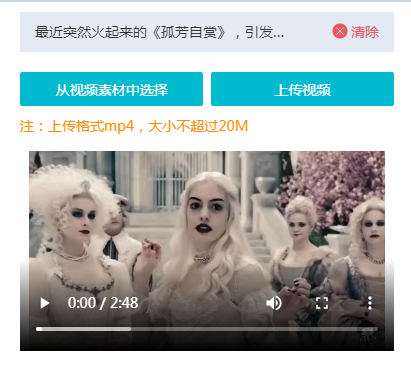
<div class="audio_btn clearfix">
            <button class=" pull-left" @click="choose">从视频素材中选择</button>
            <form enctype="multipart/form-data">
                <input id="uploadVideo" type="file" name="fileName" multiple="multiple" accept="video/mp4" class="pull-left input-upload" />
                <button class="pull-right">上传视频</button>
            </form>
        </div>
        <div class="remarks">注:上传格式mp4,大小不超过20M</div>
<div style="width: 100%; height: 200px;margin-top:10px;object-fit:fill;">
            <video id="myVideo" width="100%" height="100%"
                :src="videoSrc" controls="controls"
                preload="auto">
                您的手机不支持该视频文件!!!
            </video>
        </div>
bindUploadVideo() {
            let self = this;
            setTimeout(() => {
                // 兼容部分浏览器在打开windows选择窗口时,选择文件用双击方式后触发编辑区mouseup事件,导致模块切换或取消选中状态。
                $("#uploadVideo").off("click").on("click", function() {
                    Kdo.events.off("mouse");
                    $("body").one("mouseup", function() { setTimeout(function(){ Kdo.events.on("mouse");}); });
                });
                $("#uploadVideo").off("change").on("change", function() {
                    var $this = $(this);
                    var This = this;
                    var formData = new FormData($this.parent()[0]);
                    if (This.files.length > 1) {
                        Kdo.utils.notification.warning("单次请上传一个视频文件");
                        $this.val("");
                        return;
                    }
                    if (This.files[0].size > 20 * 1024 * 1024) {
                        Kdo.utils.notification.warning("视频文件大小不超过20M");
                        $this.val("");
                        return;
                    }
                    self.uploadingStatus = true;
                    api.request("uploadFiles", formData, result => {
                        if (result.status == 0) {
                            self.saveVideo(result.data[0]);
                        } else {
                            Kdo.utils.notification.error("视频文件上传失败!");
                            self.uploadingStatus = false;
                        }
                        $this.val("");
                    });
                });
            });
        },
        saveVideo(file) {
            let self = this;
            api.request("saveMedia", {
                name: file.title,
                path: file.file,
                type: "video"
            }, result => {
                if (result.status == 0) {
                    self.tempSelectItem = { title: file.title, src: file.file };
                    self.videoSrc = file.file;
                    this.selectedVideo();
                    self.uploadingStatus = false;
                } else {
                    Kdo.utils.notification.error(result.message);
                    self.uploadingStatus = false;
                }
            });
        },

 浙公网安备 33010602011771号