
iframe及表单的初级验证
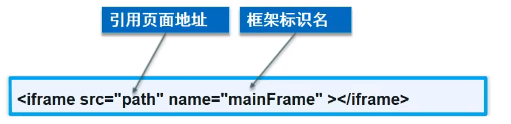
iframe内连框架
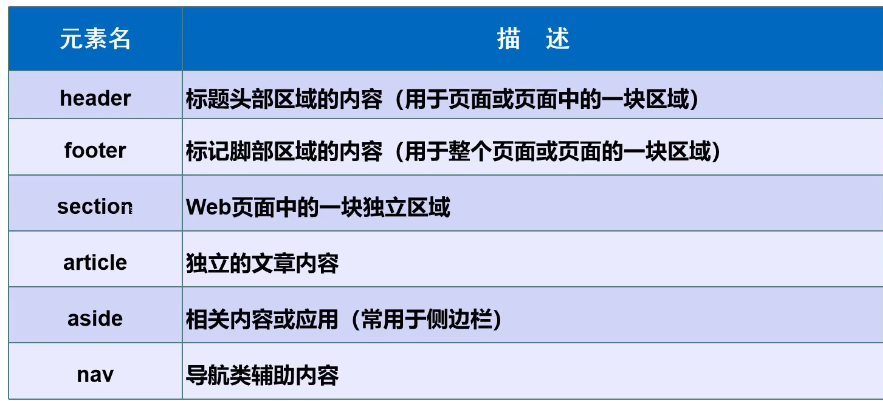
<body>

<!--iframe内联框架
src:地址
w-h:宽度高度
-->
<iframe src="" name="hello" frameborder="0" width="1000px" height="800px"></iframe>
<a href="https://www.cnblogs.com/qkshhan/" target="hello">点击跳转</a>

</body>
</html>
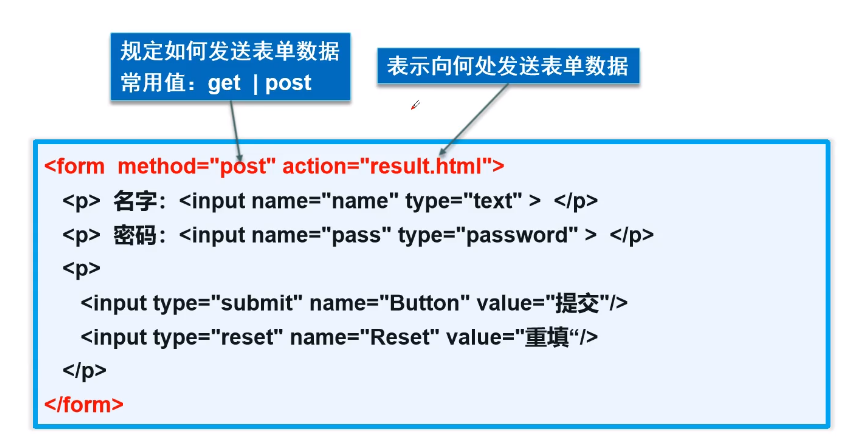
表单语法
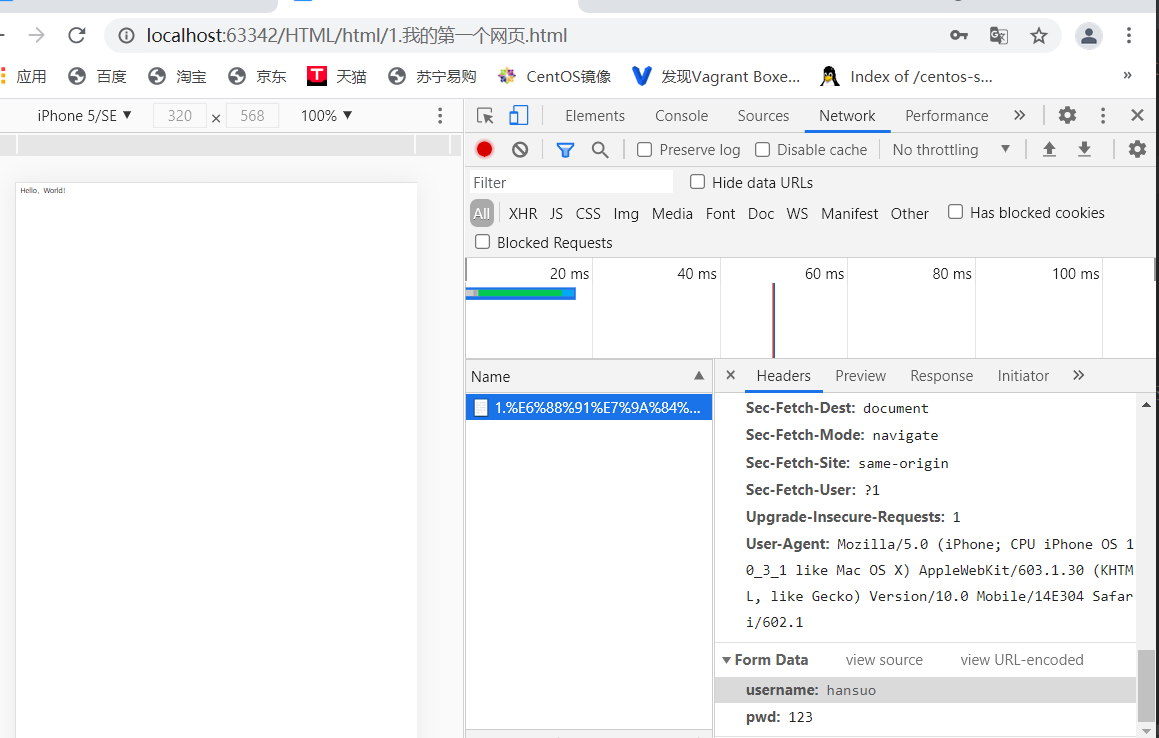
post提交方式查看密码:
表单元素格式
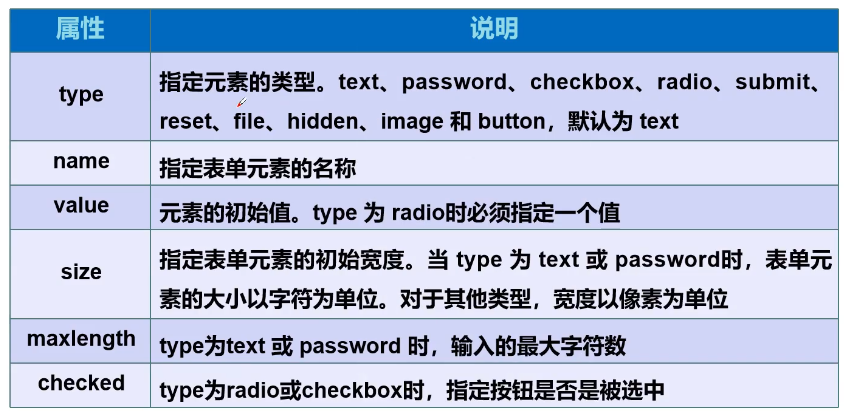
表单的应用
- 隐藏域 hidden
- 只读 readonly
- 禁用 disabled
表单初级验证
- 思考?为什么要进行表单验证
- 常用方式
- placehoder 提示信息
- required 非空判断
- pattern 正则表达式
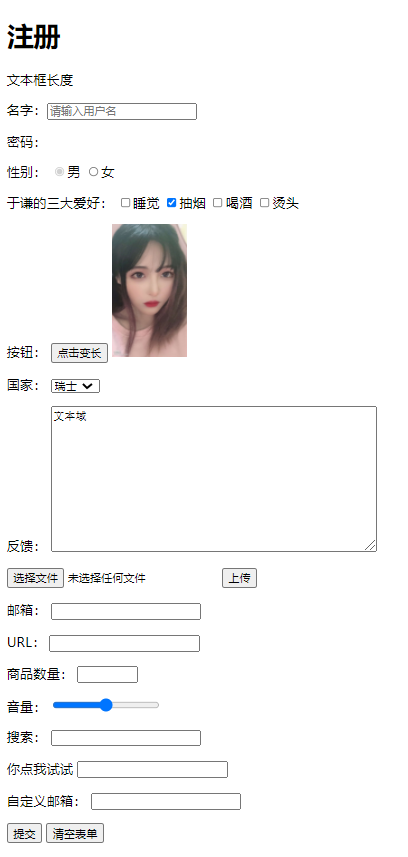
代码及效果图
<body>

<h1>注册</h1>

<!--表单from

action:表单提交的位置,可以是网站,也可以是一个请求处理地址
method:post,get提交方式
    get当时提交:我们可以在url中看到我们提交的信息,不安全,高效
    post:比较安全,传输大文件,
-->


<!--脑瘫的厉害    这连form打成from都没发现   愣是找了半天为啥不跳转-->
<form action="1.我的第一个网页.html" method="get">

<!--    文本输入框:input type="text"
value="锁子哥" 默认初始值
maxlength="8" 最长能写几个字符
size="30"-->  文本框长度

    <p>名字:<input type="text" name="username" placeholder="请输入用户名" required> </p>

<!--    密码框:input type="password"-->
    <p>密码:<input type="password" name="pwd" hidden value="123456"> </p>

<!--单选框标签
input type="radio"
value:单选框的值
name:表示组
-->
    <p>性别:
    <input type="radio" value="boy" name="sex" checked disabled/>男
    <input type="radio" value="girl"name="sex"/>女
    </p>
<!--  多选框

-->
  <p>于谦的三大爱好:
    <input type="checkbox" value="sleep" name="hobby">睡觉
    <input type="checkbox" value="smoke" checked name="hobby">抽烟
    <input type="checkbox" value="drink" name="hobby">喝酒
    <input type="checkbox" value="hair" name="hobby">烫头
  </p>

<!--  按钮
input type="button" 普通按钮
input type="image"  图像按钮
input type="submit" 提交按钮
input type="reset"  重置按钮
-->

  <p>按钮:
    <input type="button" name="btn1" value="点击变长">
    <input type="image" src="../resources/image/1.jpg" height="160" width="90">
  </p>


<!--  下拉框,列表框
-->

  <p>国家:
    <select name="列表名称" id="">
      <option value="china">中国</option>
      <option value="us">美国</option>
      <option value="eth" selected>瑞士</option>
      <option value="阿三">印度</option>

    </select>

  </p>

<!--  文本域
      cols="50" rows="10"
-->
  <p>反馈:
    <textarea name="textarea" cols="50" rows="10">文本域</textarea>

  </p>

<!--文件域-->
  <p>
    <input type="file" name="files">
    <input type="button" value="上传" name="upload">
  </p>

<!--邮件验证-->
  <p>邮箱:
    <input type="email" name="email">
  </p>

<!--URL-->
  <p>URL:
    <input type="url" name="url">
  </p>

  <!--数字-->
  <p>商品数量:
    <input type="number" name="num" max="100" min="0" step="10">
  </p>

<!--滑块-->
  <p>音量:
    <input type="range" name="voice" min="0" max="100" step="2">
  </p>

<!--搜索框-->
  <p>搜索:
    <input type="search" name="search">
  </p>


<!--  增强鼠标可用性-->
  <p>
    <label for="mark">你点我试试</label>
    <input type="text" id="mark">
  </p>


<!--  自定义邮箱:
https://www.jb51.net/tools/regexsc.htm
-->
<p>自定义邮箱:
  <input type="text" name="diyname" pattern="^[A-Za-z0-9\u4e00-\u9fa5]+@[a-zA-Z0-9_-]+(\.[a-zA-Z0-9_-]+)+$">
</p>


  <p>
      <input type="submit" >
      <input type="reset" value="清空表单">
  </p>


</form>
</body>

 浙公网安备 33010602011771号