
I/O流
分类
- IO按类型分类:
- 字节流
- 字节输入流
- 字节输出流
- 字符流
- 字符输入流
- 字符输出流
- 字节流
- 按方向分类:
- 输入流
- 输出流
字节输入流和字节输出流
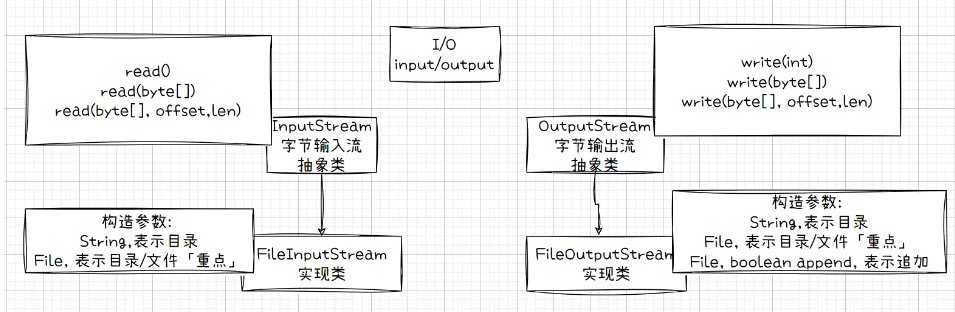
字节输入流和字节输出流顶层设计是 抽象类
- InputStream 输入字节流
- 一般使用其子类FileInputStream
- OutputStream 输出字节流
- 一般使用其子类FileOutputStream
FileInputStream
构造
点击查看代码
FileInputStream(File file) // 通过打开一个到实际文件的连接来创建一个 FileInputStream,
该文件通过文件系统中的 File 对象 file 指定。

FileInputStream(String name) // 通过打开一个到实际文件的连接来创建一个
FileInputStream,该文件通过文件系统中的路径名 name 指定。
成员方法
点击查看代码
int read() // 一次读取一个字节
void close() // 关流
// read() 一次读一个,有点"慢"
read(byte[] ) // 一次读取一个数组大小的数据,比较快
read(byte[] offset,len)
FileOutputStream
FileOutputStream // 是文件输出流,用于将数据写入 File // 适合用于写入诸如图像数据之类的原始字节的流(二进制)
构造方法及成员方法
点击查看代码
// 构造方法
FileOutputStream(File file) // 创建一个向指定 File 对象表示的文件中写入数据的文件输出
流。
FileOutputStream(File file, boolean append) // 创建一个向指定 File 对象表示的文件中写
入数据的文件输出流。
FileOutputStream(String name) // 创建一个向具有指定名称的文件中写入数据的输出文件流。
FileOutputStream(String name, boolean append) // 创建一个向具有指定 name 的文件中写入
数据的输出文件流。
appenend表示是否追加

方法
writer() 一次读一个,有点"慢"
writer(byte[] ) // 一次读取一个数组大小的数据,比较快
writer(byte[] offset,len)
void close() 关闭此文件输出流并释放与此流有关的所有系统资源
注意
- read(), 返回的表示读取的文件内容.
- read(byte[]), 返回值表示的: 读入缓冲区的总字节数,或者 -1 如果由于已到达文件末尾而没有更
- 多数据
实现复制时三行代码「重要」
点击查看代码
int len; // 读入缓冲区的总字节数,或者 -1 如果由于已到达文件末尾而没有更多数据
byte[] buf = new byte[1024]; // 每次读取字节数组的大小.
while ((len = fis.read(buf)) != -1) {
	fos.write(buf, 0, len);
}
二. 缓冲字节流
2.1 BufferedInputStream
// 默认缓冲区大小 private static int DEFAULT_BUFFER_SIZE = 8192;
- 构造方法
点击查看代码
public BufferedInputStream(InputStream in) { // InputStraem是抽象的.所以咱们这里得
	使用它的子类.
	this(in, DEFAULT_BUFFER_SIZE);
}
- 写的方法

BufferedOutputStream
- 构造方法
点击查看代码
public BufferedOutputStream(OutputStream out) {
	this(out, 8192);
}
public BufferedOutputStream(OutputStream out, int size) {
	super(out);
	if (size <= 0) {
		throw new IllegalArgumentException("Buffer size <= 0");
}
	buf = new byte[size];
}
- 成员方法
点击查看代码
public synchronized void write(byte b[], int off, int len) throws IOException {}
public synchronized void write(int b) throws IOException {}
字符流
只能处理字符,类似于word,txt,md格式.人能看得懂的.
像图片,音频,视频,这个东西,它搞不了.得通过字节流
字符输入流
一个抽象类: Reader
- read()
- read(char[])
- read(char[], offset, len)
- 抽象类是可以有构造方法的,目的是为了通过子类来初始化抽象类当中的成员变量.
- FileReader, 功能和作用类似于 FileInputStream ,都是读取操作.
FileReader
- 构造方法
点击查看代码
public FileReader(String fileName) throws FileNotFoundException {
	super(new FileInputStream(fileName));
}
public FileReader(File file) throws FileNotFoundException {
	super(new FileInputStream(file));
}
- 成员方法
点击查看代码
三个方法:
- read()
- read(char[])
- read(char[], offset, len)
FileWriter
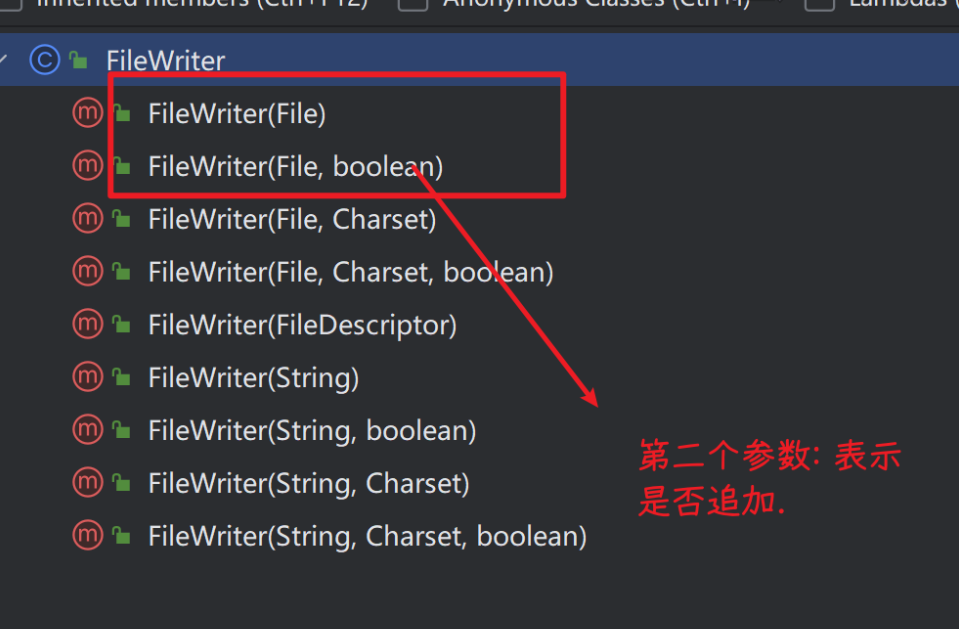
- 构造
注意事项
- 对于 FileReader 内部实现依赖于一个缓冲区. private static final int
- WRITE_BUFFER_SIZE = 1024; .
- 默认是将咱们写入的字符放到好这个缓冲区当中,如果这个缓冲满了.则由系统强制刷
- 新缓冲区,那么缓冲区的内容就刷新磁盘上了.
- 咱们必须手动调用 flush() 方法,强制刷新缓冲区.才能将数据刷新到磁盘上.
- 另外, close()方法当中,也调用了flush().
- 建议: 手动自己调用一下.
关于编码问题
jdk11之后提供了
点击查看代码
public FileWriter(File file, Charset charset) throws IOException {
	super(new FileOutputStream(file), charset);
}
提供了两种方式
点击查看代码
FileWriter fw = new FileWriter(f, Charset.forName("utf-8"));
FileWriter fw2 = new FileWriter(f, StandardCharsets.UTF_8);
// 第二个参数传入的应该是: Charest对象,表示字符编码.
// 有两种方式获取该对象: Charset对象.
// 1. 通过Charset类提供的静态方法, forName(表示字符编码的字符串.)
// 2. 通过类 StandardCharsets,提供的静态常量来获取 --> 推荐

 浙公网安备 33010602011771号