


DelayQueue实现单机延迟任务
DelayQueue实现单机延迟任务
需求背景:
项目中经常会遇到一些业务在某些情况下需要延迟一些时间后进行取消或确认操作,常见的就是订单支付时15分钟内未支付取消订单。具体使用如下:
定义接口
1.先定义一个执行延迟任务的接口,执行延迟任务的业务相关类必须实现此接口(也就是我们xxxService),具体如下:
你也可以补充自定定义一个接口,提供你需要的功能
import java.util.Map;

/**
 * 使用DelayIte时必须实现此接口, 用于延迟任务执行
 * @Author sxt
 * @Date 2023/8/17 15:58
 **/
@FunctionalInterface
public interface DelayService {

    /**
     * 执行延迟任务业务处理,无返回值
     * @param params service执行的参数数据
     */
    void executeService(Map<String, Object> params);
}
执行任务实体
2.创建一个通用接受延迟任务的class,并实现Delayed接口。主要目的是为了接受任何一个业务需要的延迟任务数据并进行到点执行。接受一个泛型, S是对应的Service,此泛型必须实现上一步定义的DelayService接口,主要是到点执行对应的业务逻辑。
具体实现如下:
import cn.hutool.json.JSONUtil;
import lombok.Getter;
import lombok.extern.slf4j.Slf4j;
import java.util.HashMap;
import java.util.Map;
import java.util.concurrent.Delayed;
import java.util.concurrent.TimeUnit;

/**
 * 简单-延迟实例
 * @Author sxt
 * @Date 2023/8/17 14:34
 **/
@Getter
@Slf4j
public class DelayItem<S extends DelayService> implements Delayed {

    /** 标识 */
    private String bizId;

    /** 延迟时间 单位毫秒*/
    private long expTime;

    /** 执行的dao对象 */
    private S service;

    /** 执行任务,没有实现DelayService需要执行的任务 或 service执行后再执行 */
    private Runnable task;

    /** service执行的参数 */
    private Map<String, Object> params;

    /** 是否重试 默认false */
    private boolean retry = false;

    /** 重试次数 */
    private int retryCount = 0;

    /** 最大重试次数 */
    private int maxRetry = 3;

    /** 重试间隔时间 = retryCount * retryInterval 单位毫秒 */
    private long retryInterval = 1000;


    /**
     * 重试
     * @param retry 是否重试
     * @param maxRetry 最大重试次数 默认3次
     * @param retryInterval 重试间隔时间 单位毫秒 默认1分钟
     * @return
     */
    public DelayItem<S> retry(boolean retry, int maxRetry, long retryInterval) {
        this.retry = retry;
        this.maxRetry = maxRetry;
        this.retryInterval = retryInterval;
        return this;
    }

    public DelayItem<S> retry(boolean retry, int maxRetry) {
        this.retry = retry;
        return this;
    }

    public DelayItem<S> retry(boolean retry) {
        this.retry = retry;
        return this;
    }

    /**
     * 构建延迟数据实例
     * @param task 执行具体任务的逻辑
     * @param params service需要的参数数据
     * @param bizId 延迟任务标识
     * @param createTime 延迟任务创建时间 毫秒
     * @param expTime 延迟时间(多长时间后执行) 秒
     */
    public DelayItem(Runnable task, Map<String, Object> params,String bizId, long createTime, long expTime){
        this.buildInstance(null, task, params, bizId, createTime, expTime);
    }

    public DelayItem(S service, Map<String, Object> params,String bizId, long createTime, long expTime){
        this.buildInstance(service, null, params, bizId, createTime, expTime);
    }

    public DelayItem(S service, Runnable task, Map<String, Object> params,String bizId, long createTime, long expTime){
        this.buildInstance(service, task, params, bizId, createTime, expTime);
    }

    private void buildInstance(S service, Runnable task, Map<String, Object> params, String bizId, long createTime, long expTime) {
        this.service = service;
        this.task = task;
        this.bizId = bizId;
        this.params = params;
        //过期时间= 创建时间+延迟时间
        this.expTime = TimeUnit.SECONDS.toMillis(expTime) + createTime;
    }

    private DelayItem(){}

    /**
     * 获取延迟时间
     * @param unit
     * @return
     */
    @Override
    public long getDelay(TimeUnit unit) {
        /*log.info("到期了吗");*/
        long l = expTime - System.currentTimeMillis();
        return unit.convert(l, TimeUnit.MILLISECONDS);
    }

    /**
     * 延迟队列用来比较执行顺序的, 延迟时间比较
     * @param o
     * @return
     */
    @Override
    public int compareTo(Delayed o) {
        return Long.compare(this.getDelay(TimeUnit.MILLISECONDS), o.getDelay(TimeUnit.MILLISECONDS));
    }


    /**
     * 实现接口优先执行,后在执行task任务
     */
    public void executeTask() {
        try {
            Map<String, Object> paramsMap = this.params;
            if (null == paramsMap) {
                paramsMap = new HashMap<>();
            }
            DelayItem<DelayService> delayItem = new DelayItem<>();
            delayItem.params = params;
            delayItem.expTime = expTime;
            delayItem.bizId = bizId;
            paramsMap.put("params", JSONUtil.toJsonStr(delayItem));
            if (null != service) {
                service.executeService(paramsMap);
            }
            if (null != task) {
                task.run();
            }
        }catch (Exception e) {
            if (retry) {
                if (retryCount < maxRetry) {
                    retryCount++;
                    expTime = System.currentTimeMillis() + retryInterval * retryCount;
                    this.hashCode();
                    SimpleDelayUtil.addItem((DelayItem<DelayService>) this);
                    log.error("延迟任务执行异常-正在进行重试: 异常信息-{} ,任务id: {} ,当前重试次数: {},重试间隔时间: {}ms,最大重试次数: {}",
                            e.getMessage(), bizId, retryCount, retryInterval * retryCount, maxRetry);
                }else {
                    log.error("延迟任务执行异常-重试次数已达上限: 异常信息-{}, 任务id: {}, 最大重试次数: {}", e.getMessage(), bizId, maxRetry);
                }
            }else {
                log.error("延迟任务执行异常: {} , 任务id: {}", e.getMessage(), bizId);
            }
        }
    }

    public static DelayItem<DelayService> buildTask(Map<String, Object> params, String bizId, long createTime, long expTime, Runnable task){
        return new DelayItem<>(task, params, bizId, createTime, expTime);
    }

    public static <S extends DelayService> DelayItem<DelayService> buildService(Map<String, Object> params, String bizId, long createTime, long expTime, S service){
        return new DelayItem<>(service, params, bizId, createTime, expTime);
    }

    /**
     * 构建延迟实例
     * @param params 延迟任务执行的参数
     * @param bizId 延迟任务标识
     * @param createTime 延迟任务创建时间 毫秒
     * @param expTime 延迟时间(多长时间后执行) 秒
     * @param service 延迟任务执行的service
     * @param task 延迟任务执行的task
     * @return
     * @param <S>
     */
    public static <S extends DelayService> DelayItem<DelayService> build(Map<String, Object> params, String bizId, long createTime, long expTime, S service, Runnable task){
        return new DelayItem<>(service, task, params, bizId, createTime, expTime);
    }
}
延迟任务工具类
3.定义一个延迟任务工具类,方便添加延迟任务
具体如下:
import com.google.common.util.concurrent.ThreadFactoryBuilder;
import com.scda.common.utils.ToolUtils;
import lombok.extern.slf4j.Slf4j;
import java.time.LocalDateTime;
import java.util.Objects;
import java.util.concurrent.*;

/**
 * 简单延迟任务
 * 用于处理延迟执行的任务
 * @Author sxt
 * @Date 2023/8/17 14:12
 **/
@Slf4j
public class SimpleDelayUtil {
    /** 是否开启线程执行延迟任务, true:已开启 */
    private static boolean isRun = false;

    private static ExecutorService threadService = null;

    private static final DelayQueue<DelayItem<DelayService>> QUEUE = new DelayQueue<>();

    /**
     * 向延迟队列中添加执行的任务
     * @param item
     */
    public static void addItem (DelayItem<DelayService> item) {
        if (!isRun) {
            SimpleDelayUtil.run();
        }
        QUEUE.put(item);
    }

    /**
     * 移除延迟队列中需要执行的任务
     * @param bizId 移除指定标识的元素
     */
    public static void remove (String bizId) {
        if (ToolUtils.isNotEmpty(bizId)) {
            if (!QUEUE.removeIf(el -> Objects.nonNull(el.getBizId()) && Objects.equals(bizId, el.getBizId()))) {
                log.error("延迟任务bizId:{}移除失败!", bizId);
                return;
            }
            log.info("延迟任务bizId: {} 移除成功", bizId);
        }
    }

    private static ExecutorService getThreadService(){
        return new ThreadPoolExecutor(
                // 核心线程池大小
                3,
                // 最大线程池大小
                6,
                // 线程最大空闲时间
                15,
                // 时间单位
                TimeUnit.SECONDS,
                // 线程等待队列
                new LinkedBlockingQueue<>(),
                // 线程创建工厂
                new ThreadFactoryBuilder().setNameFormat("Delay-Pool-%d").build(),
                // 拒绝策略
                new ThreadPoolExecutor.CallerRunsPolicy()
        );
    }

    /**
     * 阻塞获取队列元素
     */
    public static DelayItem<DelayService> take () {
        try {
            return QUEUE.take();
        } catch (InterruptedException e) {
            log.error("阻塞获取延迟实例失败: ", e);
        }
        return null;
    }

    /**
     * 非阻塞获取队列元素, 没有到期的元素直接返回 null
     */
    public static DelayItem<DelayService> poll () {
        return QUEUE.poll();
    }

    /**
     * 开启线程执行延迟队列任务
     */
    public static synchronized void run () {
        if (isRun) {
            return;
        }
        isRun = true;
        if (null == threadService) {
            threadService = getThreadService();
        }
        log.info("开始运行延迟队列~~~");
        threadService.execute(() -> {
            while (true) {
                //获取要执行的任务
                DelayItem<DelayService> task = SimpleDelayUtil.take();
                if (null == task) {
                    log.warn("延迟任务未获取到数据....");
                    continue;
                }
                // 异步执行任务
                threadService.execute(() -> {
                    task.executeTask();
                    log.info("延迟任务执行结束, 执行时间: {}", LocalDateTime.now());
                });
            }
        });
    }

    /**
     * 关闭线程池
     */
    public static void shutdown () {
        if (null != threadService && !threadService.isShutdown()) {
            threadService.shutdown();
        }
        isRun = false;
        log.info("延迟队列线程池已关闭~~~");
    }

    /** 获取当前任务数量 */
    public static int getTaskSize () {
        return QUEUE.size();
    }

    /** 清空任务队列 */
    public static void clear () {
        QUEUE.clear();
    }


}
以上就是使用jdk提供的DelayQueue实现的通用延迟队列实现。
具体的使用示例
A.实现DelayService
1.分别创建UserService和PersonService并是实现自定义的DelayService接口
public class UserService implements DelayTaskService<User> {

    private static Logger log = LoggerFactory.getLogger(UserService.class);

    @Override
    public void executeTask(Map<String,Object> data) {
        log.info("UserService服务执行...");
        log.info("data: {}", Arrays.toString(data.toArray()));
    }
}

/*****************************************************/

public class PersonService implements DelayTaskService<Person> {

    private static Logger log = LoggerFactory.getLogger(PersonService.class);

    @Override
    public void executeTask(Map<String, Object> data) {
        log.info("PersonService服务执行...");
        log.info("data: {}",data);
    }
}
2.进行测试
 Map<String, Object> map = new HashMap<>();
DelayItem<DelayService> user = DelayItem.buildService(
                map, "123", System.currentTimeMillis(), 1,
                new UserService()).retry(true);
DelayItem<DelayService> person = DelayItem.buildService(
                map, "1234", System.currentTimeMillis(), 1,
                new PersonService()).retry(true);
SimpleDelayUtil.addItem(user);
SimpleDelayUtil.addItem(person);
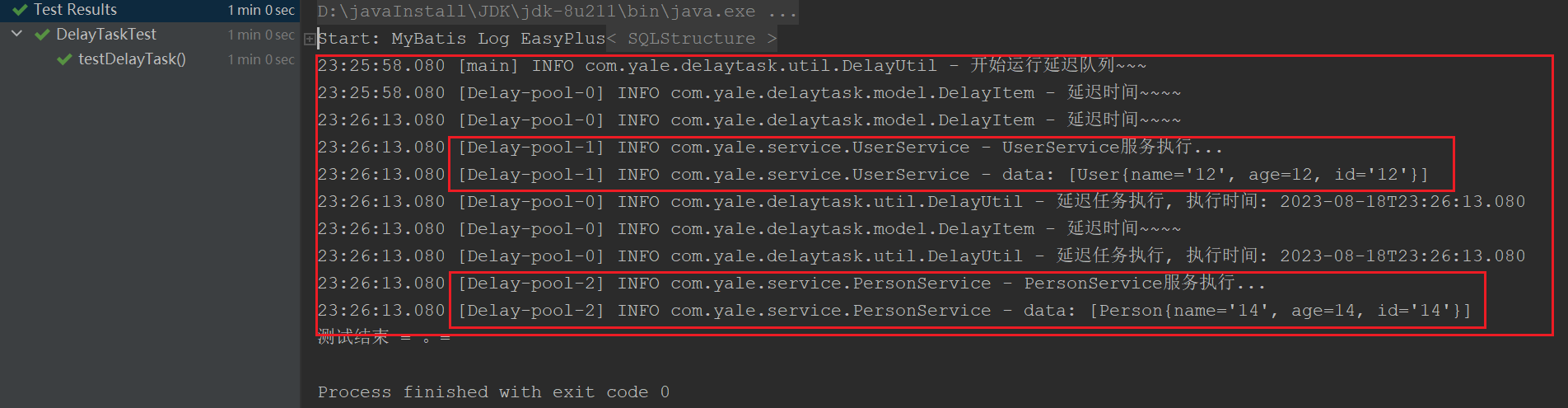
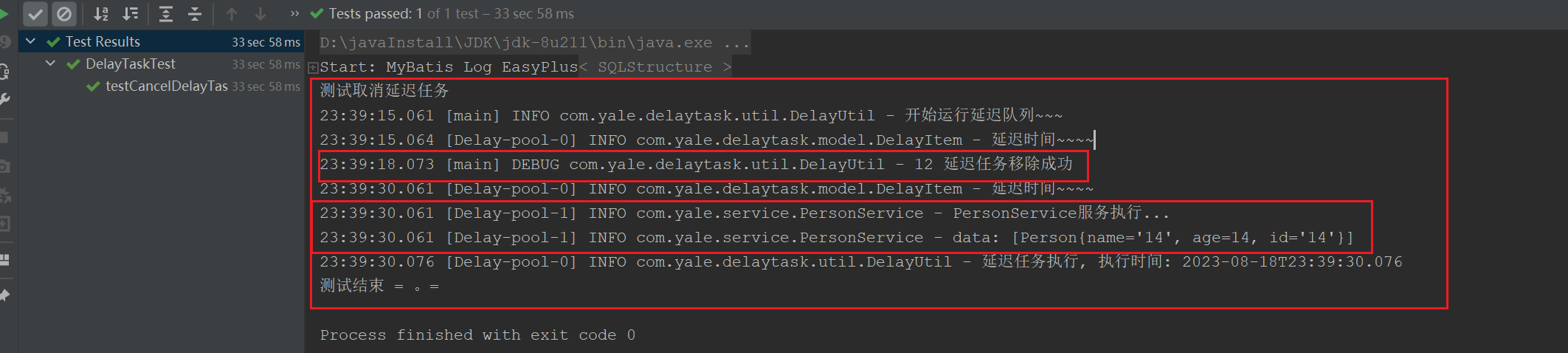
3.测试结果:
测试延迟任务执行:
测试取消延迟任务:
B.使用匿名内部类方式测试
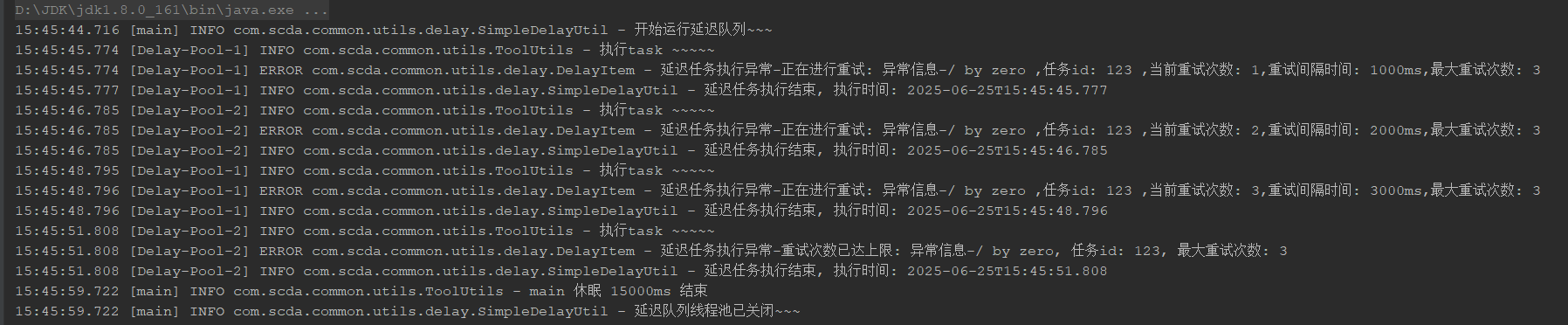
public static void main(String[] args) {
  			// 测试重试
        Map<String, Object> map = new HashMap<>();
        DelayItem<DelayService> build = DelayItem.buildService(
                map, "123", System.currentTimeMillis(), 1,
                (pa) -> {
                    log.info("执行task ~~~~~");
                    int i = 1 / 0;
                }).retry(true);
        SimpleDelayUtil.addItem(build);
        ToolUtils.sleep(15000);
        SimpleDelayUtil.shutdown();
    }
结果:
总结:
- 此方式只适用于数据量不大的情况下使用,适用于单机版
- 在项目中使用需要注意在项目启动时或启动后执行DelayUtil.start()开启延迟线程
- 服务停止会将未执行的延迟任务清空,所有在启动项目时要做获取需要执行的延迟任务数据,并添加到延迟队列中
在使用Spring框架下,可以定义一个class专门在项目启动时执行总结的点三点。具体可以时在Bean实例化后进行(实现InitializingBean接口),也可以使用@PostConstruct。当然也可以使用其他的方式,如使用CommandLineRunner在服务启动后自动执行

 浙公网安备 33010602011771号