

vue刻度尺组件 【cs-ruler】 重写可自定义小数位数
一、依赖使用
安装依赖
cnpm install cs-ruler
main.js中引入
import CsRuler from 'cs-ruler'
Vue.use(CsRuler)
代码 使用
<template>
  <section>
<!--pointerColor 指针颜色; numSize 字体大小; maxNum 最大值 minNum 最小值; NowNum当前值(默认100);
    ispoint开启小数[默认一位小数];ruleWidth:配置一页展示格数(默认40个)-->
<!--@post-NumValue来接收滚动的值 @scroll-start="startEvent"开始滚动后发送给父级消息事件 @scroll-end="endEvent"滚动结束后发送给父级消息事件-->
      <cs-ruler
        :pointer-color="pointerColor"
        :num-size="30"
        :NowNum="detail.tmda"
        :ispoint="pointFlag"
        :ruleWidth="40"
        @post-NumValue="rulerNum"></cs-ruler>
  </section>
</template>
import ruler from 'cs-ruler'
export default {
  name: 'inputTmxx',
  components: {
    'cs-ruler': ruler.CsingRuler
  },
  data () {
    return {
       detail: {
         tmmc: '您的身高是?',
         unit: 'cm',
         pointFlag: 'true',
         tmda: 8
       },
      pointerColor: '#5081FF'
    }
  },
  methods: {
    //子组件传递刻度表
   rulerNum (val) {
    this.detail.tmda = val
   }
  }
}
示例:
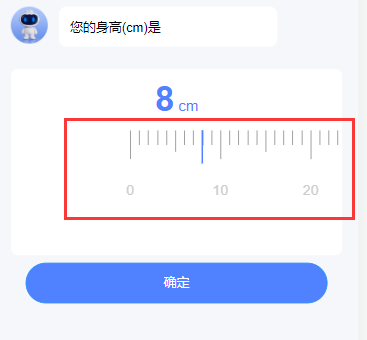
二、组件重写使用
组件使用方法(便于区分,更换了组件名字)
  <div>
     <ruler-drag
        :pointer-color="pointerColor"
        :num-size="30"
        :NowNum="detail.tmda"
        ispoint
        :pointLen="100" // 可自定义小数位数:10一位;100两位;...
        @post-NumValue="rulerNum"></ruler-drag>
    </div>
const RulerDrag = () => import('@/components/rulerDrag')
export default {
name: '',
components: {
RulerDrag
},
}
组件源码
<template>
  <div>
    <div class="cs-rule" ref="rulepage">
      <!--刻度表-->
      <div class="cs-scrollrule" ref="scrollrule">
        <ul class="cs-scrollrule-hook" ref="rulehook">
          <!--0刻度前的空白-->
          <div class="cs-rule-null">
            <li v-for="(item,index) in zeroList" class="cs-scroll-item" :key="index"></li>
          </div>
          <!--正常刻度表-->
          <template v-for="(item,index) in counter">
            <li class="cs-scroll-item" :key="index">
              <template v-if="index % 10 == 0">
                <div class="cs-scroll-item-rule vux-1px-l cs-scale-integer"></div>
                <div v-if="ispoint" class="cs-scroll-item-num">{{ (index + minNum) / pointLen }}</div>
                <div v-else class="cs-scroll-item-num">{{ (index + minNum ) * oneGridValue }}</div>
              </template>
              <template v-else-if="index % 5 == 0">
                <div class="cs-scroll-item-rule vux-1px-l cs-scale-half"></div>
              </template>
              <template v-else>
                <div class="cs-scroll-item-rule vux-1px-l cs-scale-one"></div>
              </template>
            </li>
          </template>

          <!-- 最大刻度后面的空白 -->
          <div class="cs-rule-null-after">
            <li v-for="(item,index) in aletrList" class="cs-scroll-item" :key="index"></li>
          </div>

        </ul>
      </div>
      <!--刻度表的针-->
      <div class="cs-scroll-item-pointer"></div>

    </div>
  </div>
</template>

<script>
  import BScroll from 'better-scroll'

  export default {
    name: 'cs-ruler',
    props: {
      // 初始值
      NowNum: {
        type: Number,
        default: 100
      },
      // 最大刻度
      maxNum: {
        type: Number,
        default: 1000
      },
      // 最小刻度
      minNum: {
        type: Number,
        default: 0
      },
      // 指针颜色
      pointerColor: {
        type: String,
        default: 'rgb(97,206,81)'
      },
      // 刻度尺有多细
      ruleWidth: {
        type: Number,
        default: 40
      },
      // 字体大小
      numSize: {
        type: Number,
        default: 50
      },
      // 是否启用小数
      ispoint: {
        type: Boolean,
        default: false
      },
      // 小数位数
      pointLen: {
        type: Number,
        default: 1
      },
      // 每个格子多大
      oneGridValue: {
        type: Number,
        default: 1
      }
    },
    data() {
      return {
        // 由于v-for循环的时候,按照index计数的,所以最后一个值不会显示,需要+1,则刻度尺后面的空白就要+1
        // counter: this.maxNum - this.minNum + 1, // 因为可能需要动态修改maxNum和minMun,所以放在计算属性中
        //0刻度前面的空白,
        zeroList: this.ruleWidth / 2,
        // 刻度结束后的空白
        aletrList: this.ruleWidth / 2 - 1,
      }
    },
    methods: {
      // 全局初始化
      init(){
this.NowNum = this.NowNum * this.pointLen // 需要加上,否则小数回显会有问题
this.$nextTick(() => {
          this.initScroll();
          this.calculateWidth();
          // this.NowNum - this.minNum 当前值-最小值才是初始化需要滚动的值
          this.scrollrule.scrollBy(-(this.oneWidth * (this.NowNum - this.minNum) ), 0, 0)
        });
      },
      // 初始化滚动
      initScroll() {
        this.scrollrule = new BScroll(this.$refs.scrollrule, {
          // 实时监听滚动的位置并返回
          probeType: 3,
          scrollX: true,
        })

        // 监听滚动开始
        this.scrollrule.on('scrollStart', () => {
          this.$emit('scroll-start', true)
        })

        // 监听滚动
        this.scrollrule.on('scroll', (pos) => {
          this.scrollX = Math.abs(Math.round(pos.x))
          let NumValue = Math.abs(Math.round(this.scrollX / this.oneWidth)) + this.minNum
          // 判断是否开启小数
          if(this.ispoint){
            this.$emit('post-NumValue', NumValue / this.pointLen * this.oneGridValue )
          }else{
            this.$emit('post-NumValue', NumValue * this.oneGridValue )
          }
        })

        //滚动结束监听
        this.scrollrule.on('scrollEnd', () => {
          //滑动后的小距离
          let littleNum = this.scrollX % this.oneWidth
          //计算距离下一个刻度的差值
          let vul = this.oneWidth - littleNum
          // 加入差值比较大,再进行吸附,大于一半的距离,就往右边吸附差值的距离,小于一半的距离,就往左边吸附滑动的距离
          if (vul > 0.5 && vul < (this.oneWidth - 0.5)) {
            if (littleNum > (this.oneWidth / 2)) {
              this.scrollrule.scrollBy(-vul, 0, 0)
            } else {
              this.scrollrule.scrollBy(littleNum, 0, 0)
            }
          }
          // 滚动结束给父级发送一个事件
          // 初始化时调整了一次值,所以也会有一个true
          // 第一次true是因为滚动结束,第二个true是因为位置微调了一次,所以又滚动了
          this.$emit('scroll-end', true)
        })

      },
      // 获取宽度用于计算滚动区域
      calculateWidth() {
        // 获取右侧菜单每一个的li
        let goodsList = this.$refs.rulehook
        let listWidth = goodsList.clientWidth
        let listNum = this.counter + this.zeroList + this.aletrList
        // 每一格的距离大小
        this.oneWidth = listWidth / listNum
      },
      // 获取指针颜色等信息
      getMainValue(){
        const docStyle = this.$refs.rulepage.style;
        // 指针颜色
        docStyle.setProperty('--pointer-color', this.pointerColor);
        // 字体大小
        docStyle.setProperty('--num-size', this.numSize);
        // 刻度尺宽度
        docStyle.setProperty('--rule-width', this.ruleWidth);

      },
      // 暴露给父级,如果后期需要修改某些参数,需要重新初始化一下组件
      initRule(){
        this.init()
        this.getMainValue()
      }
    },
    computed: {
      counter(){
        return this.maxNum - this.minNum + 1
      }
    },
    created() {
      this.init()
    },
    mounted() {
      this.getMainValue()
    },
    components: {

    },
    watch: {

    }
  }
</script>

<style lang="less">
  .setTopLine(@c: #C7C7C7) {
    content: " ";
    position: absolute;
    left: 0;
    top: 0;
    right: 0;
    height: 1px;
    border-top: 1px solid @c;
    color: @c;
    transform-origin: 0 0;
    transform: scaleY(0.5);
  }

  .setBottomLine(@c: #C7C7C7) {
    content: " ";
    position: absolute;
    left: 0;
    bottom: 0;
    right: 0;
    height: 1px;
    border-bottom: 1px solid @c;
    color: @c;
    transform-origin: 0 100%;
    transform: scaleY(0.5);
  }

  .setLeftLine(@c: #C7C7C7) {
    content: " ";
    position: absolute;
    left: 0;
    top: 0;
    width: 1px;
    bottom: 0;
    border-left: 1px solid @c;
    color: @c;
    transform-origin: 0 0;
    transform: scaleX(0.5);
  }

  .setRightLine(@c: #C7C7C7) {
    content: " ";
    position: absolute;
    right: 0;
    top: 0;
    width: 1px;
    bottom: 0;
    border-right: 1px solid @c;
    color: @c;
    transform-origin: 100% 0;
    transform: scaleX(0.5);
  }
  .setLine(@c: #C7C7C7) {
    content: " ";
    position: absolute;
    left: 0;
    top: 0;
    width: 200%;
    border: 1px solid @c;
    color: @c;
    height: 200%;
    transform-origin: left top;
    transform: scale(0.5);
  }

  .vux-1px,
  .vux-1px-t,
  .vux-1px-b,
  .vux-1px-tb,
  .vux-1px-l,
  .vux-1px-r {
    position: relative;
  }

  .vux-1px {
    &:before {
      .setLine();
    }
  }

  .vux-1px-t {
    &:before {
      .setTopLine();
    }
  }

  .vux-1px-b {
    &:after {
      .setBottomLine();
    }
  }

  .vux-1px-tb {
    &:before {
      .setTopLine();
    }

    &:after {
      .setBottomLine();
    }
  }

  .vux-1px-l {
    &:before {
      .setLeftLine();
    }
  }

  .vux-1px-r {
    &:after {
      .setRightLine();
    }
  }
</style>

<style scoped>
  * {
    margin: 0;
    padding: 0;
    box-sizing: border-box;
  }
  .cs-rule {
    position: relative;
    width: 100vw;
    height: calc(260 / 750 * 100vw);
    overflow: hidden;
    --pointer-color: rgb(97,206,81);
    --rule-width: 40;
    --num-size: 50
  }

  .cs-scrollrule {
    height: calc(200 / 750 * 100vw);
  }

  .cs-scrollrule-hook {
    list-style: none;
    overflow: hidden;
    border-collapse: collapse;
    white-space: nowrap;
    display: inline-block;
  }

  .cs-scroll-item {
    display: inline-block;
    width: calc(100vw / var(--rule-width));
    text-align: center;
    vertical-align: top;
  }

  /*刻度表数字*/
  .cs-scroll-item-num {
    width: calc(100 / 750 * 100vw);
    margin-left: calc(-50 / 750 * 100vw);
    margin-top: calc(38 / 750 * 100vw);
    text-align: center;
    font-size: calc(var(--num-size) / 750 * 100vw);
    color: #cccccc;
  }

  /*中间红色指针*/
  .cs-scroll-item-pointer {
    position: absolute;
    top: 0;
    left: 50%;
    height: calc(70 / 750 * 100vw);
    transform: translate(-50%, 0);
    border-right: 0.5vw solid var(--pointer-color);
  }

  .cs-scroll-item-rule {
    display: inline-block;
    width: calc(100vw / 40);
    box-sizing: border-box;
  }

  .vux-1px-l[data-v-db07d170]:before {
    border-color: #000000 !important;
  }

  .vux-1px-l:before {
    border-color: #000000 !important;
  }

  /*刻度1的*/
  .cs-scale-one {
    height: calc(30 / 750 * 100vw);
  }

  /*刻度0.5的*/
  .cs-scale-half {
    height: calc(44 / 750 * 100vw);
  }

  /*刻度10的*/
  .cs-scale-integer {
    height: calc(60 / 750 * 100vw);
  }

  /*0刻度前面的空白*/
  .cs-rule-null {
    margin-right: calc(-8 / 750 * 100vw);
    display: inline-block;
  }
  .cs-rule-null-after {
    margin-left: calc(-8 / 750 * 100vw);
    display: inline-block;
  }
</style>
smile

 浙公网安备 33010602011771号