
(.NET Framework)Nancy脱离iis的web应用
ASP.NET是个牛逼哄哄的框架,当然可以向外提供HTTP接口功能(这里我没有用WebAPI,是因为ASP.NET把WebAPI这么恰当的一 个名词给占用了,所以这里我用HTTP接口代之),但如果你像我一样喜欢简单,不喜欢IIS的话,Nancy自宿主是一个挺不错的选择。
下面说说如何用Nancy提供一个自宿主的HTTP接口。
一、新建一个控制台应用程序
注意是控制台应用程序,不是空的WebForm或空的MVC项目。
二、用NuGet安装所需包
用NuGet安装Nancy和Nancy.Hosting.Self两个程序包。
三、编写宿主启动代码
打开Program.cs,在Main方法里输入以下代码:
var url = new Url("http://localhost:9955");
    var hostConfig = new HostConfiguration();
    hostConfig.UrlReservations = new UrlReservations { CreateAutomatically = true };
    using (var host = new NancyHost(hostConfig, url))
    {
        host.Start();

        Console.WriteLine("Your application is running on " + url);
        Console.WriteLine("Press any [Enter] to close the host.");
        Console.ReadLine();
    }
四、编写接口处理模块
新建IndexModule.cs类文件,让IndexModule继承NancyModule,
在IndexModule的构造函数里编写路由规则及HTTP处理,IndexModule如下:
public class IndexModule:NancyModule
    {
        public IndexModule()
        {
            Get["/"] =_=> "Hello World";

            Get["/GetPerson/{id:int}"] = parameters =>
            {
                Person p = new Person();
                p.ID = parameters.ID;
                p.Name = "loogn";
                return Response.AsJson(p);
            };
        }
    }

    public class Person
    {
        public int ID { get; set; }
        public string Name { get; set;}
}
五、运行测试
Ctrl+F5启动服务

打开浏览器 输入:http://localhost:9955/
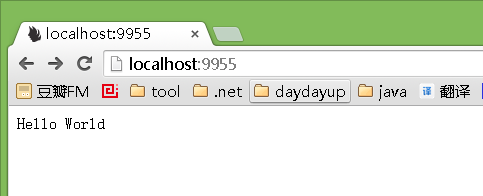
载入:http://localhost:9955/getperson/26
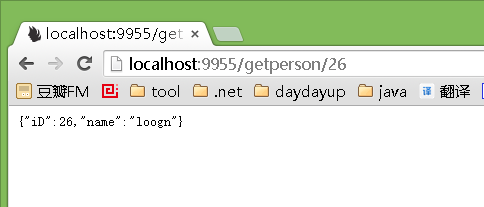
来自<https://my.oschina.net/lichaoqiang/blog/542763>

 浙公网安备 33010602011771号