

Windows去除有道云笔记左下角小广告窗口
- 找到有道云笔记安装目录theme目录,
- Windows默认安装位置为:C:\Program Files (x86)\Youdao\YoudaoNote\theme
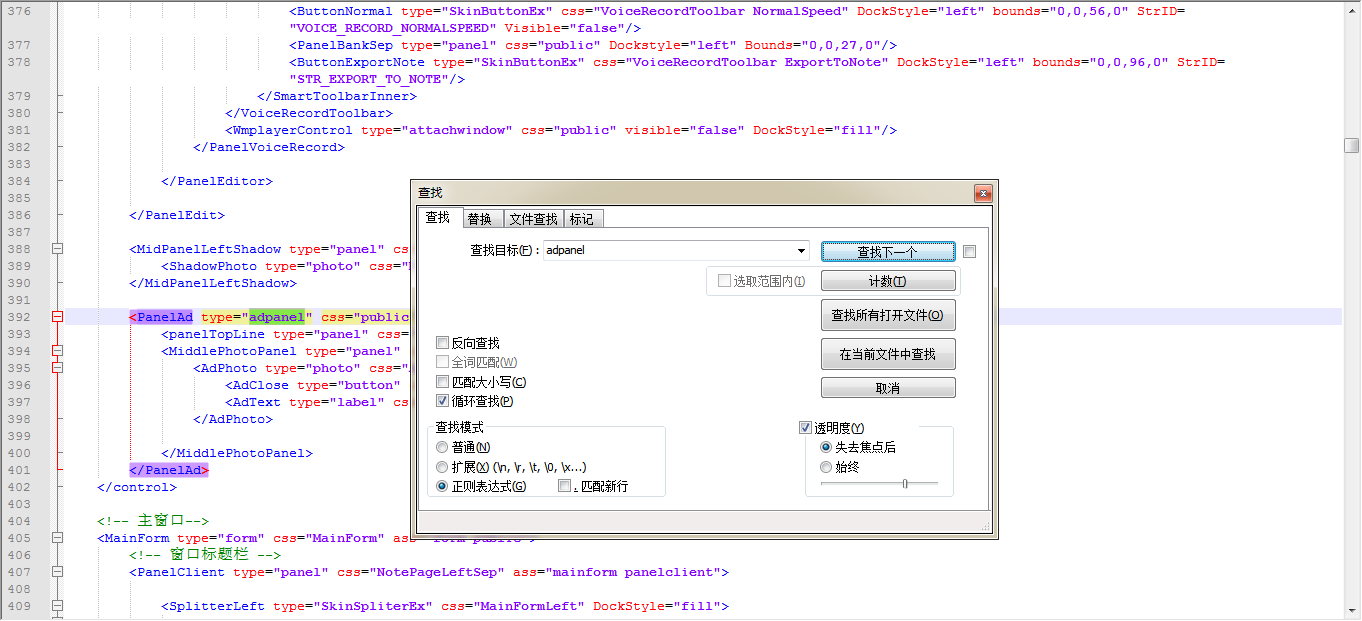
- 用Notepad++打开build.xml文件,Ctrl+F搜索 adpanel
![]()
-
然后将该部分文件修改为如下所示,然后重启有道云笔记即可。
<PanelAd type="adpanel" css="public" ass="mainform panelclient PanelAd">
            <panelTopLine type="panel" css="AdPanel" Dockstyle="top" Bounds="0,0,0,0"/>
            <MiddlePhotoPanel type="panel" css="public" DockStyle="top" Bounds="0,0,250,160" Margin="0,13,0,13">
                <AdPhoto type="photo" css="Ad AdPhoto" AnchorStyle="center" AutoZoom="ZoomEqual" Bounds="0,0,0,0">
                    <AdClose type="button" css="adclear" AnchorStyle="topright" Bounds="-1,1,24,24" />
                    <AdText type="label" css="AdText" AnchorStyle="bottomleft" Bounds="6,-6,25,10"/>
                </AdPhoto>

            </MiddlePhotoPanel>
</PanelAd>

 浙公网安备 33010602011771号