

龙芯的操作系统分abi1.0和2.0,这2个版本程序不兼容,使用lazarus写了个龙芯程序时,如果涉及不同abi版本用手工切换挺麻烦的,今天写了1个简单插件用来切换abi版本。
原理很简单:
切换时只需修改fpc.cfg龙芯对应的目录就可以:
原理很简单:
切换时只需修改fpc.cfg龙芯对应的目录就可以:


unit loongxinabiswitch;

{$mode objfpc}{$H+}

interface

uses
  Classes, SysUtils, LazLoggerBase, FileUtil, Forms, Controls, Graphics,
  Dialogs,
  LCLProc, BaseIDEIntf ,
  LazConfigStorage,
  LCLType, StdCtrls, ComCtrls, IDECommands, IDEWindowIntf, LazIDEIntf, MenuIntf;

type

  { TLoongxinABISwitching }

  TLoongxinABISwitching = class(TForm)
    ComboBox7: TComboBox;
    Label8: TLabel;
    StatusBar1: TStatusBar;
    procedure ComboBox7Change(Sender: TObject);
    procedure FormCreate(Sender: TObject);
  private
    { private declarations }
  public
    { public declarations }
  end;

var
  LoongxinABISwitching: TLoongxinABISwitching;
  LoongxinABISwitchingCreator: TIDEWindowCreator; // set by Register procedure

procedure ShowLoongxinABISwitching(Sender: TObject);
procedure Register; // Check the "Register Unit" of this unit in the package editor.implementation

implementation

{$R *.lfm}

procedure ShowLoongxinABISwitching(Sender: TObject);
begin
  //IDEWindowCreators.ShowForm(LoongxinABISwitchingCreator.FormName, true);
  LoongxinABISwitching:=TLoongxinABISwitching.Create(nil);
  LoongxinABISwitching.ShowModal;
  LoongxinABISwitching.Free;
end;

procedure CreateLoongxinABISwitching(Sender: TObject; aFormName: string;
  var AForm: TCustomForm; DoDisableAutoSizing: boolean);
begin
  if CompareText(aFormName, 'LoongxinABI')<>0 then begin
    DebugLn(['ERROR: CreateLoongxinABISwitching: there is already a form with '
      +'this name']);
    exit;
  end;
  IDEWindowCreators.CreateForm(AForm, TLoongxinABISwitching,
    DoDisableAutoSizing,
    LazarusIDE.OwningComponent);
  AForm.Name:=aFormName;
  LoongxinABISwitching:=AForm as TLoongxinABISwitching;
end;

procedure Register;
var
  CmdCatToolMenu: TIDECommandCategory;
  ToolLoongxinABISwitchingCommand: TIDECommand;
  MenuItemCaption: String;
begin
  {$if not defined(cpuloongarch64)}
  // register shortcut and menu item
  MenuItemCaption:='龙芯ABI版本切换'; // <- this caption should be replaced by a resourcestring
  // search shortcut category
  CmdCatToolMenu:=IDECommandList.FindCategoryByName(CommandCategoryToolMenuName);
  // register shortcut
  ToolLoongxinABISwitchingCommand:=RegisterIDECommand(CmdCatToolMenu,
    'ABISwitching',
    MenuItemCaption,
    IDEShortCut(VK_UNKNOWN, []), // <- set here your default shortcut
    CleanIDEShortCut, nil, @ShowLoongxinABISwitching);
  // register menu item in Tool menu
  RegisterIDEMenuCommand(mnuProject,
    'ABISwitching',
    MenuItemCaption, nil, nil, ToolLoongxinABISwitchingCommand);

  // register dockable Window
  //LoongxinABISwitchingCreator:=IDEWindowCreators.Add(
  //  'LoongxinABI',
  //  @CreateLoongxinABISwitching, nil,
  //  '40%','40%','','',''  // default place at left=100, top=100, right=300, bottom=300
  //    // you can also define percentage values of screen or relative positions, see wiki
  //  );
  {$endif}
end;

{ TLoongxinABISwitching }

procedure TLoongxinABISwitching.FormCreate(Sender: TObject);
var
  Config: TConfigStorage;
  cfg,Directory:String;
  fpccfg:TStringList;
  i:Integer;
begin
  {$if not defined(cpuloongarch64)}
  try
    Directory := LazarusIDE.GetPrimaryConfigPath;
    Directory:=StringReplace(Directory,'config_lazarus','',[]);

    Config:=GetIDEConfigStorage('fpcdefines.xml',true);
    cfg:=Config.GetValue('FPCConfigs/Item1/Compiler/File','');
    {$ifdef windows}
    cfg:=StringReplace(cfg,'fpc.exe','fpc.cfg',[]);
    {$else}
    cfg:=cfg+'.cfg';
    {$endif}
  finally
    Config.Free;
  end;
  ComboBox7.ItemIndex:=-1;
  if FileExists(cfg) then
  begin
    fpccfg:=TStringList.Create;
    fpccfg.LoadFromFile(cfg);
    for i:=1 to fpccfg.Count-1 do
    begin
      if fpccfg[i]='#IFDEF CPULOONGARCH64' then
      begin
        if fpccfg[i+5]='-Fl'+SetDirSeparators(Directory+'cross\lib\loongarch64-linux_abi2.0') then
        begin
          ComboBox7.ItemIndex:=1;
          StatusBar1.SimpleText :='当前abi版本:2.0';
        end
        else
        begin
          StatusBar1.SimpleText:='当前abi版本:1.0';
          ComboBox7.ItemIndex:=0;
        end;
        Break;
      end;
    end;
    fpccfg.Free;
  end;
  {$else}
  ComboBox7.Enabled:=False;
  StatusBar1.SimpleText:='在龙芯系统上不能切换abi';
  {$endif}
end;

procedure TLoongxinABISwitching.ComboBox7Change(Sender: TObject);
var
  Config: TConfigStorage;
  cfg:String;
  fpccfg:TStringList;
  longxin:Boolean;
  i:Integer;
  abi,Directory:String;
begin
  {$if not defined(cpuloongarch64)}
  try
    Directory := LazarusIDE.GetPrimaryConfigPath;
    Directory:=StringReplace(Directory,'config_lazarus','',[]);
    Config:=GetIDEConfigStorage('fpcdefines.xml',true);
    cfg:=Config.GetValue('FPCConfigs/Item1/Compiler/File','');
    {$ifdef windows}
    cfg:=StringReplace(cfg,'fpc.exe','fpc.cfg',[]);
    {$else}
    cfg:=cfg+'.cfg';
    {$endif}
  finally
    Config.Free;
  end;
  if FileExists(cfg) then
  begin
    try
      longxin:=False;
      fpccfg:=TStringList.Create;
      fpccfg.LoadFromFile(cfg);
      for i:=1 to fpccfg.Count do
      begin
        if fpccfg[i]='#IFDEF CPULOONGARCH64' then
        begin
          longxin:=True;
          if ComboBox7.ItemIndex=1 then
          begin
            abi:='abi 2.0';
            StatusBar1.SimpleText:='当前abi版本:2.0';
            fpccfg[i+5]:='-Fl'+SetDirSeparators(Directory+'cross\lib\loongarch64-linux_abi2.0');
            fpccfg[i+7]:='-FL/lib64/ld-linux-loongarch-lp64d.so.1';
          end
          else
          begin
            abi:='abi 1.0';
            StatusBar1.SimpleText:='当前abi版本:1.0';
            fpccfg[i+5]:='-Fl'+SetDirSeparators(Directory+'cross\lib\loongarch64-linux');
            fpccfg[i+7]:='-FL/lib64/ld.so.1';
          end;
          fpccfg.SaveToFile(cfg);
          break;
        end;
      end;
      if longxin=False then
         ShowMessage('没找到龙芯交叉编译配置信息!');
    finally
      fpccfg.Free;
    end;
  end
  Else
    ShowMessage('没安装fpc!');
  {$endif}
end;

end.


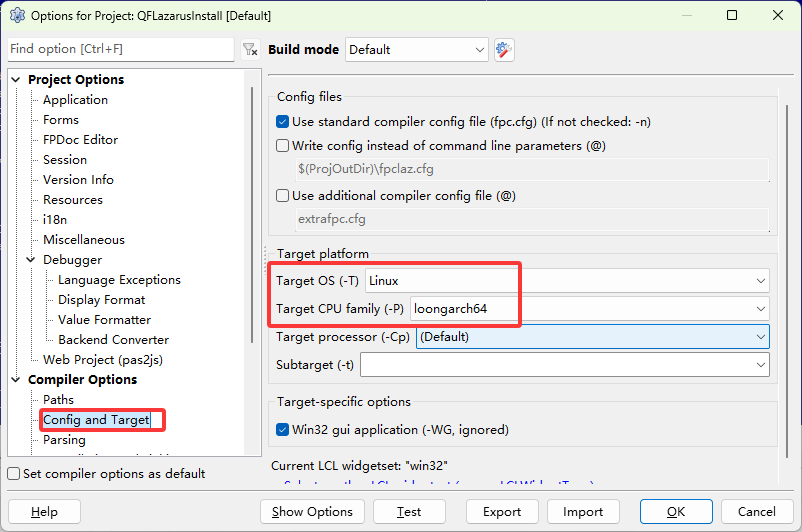
设置后就可以编译为对应版本的程序了

 浙公网安备 33010602011771号