
vue2+vant2之H5页面
菜鸡踩坑记
1.H5开发,用于页面重新载入,类似于页面刷新功能
window.parent.location.reload() //当前页面的父页面刷新
window.location.reload() //当前页面刷新
2.打开移动端的log
// import vConsole from 'vconsole'
// let Vconsole=new vConsole();
3.Vue Router 的传参使用和区别
参考:https://blog.csdn.net/mf_717714/article/details/81945218
4.H5之微信支付开发文档
https://pay.weixin.qq.com/wiki/doc/api/H5.php?chapter=15_3
5.h5判断是安卓访问还是ios访问
let ran = navigator.userAgent
let isAndroid = ran.indexOf('Android') > -1 || ran.indexOf('Linux') > -1
let isIOS = !!ran.match(/\(i[^;]+;( U;)? CPU.+Mac OS X/)

if (isAndroid) {
// 安卓代码块
}
if (isIOS) {
// ios代码块
}
6.关于ios new date() NaN解决办法
因ios真机上无法识别newdate=“2022-04-20 11:03:35”格式
将时间转换为ios能识别的格式“2022/04/20 11:03:35”
newdate.replace(/-/g,"/")
//即可
7.关于css优惠券内凹圆角的兼容性问题处理
// 先判断当前机型是否为ios
    getPhoneType () {
      let ua = navigator.userAgent.toLowerCase()
      console.log(ua,'usssaaaaaaaa');
      this.modelClass= ua.includes('iphone') ? 'ios' : 'android'
      console.log(this.modelClass,'modelClass');
    },
给ios和android不同的class保证在两种机型上面都不会出错
    .croIphone{
            width: 100%;
            height: 180px;
            border-bottom: 1px dashed black;
            margin: auto;
            -webkit-mask-box-image: url("data:image/svg+xml,%3Csvg xmlns='http://www.w3.org/2000/svg' width='60.031' height='60.031' viewBox='0 0 60.031 60.031'%3E%3Cpath data-name='椭圆 1' d='M40 60.027H20.129A20.065 20.065 0 0 0 .065 40H0V20.127h.065A20.066 20.066 0 0 0 20.131.061v-.065H40v.065a20.065 20.065 0 0 0 20.027 20.064V40A20.063 20.063 0 0 0 40 60.027z' fill-rule='evenodd'/%3E%3C/svg%3E") 20;
            background: linear-gradient(
            45deg, white, white);
      }
      .croAndroid{
        width: 100%;
        height: 180px;
        // border: 1px solid #58c4e6;
        position: relative;
        padding-top: 20px;
        // background: #fff;
        border-bottom: 1px dashed black;
        margin: auto;
        -webkit-mask: radial-gradient(circle at 0 0, transparent 20px, white 0),
          radial-gradient(circle at right 0, transparent 20px, white 0),
          radial-gradient(circle at 0 100%, transparent 20px, white 0),
          radial-gradient(circle at right 100%, transparent 20px, white 0);
        -webkit-mask-composite: source-in;
        background: linear-gradient(45deg, white, white);
      }
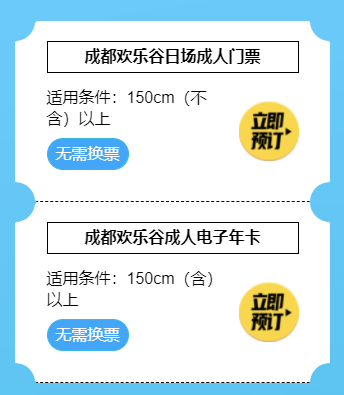
效果如上图
8.当h5的自定义页面,在路由不变,参数变化的情况(例如cyhlg?Id=52111变为cyhlg?Id=52112)Vue生命周期不会重载页面,需要手动刷新页面(体验感极差)。解决:监听路由变化,刷新页面
  // 监听,当路由发生变化的时候执行
  watch: {
     $route() {
      console.log('进入路由变化');
      this.id= this.$route.query.id
      window.location.reload()
        },
    id(){
      if (this.id) {
          this.getDetail(true);
      }
    }
    },

 浙公网安备 33010602011771号