
C# Web开发教程(十三)WebSocket介绍
服务器向客户端发送数据
-
应用场景举例
- 聊天
- 站内通知短信
-
传统的
HTTP方式: 只能由客户端主动发起,服务器被动响应- 传统的实现方式: 长轮询(Long Polling)
- 长轮询的基本原理:客户端向服务器发送一个请求,服务器保持这个请求打开,直到有数据要发送给客户端.当服务器有数据时,它发送响应,客户端接收到响应后,立即再发送一个新的请求,这样一直保持一个连接打开.

- 优点: 基于标准HTTP,无需特殊协议支持.基于标准HTTP,无需特殊协议支持.

- 缺点很明显,服务器并发的数量是有限的,长期维持"长轮询"是巨大的性能消耗.
现代替代方案
虽然长轮询是传统解决方案,但现在更推荐使用:
- WebSocket(重点了解):真正的全双工通信
- Server-Sent Events (SSE):服务器到客户端的单向流
- SignalR(重点了解):微软的实时通信库,自动选择最佳传输方式
- 本质就是
微软对WebSocket的封装,方便开发者使用 - 类似于
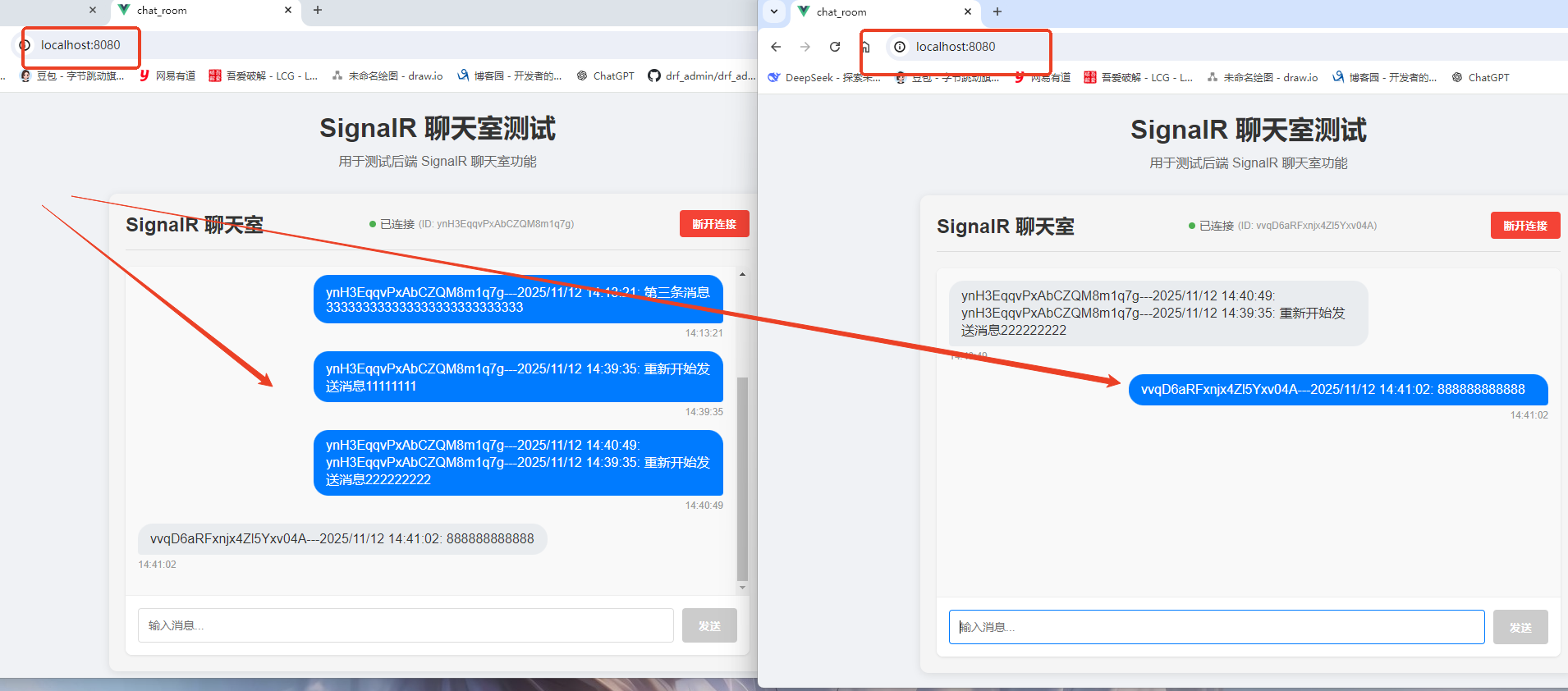
交换机,而多个客户端,就是一台台PC终端,服务器和PC间的通讯,通过交换机来实现
- 本质就是
WebSocket
- 基于TCP协议,支持二进制通信(相比HTTP字符串传递的方式,效率更高),双工通信.
- 性能和并发能力更强.
- WebSocket独立于HTTP协议,不过我们一般仍然把WebSocket服务器端部署到Web服务器上,因为可以借助HTTP协议完成初始的握手(可选),并且共享HTTP服务器的端口(比如共享80端口)
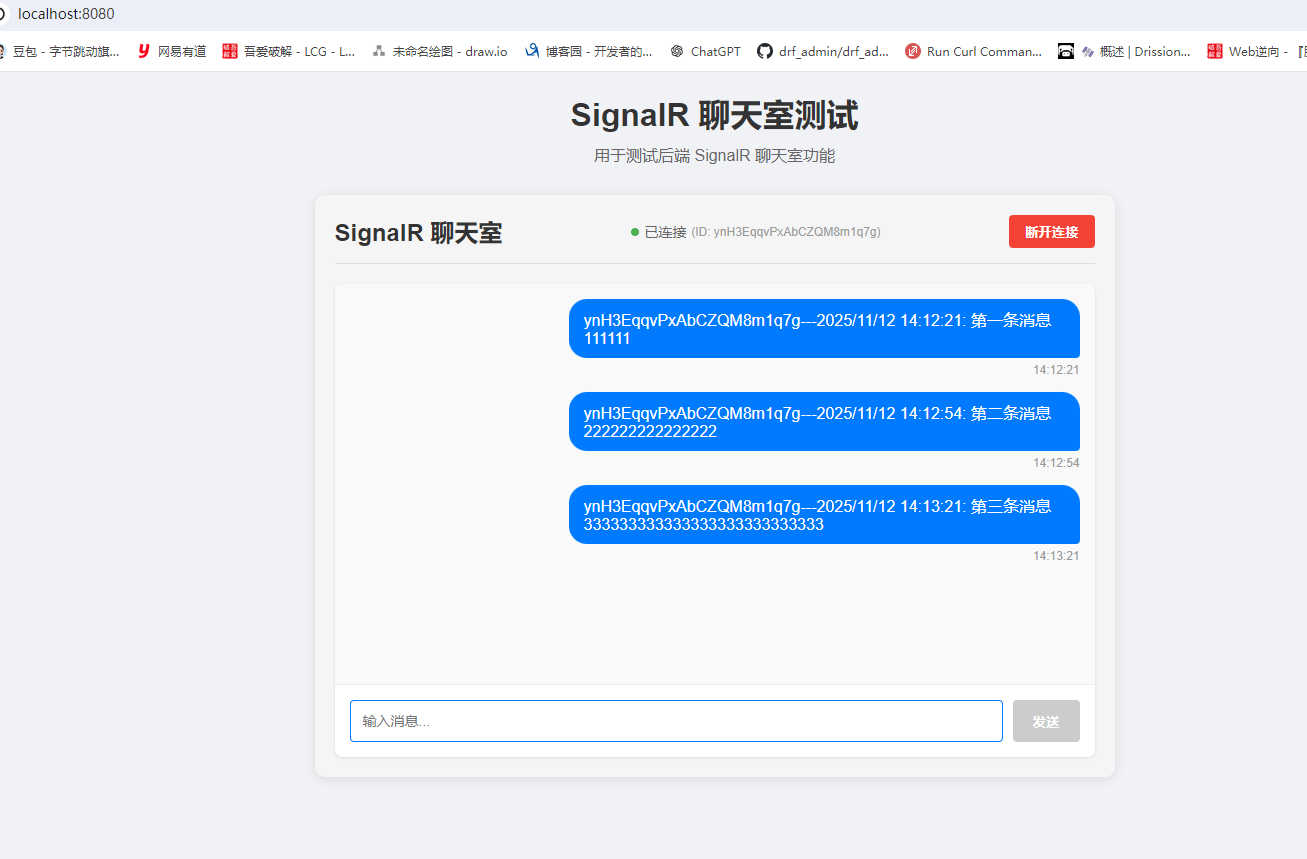
项目演示
- 新建
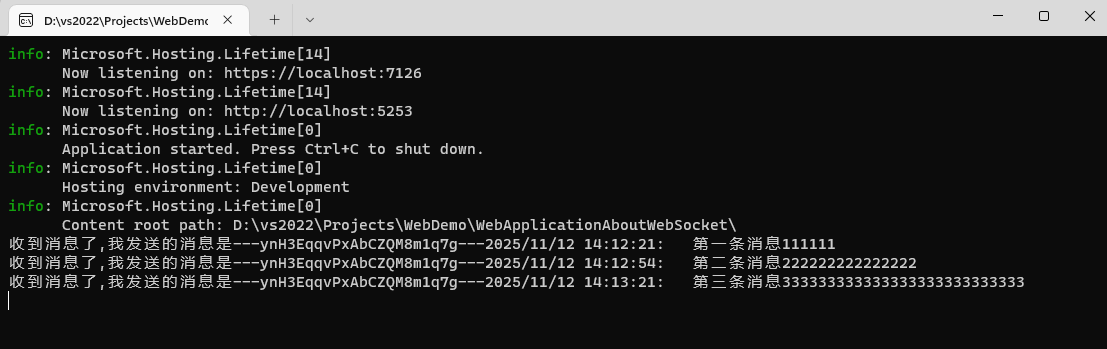
ChatRoomHub类,代码如下
using Microsoft.AspNetCore.SignalR;

namespace WebApplicationAboutWebSocket
{
    public class ChatRoomHub:Hub
    {
        public Task SendPublicMessage(string message)
        {
            string connId = this.Context.ConnectionId; // 获取客户端ID
            string msg = $"{connId}---{DateTime.Now}:   {message}"; // 构造响应消息
            Console.WriteLine($"收到消息了,我发送的消息是---{msg}");
            return Clients.All.SendAsync("ReceivePublicMessage",msg); // 向所有客户端广播
        }
    }
}
Program.cs(SignalR和跨域)配置如下
using WebApplicationAboutWebSocket;
......
builder.Services.AddSwaggerGen();
// 注册SignalR
builder.Services.AddSignalR();
// 跨域配置(允许以下地址)
string[] urls = new[] { "http://localhost:3000", "http://localhost:8080", "https://localhost:8080", "http://localhost:5173" };
builder.Services.AddCors(options =>
    options.AddDefaultPolicy(builder => builder.WithOrigins(urls)
    .AllowAnyMethod().AllowAnyHeader().AllowCredentials())
);

......
var app = builder.Build();
if (app.Environment.IsDevelopment())
{
    ......
}

// 跨域
app.UseCors();
app.UseHttpsRedirection();
app.UseAuthorization();
// SignalR路由配置
app.MapHub<ChatRoomHub>("/ChatRoomHub");
app.MapControllers();

app.Run();
前端项目(基于vue2构建)
-
安装SignalR客户端包: npm install @microsoft/signalr
-
在Vue组件中建立SignalR连接
-
提供发送消息和接收消息的界面
- 新建
src-services-signalRService.js
import * as signalR from '@microsoft/signalr'

class SignalRService {
  constructor() {
    this.connection = null
    this.isConnected = false
    // this.baseUrl = 'http://localhost:3000'  // 后端地址
  }

  // 初始化连接
  init(url) {
    this.connection = new signalR.HubConnectionBuilder()
      // .withUrl(`${this.baseUrl}/ChatRoomHub`)
	  .withUrl('/ChatRoomHub')
      .withAutomaticReconnect()
      .build()

    // 连接事件处理
    this.connection.onclose(() => {
      console.log('SignalR连接已关闭')
      this.isConnected = false
    })

    this.connection.onreconnecting(() => {
      console.log('SignalR正在重新连接...')
      this.isConnected = false
    })

    this.connection.onreconnected(() => {
      console.log('SignalR重新连接成功')
      this.isConnected = true
    })

    return this.connection
  }

  // 启动连接
  async start() {
    try {
      await this.connection.start()
      console.log('SignalR连接成功')
      this.isConnected = true
      return true
    } catch (err) {
      console.error('SignalR连接失败:', err)
      this.isConnected = false
      return false
    }
  }

  // 停止连接
  async stop() {
    try {
      await this.connection.stop()
      this.isConnected = false
      console.log('SignalR连接已停止')
    } catch (err) {
      console.error('停止SignalR连接时出错:', err)
    }
  }

  // 注册接收消息的回调
  onReceiveMessage(callback) {
    this.connection.on('ReceivePublicMessage', callback)
  }

  // 发送公共消息
  async sendPublicMessage(message) {
    try {
      await this.connection.invoke('SendPublicMessage', message)
      return true
    } catch (err) {
      console.error('发送消息失败:', err)
      return false
    }
  }

  // 获取连接ID
  getConnectionId() {
    return this.connection.connectionId
  }
}

export default new SignalRService()
- 新建
src-components-ChatRoom.vue- 一个消息列表
- 一个输入框和发送按钮
<template>
  <div class="chat-room">
    <div class="chat-header">
      <h2>SignalR 聊天室</h2>
      <div class="connection-status">
        <span :class="['status-dot', isConnected ? 'connected' : 'disconnected']"></span>
        {{ isConnected ? '已连接' : '未连接' }}
        <span v-if="connectionId" class="connection-id">(ID: {{ connectionId }})</span>
      </div>
      <button
        @click="toggleConnection"
        :class="['connect-btn', isConnected ? 'disconnect' : 'connect']"
      >
        {{ isConnected ? '断开连接' : '连接' }}
      </button>
    </div>

    <div class="chat-container">
      <!-- 消息列表 -->
      <div class="messages-container" ref="messagesContainer">
        <div
          v-for="(message, index) in messages"
          :key="index"
          :class="['message', message.isOwn ? 'own-message' : 'other-message']"
        >
          <div class="message-content">{{ message.content }}</div>
          <div class="message-time">{{ message.time }}</div>
        </div>
        <div v-if="messages.length === 0" class="no-messages">
          暂无消息,开始聊天吧!
        </div>
      </div>

      <!-- 输入区域 -->
      <div class="input-area">
        <input
          v-model="inputMessage"
          @keyup.enter="sendMessage"
          placeholder="输入消息..."
          :disabled="!isConnected"
          class="message-input"
        />
        <button
          @click="sendMessage"
          :disabled="!isConnected || !inputMessage.trim()"
          class="send-btn"
        >
          发送
        </button>
      </div>
    </div>

    <!-- 连接状态提示 -->
    <div v-if="connectionStatus" :class="['status-message', statusType]">
      {{ connectionStatus }}
    </div>
  </div>
</template>

<script>
import signalRService from '@/services/signalRService'

export default {
  name: 'ChatRoom',
  data() {
    return {
      isConnected: false,
      connectionId: '',
      messages: [],
      inputMessage: '',
      connectionStatus: '',
      statusType: 'info' // info, success, error
    }
  },
  mounted() {
    this.initSignalR()
  },
  beforeDestroy() {
    this.disconnect()
  },
  methods: {
    // 初始化SignalR - 移除参数
	initSignalR() {
	  signalRService.init()
	  signalRService.onReceiveMessage(this.handleReceiveMessage)
	},

    // 切换连接状态
    async toggleConnection() {
      if (this.isConnected) {
        await this.disconnect()
      } else {
        await this.connect()
      }
    },

    // 连接
	async connect() {
	  this.showStatus('正在连接...', 'info')

	  const success = await signalRService.start()
	  if (success) {
		this.isConnected = true
		this.connectionId = signalRService.getConnectionId()
		this.showStatus('连接成功!', 'success')

		setTimeout(() => {
		  this.connectionStatus = ''
		}, 3000)
	  } else {
		this.showStatus('连接失败,请检查服务器是否运行在 http://localhost:3000', 'error')
	  }
	},

    // 断开连接
    async disconnect() {
      this.showStatus('正在断开连接...', 'info')
      await signalRService.stop()
      this.isConnected = false
      this.connectionId = ''
      this.showStatus('已断开连接', 'info')

      setTimeout(() => {
        this.connectionStatus = ''
      }, 3000)
    },

    // 发送消息
    async sendMessage() {
      if (!this.inputMessage.trim()) return

      const message = this.inputMessage.trim()
      const success = await signalRService.sendPublicMessage(message)

      if (success) {
        // 清空输入框
        this.inputMessage = ''
      } else {
        this.showStatus('发送失败,请检查连接状态', 'error')
      }
    },

    // 处理接收到的消息
    handleReceiveMessage(message) {
      // 解析消息格式:"{connectionId}{DateTime}:{message}"
      const messageObj = {
        content: message,
        time: new Date().toLocaleTimeString(),
        isOwn: message.includes(this.connectionId)
      }

      this.messages.push(messageObj)

      // 滚动到底部
      this.$nextTick(() => {
        const container = this.$refs.messagesContainer
        container.scrollTop = container.scrollHeight
      })
    },

    // 显示状态消息
    showStatus(message, type) {
      this.connectionStatus = message
      this.statusType = type
    }
  }
}
</script>

<style scoped>
.chat-room {
  max-width: 800px;
  margin: 0 auto;
  padding: 20px;
  font-family: 'Arial', sans-serif;
  background-color: #f5f5f5;
  border-radius: 10px;
  box-shadow: 0 2px 10px rgba(0, 0, 0, 0.1);
}

.chat-header {
  display: flex;
  justify-content: space-between;
  align-items: center;
  margin-bottom: 20px;
  padding-bottom: 15px;
  border-bottom: 1px solid #ddd;
}

.chat-header h2 {
  margin: 0;
  color: #333;
}

.connection-status {
  display: flex;
  align-items: center;
  font-size: 14px;
  color: #666;
}

.status-dot {
  display: inline-block;
  width: 8px;
  height: 8px;
  border-radius: 50%;
  margin-right: 5px;
}

.status-dot.connected {
  background-color: #4CAF50;
}

.status-dot.disconnected {
  background-color: #f44336;
}

.connection-id {
  font-size: 12px;
  color: #999;
  margin-left: 5px;
}

.connect-btn {
  padding: 8px 16px;
  border: none;
  border-radius: 4px;
  cursor: pointer;
  font-weight: bold;
  transition: background-color 0.3s;
}

.connect-btn.connect {
  background-color: #4CAF50;
  color: white;
}

.connect-btn.disconnect {
  background-color: #f44336;
  color: white;
}

.connect-btn:hover {
  opacity: 0.9;
}

.chat-container {
  background: white;
  border-radius: 8px;
  overflow: hidden;
  box-shadow: 0 1px 3px rgba(0, 0, 0, 0.1);
}

.messages-container {
  height: 400px;
  overflow-y: auto;
  padding: 15px;
  background-color: #f9f9f9;
}

.message {
  margin-bottom: 15px;
  max-width: 70%;
}

.own-message {
  margin-left: auto;
}

.other-message {
  margin-right: auto;
}

.message-content {
  padding: 10px 15px;
  border-radius: 18px;
  word-break: break-word;
}

.own-message .message-content {
  background-color: #007bff;
  color: white;
  border-bottom-right-radius: 4px;
}

.other-message .message-content {
  background-color: #e9ecef;
  color: #333;
  border-bottom-left-radius: 4px;
}

.message-time {
  font-size: 12px;
  color: #999;
  margin-top: 5px;
  text-align: right;
}

.other-message .message-time {
  text-align: left;
}

.no-messages {
  text-align: center;
  color: #999;
  padding: 40px 0;
}

.input-area {
  display: flex;
  padding: 15px;
  border-top: 1px solid #eee;
  background-color: white;
}

.message-input {
  flex: 1;
  padding: 12px;
  border: 1px solid #ddd;
  border-radius: 4px;
  margin-right: 10px;
  font-size: 14px;
}

.message-input:focus {
  outline: none;
  border-color: #007bff;
}

.send-btn {
  padding: 12px 20px;
  background-color: #007bff;
  color: white;
  border: none;
  border-radius: 4px;
  cursor: pointer;
  font-weight: bold;
}

.send-btn:disabled {
  background-color: #ccc;
  cursor: not-allowed;
}

.send-btn:not(:disabled):hover {
  background-color: #0056b3;
}

.status-message {
  margin-top: 15px;
  padding: 10px;
  border-radius: 4px;
  text-align: center;
  font-size: 14px;
}

.status-message.info {
  background-color: #e7f3ff;
  color: #0066cc;
}

.status-message.success {
  background-color: #e7f7e7;
  color: #2d8515;
}

.status-message.error {
  background-color: #fde7e7;
  color: #c53030;
}
</style>
App.vue代码如下
<template>
  <div id="app">
    <!-- <img alt="Vue logo" src="./assets/logo.png">
    <HelloWorld msg="Welcome to Your Vue.js App"/> -->

	<div class="app-header">
	  <h1>SignalR 聊天室测试</h1>
	  <p>用于测试后端 SignalR 聊天室功能</p>
	</div>
	<ChatRoom />

  </div>
</template>

<script>
import HelloWorld from './components/HelloWorld.vue'
import ChatRoom from './components/ChatRoom.vue'

export default {
  name: 'App',
  components: {
    HelloWorld,
	ChatRoom
  }
}
</script>

<style>
* {
  margin: 0;
  padding: 0;
  box-sizing: border-box;
}

body {
  font-family: 'Arial', sans-serif;
  background-color: #f0f2f5;
  color: #333;
}

#app {
  min-height: 100vh;
  padding: 20px;
}

.app-header {
  text-align: center;
  margin-bottom: 30px;
}

.app-header h1 {
  color: #333;
  margin-bottom: 10px;
}

.app-header p {
  color: #666;
  font-size: 16px;
}
</style>
vue.config.js代码如下
const { defineConfig } = require('@vue/cli-service')

module.exports = defineConfig({
  transpileDependencies: true,
  // 关闭 ESLint 检查
  lintOnSave: false,

  // 开发服务器配置
  devServer: {
    port: 8080,
    open: true, // 自动打开浏览器
    proxy: {
      // 配置 API 代理,解决跨域问题
      '/api': {
        target: 'http://localhost:5253',
        changeOrigin: true,
        pathRewrite: {
          '^/api': ''
        }
      },
      // 配置 SignalR Hub 代理
      '/ChatRoomHub': {
        target: 'http://localhost:5253',
        changeOrigin: true,
        ws: true // 重要:启用 WebSocket 代理
      }
    }
  }
})
协议协商
-
当前端点击
连接按钮时,先发起了一个协议协商的请求(浏览器和服务器之间协商,用哪种协议来实现持久性会话)-
正常流程:
- 协商请求 → 确定可用协议
- 按优先级尝试连接:WebSocket → ServerSentEvents → LongPolling
- 建立持久连接
-
- https://localhost:7126/ChatRoomHub/negotiate?negotiateVersion=1 // 携带参数negotiateVersion=1
	- 响应数据如下:

		{
    "negotiateVersion": 1,
    "connectionId": "PhGF6NDaNnWtn1Uw3Z9z3g",
    "connectionToken": "lzlZO0pgoIaXk7UTc20I6g",
    "availableTransports": [
        {
            "transport": "WebSockets", // WebSockets(首选)
            "transferFormats": [
                "Text",
                "Binary"
            ]
        },
        {
            "transport": "ServerSentEvents", // 备选
            "transferFormats": [
                "Text"
            ]
        },
        {
            "transport": "LongPolling", // 长轮询(最后选)
            "transferFormats": [
                "Text",
                "Binary"
            ]
        }
    ]
}
- 在
消息选项卡中,可以看到消息的交互情况(课程中可以展示,我自己的测试展示不出来)
- 注意事项: “消息”选项卡只对特定类型的请求显示,主要是:
	- WebSocket 连接 (ws:// 或 wss://)
	- EventSource (服务器发送事件)
	- 其他双向通信协议
对于普通的 HTTP/HTTPS 请求(GET、POST 等),是没有“消息”选项卡的。
协议协商的问题
- 在"服务器集群"中,"协商请求"被服务器A处理,而接下来的"WebSocket请求"却被服务器B处理,造成驴唇不对马嘴...

- 解决办法:使用"粘性会话"和"禁用协商"
	- 粘性会话(Stiky Session): 把来自同一个客户端的请求都发给同一台服务器
		- 缺点: 因为共性公网IP等,造成请求无法被均匀的分配到服务器集群,且扩容的自适应性不强!

	- 禁用协商: 不再先发送"协商请求",而是之间发"WebSocket请求",会话一旦建立起来,后续的持久性会话都由同一台服务器处理!
		- 缺点: 无法降级到"服务器推动方式"或者"长轮询"(问题不大)
SignalR支持多种"服务器推动方式"(WebSocket,Server-Sent Events,长轮询),默认依次按照顺序尝试WebSocket和HTTP是不同的协议,为什么能用同一个端口?- 因为WebSocket握手是通过HTTP升级请求完成的,所以可以在同一个端口上同时支持HTTP和WebSocket。
- 禁用
协议协商的方式: 无论前端还是后端,配置起来都比较简单
// 前端 signalRService.js

import * as signalR from '@microsoft/signalr'

class SignalRService {
  constructor() {
    this.connection = null
    this.isConnected = false
    this.messageCallback = null // 存储消息回调
  }

  // 初始化连接
  init() {
    this.connection = new signalR.HubConnectionBuilder()
      .withUrl('/ChatRoomHub', {
        skipNegotiation: true,
        transport: signalR.HttpTransportType.WebSockets
      })
      .withAutomaticReconnect()
      .build()

    // 连接事件处理
    this.connection.onclose(() => {
      console.log('SignalR连接已关闭')
      this.isConnected = false
    })

    this.connection.onreconnecting(() => {
      console.log('SignalR正在重新连接...')
      this.isConnected = false
    })

    this.connection.onreconnected(() => {
      console.log('SignalR重新连接成功')
      this.isConnected = true
    })

    // 注册接收消息的监听器
    this.connection.on('ReceivePublicMessage', (message) => {
      console.log('收到服务器消息:', message)
      if (this.messageCallback) {
        this.messageCallback(message)
      } else {
        console.warn('消息回调函数未设置,但收到了消息:', message)
      }
    })

    return this.connection
  }

  // 启动连接
  async start() {
    try {
      await this.connection.start()
      console.log('SignalR WebSocket 连接成功')
      console.log('连接ID:', this.connection.connectionId)
      this.isConnected = true
      return true
    } catch (err) {
      console.error('SignalR连接失败:', err)
      this.isConnected = false
      return this.fallbackToNegotiation()
    }
  }

  // 回退到协商方式
  async fallbackToNegotiation() {
    try {
      console.log('尝试使用协商方式连接...')
      this.connection = new signalR.HubConnectionBuilder()
        .withUrl('/ChatRoomHub')
        .withAutomaticReconnect()
        .build()

      // 重新绑定事件和消息监听
      this.connection.onclose(() => {
        console.log('SignalR连接已关闭')
        this.isConnected = false
      })

      this.connection.onreconnecting(() => {
        console.log('SignalR正在重新连接...')
        this.isConnected = false
      })

      this.connection.onreconnected(() => {
        console.log('SignalR重新连接成功')
        this.isConnected = true
      })

      // 重新注册消息监听
      this.connection.on('ReceivePublicMessage', (message) => {
        console.log('收到服务器消息(协商模式):', message)
        if (this.messageCallback) {
          this.messageCallback(message)
        }
      })

      await this.connection.start()
      console.log('SignalR协商连接成功')
      console.log('连接ID:', this.connection.connectionId)
      this.isConnected = true
      return true
    } catch (err) {
      console.error('协商连接也失败:', err)
      return false
    }
  }

  // 停止连接
  async stop() {
    try {
      await this.connection.stop()
      this.isConnected = false
      console.log('SignalR连接已停止')
    } catch (err) {
      console.error('停止SignalR连接时出错:', err)
    }
  }

  // 注册接收消息的回调
  onReceiveMessage(callback) {
    console.log('设置消息回调函数')
    this.messageCallback = callback
  }

  // 发送公共消息
  async sendPublicMessage(message) {
    try {
      console.log('发送消息:', message)
      await this.connection.invoke('SendPublicMessage', message)
      return true
    } catch (err) {
      console.error('发送消息失败:', err)
      return false
    }
  }

  // 获取连接ID
  getConnectionId() {
    return this.connection.connectionId
  }
}

export default new SignalRService()

// ChatRoom.vue

<template>
  <!-- 模板部分保持不变 -->
</template>

<script>
import signalRService from '@/services/signalRService'

export default {
  name: 'ChatRoom',
  data() {
    return {
      isConnected: false,
      connectionId: '',
      messages: [],
      inputMessage: '',
      connectionStatus: '',
      statusType: 'info'
    }
  },
  mounted() {
    this.initSignalR()
  },
  beforeDestroy() {
    this.disconnect()
  },
  methods: {
    // 初始化SignalR
    initSignalR() {
      console.log('初始化SignalR连接...')
      signalRService.init()

      // 设置消息接收回调
      signalRService.onReceiveMessage(this.handleReceiveMessage)

      // 自动连接
      this.connect()
    },

    // 切换连接状态
    async toggleConnection() {
      if (this.isConnected) {
        await this.disconnect()
      } else {
        await this.connect()
      }
    },

    // 连接
    async connect() {
      this.showStatus('正在建立连接...', 'info')

      const success = await signalRService.start()
      if (success) {
        this.isConnected = true
        this.connectionId = signalRService.getConnectionId()
        console.log('连接成功,连接ID:', this.connectionId)
        this.showStatus('连接成功!', 'success')

        setTimeout(() => {
          this.connectionStatus = ''
        }, 3000)
      } else {
        this.showStatus('连接失败,请检查服务器状态', 'error')
      }
    },

    // 断开连接
    async disconnect() {
      this.showStatus('正在断开连接...', 'info')
      await signalRService.stop()
      this.isConnected = false
      this.connectionId = ''
      this.showStatus('已断开连接', 'info')

      setTimeout(() => {
        this.connectionStatus = ''
      }, 3000)
    },

    // 发送消息
    async sendMessage() {
      if (!this.inputMessage.trim()) return

      const message = this.inputMessage.trim()
      console.log('准备发送消息:', message)
      const success = await signalRService.sendPublicMessage(message)

      if (success) {
        console.log('消息发送成功')
        this.inputMessage = ''
      } else {
        this.showStatus('发送失败,请检查连接状态', 'error')
      }
    },

    // 处理接收到的消息 - 修复消息解析逻辑
    handleReceiveMessage(message) {
      console.log('处理接收到的消息:', message)

      // 解析消息格式:"{connectionId}---{DateTime}:   {message}"
      const parts = message.split('---')
      let messageConnectionId = ''
      let messageContent = message

      if (parts.length >= 2) {
        messageConnectionId = parts[0]
        messageContent = parts.slice(1).join('---') // 重新组合剩余部分
      }

      const messageObj = {
        content: messageContent,
        time: new Date().toLocaleTimeString(),
        isOwn: messageConnectionId === this.connectionId
      }

      console.log('解析后的消息对象:', messageObj)
      this.messages.push(messageObj)

      // 滚动到底部
      this.$nextTick(() => {
        const container = this.$refs.messagesContainer
        if (container) {
          container.scrollTop = container.scrollHeight
        }
      })
    },

    // 显示状态消息
    showStatus(message, type) {
      this.connectionStatus = message
      this.statusType = type
    }
  }
}
</script>

<style scoped>
/* 样式保持不变 */
</style>

// vue.config.js
const { defineConfig } = require('@vue/cli-service')

module.exports = defineConfig({
  transpileDependencies: true,
  lintOnSave: false,

  devServer: {
    port: 8080,
    open: true,
    proxy: {
      '/api': {
        target: 'http://localhost:5253',
        changeOrigin: true,
        pathRewrite: {
          '^/api': ''
        }
      },
      '/ChatRoomHub': {
        target: 'http://localhost:5253',
        changeOrigin: true,
        ws: true,
        secure: false
      }
    }
  }
})
- 后端的使用场景
- 四个客户端被连接到不同的服务器上,服务器之间没有互通
- 解决方案: 所有服务器连接到同一个消息中间件,使用"粘性会话"或者"跳过协商"(使用WebSocket)
- C# 微软提供的方案: Redis backplane(使用消息中间件(如Redis)作为背板(backplane),使所有服务器通过Redis来同步消息。)
	- Install-Package Microsoft.AspNetCore.SignalR.StackExchangeRedis -Version 6.0.0
// Program.cs
......
//builder.Services.AddSignalR();
// 所有服务器都连接到同一个Redis实例,并通过Redis来广播消息,确保客户端无论连接到哪台服务器都能收到消息
builder.Services.AddSignalR().AddStackExchangeRedis("127.0.0.1", opt =>
{
    opt.Configuration.ChannelPrefix = "WebApplicationAboutWebSocket";
});
身份认证
- 问题点: SignalR目前谁都能连,使用
JWT来解决
- 配置 SigningKey,ExpireSeconds,创建配置类 JWTOptions

- 安装工具包: Microsoft.AspNetCore.Authentication.JwtBearer
- 引入
JWT示例
// JWTSettings.cs
namespace WebApplicationAboutWebSocket
{
    public class JWTSettings
    {
        public string SecKey { get; set; }
        public int ExpireSeconds { get; set; }
    }
}

// Programs.cs
......
using WebApplicationAboutJWTConfigRun;

var builder = WebApplication.CreateBuilder(args);
......
// JWT配置
builder.Services.Configure<JWTSettings>(builder.Configuration.GetSection("JWT")); // 将配置文件中的 "JWT" 节点绑定到 JWTSettings 类
// JWT认证服务配置: :告诉 ASP.NET Core 如何验证传入的 JWT 令牌
builder.Services.AddAuthentication(JwtBearerDefaults.AuthenticationScheme)
.AddJwtBearer(x =>
{
    var jwtOpt = builder.Configuration.GetSection("JWT").Get<JWTSettings>();
    byte[] keyBytes = Encoding.UTF8.GetBytes(jwtOpt.SecKey);
    var secKey = new SymmetricSecurityKey(keyBytes);
    x.TokenValidationParameters = new()
    {
        ValidateIssuer = false, // 不验证发行者
        ValidateAudience = false,  // 不验证受众
        ValidateLifetime = true, // 验证令牌有效期
        ValidateIssuerSigningKey = true, // 验证签名密钥
        IssuerSigningKey = secKey // 设置签名密钥
    };
});
......
var app = builder.Build();
// 配置认证(必须放在UseAuthorization之前)
app.UseAuthentication();
app.UseAuthorization();

......


// appsettings.cs配置私匙

{
  "Logging": {
    ......
  },
......
  "Jwt": {
    "SecKey": "sjdfklasdklfjsaldfjasjoasjkdfjas4554sdfsadfsa45d",
    "ExpireSeconds": 3600
  }
}

// API接口

using Microsoft.AspNetCore.Mvc;
using Microsoft.Extensions.Options;
using Microsoft.IdentityModel.Tokens;
using System.IdentityModel.Tokens.Jwt;
using System.Security.Claims;
using System.Text;

namespace WebApplicationAboutWebSocket.Controllers
{
    [Route("api/[controller]/[action]")]
    [ApiController]
    // [Authorize] // 先不要认证
    public class DemoController : ControllerBase
    {
        private readonly IOptionsSnapshot<JWTSettings> jwtSettingsOpt;

        public DemoController(IOptionsSnapshot<JWTSettings> jwtSettingsOpt)
        {
            this.jwtSettingsOpt = jwtSettingsOpt; // 通过依赖注入获取 JWT 配置
        }

        [HttpPost]
        public ActionResult<string> Login(string userName, string password)
        {
            if (userName == "yzk" && password == "123456")
            {
                // 创建声明(Claims)
                var claims = new List<Claim>();
                claims.Add(new Claim(ClaimTypes.NameIdentifier, "1"));
                claims.Add(new Claim(ClaimTypes.Name, userName));
                // 准备令牌参数
                string key = jwtSettingsOpt.Value.SecKey;
                DateTime expire = DateTime.Now.AddSeconds(jwtSettingsOpt.Value.ExpireSeconds);
                byte[] secBytes = Encoding.UTF8.GetBytes(key);
                var secKey = new SymmetricSecurityKey(secBytes);
                var credentials = new SigningCredentials(secKey,
                // 创建并生成令牌
                SecurityAlgorithms.HmacSha256Signature);
                var tokenDescriptor = new JwtSecurityToken(claims: claims, expires: expire, signingCredentials: credentials);
                string jwt = new JwtSecurityTokenHandler().WriteToken(tokenDescriptor);
                return jwt;
            }
            else
            {
                return BadRequest();
            }
        }
    }
}
- 测试
- https://localhost:7126/api/Demo/Login?userName=yzk&password=123456
- 成功响应:eyJhbGciOiJodHRwOi8vd3d3LnczLm9yZy8yMDAxLzA0L3htbGRzaWctbW9yZSNobWFjLXNoYTI1NiIsInR5cCI6IkpXVCJ9.eyJodHRwOi8vc2NoZW1hcy54bWxzb2FwLm9yZy93cy8yMDA1LzA1L2lkZW50aXR5L2NsYWltcy9uYW1laWRlbnRpZmllciI6IjEiLCJodHRwOi8vc2NoZW1hcy54bWxzb2FwLm9yZy93cy8yMDA1LzA1L2lkZW50aXR5L2NsYWltcy9uYW1lIjoieXprIiwiZXhwIjoxNzYzMDE2MzIzfQ.J8O1GVfSqcSY5LxVAeMfXif1lMKWu0d8Hwd63ndju_M

- 失败响应:
	{
      "type": "https://tools.ietf.org/html/rfc7231#section-6.5.1",
      "title": "Bad Request",
      "status": 400,
      "traceId": "00-8d39e0565221b11c3c04f97faa1883c0-248a3e5d12864b55-00"
    }
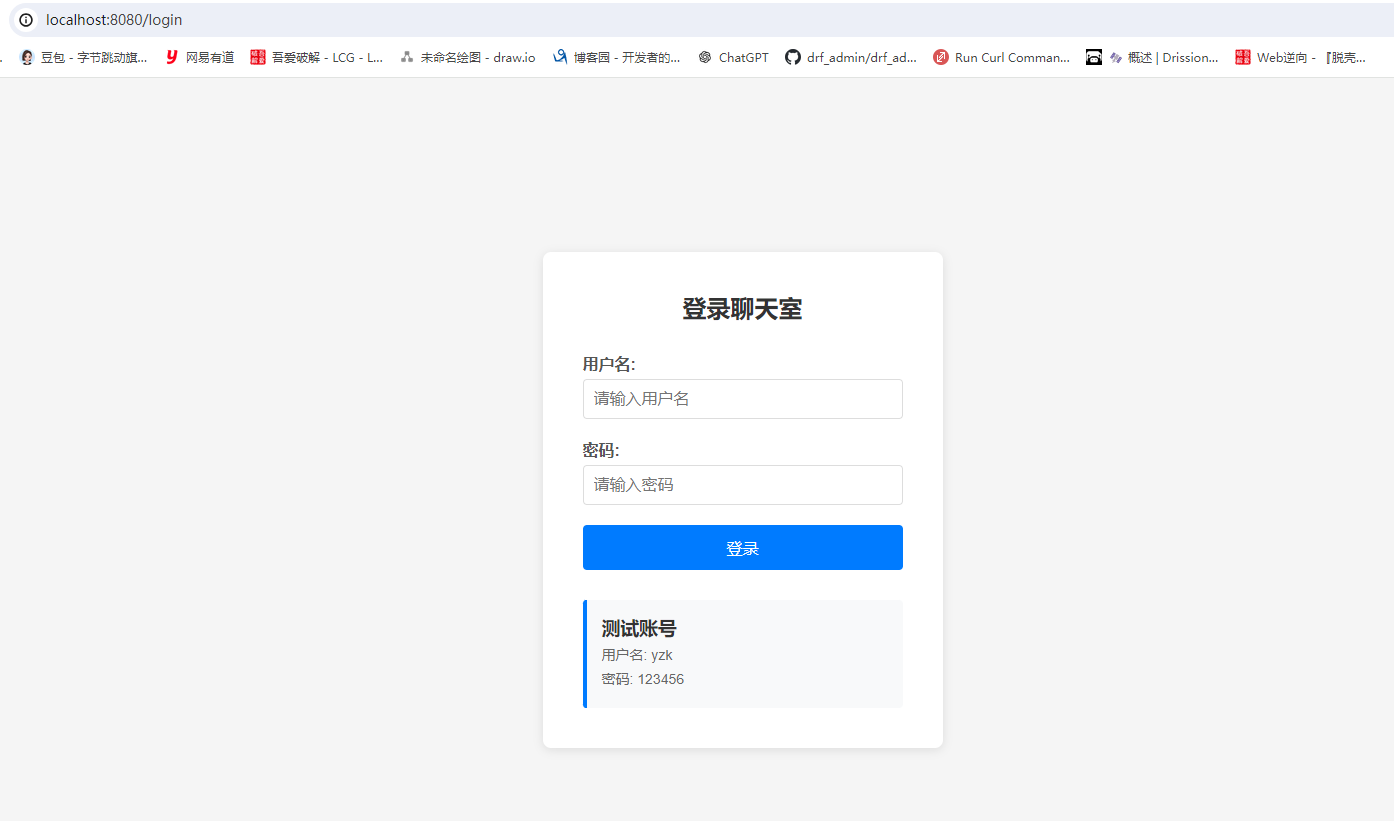
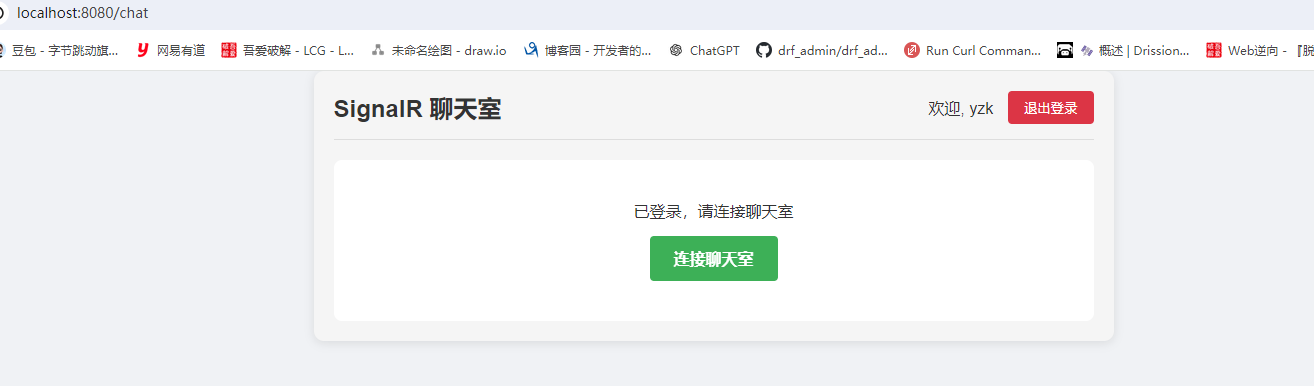
需求场景: 聊天室必须先登录成功以后,才能继续聊天
Program.cs引入全局授权策略
......
// 跨域配置(新增后端项目运行的地址)
string[] urls = new[] { "http://localhost:3000", "http://localhost:8080", "https://localhost:8080", "http://localhost:5173", "https://localhost:5173" };

// 全局授权策略
builder.Services.AddAuthorization(options =>
{
    options.FallbackPolicy = new AuthorizationPolicyBuilder()
        .RequireAuthenticatedUser()
        .Build();
});

var app = builder.Build();
......
- 修改
ChatRoomHub 类的逻辑,添加授权要求,并添加友好连接提示信息
using Microsoft.AspNetCore.Authorization;
using Microsoft.AspNetCore.SignalR;
using System.Security.Claims;

namespace WebApplicationAboutWebSocket
{
    [Authorize] // 添加授权要求
    public class ChatRoomHub : Hub
    {
        public Task SendPublicMessage(string message)
        {
            // 从 JWT token 中获取用户信息
            var userName = Context.User?.FindFirst(ClaimTypes.Name)?.Value;
            var userId = Context.User?.FindFirst(ClaimTypes.NameIdentifier)?.Value;

            string connId = this.Context.ConnectionId;
            string msg = $"{userName}({connId})---{DateTime.Now}: {message}";

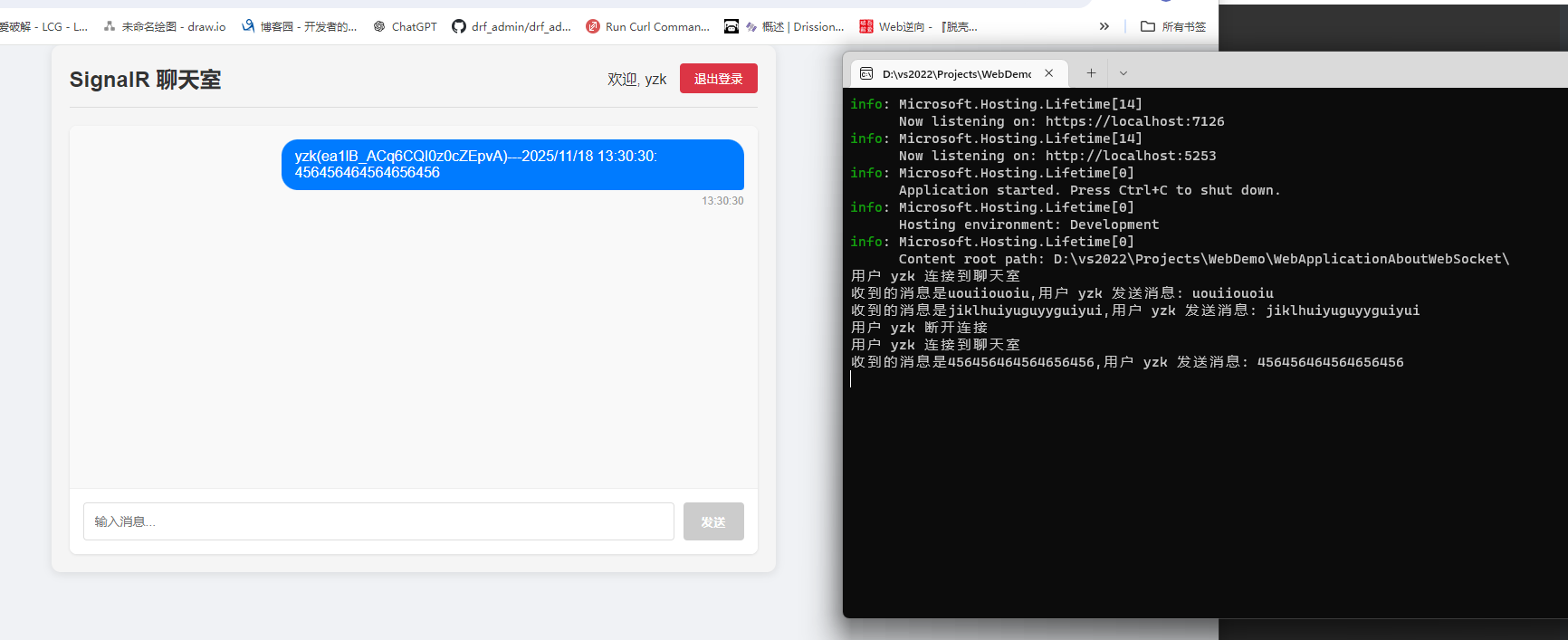
            Console.WriteLine($"用户 {userName} 发送消息: {message}");

            return Clients.All.SendAsync("ReceivePublicMessage", msg);
        }

        // 重写连接事件,记录用户连接
        public override async Task OnConnectedAsync()
        {
            var userName = Context.User?.FindFirst(ClaimTypes.Name)?.Value;
            Console.WriteLine($"用户 {userName} 连接到聊天室");
            await base.OnConnectedAsync();
        }

        public override async Task OnDisconnectedAsync(Exception? exception)
        {
            var userName = Context.User?.FindFirst(ClaimTypes.Name)?.Value;
            Console.WriteLine($"用户 {userName} 断开连接");
            await base.OnDisconnectedAsync(exception);
        }
    }
}
api接口演示(添加认证控制器)
using Microsoft.AspNetCore.Authorization;
using Microsoft.AspNetCore.Mvc;
using Microsoft.Extensions.Options;
using Microsoft.IdentityModel.Tokens;
using System.IdentityModel.Tokens.Jwt;
using System.Security.Claims;
using System.Text;

namespace WebApplicationAboutWebSocket.Controllers
{
    [Route("api/[controller]")]
    [ApiController]
    [AllowAnonymous] // 允许匿名访问登录接口
    public class AuthController : ControllerBase
    {
        private readonly IOptionsSnapshot<JWTSettings> _jwtSettings;

        public AuthController(IOptionsSnapshot<JWTSettings> jwtSettings)
        {
            _jwtSettings = jwtSettings;
        }

        [HttpPost("login")]
        public ActionResult<LoginResponse> Login([FromBody] LoginRequest request)
        {
            if (request.UserName == "yzk" && request.Password == "123456")
            {
                // 创建声明(Claims)
                var claims = new List<Claim>
                {
                    new Claim(ClaimTypes.NameIdentifier, "1"),
                    new Claim(ClaimTypes.Name, request.UserName)
                };

                // 生成 JWT Token
                string key = _jwtSettings.Value.SecKey;
                DateTime expire = DateTime.Now.AddSeconds(_jwtSettings.Value.ExpireSeconds);
                byte[] secBytes = Encoding.UTF8.GetBytes(key);
                var secKey = new SymmetricSecurityKey(secBytes);
                var credentials = new SigningCredentials(secKey, SecurityAlgorithms.HmacSha256Signature);

                var tokenDescriptor = new JwtSecurityToken(claims: claims, expires: expire, signingCredentials: credentials);
                string jwt = new JwtSecurityTokenHandler().WriteToken(tokenDescriptor);

                return Ok(new LoginResponse
                {
                    Success = true,
                    Token = jwt,
                    UserName = request.UserName,
                    Expires = expire
                });
            }
            else
            {
                return Ok(new LoginResponse
                {
                    Success = false,
                    Message = "用户名或密码错误"
                });
            }
        }

        [Authorize]
        [HttpGet("validate")]
        public ActionResult<ValidateResponse> Validate()
        {
            var userName = User.FindFirst(ClaimTypes.Name)?.Value;
            var userId = User.FindFirst(ClaimTypes.NameIdentifier)?.Value;

            return Ok(new ValidateResponse
            {
                UserName = userName,
                UserId = userId,
                IsValid = true
            });
        }
    }

    public class LoginRequest
    {
        public string UserName { get; set; } = string.Empty;
        public string Password { get; set; } = string.Empty;
    }

    public class LoginResponse
    {
        public bool Success { get; set; }
        public string? Token { get; set; }
        public string? UserName { get; set; }
        public DateTime? Expires { get; set; }
        public string? Message { get; set; }
    }

    public class ValidateResponse
    {
        public string? UserName { get; set; }
        public string? UserId { get; set; }
        public bool IsValid { get; set; }
    }
}
前端改造
SignalRService.js
import * as signalR from '@microsoft/signalr'

class SignalRService {
  constructor() {
    this.connection = null
    this.isConnected = false
    this.messageCallback = null
  }

  // 初始化连接
init() {
  const token = localStorage.getItem('jwt_token')

  if (!token) {
	console.error('未找到 JWT token,请先登录')
	return null
  }

  this.connection = new signalR.HubConnectionBuilder()
	.withUrl('/ChatRoomHub', {
	  skipNegotiation: true,
	  transport: signalR.HttpTransportType.WebSockets,
	  accessTokenFactory: () => token
	})
	.withAutomaticReconnect()
	.build()

  // 连接事件处理
  this.connection.onclose(() => {
	console.log('SignalR连接已关闭')
	this.isConnected = false
  })

  this.connection.onreconnecting(() => {
	console.log('SignalR正在重新连接...')
	this.isConnected = false
  })

  this.connection.onreconnected(() => {
	console.log('SignalR重新连接成功')
	this.isConnected = true
  })

  // 注册接收消息的监听器
  this.connection.on('ReceivePublicMessage', (message) => {
	console.log('收到服务器消息:', message)
	if (this.messageCallback) {
	  this.messageCallback(message)
	}
  })

  return this.connection
}

  // 启动连接
  async start() {
    try {
      // 检查 token
      const token = localStorage.getItem('jwt_token')
      if (!token) {
        console.error('无法连接:未找到 JWT token')
        return false
      }

      await this.connection.start()
      console.log('SignalR WebSocket 连接成功')
      this.isConnected = true
      return true
    } catch (err) {
      console.error('SignalR连接失败:', err)
      this.isConnected = false

      // 如果是认证失败,清除 token
      if (err.statusCode === 401) {
        localStorage.removeItem('jwt_token')
        localStorage.removeItem('user_name')
      }

      return false
    }
  }

  // 停止连接
  async stop() {
    try {
      await this.connection.stop()
      this.isConnected = false
      console.log('SignalR连接已停止')
    } catch (err) {
      console.error('停止SignalR连接时出错:', err)
    }
  }

  // 注册接收消息的回调
  onReceiveMessage(callback) {
    this.messageCallback = callback
  }

  // 发送公共消息
  async sendPublicMessage(message) {
    try {
      await this.connection.invoke('SendPublicMessage', message)
      return true
    } catch (err) {
      console.error('发送消息失败:', err)
      return false
    }
  }

  // 获取连接ID
  getConnectionId() {
    return this.connection.connectionId
  }
}

export default new SignalRService()
Login.vue
<template>
  <div class="login-container">
    <div class="login-form">
      <h2>登录聊天室</h2>
      <form @submit.prevent="handleLogin">
        <div class="form-group">
          <label>用户名:</label>
          <input
            v-model="loginForm.userName"
            type="text"
            required
            placeholder="请输入用户名"
          >
        </div>
        <div class="form-group">
          <label>密码:</label>
          <input
            v-model="loginForm.password"
            type="password"
            required
            placeholder="请输入密码"
          >
        </div>
        <button
          type="submit"
          :disabled="loading"
          class="login-btn"
        >
          {{ loading ? '登录中...' : '登录' }}
        </button>
      </form>

      <div v-if="message" :class="['message', messageType]">
        {{ message }}
      </div>

      <div class="demo-account">
        <h3>测试账号</h3>
        <p>用户名: yzk</p>
        <p>密码: 123456</p>
      </div>
    </div>
  </div>
</template>

<script>
export default {
  name: 'Login',
  data() {
    return {
      loginForm: {
        userName: '',
        password: ''
      },
      loading: false,
      message: '',
      messageType: 'error'
    }
  },
  methods: {
    async handleLogin() {
      this.loading = true
      this.message = ''

      try {
        const response = await fetch('/api/Auth/login', {
          method: 'POST',
          headers: {
            'Content-Type': 'application/json'
          },
          body: JSON.stringify(this.loginForm)
        })

        const result = await response.json()

        if (result.success) {
          // 保存 token 和用户信息
          localStorage.setItem('jwt_token', result.token)
          localStorage.setItem('user_name', result.userName)

          this.message = '登录成功!正在跳转到聊天室...'
          this.messageType = 'success'

          // 跳转到聊天页面
          setTimeout(() => {
            this.$router.push('/chat')
          }, 1000)
        } else {
          this.message = result.message || '登录失败'
          this.messageType = 'error'
        }
      } catch (error) {
        console.error('登录错误:', error)
        this.message = '登录失败,请检查网络连接'
        this.messageType = 'error'
      } finally {
        this.loading = false
      }
    }
  }
}
</script>

<style scoped>
.login-container {
  display: flex;
  justify-content: center;
  align-items: center;
  min-height: 100vh;
  background-color: #f5f5f5;
}

.login-form {
  background: white;
  padding: 40px;
  border-radius: 8px;
  box-shadow: 0 2px 10px rgba(0, 0, 0, 0.1);
  width: 400px;
}

.login-form h2 {
  text-align: center;
  margin-bottom: 30px;
  color: #333;
}

.form-group {
  margin-bottom: 20px;
}

.form-group label {
  display: block;
  margin-bottom: 5px;
  font-weight: bold;
  color: #555;
}

.form-group input {
  width: 100%;
  padding: 10px;
  border: 1px solid #ddd;
  border-radius: 4px;
  font-size: 16px;
}

.form-group input:focus {
  outline: none;
  border-color: #007bff;
}

.login-btn {
  width: 100%;
  padding: 12px;
  background-color: #007bff;
  color: white;
  border: none;
  border-radius: 4px;
  font-size: 16px;
  cursor: pointer;
  transition: background-color 0.3s;
}

.login-btn:hover:not(:disabled) {
  background-color: #0056b3;
}

.login-btn:disabled {
  background-color: #ccc;
  cursor: not-allowed;
}

.message {
  margin-top: 15px;
  padding: 10px;
  border-radius: 4px;
  text-align: center;
}

.message.success {
  background-color: #e7f7e7;
  color: #2d8515;
}

.message.error {
  background-color: #fde7e7;
  color: #c53030;
}

.demo-account {
  margin-top: 30px;
  padding: 15px;
  background-color: #f8f9fa;
  border-radius: 4px;
  border-left: 4px solid #007bff;
}

.demo-account h3 {
  margin-top: 0;
  color: #333;
}

.demo-account p {
  margin: 5px 0;
  color: #666;
  font-size: 14px;
}
</style>
ChatRoom.vue
<template>
  <div class="chat-room">
    <div class="chat-header">
      <h2>SignalR 聊天室</h2>
      <div class="user-info" v-if="isAuthenticated">
        <span>欢迎, {{ userName }}</span>
        <button @click="handleLogout" class="logout-btn">退出登录</button>
      </div>
    </div>

    <!-- 未登录状态显示登录提示 -->
    <div v-if="!isAuthenticated" class="login-prompt">
      <div class="prompt-content">
        <h3>请先登录</h3>
        <p>您需要登录后才能使用聊天功能</p>
        <button @click="goToLogin" class="login-btn">前往登录</button>
      </div>
    </div>

    <!-- 已登录但未连接 -->
    <div v-else-if="isAuthenticated && !isConnected" class="connection-prompt">
      <p>已登录,请连接聊天室</p>
      <button @click="connect" class="connect-btn">连接聊天室</button>
    </div>

    <!-- 已登录且已连接 -->
    <div v-else class="chat-container">
      <div class="messages-container" ref="messagesContainer">
        <div
          v-for="(message, index) in messages"
          :key="index"
          :class="['message', message.isOwn ? 'own-message' : 'other-message']"
        >
          <div class="message-content">{{ message.content }}</div>
          <div class="message-time">{{ message.time }}</div>
        </div>
        <div v-if="messages.length === 0" class="no-messages">
          暂无消息,开始聊天吧!
        </div>
      </div>

      <div class="input-area">
        <input
          v-model="inputMessage"
          @keyup.enter="sendMessage"
          placeholder="输入消息..."
          class="message-input"
        />
        <button
          @click="sendMessage"
          :disabled="!inputMessage.trim()"
          class="send-btn"
        >
          发送
        </button>
      </div>
    </div>

    <!-- 连接状态提示 -->
    <div v-if="connectionStatus" :class="['status-message', statusType]">
      {{ connectionStatus }}
    </div>
  </div>
</template>

<script>
import signalRService from '@/services/signalRService'

export default {
  name: 'ChatRoom',
  data() {
    return {
      isAuthenticated: false,  // 新增:认证状态
      isConnected: false,
      userName: '',
      messages: [],
      inputMessage: '',
      connectionStatus: '',
      statusType: 'info'
    }
  },
  mounted() {
    this.checkAuth()
  },
  beforeDestroy() {
    this.disconnect()
  },
  methods: {
    // 检查认证状态
    checkAuth() {
      const token = localStorage.getItem('jwt_token')
      const storedUserName = localStorage.getItem('user_name')

      if (!token) {
        this.isAuthenticated = false
        this.userName = ''
        // 如果没有token,确保清除任何可能的残留数据
        localStorage.removeItem('jwt_token')
        localStorage.removeItem('user_name')
        return
      }

      this.isAuthenticated = true
      this.userName = storedUserName || '未知用户'

      // 验证token有效性
      this.validateToken()
    },

    // 验证token
    async validateToken() {
      try {
        const response = await fetch('/api/Auth/validate', {
          headers: {
            'Authorization': `Bearer ${localStorage.getItem('jwt_token')}`
          }
        })

        if (!response.ok) {
          throw new Error('Token无效')
        }

        const data = await response.json()
        this.userName = data.userName || this.userName

        // Token有效,初始化SignalR
        this.initSignalR()
      } catch (error) {
        console.error('Token验证失败:', error)
        this.handleLogout()
      }
    },

    // 初始化SignalR
    initSignalR() {
      const connection = signalRService.init()
      if (connection) {
        signalRService.onReceiveMessage(this.handleReceiveMessage)
      }
    },

    // 前往登录页
    goToLogin() {
      this.$router.push('/login')
    },

    // 连接聊天室
    async connect() {
      const success = await signalRService.start()
      if (success) {
        this.isConnected = true
        this.connectionStatus = '连接成功'
        setTimeout(() => {
          this.connectionStatus = ''
        }, 2000)
      } else {
        this.connectionStatus = '连接失败'
        setTimeout(() => {
          this.connectionStatus = ''
        }, 3000)
      }
    },

    // 断开连接
    async disconnect() {
      if (signalRService.connection) {
        await signalRService.stop()
      }
      this.isConnected = false
    },

    // 发送消息
    async sendMessage() {
      if (!this.inputMessage.trim() || !this.isConnected) return

      const success = await signalRService.sendPublicMessage(this.inputMessage.trim())
      if (success) {
        this.inputMessage = ''
      } else {
        this.connectionStatus = '发送失败'
        setTimeout(() => {
          this.connectionStatus = ''
        }, 3000)
      }
    },

    // 处理接收消息
    handleReceiveMessage(message) {
      const messageObj = {
        content: message,
        time: new Date().toLocaleTimeString(),
        isOwn: message.includes(this.userName)
      }

      this.messages.push(messageObj)
      this.$nextTick(() => {
        const container = this.$refs.messagesContainer
        if (container) {
          container.scrollTop = container.scrollHeight
        }
      })
    },

    // 退出登录
    handleLogout() {
      localStorage.removeItem('jwt_token')
      localStorage.removeItem('user_name')
      this.disconnect()
      this.isAuthenticated = false
      this.userName = ''
      this.$router.push('/login')
    }
  }
}
</script>

<style scoped>
.chat-room {
  max-width: 800px;
  margin: 0 auto;
  padding: 20px;
  font-family: 'Arial', sans-serif;
  background-color: #f5f5f5;
  border-radius: 10px;
  box-shadow: 0 2px 10px rgba(0, 0, 0, 0.1);
}

.chat-header {
  display: flex;
  justify-content: space-between;
  align-items: center;
  margin-bottom: 20px;
  padding-bottom: 15px;
  border-bottom: 1px solid #ddd;
}

.chat-header h2 {
  margin: 0;
  color: #333;
}

.connection-status {
  display: flex;
  align-items: center;
  font-size: 14px;
  color: #666;
}

.status-dot {
  display: inline-block;
  width: 8px;
  height: 8px;
  border-radius: 50%;
  margin-right: 5px;
}

.status-dot.connected {
  background-color: #4CAF50;
}

.status-dot.disconnected {
  background-color: #f44336;
}

.connection-id {
  font-size: 12px;
  color: #999;
  margin-left: 5px;
}

.connect-btn {
  padding: 8px 16px;
  border: none;
  border-radius: 4px;
  cursor: pointer;
  font-weight: bold;
  transition: background-color 0.3s;
}

.connect-btn.connect {
  background-color: #4CAF50;
  color: white;
}

.connect-btn.disconnect {
  background-color: #f44336;
  color: white;
}

.connect-btn:hover {
  opacity: 0.9;
}

.chat-container {
  background: white;
  border-radius: 8px;
  overflow: hidden;
  box-shadow: 0 1px 3px rgba(0, 0, 0, 0.1);
}

.messages-container {
  height: 400px;
  overflow-y: auto;
  padding: 15px;
  background-color: #f9f9f9;
}

.message {
  margin-bottom: 15px;
  max-width: 70%;
}

.own-message {
  margin-left: auto;
}

.other-message {
  margin-right: auto;
}

.message-content {
  padding: 10px 15px;
  border-radius: 18px;
  word-break: break-word;
}

.own-message .message-content {
  background-color: #007bff;
  color: white;
  border-bottom-right-radius: 4px;
}

.other-message .message-content {
  background-color: #e9ecef;
  color: #333;
  border-bottom-left-radius: 4px;
}

.message-time {
  font-size: 12px;
  color: #999;
  margin-top: 5px;
  text-align: right;
}

.other-message .message-time {
  text-align: left;
}

.no-messages {
  text-align: center;
  color: #999;
  padding: 40px 0;
}

.input-area {
  display: flex;
  padding: 15px;
  border-top: 1px solid #eee;
  background-color: white;
}

.message-input {
  flex: 1;
  padding: 12px;
  border: 1px solid #ddd;
  border-radius: 4px;
  margin-right: 10px;
  font-size: 14px;
}

.message-input:focus {
  outline: none;
  border-color: #007bff;
}

.send-btn {
  padding: 12px 20px;
  background-color: #007bff;
  color: white;
  border: none;
  border-radius: 4px;
  cursor: pointer;
  font-weight: bold;
}

.send-btn:disabled {
  background-color: #ccc;
  cursor: not-allowed;
}

.send-btn:not(:disabled):hover {
  background-color: #0056b3;
}

.status-message {
  margin-top: 15px;
  padding: 10px;
  border-radius: 4px;
  text-align: center;
  font-size: 14px;
}

.status-message.info {
  background-color: #e7f3ff;
  color: #0066cc;
}

.status-message.success {
  background-color: #e7f7e7;
  color: #2d8515;
}

.status-message.error {
  background-color: #fde7e7;
  color: #c53030;
}

/* 原有的样式保持不变,添加新样式 */

.login-prompt {
  display: flex;
  justify-content: center;
  align-items: center;
  height: 400px;
  background: white;
  border-radius: 8px;
  margin-top: 20px;
}

.prompt-content {
  text-align: center;
  padding: 40px;
}

.prompt-content h3 {
  margin-bottom: 15px;
  color: #333;
}

.prompt-content p {
  margin-bottom: 20px;
  color: #666;
}

.login-btn {
  padding: 12px 24px;
  background-color: #007bff;
  color: white;
  border: none;
  border-radius: 4px;
  cursor: pointer;
  font-size: 16px;
}

.login-btn:hover {
  background-color: #0056b3;
}

.user-info {
  display: flex;
  align-items: center;
  gap: 15px;
}

.logout-btn {
  padding: 8px 16px;
  background-color: #dc3545;
  color: white;
  border: none;
  border-radius: 4px;
  cursor: pointer;
}

.logout-btn:hover {
  background-color: #c82333;
}

.connection-prompt {
  text-align: center;
  padding: 40px;
  background: white;
  border-radius: 8px;
  margin-top: 20px;
}

.connect-btn {
  padding: 12px 24px;
  background-color: #28a745;
  color: white;
  border: none;
  border-radius: 4px;
  cursor: pointer;
  font-size: 16px;
  margin-top: 15px;
}

.connect-btn:hover {
  background-color: #218838;
}

.status-message {
  margin-top: 15px;
  padding: 10px;
  border-radius: 4px;
  text-align: center;
  font-size: 14px;
}

.status-message.info {
  background-color: #e7f3ff;
  color: #0066cc;
}

.status-message.success {
  background-color: #e7f7e7;
  color: #2d8515;
}

.status-message.error {
  background-color: #fde7e7;
  color: #c53030;
}

</style>
- 新建路由:
src-router-index.js
// router/index.js
import Vue from 'vue'
import VueRouter from 'vue-router'
import Login from '@/components/Login.vue'
import ChatRoom from '@/components/ChatRoom.vue'

// 使用 Vue Router
Vue.use(VueRouter)

const routes = [
  {
    path: '/',
    redirect: '/login'
  },
  {
    path: '/login',
    name: 'Login',
    component: Login
  },
  {
    path: '/chat',
    name: 'ChatRoom',
    component: ChatRoom,
    meta: { requiresAuth: true }
  },
  {
    path: '*',
    redirect: '/login'
  }
]

const router = new VueRouter({
  mode: 'history', // 使用 history 模式
  base: process.env.BASE_URL,
  routes
})

// 路由守卫
router.beforeEach((to, from, next) => {
  const token = localStorage.getItem('jwt_token')

  if (to.matched.some(record => record.meta.requiresAuth) && !token) {
    // 如果需要认证但未登录,重定向到登录页
    next('/login')
  } else if (to.path === '/login' && token) {
    // 如果已登录但访问登录页,重定向到聊天室
    next('/chat')
  } else {
    next()
  }
})

export default router
App.vue
<template>
  <div id="app">
    <!-- 只显示路由对应的组件 -->
    <router-view></router-view>
  </div>
</template>

<script>
export default {
  name: 'App'
}
</script>

<style>
* {
  margin: 0;
  padding: 0;
  box-sizing: border-box;
}

body {
  font-family: 'Arial', sans-serif;
  background-color: #f0f2f5;
  color: #333;
}

#app {
  min-height: 100vh;
}
</style>
main.js
// main.js
import Vue from 'vue'
import App from './App.vue'
import router from './router'

// 如果你有 Vuex 也可以在这里引入
// import store from './store'

new Vue({
  router,
  // store,
  render: h => h(App)
}).$mount('#app')
vue.config.js
const { defineConfig } = require('@vue/cli-service')

module.exports = defineConfig({
  transpileDependencies: true,
  lintOnSave: false,

  devServer: {
    port: 8080,
    open: true,
    proxy: {
      '/api': {
        target: 'https://localhost:7126', // 修改为你的实际后端地址
        changeOrigin: true,
        secure: false, // 重要:对于自签名 HTTPS 证书设为 false
        pathRewrite: {
          '^/api': '/api'
        }
      },
      '/ChatRoomHub': {
        target: 'https://localhost:7126', // 修改为你的实际后端地址
        changeOrigin: true,
        ws: true,
        secure: false // 重要:对于自签名 HTTPS 证书设为 false
      }
    }
  }
})
后端,前端,前后端交互流程图如下
graph TB
A[客户端请求] --> B[ASP.NET Core 应用]
B --> C[中间件管道]
C --> D[UseCors]
C --> E[UseAuthentication]
C --> F[UseAuthorization]
C --> G[UseRouting]
G --> H[控制器路由]
G --> I[SignalR Hub路由]
H --> J[AuthController]
J --> K[登录验证]
K --> L[JWT Token生成]
L --> M[返回Token]
I --> N[ChatRoomHub]
N --> O[消息广播]
N --> P[连接管理]
O --> Q[Redis Backplane<br/>分布式支持]
P --> R[用户连接跟踪]
J --> S[JWT设置配置]
N --> S
S --> T[appsettings.json]
subgraph "认证配置"
E --> U[JWT Bearer配置]
U --> V[Token验证参数]
V --> W[签名密钥验证]
V --> X[有效期验证]
end
subgraph "数据存储"
Q --> Y[Redis服务器]
R --> Z[内存连接字典]
end
style A fill:#e1f5fe
style J fill:#f3e5f5
style N fill:#e8f5e8
style Q fill:#fff3e0
graph TB
A[用户访问] --> B{Vue Router<br/>路由守卫}
B -->|未登录| C[Login.vue<br/>登录页面]
B -->|已登录| D[ChatRoom.vue<br/>聊天室页面]
C --> E[登录表单]
E --> F[登录请求]
F --> G[API调用]
G --> H[Token存储]
H --> I[路由跳转]
D --> J[页面初始化]
J --> K[认证检查]
K --> L[SignalR初始化]
L --> M[signalRService.js]
M --> N[连接配置]
N --> O[Token注入]
O --> P[WebSocket连接]
P --> Q[消息发送]
P --> R[消息接收]
Q --> S[发送公共消息]
R --> T[接收公共消息]
T --> U[更新消息列表]
subgraph "状态管理"
H --> V[localStorage<br/>Token存储]
V --> W[认证状态]
W --> K
end
subgraph "UI组件"
U --> X[消息列表渲染]
E --> Y[表单验证]
D --> Z[连接状态显示]
end
subgraph "配置管理"
N --> AA[vue.config.js<br/>代理配置]
AA --> BB[开发服务器配置]
end
style C fill:#f3e5f5
style D fill:#e8f5e8
style M fill:#fff3e0
style V fill:#e1f5fe
sequenceDiagram
participant U as 用户
participant F as 前端应用<br/>Vue.js
participant A as 认证控制器<br/>AuthController
participant H as 聊天中心<br/>ChatRoomHub
participant R as Redis<br/>分布式缓存
Note over U, R: 1. 登录认证流程
U->>F: 访问登录页面
F->>U: 显示登录表单
U->>F: 输入用户名密码<br/>(yzk/123456)
F->>A: POST /api/Auth/login<br/>{userName, password}
A->>A: 验证用户凭据
A->>A: 生成JWT Token<br/>(包含用户声明)
A-->>F: 返回JWT Token
F->>F: 存储Token到localStorage
F->>U: 跳转到聊天室页面
Note over U, R: 2. 聊天室连接流程
U->>F: 进入聊天室
F->>F: 从localStorage读取Token
F->>H: WebSocket连接请求<br/>携带Token参数
H->>H: 验证JWT Token
H->>H: 建立SignalR连接
H->>R: 注册连接信息(分布式)
H-->>F: 连接成功确认
Note over U, R: 3. 消息通信流程
U->>F: 输入聊天消息
F->>H: 调用SendPublicMessage方法<br/>传递消息内容
H->>H: 处理消息(添加用户信息和时间戳)
H->>R: 广播消息到所有节点(分布式)
R->>H: 同步消息到所有连接的客户端
H->>F: 推送ReceivePublicMessage事件<br/>包含格式化消息
F->>F: 解析并显示消息
F->>U: 更新消息列表UI
Note over U, R: 4. 断开连接流程
U->>F: 点击退出登录
F->>F: 清除localStorage中的Token
F->>H: 关闭WebSocket连接
H->>H: 处理连接断开
H->>R: 移除连接信息(分布式)
H-->>F: 连接关闭确认
F->>U: 跳转回登录页面
Note left of F: 前端状态<br/>- 路由守卫<br/>- Token管理<br/>- 连接状态
Note right of H: 后端服务<br/>- JWT认证<br/>- 消息广播<br/>- 连接管理
需求:实现筛选客户端的功能(只有属于chat组的客户端才能参与聊天)
- 让只有属于"chat"组的客户端才能参与聊天,"unchat"组的客户端不能参与聊天。
后端修改
1. 修改登录接口,添加用户组信息
// AuthController.cs
[HttpPost("login")]
public ActionResult<LoginResponse> Login([FromBody] LoginRequest request)
{
    if (request.UserName == "yzk" && request.Password == "123456")
    {
        // 创建声明(Claims)
        var claims = new List<Claim>();
        claims.Add(new Claim(ClaimTypes.NameIdentifier, "1"));
        claims.Add(new Claim(ClaimTypes.Name, request.UserName));

        // 添加用户组声明 - 根据用户名或其他逻辑分配组
        string userGroup = AssignUserGroup(request.UserName);
        claims.Add(new Claim("Group", userGroup));

        // 生成 JWT Token
        string key = _jwtSettings.Value.SecKey;
        DateTime expire = DateTime.Now.AddSeconds(_jwtSettings.Value.ExpireSeconds);
        byte[] secBytes = Encoding.UTF8.GetBytes(key);
        var secKey = new SymmetricSecurityKey(secBytes);
        var credentials = new SigningCredentials(secKey, SecurityAlgorithms.HmacSha256Signature);

        var tokenDescriptor = new JwtSecurityToken(claims: claims, expires: expire, signingCredentials: credentials);
        string jwt = new JwtSecurityTokenHandler().WriteToken(tokenDescriptor);

        return Ok(new LoginResponse
        {
            Success = true,
            Token = jwt,
            UserName = request.UserName,
            Group = userGroup, // 返回用户组信息
            Expires = expire
        });
    }
    else
    {
        return Ok(new LoginResponse
        {
            Success = false,
            Message = "用户名或密码错误"
        });
    }
}

// 分配用户组的逻辑
private string AssignUserGroup(string userName)
{
    // 这里可以根据业务逻辑分配用户组
    // 示例:用户名为 yzk 的分配到 chat 组,其他分配到 unchat 组
    return userName.ToLower() == "yzk" ? "chat" : "unchat";

    // 或者随机分配进行测试
    // return new Random().Next(0, 2) == 0 ? "chat" : "unchat";
}
2. 修改 LoginResponse 类
public class LoginResponse
{
    public bool Success { get; set; }
    public string? Token { get; set; }
    public string? UserName { get; set; }
    public string? Group { get; set; } // 新增用户组字段
    public DateTime? Expires { get; set; }
    public string? Message { get; set; }
}
3. 修改 ChatRoomHub,添加分组验证
using Microsoft.AspNetCore.Authorization;
using Microsoft.AspNetCore.SignalR;
using System.Security.Claims;

namespace WebApplicationAboutWebSocket
{
    [Authorize]
    public class ChatRoomHub : Hub
    {
        // 检查用户是否在 chat 组
        private bool IsInChatGroup()
        {
            var userGroup = Context.User?.FindFirst("Group")?.Value;
            return userGroup == "chat";
        }

        public async Task SendPublicMessage(string message)
        {
            // 检查用户组权限
            if (!IsInChatGroup())
            {
                await Clients.Caller.SendAsync("ReceiveError", "您没有权限发送消息,您属于 unchat 组");
                return;
            }

            // 从 JWT token 中获取用户信息
            var userName = Context.User?.FindFirst(ClaimTypes.Name)?.Value;
            var userGroup = Context.User?.FindFirst("Group")?.Value;

            string connId = this.Context.ConnectionId;
            string msg = $"{userName}({userGroup})---{DateTime.Now}: {message}";

            Console.WriteLine($"用户 {userName}({userGroup}) 发送消息: {message}");

            // 只发送给 chat 组的用户
            await Clients.Group("chat").SendAsync("ReceivePublicMessage", msg);
        }

        // 重写连接事件,根据用户组添加到不同的组
        public override async Task OnConnectedAsync()
        {
            var userName = Context.User?.FindFirst(ClaimTypes.Name)?.Value;
            var userGroup = Context.User?.FindFirst("Group")?.Value;

            Console.WriteLine($"用户 {userName} 连接到聊天室,用户组: {userGroup}");

            // 根据用户组添加到不同的 SignalR 组
            if (userGroup == "chat")
            {
                await Groups.AddToGroupAsync(Context.ConnectionId, "chat");
                await Clients.Caller.SendAsync("ReceiveSystemMessage", "您已加入聊天组,可以发送和接收消息");
            }
            else if (userGroup == "unchat")
            {
                await Groups.AddToGroupAsync(Context.ConnectionId, "unchat");
                await Clients.Caller.SendAsync("ReceiveSystemMessage", "您属于观察组,只能查看消息,不能发送消息");
            }

            // 向所有用户发送上线通知
            await Clients.Group("chat").SendAsync("ReceiveSystemMessage", $"{userName}({userGroup}) 进入了聊天室");

            await base.OnConnectedAsync();
        }

        public override async Task OnDisconnectedAsync(Exception? exception)
        {
            var userName = Context.User?.FindFirst(ClaimTypes.Name)?.Value;
            var userGroup = Context.User?.FindFirst("Group")?.Value;

            Console.WriteLine($"用户 {userName}({userGroup}) 断开连接");

            // 从组中移除
            if (userGroup == "chat")
            {
                await Groups.RemoveFromGroupAsync(Context.ConnectionId, "chat");
            }
            else if (userGroup == "unchat")
            {
                await Groups.RemoveFromGroupAsync(Context.ConnectionId, "unchat");
            }

            // 向所有用户发送下线通知
            await Clients.Group("chat").SendAsync("ReceiveSystemMessage", $"{userName}({userGroup}) 离开了聊天室");

            await base.OnDisconnectedAsync(exception);
        }

        // 新增:获取用户组信息的方法
        public async Task<string> GetUserGroup()
        {
            var userGroup = Context.User?.FindFirst("Group")?.Value;
            return await Task.FromResult(userGroup ?? "unknown");
        }
    }
}
前端修改
1. 修改 signalRService.js
import * as signalR from '@microsoft/signalr'

class SignalRService {
  constructor() {
    this.connection = null
    this.isConnected = false
    this.messageCallback = null
    this.systemMessageCallback = null
    this.errorCallback = null
  }

  // 初始化连接
  init() {
    const token = localStorage.getItem('jwt_token')

    if (!token) {
      console.error('未找到 JWT token,请先登录')
      return null
    }

    this.connection = new signalR.HubConnectionBuilder()
      .withUrl('/ChatRoomHub', {
        skipNegotiation: true,
        transport: signalR.HttpTransportType.WebSockets,
        accessTokenFactory: () => token
      })
      .withAutomaticReconnect()
      .build()

    // 连接事件处理
    this.connection.onclose(() => {
      console.log('SignalR连接已关闭')
      this.isConnected = false
    })

    this.connection.onreconnecting(() => {
      console.log('SignalR正在重新连接...')
      this.isConnected = false
    })

    this.connection.onreconnected(() => {
      console.log('SignalR重新连接成功')
      this.isConnected = true
    })

    // 注册接收消息的监听器
    this.connection.on('ReceivePublicMessage', (message) => {
      console.log('收到公共消息:', message)
      if (this.messageCallback) {
        this.messageCallback(message)
      }
    })

    // 注册系统消息监听器
    this.connection.on('ReceiveSystemMessage', (message) => {
      console.log('收到系统消息:', message)
      if (this.systemMessageCallback) {
        this.systemMessageCallback(message)
      }
    })

    // 注册错误消息监听器
    this.connection.on('ReceiveError', (error) => {
      console.log('收到错误消息:', error)
      if (this.errorCallback) {
        this.errorCallback(error)
      }
    })

    return this.connection
  }

  // 启动连接
  async start() {
    try {
      const token = localStorage.getItem('jwt_token')
      if (!token) {
        console.error('无法连接:未找到 JWT token')
        return false
      }

      await this.connection.start()
      console.log('SignalR WebSocket 连接成功')
      this.isConnected = true
      return true
    } catch (err) {
      console.error('SignalR连接失败:', err)
      this.isConnected = false
      return false
    }
  }

  // 停止连接
  async stop() {
    try {
      await this.connection.stop()
      this.isConnected = false
      console.log('SignalR连接已停止')
    } catch (err) {
      console.error('停止SignalR连接时出错:', err)
    }
  }

  // 注册接收消息的回调
  onReceiveMessage(callback) {
    this.messageCallback = callback
  }

  // 注册接收系统消息的回调
  onReceiveSystemMessage(callback) {
    this.systemMessageCallback = callback
  }

  // 注册接收错误消息的回调
  onReceiveError(callback) {
    this.errorCallback = callback
  }

  // 发送公共消息
  async sendPublicMessage(message) {
    try {
      await this.connection.invoke('SendPublicMessage', message)
      return true
    } catch (err) {
      console.error('发送消息失败:', err)
      return false
    }
  }

  // 获取用户组信息
  async getUserGroup() {
    try {
      return await this.connection.invoke('GetUserGroup')
    } catch (err) {
      console.error('获取用户组失败:', err)
      return 'unknown'
    }
  }

  // 获取连接ID
  getConnectionId() {
    return this.connection.connectionId
  }
}

export default new SignalRService()
2. 修改 Login.vue
<script>
export default {
  name: 'Login',
  data() {
    return {
      loginForm: {
        userName: '',
        password: ''
      },
      loading: false,
      message: '',
      messageType: 'error',
      debugInfo: ''
    }
  },
  methods: {
    async handleLogin() {
      this.loading = true
      this.message = ''
      this.debugInfo = ''

      try {
        console.log('开始登录请求...')

        const requestBody = JSON.stringify(this.loginForm)
        console.log('请求体:', requestBody)

        const response = await fetch('/api/Auth/login', {
          method: 'POST',
          headers: {
            'Content-Type': 'application/json'
          },
          body: requestBody
        })

        console.log('响应状态:', response.status)
        console.log('响应URL:', response.url)

        const responseText = await response.text()
        console.log('响应内容:', responseText)

        let result
        try {
          result = JSON.parse(responseText)
        } catch (e) {
          throw new Error(`响应不是有效的JSON: ${responseText}`)
        }

        if (response.ok && result.success) {
          // 保存 token 和用户信息
          localStorage.setItem('jwt_token', result.token)
          localStorage.setItem('user_name', result.userName)
          localStorage.setItem('user_group', result.group) // 保存用户组

          this.message = `登录成功!您被分配到 ${result.group} 组,正在跳转到聊天室...`
          this.messageType = 'success'

          // 跳转到聊天页面
          setTimeout(() => {
            this.$router.push('/chat')
          }, 1000)
        } else {
          this.message = result.message || `登录失败 (状态码: ${response.status})`
          this.messageType = 'error'
          this.debugInfo = `状态码: ${response.status}\n响应: ${responseText}`
        }
      } catch (error) {
        console.error('登录错误:', error)
        this.message = `登录失败: ${error.message}`
        this.messageType = 'error'
        this.debugInfo = error.stack || error.message
      } finally {
        this.loading = false
      }
    }
  }
}
</script>
3. 修改 ChatRoom.vue
<template>
  <div class="chat-room">
    <div class="chat-header">
      <h2>SignalR 聊天室</h2>
      <div class="user-info" v-if="isAuthenticated">
        <span>欢迎, {{ userName }} ({{ userGroup }}组)</span>
        <button @click="handleLogout" class="logout-btn">退出登录</button>
      </div>
    </div>

    <!-- 未登录状态显示登录提示 -->
    <div v-if="!isAuthenticated" class="login-prompt">
      <div class="prompt-content">
        <h3>请先登录</h3>
        <p>您需要登录后才能使用聊天功能</p>
        <button @click="goToLogin" class="login-btn">前往登录</button>
      </div>
    </div>

    <!-- 已登录但未连接 -->
    <div v-else-if="isAuthenticated && !isConnected" class="connection-prompt">
      <p>已登录,请连接聊天室</p>
      <button @click="connect" class="connect-btn">连接聊天室</button>
    </div>

    <!-- 已登录且已连接 -->
    <div v-else class="chat-container">
      <!-- 系统消息区域 -->
      <div v-if="systemMessages.length > 0" class="system-messages">
        <div
          v-for="(message, index) in systemMessages"
          :key="'system-' + index"
          class="system-message"
        >
          {{ message }}
        </div>
      </div>

      <div class="messages-container" ref="messagesContainer">
        <div
          v-for="(message, index) in messages"
          :key="index"
          :class="['message', message.isOwn ? 'own-message' : 'other-message']"
        >
          <div class="message-content">{{ message.content }}</div>
          <div class="message-time">{{ message.time }}</div>
        </div>
        <div v-if="messages.length === 0" class="no-messages">
          暂无消息,开始聊天吧!
        </div>
      </div>

      <div class="input-area">
        <input
          v-model="inputMessage"
          @keyup.enter="sendMessage"
          placeholder="输入消息..."
          :disabled="userGroup !== 'chat'"
          class="message-input"
          :title="userGroup !== 'chat' ? '您属于观察组,不能发送消息' : ''"
        />
        <button
          @click="sendMessage"
          :disabled="!inputMessage.trim() || userGroup !== 'chat'"
          class="send-btn"
          :title="userGroup !== 'chat' ? '您属于观察组,不能发送消息' : ''"
        >
          发送
        </button>
      </div>

      <!-- 权限提示 -->
      <div v-if="userGroup === 'unchat'" class="permission-hint">
        <p>💡 您属于 <strong>观察组(unchat)</strong>,只能查看消息,不能发送消息</p>
      </div>
    </div>

    <!-- 连接状态提示 -->
    <div v-if="connectionStatus" :class="['status-message', statusType]">
      {{ connectionStatus }}
    </div>

    <!-- 错误消息提示 -->
    <div v-if="errorMessage" class="error-message">
      {{ errorMessage }}
    </div>
  </div>
</template>

<script>
import signalRService from '@/services/signalRService'

export default {
  name: 'ChatRoom',
  data() {
    return {
      isAuthenticated: false,
      isConnected: false,
      userName: '',
      userGroup: '', // 新增用户组
      messages: [],
      systemMessages: [], // 新增系统消息
      inputMessage: '',
      connectionStatus: '',
      errorMessage: '', // 新增错误消息
      statusType: 'info'
    }
  },
  mounted() {
    this.checkAuth()
  },
  beforeDestroy() {
    this.disconnect()
  },
  methods: {
    // 检查认证状态
    checkAuth() {
      const token = localStorage.getItem('jwt_token')
      const storedUserName = localStorage.getItem('user_name')
      const storedUserGroup = localStorage.getItem('user_group')

      if (!token) {
        this.isAuthenticated = false
        this.userName = ''
        this.userGroup = ''
        localStorage.removeItem('jwt_token')
        localStorage.removeItem('user_name')
        localStorage.removeItem('user_group')
        return
      }

      this.isAuthenticated = true
      this.userName = storedUserName || '未知用户'
      this.userGroup = storedUserGroup || 'unknown'

      this.validateToken()
    },

    // 验证token
    async validateToken() {
      try {
        const response = await fetch('/api/Auth/validate', {
          headers: {
            'Authorization': `Bearer ${localStorage.getItem('jwt_token')}`
          }
        })

        if (!response.ok) {
          throw new Error('Token无效')
        }

        const data = await response.json()
        this.userName = data.userName || this.userName

        this.initSignalR()
      } catch (error) {
        console.error('Token验证失败:', error)
        this.handleLogout()
      }
    },

    // 初始化SignalR
    initSignalR() {
      const connection = signalRService.init()
      if (connection) {
        // 注册消息回调
        signalRService.onReceiveMessage(this.handleReceiveMessage)
        signalRService.onReceiveSystemMessage(this.handleReceiveSystemMessage)
        signalRService.onReceiveError(this.handleReceiveError)
      }
    },

    // 前往登录页
    goToLogin() {
      this.$router.push('/login')
    },

    // 连接聊天室
    async connect() {
      this.connectionStatus = '正在连接...'
      this.statusType = 'info'

      const success = await signalRService.start()
      if (success) {
        this.isConnected = true

        // 获取用户组信息
        const userGroup = await signalRService.getUserGroup()
        if (userGroup && userGroup !== 'unknown') {
          this.userGroup = userGroup
          localStorage.setItem('user_group', userGroup)
        }

        this.connectionStatus = '连接成功!'
        this.statusType = 'success'

        setTimeout(() => {
          this.connectionStatus = ''
        }, 2000)
      } else {
        this.connectionStatus = '连接失败'
        this.statusType = 'error'
        setTimeout(() => {
          this.connectionStatus = ''
        }, 3000)
      }
    },

    // 断开连接
    async disconnect() {
      if (signalRService.connection) {
        await signalRService.stop()
      }
      this.isConnected = false
    },

    // 发送消息
    async sendMessage() {
      if (!this.inputMessage.trim() || !this.isConnected || this.userGroup !== 'chat') return

      const success = await signalRService.sendPublicMessage(this.inputMessage.trim())
      if (success) {
        this.inputMessage = ''
      } else {
        this.errorMessage = '发送失败'
        setTimeout(() => {
          this.errorMessage = ''
        }, 3000)
      }
    },

    // 处理接收消息
    handleReceiveMessage(message) {
      const messageObj = {
        content: message,
        time: new Date().toLocaleTimeString(),
        isOwn: message.includes(this.userName)
      }

      this.messages.push(messageObj)
      this.scrollToBottom()
    },

    // 处理接收系统消息
    handleReceiveSystemMessage(message) {
      this.systemMessages.push(message)

      // 限制系统消息数量,最多显示5条
      if (this.systemMessages.length > 5) {
        this.systemMessages.shift()
      }

      this.scrollToBottom()
    },

    // 处理接收错误消息
    handleReceiveError(error) {
      this.errorMessage = error
      setTimeout(() => {
        this.errorMessage = ''
      }, 5000)
    },

    // 滚动到底部
    scrollToBottom() {
      this.$nextTick(() => {
        const container = this.$refs.messagesContainer
        if (container) {
          container.scrollTop = container.scrollHeight
        }
      })
    },

    // 退出登录
    handleLogout() {
      localStorage.removeItem('jwt_token')
      localStorage.removeItem('user_name')
      localStorage.removeItem('user_group')
      this.disconnect()
      this.isAuthenticated = false
      this.userName = ''
      this.userGroup = ''
      this.$router.push('/login')
    }
  }
}
</script>

<style scoped>
/* 原有样式保持不变,添加新样式 */

.system-messages {
  padding: 10px;
  background-color: #fff3cd;
  border-bottom: 1px solid #ffeaa7;
}

.system-message {
  font-size: 12px;
  color: #856404;
  text-align: center;
  margin: 2px 0;
}

.permission-hint {
  padding: 10px;
  background-color: #e7f3ff;
  border-top: 1px solid #b3d9ff;
  text-align: center;
  font-size: 14px;
  color: #0066cc;
}

.permission-hint strong {
  color: #004499;
}

.error-message {
  margin-top: 10px;
  padding: 10px;
  background-color: #fde7e7;
  color: #c53030;
  border-radius: 4px;
  text-align: center;
}

/* 禁用状态的输入框样式 */
.message-input:disabled {
  background-color: #f8f9fa;
  cursor: not-allowed;
}

.send-btn:disabled {
  background-color: #ccc;
  cursor: not-allowed;
}
</style>
系统流程图
graph TB
A[用户登录] --> B[后端分配用户组]
B --> C[chat组]
B --> D[unchat组]
C --> E[添加到chat SignalR组]
E --> F[可以发送和接收消息]
D --> G[添加到unchat SignalR组]
G --> H[只能接收消息]
F --> I[消息广播到chat组]
H --> I
subgraph "权限控制"
C --> J[SendPublicMessage: 允许]
D --> K[SendPublicMessage: 拒绝]
end
style C fill:#e8f5e8
style D fill:#fff3e0
style J fill:#c8e6c9
style K fill:#ffccbc
功能说明
用户组分配逻辑
- chat组:可以发送和接收所有消息
- unchat组:只能接收消息,不能发送消息
主要特性
- 动态用户组分配:根据用户名或其他业务逻辑分配用户组
- SignalR分组:使用 SignalR 的 Groups 功能实现消息定向广播
- 前端权限控制:根据用户组禁用输入框和发送按钮
- 后端权限验证:在 Hub 方法中检查用户组权限
- 系统消息:显示用户加入/离开通知和权限提示
测试方法
- 使用不同用户名登录,观察分配的用户组
- chat 组用户可以正常聊天
- unchat 组用户会看到输入框被禁用,发送消息会收到错误提示
这样就实现了基于用户组的聊天室权限控制!

 浙公网安备 33010602011771号