
IdentityServer4 - Authorization Code
本章主要介绍下Authorization Code这种GrantType在IdentityServer中的应用。
在IdentityServer中通过OpenID Connect 协议支持interactive user 认证。
接下来创建MVC application使用IdentityServer做认证。
1、创建MVC Client,通过Nuget下载安装 Microsoft.AspNetCore.Authentication.OpenIdConnect
1)、在Startup中配置ConfigureServices:
public void ConfigureServices(IServiceCollection services)
{
            services.AddControllersWithViews();
            JwtSecurityTokenHandler.DefaultMapInboundClaims = false;

            services.AddAuthentication(options =>
            {
                options.DefaultScheme = CookieAuthenticationDefaults.AuthenticationScheme;//"Cookies";
                options.DefaultChallengeScheme = OpenIdConnectDefaults.AuthenticationScheme;"oidc";
            })
            .AddCookie("Cookies")
            .AddOpenIdConnect("oidc",options=>
            {
                options.Authority = "https://localhost:5001";
                options.ClientId = "mvc";
                options.ClientSecret = "secret";
                options.ResponseType = "code";
                options.SaveTokens = true;
            });
}
AddAuthentication 添加认证服务依赖注入
设置DefaultScheme = Cookies 作为本地用户的登录,设置DefaultChallengeScheme = oidc,因为需要用户登录使用OpenID Connect协议。
AddCookie 添加处理Cookies处理程序。
AddOpenIdConnect 用作执行OpenID Connect protocol的处理程序。Authority指定了受信任的token service地址(IdentityServer地址),通过ClientId和ClientSecret来验证client,SaveTokens用作持续存储从IdentityServer获取到的token,以便后来只需(as they will be needed later)。
2)、在Startup中配置Configure,确保Authentication Service每次请求都被执行:
app.UseStaticFiles();
app.UseRouting();
app.UseAuthentication();
app.UseAuthorization();
app.UseEndpoints(endpoints =>
{
      endpoints.MapDefaultControllerRoute()
               .RequireAuthorization();
});
RequireAuthorization 方法禁止匿名访问整个application。
你也可以使用[Authorize]属性,指定Controller或者Action需要authentiation。
3)、添加Home View显示User Claims 和 Cookies 属性信息、
2、配置IdentityServer
在IdentityServer project中添加支持的OpenID Connect的Scope。
public static IEnumerable<IdentityResource> IdentityResources =>
           new List<IdentityResource>
           {
                new IdentityResources.OpenId(),
                new IdentityResources.Profile(),
                new IdentityResources.Email(),
                new IdentityResources.Phone(),
                new IdentityResources.Address()
           };
Startup中配置如下:
var builder = services.AddIdentityServer()
    .AddInMemoryIdentityResources(Config.IdentityResources)
    .AddInMemoryApiScopes(Config.ApiScopes)
    .AddInMemoryClients(Config.Clients)
    .AddTestUsers(TestUsers.Users);
AddInMemoryIdentityResources 将identityResource注册到IdentityServer
AddInMemoryClients 添加mvc Client, mvc client配置如下:
new Client
{
   ClientId="mvc",
   ClientSecrets={new Secret("secret".Sha256())},
   AllowedGrantTypes={ OidcConstants.GrantTypes.AuthorizationCode },
   //where to redirect to after login
   RedirectUris={ "https://localhost:5002/signin-oidc" },
   //where to redirect to after logout
   PostLogoutRedirectUris ={ "https://localhost:5002/signout-callback-oidc" },

   AllowOfflineAccess = true,
   AlwaysSendClientClaims = true,
   AllowedScopes= new List<string>
   {
      IdentityServerConstants.StandardScopes.OpenId,
      IdentityServerConstants.StandardScopes.Profile,
      IdentityServerConstants.StandardScopes.Address,
      IdentityServerConstants.StandardScopes.Phone,
      IdentityServerConstants.StandardScopes.Email,
      IdentityServerConstants.StandardScopes.OfflineAccess
    }
}
3、启动mvc 和 identity server,访问mvc protected controller,将重定向到identity server登录页面;登录之后,将重定向回MVC 客户端,在这里OpenID Connect执行了认证并且user登录在本地设置了cookie。最终MVC呈现页面。
4、添加sign-out
public IActionResult Logout()
{
    //return SignOut("Cookies", "oidc");
    return SignOut(CookieAuthenticationDefaults.AuthenticationScheme, OpenIdConnectDefaults.AuthenticationScheme);
}
这将会清除本地cookie,然后重定向到IdentityServer,IdentityServer将清除cookies并且给user一个链接返回MVC application。
5、获取claims从UserInfo endpoint
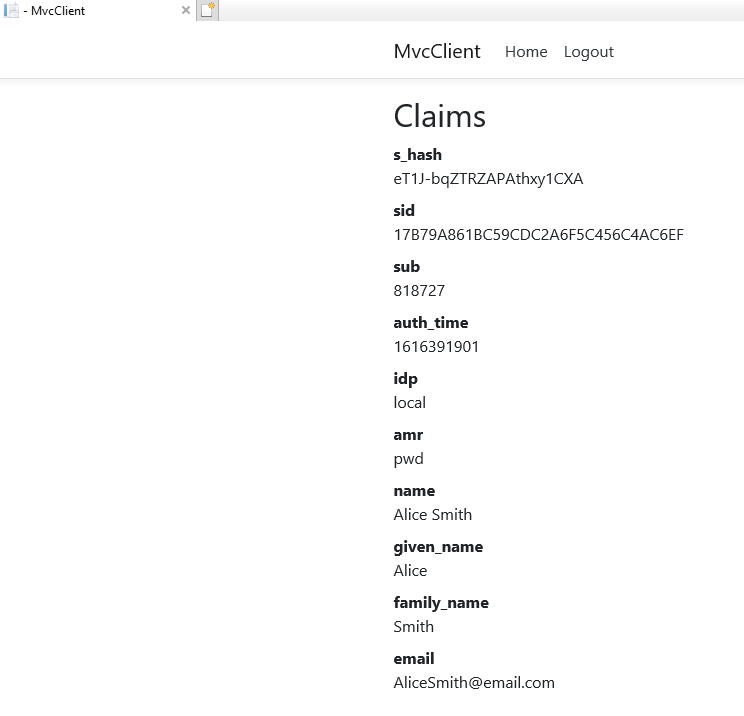
尽管我们在client中配置了scope 可以检索profile 等identity scope,但是identity scope依然不会出现在token里,这时需要在Client设置GetClaimsFromUserInfoEndpoint
 .AddOpenIdConnect(OpenIdConnectDefaults.AuthenticationScheme, options=>
 {
                options.Authority = "https://localhost:5001";
                options.ClientId = "mvc";
                options.ClientSecret = "secret";
                options.ResponseType = "code";
                options.SaveTokens = true;
                options.Scope.Add(OidcConstants.StandardScopes.OpenId);
                options.Scope.Add(OidcConstants.StandardScopes.Address);
                options.Scope.Add(OidcConstants.StandardScopes.Phone);
                options.Scope.Add(OidcConstants.StandardScopes.Email);
                options.Scope.Add(OidcConstants.StandardScopes.Profile);
                options.Scope.Add(OidcConstants.StandardScopes.OfflineAccess);
                options.GetClaimsFromUserInfoEndpoint = true;
});
运行结果如下:

 浙公网安备 33010602011771号