
getBoundingClientRect方法的简单使用
下面是使用getBoundingClientRect方法的简单示例:
<!DOCTYPE html>
<html>
    <head>
        <meta charset="utf-8">
        <title></title>
        <style type="text/css">
            #ball {
                height: 50px;
                width: 50px;
                border-radius: 50%;
                background-color: red;
                position: absolute;
                top: 100px;
                left: 100px;
            }
        </style>
    </head>
    <body>
        <div id="ball"></div>
    </body>
    <script type="text/javascript">
        var rectangleObj = document.getElementById("ball").getBoundingClientRect();
        console.log(`图形上边界距离视图上边界:${rectangleObj.top}`);
        console.log(`图形下边界距离视图上边界:${rectangleObj.bottom}`);
        console.log(`图形左边界距离视图左边界:${rectangleObj.left}`);
        console.log(`图形右边界距离视图左边界:${rectangleObj.right}`);
    </script>
</html>
预览图:

输出结果:

getBoundingClientRect方法返回的结果是包含完整元素的最小矩形;
可以从下图来理解:
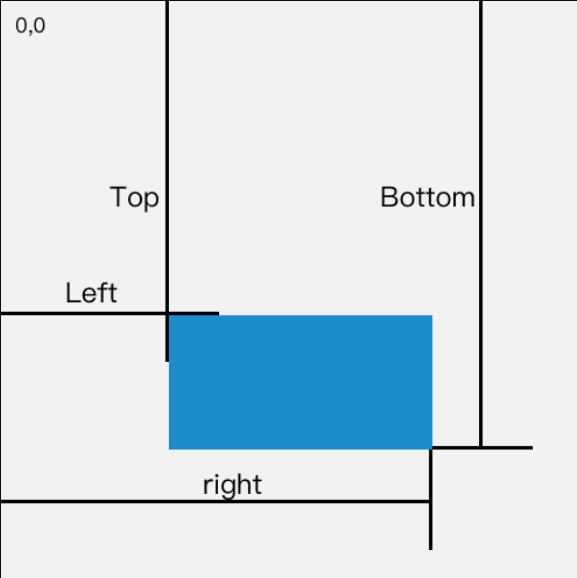
注意: 这些属性不是固定的值,随着屏幕的滚动,这些属性值是可能发生变化的;
------
详情可以在MDN上查看:
https://developer.mozilla.org/zh-CN/docs/Web/API/Element/getBoundingClientRect

 浙公网安备 33010602011771号