


使用 sysMonApp 分析 Qualcomm Hexagon DSP 性能/负载情况
使用 sysMonApp 分析 Qualcomm Hexagon DSP 性能/负载情况
Qidi Huang 2025.06.06
0. 工具介绍
高通 Hexagon_SDK 中提供了不同的 sysMonApp 工具,用于在不同操作系统环境下抓取 Hexagon DSP 性能数据。
如果你采用默认路径安装 Hexagon_SDK,那么这些工具位于 C:\Qualcomm\Hexagon_SDK\6.2.0.1\tools\utils\sysmon 目录下。或者,也可以在代码目录 <ADSP build>/adsp_proc/performance/sysmonapp/sysMonAppE 下找到它们。分别是:
- Android Java:
sysMon_DSP_Profiler_v2.apk - Android Native:
sysMonApp - Linux:
sysMonAppLE - QNX:
sysMonAppQNX - Gunyah:
sysMonAppLE
1. 抓取性能/负载数据
尽管高通提供了在 Android Java、Native 等 GVM 环境抓取 DSP 性能数据的工具版本,但由于这些工具在抓取数据时需要进行 GVM - PVM 跨系统通信,意味着必须在 GVM 侧运行 FastRPC daemon(即 /system/bin/adsprpcd)才能抓到数据。
我使用的系统镜像中并没有打包 adsprpcd,所以我选择在 PVM 运行 sysMonAPP 抓取数据。当然你也可以编译一个打包了 adsprpcd 的系统镜像,专门用作性能/负载评估。
在我的开发环境下,GVM 是 Android,PVM 是 QNX,两个 VM 间通过 NFS 共享文件。所以,我使用 adb push 命令将 sysMonAppQNX 工具拷贝到 Android 的 NFS 目录下,然后登录 QNX 并从 NFS 目录下运行 sysMonAppQNX 工具。
1.1 抓取 DSP 整体性能/负载数据:
sysMonAppQNX profiler --q6 adsp --duration 60
其中 --q6 参数值可以是 adsp、cdsp、sdsp、mdsp 之一,默认是 adsp;--duration 参数表示抓取数据时长,单位是秒,默认值是 10。
抓取完成后,生成数据文件 /data/sysmon.bin(如果参数是 mdsp,那么文件名是 sysmon_mdsp.bin)
1.2 抓取各硬件线程性能/负载数据:
sysMonAppQNX tlp --profile 1 --samplingPeriod 1 --q6 adsp --defaultSetEnable 3 --duration 60
其中 tlp 表示 Thread Level Performance;--profile 表示是否要同时抓取 DSP 整体性能/负载数据;--samplingPeriod 表示数据采样间隔,单位是毫秒,默认值是 50;--defaultSetEnable 表示选取何种 logging 配置,从各种文档推测,其取值范围是 0~3,此处我们需要设置为 3。
抓取完成后,生成数据文件 /data/sysmontlp_adsp.bin(如果参数是 mdsp,那么文件名是 sysmontlp_mdsp.bin)
关于 --defaultSetEnable 参数,公开的资料很少。高通文档 (DCN: 80-NF768-19) 中能找到一段说明。不过由于该文档发布于 2016 年,其内容可能与 sysMonApp 最新版本有所出入,并且只提供了参数取值为 0、1、2 的描述。如下:
| Argument | Property | Value | Explanation |
|---|---|---|---|
| --defaultSetEnable | Optional (Default: 0) |
0 | User mode logging with four PMU events per set. Each set is repeated by --samplesPerSet number of times, and then next set is selected. By default, DCVS is disabled in this mode. If DCVS is required, use --dcvsOption to enable DCVS (unless it is disabled globally through DVCS Service.) |
| 1 | Defalut mode logging. A default set of eight PMU events are captured for the entire profiling duration. This mode is the preferred mode of capture with DCVS enabled. aDSP DCVS (if supported) remains enabled in this mode (unless disabled globally through DCVS Service.) |
||
| 2 | User mode logging with eight PMU events per set. Each set is repeated by --samplesPerSet number of times, and then the next set is selected. aDSP DCVS (if supported) is disabled in this mode. |
1.3 查看完整参数说明:
sysMonAppQNX -help
以下是完整参数说明:
--------------------
sysMonApp user guide:
--------------------
Supported features :

1. profiler: Collect performance statistics of Q6
        Available Options for adsp/sdsp/cdsp : (If no argument then uses default):
                --q6            (default selected processor:ADSP):
                                        adsp - Selected processor ADSP
                                        sdsp - Selected processor Sensors DSP
                                        cdsp - Selected processor CDSP
                                        mdsp - Selected processor MDSP
                --debugLevel            (default:1 - default mode) Input 0 for user mode
                                        0 - User mode logging with 4 PMU events per set
                                        1 - Default mode logging
                                        2 - User mode logging with 8 PMU events per set
                --profileFastrpcTimeline        Profile the time taken by fastRPC communication
                                                0 - Disable
                                                1 - Enable
                      Following options are valid only for 'Default mode' logging
                --samplingPeriod        sampling period in ms(default:0 ms - no sampling period override - to be decided by sysMon
                --duration              profiling duration in seconds(default:10s)
                --dcvsOption            1 - Keep DCVS enabled (if not disabled externally by other clients) for this profiling
                                        0 - disable DCVS for this profiling. Use this option if you want to fix a particular sampling rate.
                                        (Default: 1 - Donot disable DCVS)
                      Following options are valid only for 'user mode' logging
                --samplingPeriod        sampling period in ms(default:1 ms)
                --dcvsOption            1 - Keep DCVS enabled (if not disabled externally by other clients) for this profiling
                                        0 - disable DCVS for this profiling. Use this option if you want to fix a particular sampling rate.
                                        (Default: 0 - Disables DCVS)
                        For user mode logging, if you want to override default PMU events used by sysmon app, create /data/pmu_events.txt file with comma separated PMU events in HEX format
        Example: ./sysMonApp profiler --samplingPeriod 100
        Example: ./sysMonApp profiler --q6 adsp --samplingPeriod 100
        Example: ./sysMonApp profiler --q6 cdsp --samplingPeriod 100
        Available Options for npu : (If no argument then uses default):
                --q6            (default selected processor:CDSP):
                                        npu - Selected processor NPU
                --samplingPeriod        sampling period in ms(default:1 ms
                --cdsp                 (default:0 - Profiles NPU alone
                                                0 - Profiles NPU alone
                                                1 - Profiles both NPU and CDSP
        Example: ./sysMonApp profiler --q6 npu
        Example: ./sysMonApp profiler --q6 npu --cdsp 1
        Available Options for mdsp : (If no argument then uses default):
                --q6            (default selected processor:CDSP):
                                        mdsp - Selected processor MDSP
                --samplingPeriod        sampling period in ms(default:1 ms
        Example: ./sysMonApp profiler --q6 mdsp
        Example: ./sysMonApp profiler --q6 mdsp --cdsp 1
        Additional Options/features supported :
                --prints  1            (default:1 - by default sysmon prints are enabled)
                                                0 - sysmon prints will be disabled
                --outputbin  1            (default: 1 - generates output binary files)
                                                    0 - output binary generation is disabled
                --outfile   /data/file.txt   logging the sysmon prints to a file
        Example: ./sysMonApp getload --prints 0 --q6 adsp
        Example: ./sysMonApp getload --outfile /data/log.txt --q6 adsp
        Example: ./sysMonApp getload --prints 1 --outputbin 0  --q6 adsp

2. tlp: Collect thread level performance statistics of Q6
        Available Options : (If no argument then uses default):
                --q6            (default selected processor:ADSP):
                                        adsp - Selected processor ADSP
                                        sdsp - Selected processor Sensors DSP
                                        cdsp - Selected processor CDSP
                --samplingPeriod        sampling period in ms(default:50 ms)
                --duration              profiling duration in seconds(default:10s)
                --tName         Thread names to profile seperated with comma(default: Profile all active threads)
                --profile         Runs Sysmon profile in paralle with TLP(default:0)
                                        0 - Sysmon Profile is not executed
                                        1 - Sysmon Profile is executed
        Example: ./sysMonApp TLP
        Example: ./sysMonApp TLP --samplingPeriod 50
        Example: ./sysMonApp TLP --samplingPeriod 10 --profile 1
        Example: ./sysMonApp TLP --samplingPeriod 5 --profile 1 --tName AfeDy4000,MXAR

3. dcvs: Enable or disable DCVS
        ./sysMonApp dcvs <enable/disable>
        ./sysMonApp dcvs --q6 sdsp <enable/disable>
        ./sysMonApp dcvs --q6 adsp <enable/disable>
                --q6            (default selected processor:ADSP):
                                        adsp - Selected processor ADSP
                                        sdsp - Selected processor Sensors DSP
                                        cdsp - Selected processor CDSP
                enable:
                        Will enable SysMon DCVS in ADSP if previously disabled
                disable:
                        Will disable SysMon DCVS in ADSP

4. getstate: Get present clock, heap state
        Available Options for getstate: (If no argument then uses default parameters):
                --q6            (default selected processor:ADSP):
                                        adsp - Selected processor ADSP
                                        sdsp - Selected processor Sensors DSP
                --getvotes            (default selected value:0):
                                        1 - Get the DCVS client votes
                                        0 - DCVS client votes are not queried
        Example : ./sysMonApp getstate --q6 sdsp
        Example : ./sysMonApp getstate --getvotes 1 --q6 adsp
        Example : ./sysMonApp getstate

5. clocks: For changing Q6 related clocks
        ./sysMonApp clocks <set/remove/limit> <options>

        Available Options:
                --q6            (default selected processor:ADSP):
                                        adsp - Selected processor ADSP
                                        sdsp - Selected processor Sensors DSP
                                        cdsp - Selected processor CDSP

        Available Options (for set option):
                --coreClock    <in MHz>(default:0)
                --busClock     <in MHz>(default:0)
                --hcpBusClock  <in MHz>(default:0)
                --dmaBusClock  <in MHz>(default:0)
                --sleepLatency <in micro-seconds>(default:0)

        An explicity vote of 0 removes any previous vote for that option
        Leave the defaults for the clocks you don't want to change
        A remove has to be called to revert all the settings once done
        limit - Limits only the coreClock, all the other clients voting for core clock will be overwritten
        Example: ./sysMonApp clocks set --coreClock 200 --busClock 100
        Example: ./sysMonApp clocks remove
        Example: ./sysMonApp clocks limit --coreClock 400

6. ./sysMonApp tinfo     :Print the all SW threads info at that instance
        Available Options : (If no argument then uses default):
                --q6            (default selected processor:ADSP):
                                        adsp - Selected processor ADSP
                                        sdsp - Selected processor Sensors DSP
                                        cdsp - Selected processor CDSP
                --getstack        Provides the declared and max used Stack Size
                                        root - Provides Stack info of rootPD
                                        audio - Provides Stack info of audioPD
                                        sensors - Provides Stack info of sensorsPD
                                        user - Provides Stack info of userPD
                                        all - Provides Stack info of allPDs
                                        If none of the above match provides the defaults
        Example: ./sysMonApp tinfo
        Example: ./sysMonApp tinfo --getstack root
        Example: ./sysMonApp TLP --getstack all

7. ./sysMonApp benchmark :Run benchmark application with desired functions

8. getLoad: On Traget Q6 Profile Stats
        Available Options : (If no argument then uses default):
                --q6            (default selected processor:ADSP):
                                        adsp - Selected processor ADSP
                                        sdsp - Selected processor Sensors DSP
                                        cdsp - Selected processor CDSP
                --time        time in ms(default:1000)
                --iterations  Provides the profile stats for that many number of iterations set by user(default:1)

9. etmTrace: Etm Trace Enablement || DLL Loaded Output
        ./sysMonApp etmTrace
                --command       (default selected etm):
                                        etm - Enable ETM tracing
                                        dll - Output DLL
                --etmType       (default selected pc_mem):
                                        pc        - PC Only Collection
                                        mem       - Memory Only Collection
                                        pc_mem    - PC + Memory Collection
                                        cc_pc - Cycle Coarse PC Only Collection
                                        cc_mem - Cycle Coarse Memory Only Collection
                                        cc_pc_mem - Cycle Coarse PC + Memory Collection
                                        ca_pc - Cycle Accurate PC Only Collection
                                        ca_mem - Cycle Accurate Memory Only Collection
                                        ca_pc_mem - Cycle Accurate PC + Memory Collection
                --d             (default 0):
                                        1 - Debug prints enabled
                                        0 - Debug prints disabled

10. DSP Power Statistics

 getPowerStats: Get DSP power stats
        Available options:(If no argument then uses default)
                --q6            (default selected processor:ADSP):
                                        adsp - Selected processor ADSP
                                        sdsp - Selected processor Sensors DSP
                                        cdsp - Selected processor CDSP
                --clear         By 'clear' value as 1, it clears DSP power stats and restarts collecting it again(default: 0)
        Example : ./sysMonApp getPowerStats --q6 cdsp
        Example : ./sysMonApp getPowerStats --clear 1 --q6 adsp

11. pinfo: Displays the Stats of PD
        ./sysMonApp pinfo --q6 cdsp
2. 生成报告
需要将抓取到的数据,即 sysmon*.bin,转换成 HTML 页面,才能阅读。
使用 Hexagon_SDK 自带的解析工具就能进行转换,非常简单。如果你采用默认路径安装,那么解析工具位于 C:\Qualcomm\Hexagon_SDK\6.2.0.1\tools\utils\sysmon\parser_win_v2\HTML_Parser\sysmon_parser.exe。如果你是在 Linux 环境下操作,就去 parser_linux_v2 目录下取用。
转换命令如下:
sysmon_parser sysmontlp_adsp.bin
以上命令会在解析工具所在目录下会生成一个名称类似 sysmon_report_2025213_1417 的文件夹,里面有个叫 sysmon_report.html 的页面,这就是性能/负载报告了。
3. 分析报告
工作中碰到个 “播放收音机的过程中频繁切换音效导致播放出现大量噪声” 的问题。由于收音机数据是 ADSP 直接从 Modem芯片 读取、再写入功放芯片,所以怀疑噪声是由于 ADSP 性能不足所致,与 CPU 调度无关。
为了分析,我用上文 1.2 节的命令抓取了问题过程中的 ADSP 性能/负载数据。本节以此问题为例,对分析报告过程进行说明。
用浏览器打开报告。首先看到的是 ADSP 性能/负载概要信息:
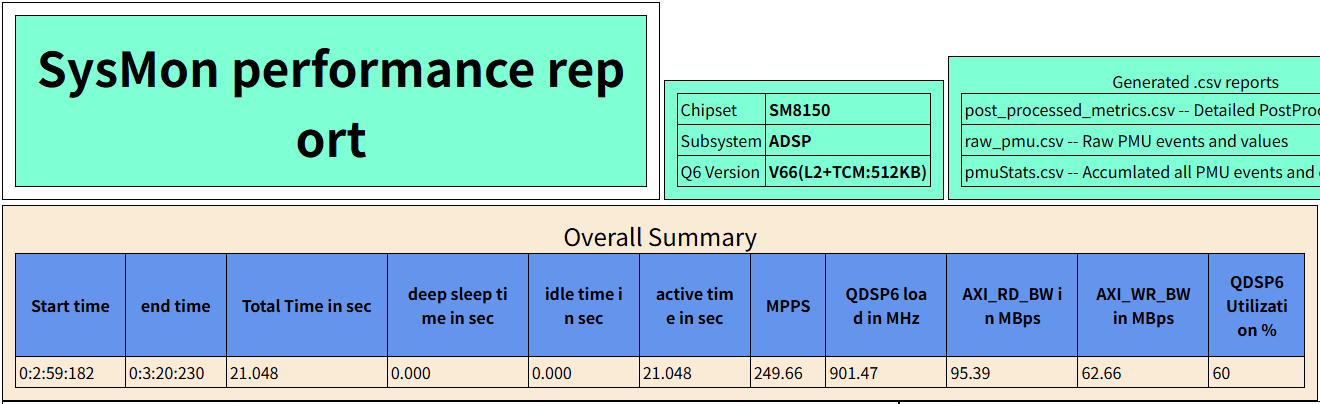
从概要信息可以看到,抓取性能数据的时长是 21.048 秒;时段内 ADSP 平均运行主频为 901.47MHz;时段内 ADSP 平均使用率为 60%。时段内 ADSP 使用率没有超过高通建议的最大值(70%),看起来整体负载不算高。
继续看分列信息:
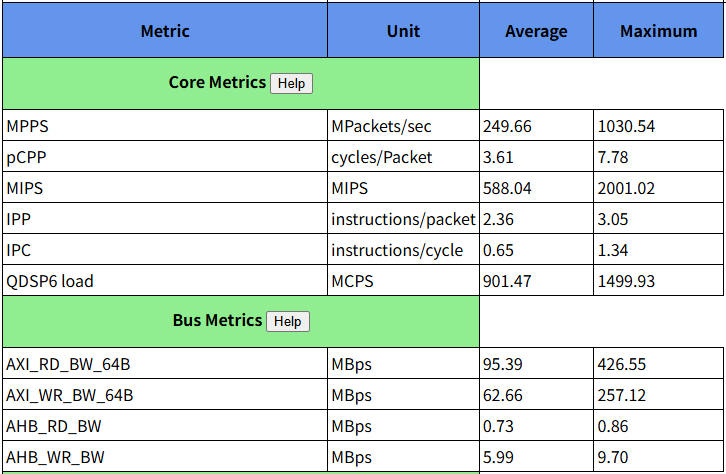
这里看到,pCPP 平均值为 3.61,最大值达到了 7.78。根据高通文档,pCPP 值超过 3.5 就意味着代码执行效率不高。(更多参数说明见 《DSP/CPU 性能/算力评估指标介绍
》)
另一方面,尽管 ADSP 平均运行频率为 901.47MHz,但最大运行频率却达到过 1499.93MHz。这表明在时段内至少出现过一次 ADSP 瞬时负载拉满的情况。这可能导致 ADSP 内部的音效算法数据处理不及时或 ADSP 对外的数据读写不及时。一旦出现 ADSP buffer 内数据耗尽又没能及时写入数据的情形,噪声就产生了。不过仅凭这个最大运行频率记录还不足以说明问题。
再向下看:
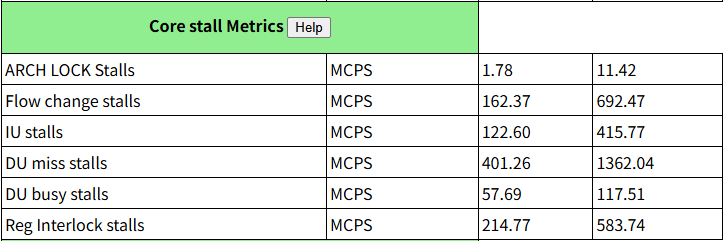
这是 ADSP 运行过程中各类型停顿(stall)的统计数据。单看这个表格不够直观,我们可以看它右侧对应的饼状图:
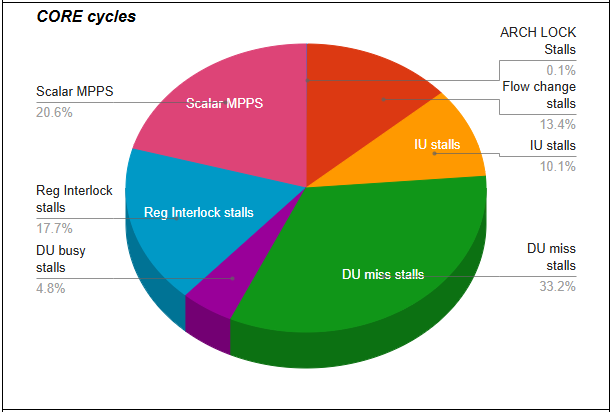
可以看到在抓取负载数据的时段内,ADSP 实际进行数据处理的时间只占 20.6%。这个利用率太低了。利用率低的原因可能在于频繁切换音效时,音效算法实例不断创建、销毁,造成大量缓存未命中(Cache miss);也可能是音效算法的代码质量不够好。
最后再检查全时段 ADSP 负载波形:
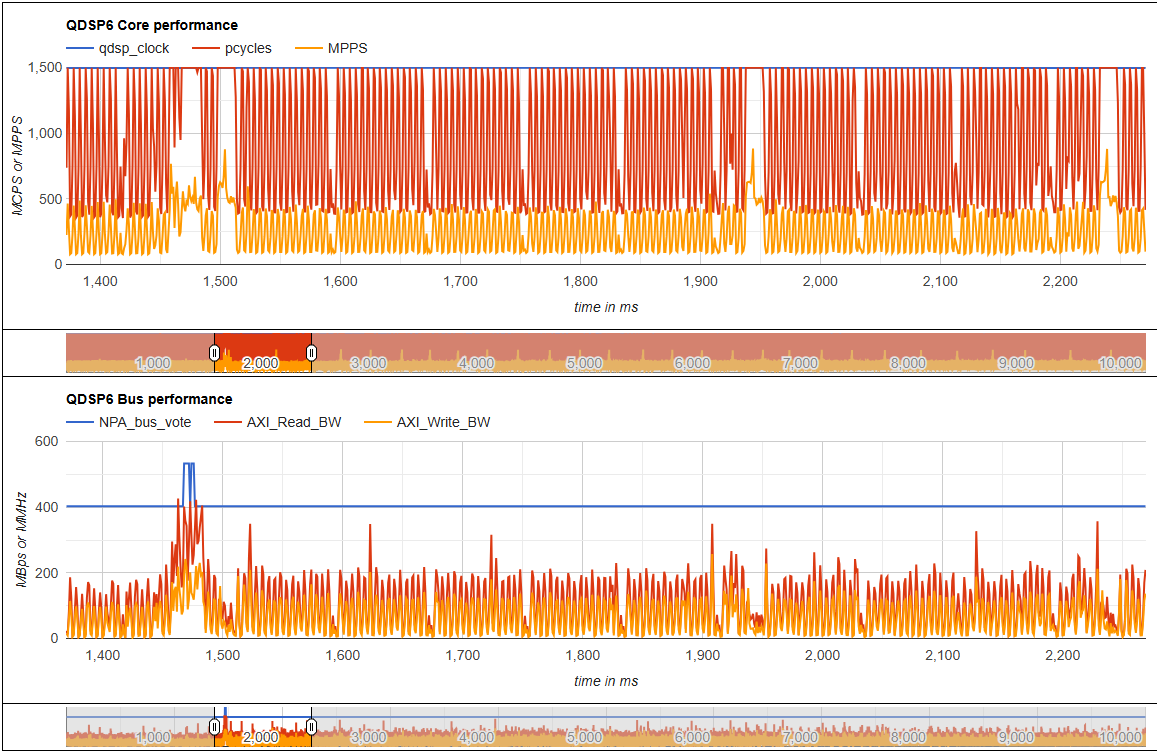
可以看到,AXI 总线频率除了在 1462~1477ms 时段短暂升频以满足 DDR 访问外,其余时段负载情况均正常。
而 ADSP 负载就不乐观了。切换音效算法前,ADSP 的瞬时负载就已经出现每隔 5ms 左右达到 100% 的情况;而后伴随频繁的音效切换,以大约 300ms 的间隔,ADSP 负载不断被拉到 100%,平均每次持续时长约 10ms。
根据高通文档(DCN: 80-27686-1),当 ADSP 负载超过 70% 时,就可能导致音频播放过程中出现噪声:
This may work most of the time, but there will be additional things to be executed, load peaks or extra delays in the DSP, like loading a new use case, extra calculation from adaptive processing, increased DDR access latency from concurrent subsystem competition, etc.
Such delays would sporadically or even regularly prevent the DSP framework from delivering processed audio to hardware or software interfaces in time.
This is the reason why Qualcomm recommends keeping a safety margin and only use 70% of the maximum MPPS number for automotive applications, to guarantee distortion free audio under all operational conditions.
综上,我判断噪声是该问题场景下 ADSP 负载过高导致,而要降低负载可能需要优化音效算法、或调整音效算法模块的加载策略。
4. 补充记录
顺带说一下调节 Qualcomm Hexagon DSP 运行频率的命令。如下:
sysMonAppQNX clocks set --coreClock 1500 --busClock 2000 --q6 adsp
类似的,--q6 参数根据芯片型号,可以是 adsp、mdsp、cdsp、sdsp 之一;--coreClock 和 --busClock 根据芯片型号,所支持的最大值也有所不同。
5. 参考资料
[1] 高通文档《80-31869-2_REV_AA_SysMon__DSP__Overview》
[2] 高通文档《80-27686-1_REV_AA_Hexagon_Audio_DSP_Load_Metrics》
[3] 高通文档《KBA-240602194851_REV_3_How_to_use_sysmonapp_on_HQX》
[4] Hexagon_SDK/6.2.0.1/docs/tools/sysmon_parser.html
[5] Sysmon profiler
本文来自博客园,作者:Qidi_Huang,转载请注明原文链接:https://www.cnblogs.com/qidi-huang/p/18927509

 浙公网安备 33010602011771号