


odoo 上传与下载附件
postman 上传成功示例:
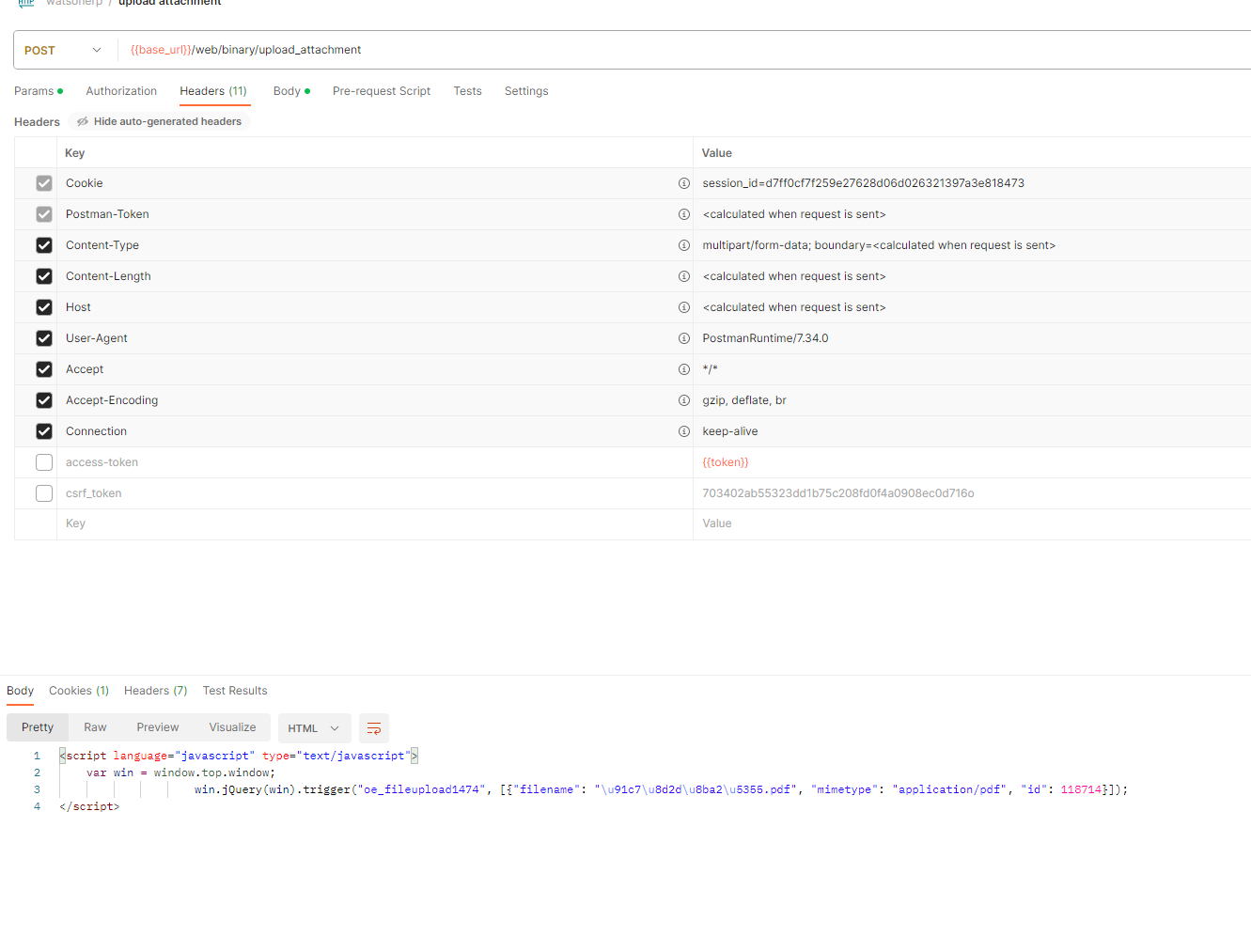
路由地址:/web/binary/upload_attachment
获取odoo 的cookie和csrf_token
csrf_token 调用方法:request.csrf_token()
cookie 很难获取,建议重新写路由
模仿restful模块添加附件路由
	# 下载路由
    @validate_token
    @http.route(['/api2/web/content',
        '/api2/web/content/<string:xmlid>',
        '/api2/web/content/<string:xmlid>/<string:filename>',
        '/api2/web/content/<int:id>',
        '/api2/web/content/<int:id>/<string:filename>',
        '/api2/web/content/<int:id>-<string:unique>',
        '/api2/web/content/<int:id>-<string:unique>/<string:filename>',
        '/api2/web/content/<int:id>-<string:unique>/<path:extra>/<string:filename>',
        '/api2/web/content/<string:model>/<int:id>/<string:field>',
        '/api2/web/content/<string:model>/<int:id>/<string:field>/<string:filename>'], type="http", auth="none", methods=["GET"], csrf=False, cors="*", save_session=False)
    def content_common(self, xmlid=None, model='ir.attachment', id=None, field='datas',
                       filename=None, filename_field='datas_fname', unique=None, mimetype=None,
                       download=None, data=None, token=None, access_token=None, related_id=None, access_mode=None,
                       **kw):
        status, headers, content = binary_content(
            xmlid=xmlid, model=model, id=id, field=field, unique=unique, filename=filename,
            filename_field=filename_field, download=download, mimetype=mimetype,
            access_token=access_token, related_id=related_id, access_mode=access_mode)
        if status == 304:
            response = werkzeug.wrappers.Response(status=status, headers=headers)
        elif status == 301:
            return werkzeug.utils.redirect(content, code=301)
        elif status != 200:
            response = request.not_found()
        else:
            content_base64 = base64.b64decode(content)
            headers.append(('Content-Length', len(content_base64)))
            response = request.make_response(content_base64, headers)
        if token:
            response.set_cookie('fileToken', token)
        return response

	# 上传路由
    @validate_token
    @http.route('/api2/web/binary/upload_attachment', type='http', auth="none", methods=["POST"], csrf=False, cors="*", save_session=False)
    @serialize_exception
    def upload_attachment(self, callback, model, id, ufile):
        files = request.httprequest.files.getlist('ufile')
        Model = request.env['ir.attachment']
        out = """<script language="javascript" type="text/javascript">
                    var win = window.top.window;
                    win.jQuery(win).trigger(%s, %s);
                </script>"""
        args = []
        for ufile in files:

            filename = ufile.filename
            if request.httprequest.user_agent.browser == 'safari':
                # Safari sends NFD UTF-8 (where é is composed by 'e' and [accent])
                # we need to send it the same stuff, otherwise it'll fail
                filename = unicodedata.normalize('NFD', ufile.filename)

            try:
                attachment = Model.create({
                    'name': filename,
                    'datas': base64.encodestring(ufile.read()),
                    'datas_fname': filename,
                    'res_model': model,
                    'res_id': int(id)
                })
                attachment._post_add_create()
            except Exception:
                args.append({'error': _("Something horrible happened")})
                _logger.exception("Fail to upload attachment %s" % ufile.filename)
            else:
                args.append({
                    'filename': filename,
                    'mimetype': ufile.content_type,
                    'id': attachment.id
                })
        return out % (json.dumps(callback), json.dumps(args))
js 请求示例:
// 上传
var form = new FormData();
form.append("model", "stock.picking");
form.append("id", "79183");
form.append("callback", "oe_fileupload14741");
form.append("ufile", fileInput.files[0], "/C:/Users/qianx/Documents/odoo_dev.conf");

var settings = {
  "url": "test.com/api2/web/binary/upload_attachment",
  "method": "POST",
  "timeout": 0,
  "headers": {
    "access-token": "access_token_1db078ca41c34b1cf72b4b66e4d8375c94134123",
    "Cookie": "session_id=02cc213a0956e920911e920330f35ab4b844391c"
  },
  "processData": false,
  "mimeType": "multipart/form-data",
  "contentType": false,
  "data": form
};

$.ajax(settings).done(function (response) {
  console.log(response);
});

// 下载
var settings = {
  "url": "test.com/api2/web/content/118714?download=true",
  "method": "GET",
  "timeout": 0,
  "headers": {
    "access-token": "access_token_1db078ca41c34b1cf72b4b66e4d8375c94134123",
    "Cookie": "session_id=02cc213a0956e920911e920330f35ab4b844391c"
  },
};

$.ajax(settings).done(function (response) {
  console.log(response);
});
本文来自博客园,作者:那时一个人,转载请注明原文链接:https://www.cnblogs.com/qianxunman/p/17819361.html

 浙公网安备 33010602011771号