vue3+ts+vite 基于router的方式改造侧边菜单 第九回
1.先来回忆下路由的代码段
import {
  createRouter,
  createWebHashHistory,
  RouteRecordRaw
} from 'vue-router'
const routes:Array<RouteRecordRaw>=[
  {
    path:'/',
    name:'Home',
    component:()=>import('../views/index.vue')
  },
  {
    path:'/about',
    name:'About',
    component:()=>import('../views/about.vue')
  }
]
const router = createRouter({
  history: createWebHashHistory(), // 路由跳转模式 ,hash模式会带#号 /#/xxx.
  routes
})
export default router
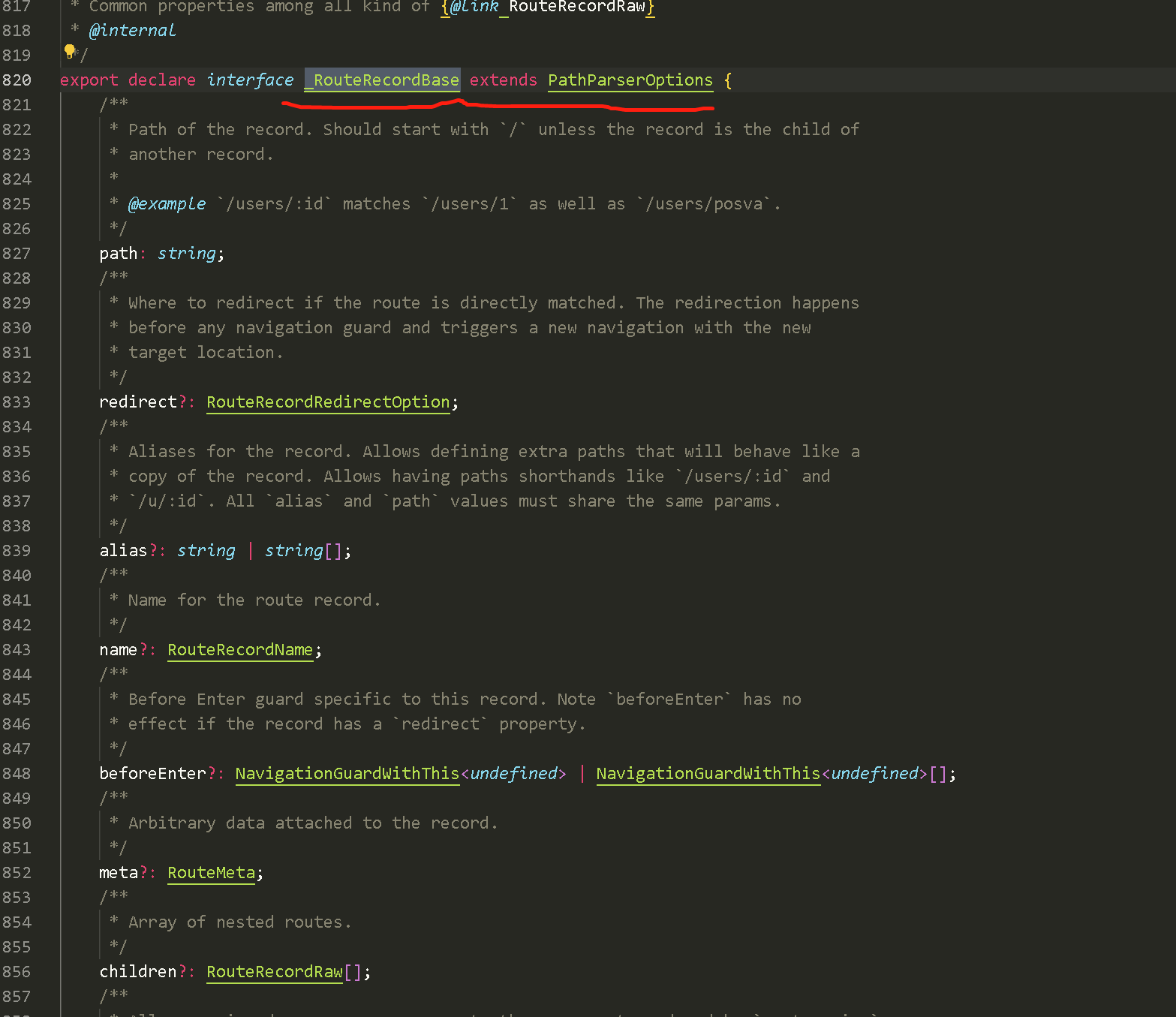
2.现在使用的是vue3+ts的方式去实现,所以 RouteRecordRaw 里指定的类型必然不能满足日常的需要,接下来看一下源码。对RouteRecortdRaw的类型支持。

不难发现,每一个类型都继承了自 _RouteRecordBase,所以如果想扩展router的额外自定义参数,依然需要用到类型声明合并。只需要对该类型扩展即可
3.在types目录下新建vue-router.d.ts 内容如下
import { Component } from 'vue';
import { _RouteRecordBase } from 'vue-router';
declare module 'vue-router'{
  interface _RouteRecordBase{
      showForMenue?: boolean , // 是否把路由显示在侧边栏菜单
      Icons?:string | Component,   // 自定义的Icon
      Title?:string,    // 标题
  }
}

// 这里我们扩展3个参数。以此举例
4.接下来改造下路由
import {
  createRouter,
  createWebHashHistory,
  RouteRecordRaw
} from 'vue-router'
const routes:Array<RouteRecordRaw>=[
  {
    path:'/',
    name:'Home',
    showForMenue:true,
    Title:"首页",
    Icons:"fund-view-outlined",
    component:()=>import('../views/index.vue')
  },
  {
    path:'/about',
    name:'About',
    showForMenue:true,
    Title:"关于我们",
    Icons:"fund-view-outlined",
    component:()=>import('../views/about.vue')
  }
]
const router = createRouter({
  history: createWebHashHistory(), // 路由跳转模式 ,hash模式会带#号 /#/xxx.
  routes
})
export default router
5.菜单上的使用
<script setup lang="ts" >
const selectedKeys = ref<string[]>(['1'])

const router = useRouter()

let routerArray: RouteRecordRaw[] = reactive([])
let initMenu = () => {
  routerArray = router.options.routes.filter((item: any) => item.showForMenue)
  selectedKeys.value = [router.currentRoute.value.name as string || '1']
}

onBeforeMount(() => {
  initMenu()
})

</script>
 <a-menu v-model:selectedKeys="selectedKeys" theme="dark" mode="inline">
        <a-menu-item v-for="item in routerArray" :key="item.children?.length == 1 ? item.children[0].name : item.name">
          <router-link :to="item.children?.length == 1 ? item.children[0].path : item.path">
            <component :is="item.Icons"></component>
            <span>{{ item.Title }}</span>
          </router-link>
        </a-menu-item>
</a-menu>
本文来自博客园,作者:都是机缘,转载请注明原文链接:https://www.cnblogs.com/qh1688/p/17477139.html

 浙公网安备 33010602011771号