
常用配置
bashrc
which docker >/dev/null 2>/dev/null || PSDOCKER="[d]"
export PS1=$PSDOCKER'\u@\h:\w$ '
alias ls='ls --color'
export PYTHONDONTWRITEBYTECODE=1

apt-get update
apt-get install locales
locale-gen en_US.UTF-8
export LANG="en_US.UTF-8"
export LC_ALL="en_US.UTF-8"

locale-gen zh_CN.UTF-8
export LANG="zh_CN.UTF-8"
export LC_ALL="zh_CN.UTF-8"
如果想变更HOME目录,比如磁盘大小原因,那么在最初bashrc修改如下,这样需要修改两个不同位置的bashrc
export HOME=/ssd7/shikejing/
cd
vimrc
set nu
set hlsearch

set tabstop=2
set shiftwidth=2
set expandtab

set softtabstop=2
set autoindent

nmap <c-k> <c-w><c-k>
nmap <c-j> <c-w><c-j>
nmap <c-h> <c-w><c-h>
nmap <c-l> <c-w><c-l>
screenrc
caption always "%{=b kR} %-w%{-b bg}%n %t%{-}%+w"
vbell off
defdynamictitle off
termcapinfo xterm* ti@:te@
cat ~/.config/pip/pip.conf
[global]
index-url = https://mirrors.aliyun.com/pypi/simple
[install]
trusted-host = mirrors.aliyun.com

[global]
index-url=http://mirrors.baidubce.com/pypi/simple/
[install]
trusted-host=mirrors.baidubce.com
cat ~/.gitconfig
[user]
name = xx
email = xxx
[docker]
set -e

COMMAND="$1"

YOUR_DOCKER_NAME=shikejing_ubuntu2004_test

start_docker() {
  echo "docker container name: ${YOUR_DOCKER_NAME}"
  image='hunyuanvideo/hunyuanvideo:cuda_12'
  docker run -itd --rm --gpus all --init --net=host --uts=host -v ${PWD}/:${PWD} -w ${PWD} --ipc=host --name ${YOUR_DOCKER_NAME} --pid=host --security-opt=seccomp=unconfined --ulimit=stack=67108864 --ulimit=memlock=-1 --shm-size=64g --privileged -p 8123:8123 hunyuanvideo/hunyuanvideo:cuda_12
}


rm_docker() {
  docker rm -f $YOUR_DOCKER_NAME
}

exec_docker() {
  if [ -n "$1" ]; then
    docker exec -u shikejing -it $YOUR_DOCKER_NAME bash
  else
    docker exec -it $YOUR_DOCKER_NAME bash
  fi
}

init_docker() {
  #cp /home/users/shikejing/.vimrc /root
  #cp /home/users/shikejing/.screenrc /root
  #apt-get install screen
  apt-get install sudo
  echo 'shikejing:x:569872:100000::/ssd7/shikejing:/bin/bash' >> /etc/passwd
  echo 'shikejing:!:20112:0:99999:7:::' >> /etc/shadow
  echo 'DOORGOD:x:100000:' >> /etc/group
  echo 'shikejing       ALL=(ALL:ALL) NOPASSWD:ALL' >> /etc/sudoers
  #curl http://baidu-ide.bj.bcebos.com/platform/script/host-script/install-agent.sh | bash -s -- -g 4a105f82-1e87-4360-856c-ba4d4a0c8130 -c a70b366f74e9431e3e9c0b592cc9650b -v 1.8.401.83.1.03 -p 8123
}

init_docker_ssh() {
  sudo sed -i 's/#Port 22/Port 8223/g' /etc/ssh/sshd_config
  sudo service ssh start
  sudo service ssh status
}

if [ $1 == 'start' ]; then
  start_docker
elif [ $1 == 'rm' ]; then
  rm_docker
elif [ $1 == 'init' ]; then
  init_docker
  init_docker_ssh
elif [ $1 == 'exec' ]; then
  exec_docker $2
fi
terminal用这个颜色

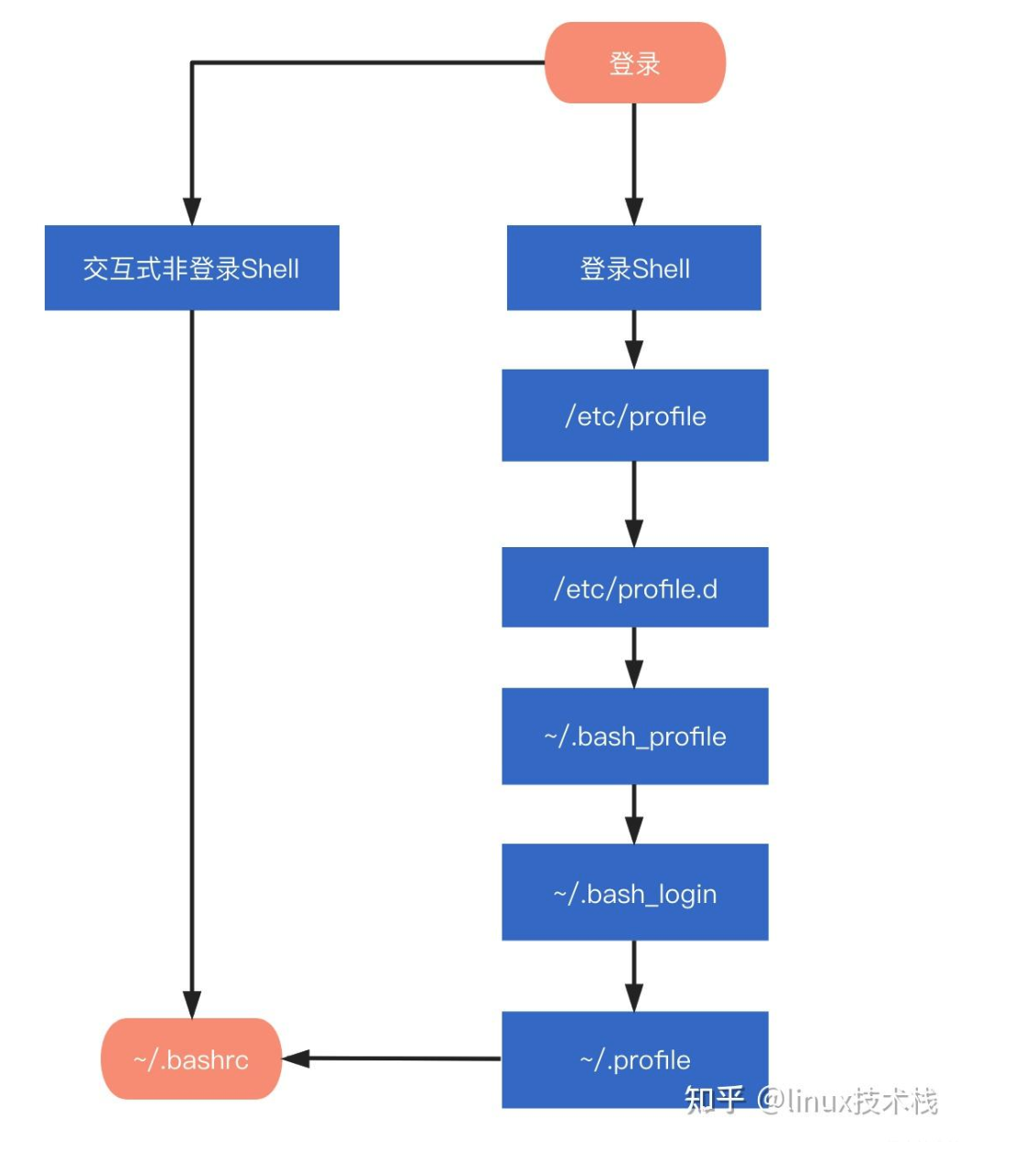
- 注意:docker exec 不算登录,只是开了个shell *
ssh 代理
If you are using macOS and want to ssh to machine 1.1.1.1:2222 under socks proxy(127.0.0.1:1080), then you can use the below configuration:

Host 1.1.1.1
    HostName 1.1.1.1
        ProxyCommand nc -X 5 -x 127.0.0.1:1080 %h %p
    Port 2222
    User YourName
If you are using http proxy or using Windows(Linux), go to check Connect with SSH through a proxy . Then replace the corresponding ProxyCommand.

Hope this could help you.
touchbar
sudo kill -9 `ps aux | grep 'TouchBarServer' | grep -v 'grep' | awk '{print $2}'`

 浙公网安备 33010602011771号