今日百度热搜前十名
页面分析
1.在浏览器中输入百度热搜风云网网址http://top.baidu.com/buzz?b=1&fr=topindex,点击今日热搜
2.查看页面源代码,查询需要的标签属性关键字
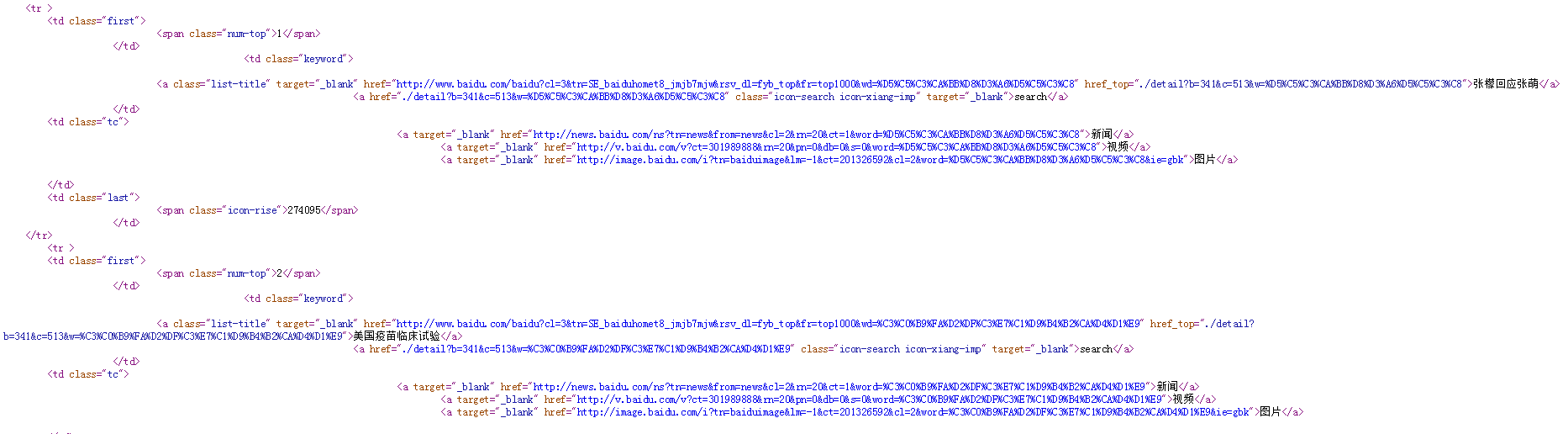
3.程序实现
import requests
from bs4 import BeautifulSoup
import pandas as pd
url = 'http://top.baidu.com/buzz?b=341&c=513'
#爬虫请求头信息
headers = {'Mozilla/4.0 (compatible; MSIE 7.0; Windows NT 5.1)'}
#发起一个GET请求
res=requests.get(url,timeout=30)
res.encoding=res.apparent_encoding#设置编码标准
soup=BeautifulSoup(res.text,'html.parser')#采用BeautifulSoup类解析网页,使用html.parser解析器
#创建列表
list1=[]
list2=[]
for x in soup.find_all('td',class_="keyword"):#for语句查找标签
    list1.append(x.get_text().strip())
for y in soup.find_all('td',class_= "last"):#for语句查找标签
    list2.append(y.get_text().strip())
data=[list1,list2]
df=pd.DataFrame(data,index=["关键词","搜索指数"])
print(df.T)
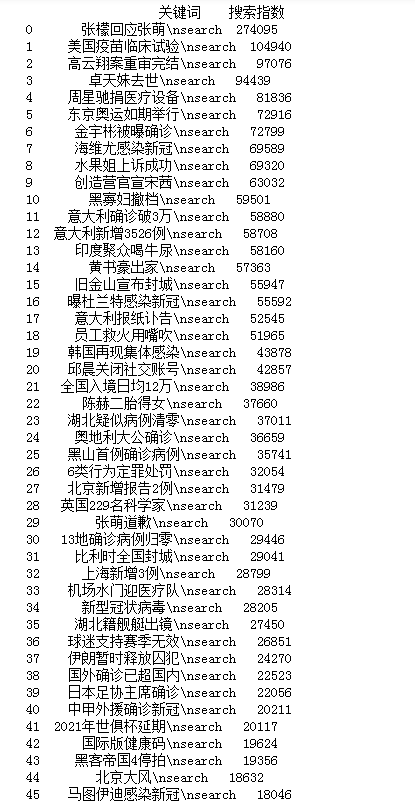
4.获取数据

 浙公网安备 33010602011771号