
谈谈IE针对Ajax请求结果的缓存
在默认情况下,IE会针对请求地址缓存Ajax请求的结果。换句话说,在缓存过期之前,针对相同地址发起的多个Ajax请求,只有第一次会真正发送到服务端。在某些情况下,这种默认的缓存机制并不是我们希望的(比如获取实时数据),这篇文章就来简单地讨论这个问题,以及介绍几种解决方案。
目录
一、问题重现
二、通过为URL地址添加后缀的方式解决问题
三、通过JQuery的Ajax设置解决问题
四、通过定制响应解决问题
一、问题重现
我们通过一个ASP.NET MVC应用来重现IE针对Ajax请求结果的缓存。在一个空ASP.NET MVC应用中我们定义了如下一个默认的HomeController,其中包含一个返回当前时间的Action方法GetCurrentTime。
 1: public class HomeController : Controller
   2: {
   3:     public ActionResult Index()
   4:     {
   5:         return View();
   6:     }
   7:
   8:     public string GetCurrentTime()
   9:     {
  10:         return DateTime.Now.ToLongTimeString();
  11:     }
  12: }
默认Action方法Index对应的View定义如下。我们每隔5秒钟利用JQuery的方法以Ajax的方式调用GetCurrentTime操作,并将返回的结果显示出来。

   1: <!DOCTYPE html>
   2: <html>
   3:     <head>
   4:         <title>@ViewBag.Title</title>
   5:         <script type="text/javascript" src="@Url.Coutent(“~/Scripts/jquery-1.7.1.min.js”)"></script>
   6:         <script type="text/javascript">
   7:             $(function () {
   8:                 window.setInterval(function () {
   9:                     $.ajax({
  10:                         url:'@Url.Action("GetCurrentTime")',
  11:                         success: function (result) {
  12:                             $("ul").append("<li>" + result + "</li>");
  13:                         }
  14:                     });
  15:                 }, 5000);
  16:             });
  17:         </script>
  18:     </head>
  19:     <body>
  20:         <ul></ul>
  21:     </body>
  22: </html>
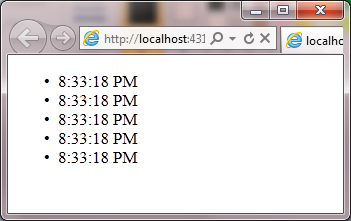
采用不同的浏览器运行该程序会得到不同的输出结果,如下图所示,Chrome浏览器中能够显示出实时时间,但是在IE中显示的时间都是相同的。

二、通过为URL地址添加后缀的方式解决问题
由于IE针对Ajax请求的返回的结果是根据请求地址进行缓存的,所以如果不希望这个缓存机制生效,我们可以在每次请求时为请求地址添加不同的后缀来解决这个问题。针对这个例子,我们通过如下的代码为请求地址添加一个基于当前时间的查询字符串,再次运行程序后IE中将会显示实时的时间。
 1: <!DOCTYPE html>
   2: <html>
   3:     <head>
   4:         <script type="text/javascript">
   5:             $(function () {
   6:                 window.setInterval(function () {
   7:                     $.ajax({
   8:                         url:'@Url.Action("GetCurrentTime")?'+ new Date().toTimeString() ,
   9:                         success: function (result) {
  10:                             $("ul").append("<li>" + result + "</li>");
  11:                         }
  12:                     });
  13:                 }, 5000);
  14:             });
  15:         </script>
  16:     </head>
  17: </html>
三、通过jQuery的Ajax设置解决问题
实际上jQuery具有针对这个的Ajax设置,我们只需要按照如下的方式调用$.ajaxSetup方法禁止掉Ajaz的缓存机制。
 1: <!DOCTYPE html>
   2: <html>
   3:     <head>
   4:         <script type="text/javascript">
   5:             $(function () {
   6:                 $.ajaxSetup({ cache: false });
   7:                 window.setInterval(function () {
   8:                     $.ajax({
   9:                         url:'@Url.Action("GetCurrentTime")',
  10:                         success: function (result) {
  11:                             $("ul").append("<li>" + result + "</li>");
  12:                         }
  13:                     });
  14:                 }, 5000);
  15:             });
  16:         </script>
  17:     </head>
  18: </html>
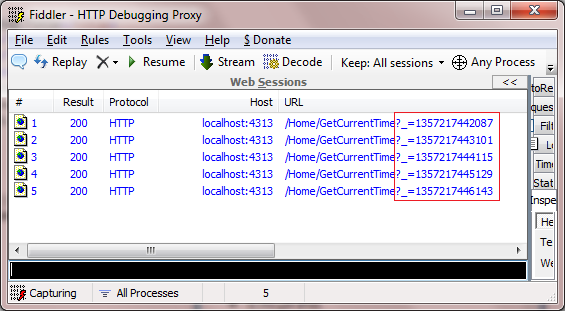
实际上jQuery的这个机制也是通过为请求地址添加不同的查询字符串后缀来实现的,这可以通过Fiddler拦截的请求来证实。
四、通过定制响应解决问题
我们可以通过请求的响应来控制浏览器针对结果的缓存,为此我们定义了如下一个名为NoCacheAttribute的ActionFilter。在实现的OnActionExecuted方法中,我们调用当前HttpResponse的SetCacheability方法将缓存选项设置为NoCache。该NoCacheAttribute特性被应用到GetCurrentTime方法后,运行我们的程序在IE中依然可以得到实时的时间。
1: public class HomeController : Controller
   2: {
   3:     public ActionResult Index()
   4:     {
   5:         return View();
   6:     }
   7:
   8:     [NoCache]
   9:     public string GetCurrentTime()
  10:     {
  11:         return DateTime.Now.ToLongTimeString();
  12:     }
  13: }
  14: public class NoCacheAttribute : FilterAttribute, IActionFilter
  15: {
  16:     public void OnActionExecuted(ActionExecutedContext filterContext)
  17:     {
  18:         filterContext.HttpContext.Response.Cache.SetCacheability(HttpCacheability.NoCache);
  19:     }
  20:
  21:     public void OnActionExecuting(ActionExecutingContext filterContext)
  22:     {}
  23: }
实际NoCacheAttribute特性最终控制消息消息的Cache-Control报头,并将其设置为“no-cache”,指示浏览器不要对结果进行缓存。如下所示的是针对GetCurrentTime请求的响应消息:
 1: HTTP/1.1 200 OK
   2: Server: ASP.NET Development Server/10.0.0.0
   3: Date: Thu, 03 Jan 2013 12:54:56 GMT
   4: X-AspNet-Version: 4.0.30319
   5: X-AspNetMvc-Version: 4.0
   6: Cache-Control: no-cache
   7: Pragma: no-cache
   8: Expires: -1
   9: Content-Type: text/html; charset=utf-8
  10: Content-Length: 10
  11: Connection: Close
  12:
  13: 8:54:56 PM

 浙公网安备 33010602011771号