之前一直用minio,现在准备换成rustfs了,minio的开源问题懂得都懂
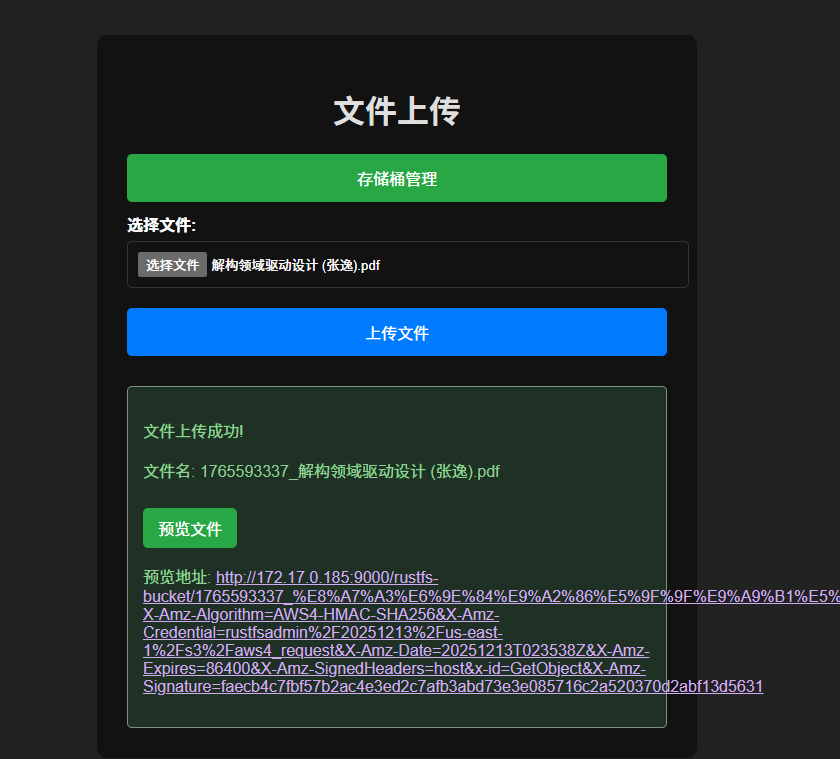
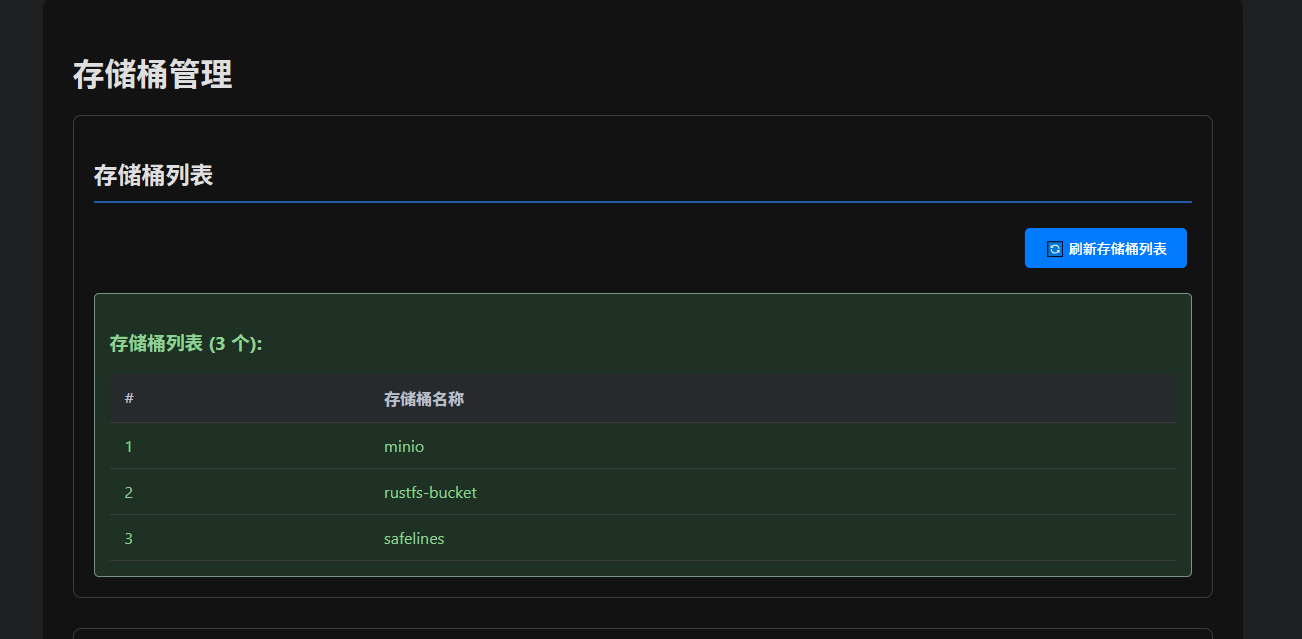
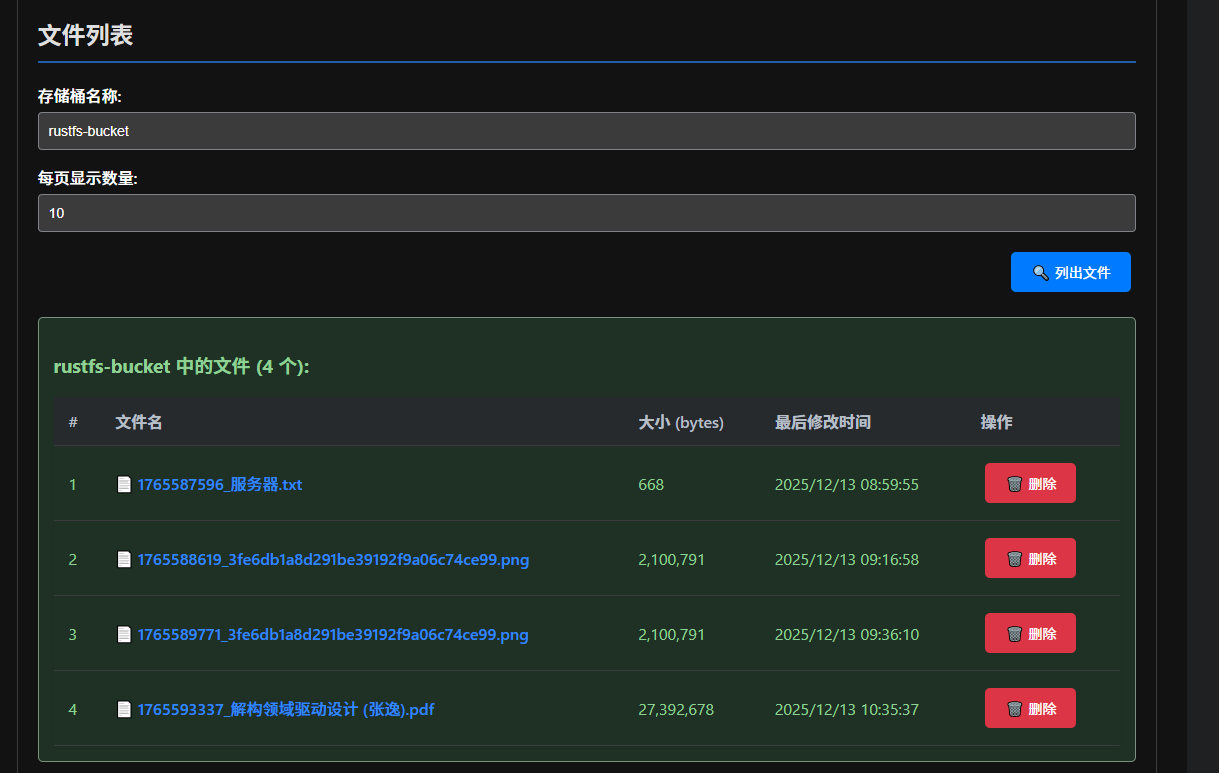
包含:文件上传、文件删除、文件下载、展示bucket、创建bucket、展示bucket下的文件列表
后台管理地址是ip:9001,账号密码默认都是rustfsadmin
代码
main.go
package main

import (
	"bytes"
	"context"
	"fmt"
	"io"
	"net/http"
	"net/url"
	"strconv"
	"time"

	"github.com/aws/aws-sdk-go-v2/aws"
	"github.com/aws/aws-sdk-go-v2/credentials"
	"github.com/aws/aws-sdk-go-v2/service/s3"
	"github.com/gin-gonic/gin"
)

// RustFS 配置 - 请根据实际情况修改这些值
const (
	rustfsEndpoint = "http://172.17.0.185:9000" // RustFS 服务地址 (请修改为实际地址)
	region         = "us-east-1"                // 区域,只是为了标识。具体没有实际作用
	accessKey      = "rustfsadmin"              // 访问密钥 (请修改为实际密钥)
	secretKey      = "rustfsadmin"              // 秘密密钥 (请修改为实际密钥)
	bucketName     = "rustfs-bucket-2"          // 存储桶名称
)

var s3Client *s3.Client
var presignClient *s3.PresignClient

func main() {
	// 初始化 S3 客户端
	initS3Client()

	// 设置 Gin 路由
	router := gin.Default()

	// 设置 HTML 模板目录
	router.LoadHTMLGlob("templates/*")

	// 首页路由 - 显示上传表单
	router.GET("/", showUploadForm)

	// 存储桶管理页面路由
	router.GET("/buckets/manage", showBucketsPage)

	// 列出所有存储桶 API
	router.GET("/api/buckets", listBuckets)

	// 列出存储桶中的文件 API
	router.GET("/api/buckets/:bucketName/objects", listObjects)

	// 下载文件 API
	router.GET("/api/buckets/:bucketName/objects/:objectKey/download", downloadObject)

	// 删除文件 API
	router.DELETE("/api/buckets/:bucketName/objects/:objectKey", deleteObject)

	// 文件上传 API
	router.POST("/api/upload", uploadFile)

	// 启动服务器
	fmt.Println("Server starting on :8081")
	router.Run(":8081")
}

// 初始化 S3 客户端
func initS3Client() {
	// 使用静态凭证提供者
	creds := credentials.NewStaticCredentialsProvider(accessKey, secretKey, "")

	// 创建 S3 客户端配置
	cfg := aws.Config{
		Region:      region,
		Credentials: creds,
	}

	// 创建 S3 客户端,使用新的 BaseEndpoint 方式
	s3Client = s3.NewFromConfig(cfg, func(o *s3.Options) {
		o.BaseEndpoint = aws.String(rustfsEndpoint)
		o.UsePathStyle = true // 必须启用路径样式以兼容 MinIO/RustFS
	})

	// 创建预签名客户端
	presignClient = s3.NewPresignClient(s3Client)

	fmt.Println("S3 client and Presign client initialized successfully!")
}

// 显示上传表单
func showUploadForm(c *gin.Context) {
	c.HTML(http.StatusOK, "upload.html", gin.H{
		"title": "文件上传",
	})
}

// 显示存储桶管理页面
func showBucketsPage(c *gin.Context) {
	c.HTML(http.StatusOK, "buckets.html", gin.H{
		"title": "存储桶管理",
	})
}

// 列出所有存储桶
func listBuckets(c *gin.Context) {
	result, err := s3Client.ListBuckets(context.TODO(), &s3.ListBucketsInput{})
	if err != nil {
		c.JSON(http.StatusInternalServerError, gin.H{"error": fmt.Sprintf("Failed to list buckets: %v", err)})
		return
	}

	var buckets []string
	for _, bucket := range result.Buckets {
		buckets = append(buckets, *bucket.Name)
	}

	c.JSON(http.StatusOK, gin.H{
		"buckets": buckets,
	})
}

// 列出存储桶中的文件(带分页)
func listObjects(c *gin.Context) {
	bucketName := c.Param("bucketName")

	// 获取分页参数
	maxKeysStr := c.Query("maxKeys")
	pageToken := c.Query("pageToken")

	// 默认每页显示10个对象
	maxKeys := int32(10)
	if maxKeysStr != "" {
		if mk, err := strconv.ParseInt(maxKeysStr, 10, 32); err == nil {
			maxKeys = int32(mk)
		}
	}

	// 构建请求
	input := &s3.ListObjectsV2Input{
		Bucket:  aws.String(bucketName),
		MaxKeys: &maxKeys,
	}

	// 如果有分页令牌,则设置
	if pageToken != "" {
		input.ContinuationToken = aws.String(pageToken)
	}

	result, err := s3Client.ListObjectsV2(context.TODO(), input)
	if err != nil {
		c.JSON(http.StatusInternalServerError, gin.H{"error": fmt.Sprintf("Failed to list objects: %v", err)})
		return
	}

	// 构建对象列表
	type ObjectInfo struct {
		Key          string `json:"key"`
		Size         int64  `json:"size"`
		LastModified string `json:"lastModified"`
		PreviewURL   string `json:"previewURL"`
	}

	var objects []ObjectInfo
	for _, obj := range result.Contents {
		// 生成预签名URL
		previewURL, _ := generatePresignedURL(*obj.Key)

		objects = append(objects, ObjectInfo{
			Key:          *obj.Key,
			Size:         *obj.Size,
			LastModified: obj.LastModified.Format(time.RFC3339),
			PreviewURL:   previewURL,
		})
	}

	// 构建响应
	response := gin.H{
		"bucket":      bucketName,
		"objects":     objects,
		"maxKeys":     maxKeys,
		"isTruncated": result.IsTruncated,
	}

	// 如果有下一页,添加分页令牌
	if result.NextContinuationToken != nil {
		response["nextPageToken"] = *result.NextContinuationToken
	}

	c.JSON(http.StatusOK, response)
}

// 下载文件
func downloadObject(c *gin.Context) {
	bucketName := c.Param("bucketName")
	objectKey := c.Param("objectKey")

	// 解码对象键
	decodedKey, err := url.QueryUnescape(objectKey)
	if err != nil {
		decodedKey = objectKey
	}

	// 从 S3 获取对象
	input := &s3.GetObjectInput{
		Bucket: aws.String(bucketName),
		Key:    aws.String(decodedKey),
	}

	output, err := s3Client.GetObject(context.TODO(), input)
	if err != nil {
		c.JSON(http.StatusInternalServerError, gin.H{"error": fmt.Sprintf("Failed to get object: %v", err)})
		return
	}
	defer output.Body.Close()

	// 设置响应头以便浏览器下载文件
	c.Header("Content-Disposition", fmt.Sprintf("attachment; filename=\"%s\"", decodedKey))
	c.Header("Content-Type", "application/octet-stream")

	// 将文件内容复制到响应中
	_, err = io.Copy(c.Writer, output.Body)
	if err != nil {
		c.JSON(http.StatusInternalServerError, gin.H{"error": fmt.Sprintf("Failed to copy object to response: %v", err)})
		return
	}
}

// 删除文件
func deleteObject(c *gin.Context) {
	bucketName := c.Param("bucketName")
	objectKey := c.Param("objectKey")

	// 解码对象键
	decodedKey, err := url.QueryUnescape(objectKey)
	if err != nil {
		decodedKey = objectKey
	}

	input := &s3.DeleteObjectInput{
		Bucket: aws.String(bucketName),
		Key:    aws.String(decodedKey),
	}

	_, err = s3Client.DeleteObject(context.TODO(), input)
	if err != nil {
		c.JSON(http.StatusInternalServerError, gin.H{"error": fmt.Sprintf("Failed to delete object: %v", err)})
		return
	}

	c.JSON(http.StatusOK, gin.H{
		"message": "Object deleted successfully",
		"bucket":  bucketName,
		"key":     decodedKey,
	})
}

// 上传文件
func uploadFile(c *gin.Context) {
	// 从请求中获取上传的文件
	file, header, err := c.Request.FormFile("file")
	if err != nil {
		c.JSON(http.StatusBadRequest, gin.H{"error": "Failed to get file from request"})
		return
	}
	defer file.Close()

	// 确保存储桶存在
	err = ensureBucketExists(bucketName)
	if err != nil {
		c.JSON(http.StatusInternalServerError, gin.H{"error": fmt.Sprintf("Failed to ensure bucket exists: %v", err)})
		return
	}

	// 读取文件内容
	buf := bytes.NewBuffer(nil)
	if _, err := io.Copy(buf, file); err != nil {
		c.JSON(http.StatusInternalServerError, gin.H{"error": "Failed to read file"})
		return
	}

	// 生成带日期路径的文件名
	now := time.Now()
	folderPath := fmt.Sprintf("%d/%02d/%02d", now.Year(), now.Month(), now.Day())
	filename := fmt.Sprintf("%s/%d_%s", folderPath, now.Unix(), header.Filename)

	// 上传到 RustFS
	err = uploadToRustFS(filename, buf.Bytes(), header.Header.Get("Content-Type"))
	if err != nil {
		c.JSON(http.StatusInternalServerError, gin.H{"error": fmt.Sprintf("Failed to upload to RustFS: %v", err)})
		return
	}

	// 生成预签名的预览 URL
	previewURL, err := generatePresignedURL(filename)
	if err != nil {
		c.JSON(http.StatusInternalServerError, gin.H{"error": fmt.Sprintf("Failed to generate preview URL: %v", err)})
		return
	}

	// 返回成功响应
	c.JSON(http.StatusOK, gin.H{
		"message":    "File uploaded successfully",
		"filename":   filename,
		"previewURL": previewURL,
	})
}

// 确保存储桶存在
func ensureBucketExists(bucket string) error {
	// 检查存储桶是否存在
	_, err := s3Client.HeadBucket(context.TODO(), &s3.HeadBucketInput{
		Bucket: aws.String(bucket),
	})

	// 如果存储桶不存在,则创建它
	if err != nil {
		// 创建存储桶
		_, err := s3Client.CreateBucket(context.TODO(), &s3.CreateBucketInput{
			Bucket: aws.String(bucket),
		})
		if err != nil {
			return fmt.Errorf("failed to create bucket: %v", err)
		}
		fmt.Printf("Bucket %s created successfully\n", bucket)
	} else {
		fmt.Printf("Bucket %s already exists\n", bucket)
	}

	return nil
}

// 上传文件到 RustFS
func uploadToRustFS(filename string, data []byte, contentType string) error {
	input := &s3.PutObjectInput{
		Bucket:      aws.String(bucketName),
		Key:         aws.String(filename),
		Body:        bytes.NewReader(data),
		ContentType: aws.String(contentType),
	}

	_, err := s3Client.PutObject(context.TODO(), input)
	return err
}

// 生成预签名 URL
func generatePresignedURL(filename string) (string, error) {
	// 创建 GetObject 请求
	getReq := &s3.GetObjectInput{
		Bucket: aws.String(bucketName),
		Key:    aws.String(filename),
	}

	// 生成预签名 URL,设置有效期为 24 小时
	presignResult, err := presignClient.PresignGetObject(context.TODO(), getReq, func(opts *s3.PresignOptions) {
		opts.Expires = 24 * time.Hour // 24小时有效期
	})

	if err != nil {
		return "", err
	}

	return presignResult.URL, nil
}
新建templates静态文件夹(可选,可以直接用接口访问)
buckets.html
<!DOCTYPE html>
<html lang="zh-CN">
<head>
<meta charset="UTF-8">
<meta name="viewport" content="width=device-width, initial-scale=1.0">
<title>存储桶管理</title>
<style>
body {
font-family: 'Segoe UI', Tahoma, Geneva, Verdana, sans-serif;
max-width: 1200px;
margin: 20px auto;
padding: 20px;
background-color: #f8f9fa;
}
.container {
background-color: white;
padding: 30px;
border-radius: 10px;
box-shadow: 0 4px 12px rgba(0,0,0,0.1);
}
h1, h2 {
color: #333;
margin-bottom: 20px;
}
.section {
margin-bottom: 30px;
padding: 20px;
border: 1px solid #dee2e6;
border-radius: 8px;
background-color: #fff;
}
.section-title {
border-bottom: 2px solid #007bff;
padding-bottom: 10px;
margin-bottom: 20px;
}
button {
background-color: #007bff;
color: white;
padding: 10px 20px;
border: none;
border-radius: 5px;
cursor: pointer;
font-size: 14px;
margin: 5px;
transition: background-color 0.3s;
}
button:hover {
background-color: #0056b3;
}
.btn-danger {
background-color: #dc3545;
}
.btn-danger:hover {
background-color: #c82333;
}
.btn-success {
background-color: #28a745;
}
.btn-success:hover {
background-color: #218838;
}
.btn-info {
background-color: #17a2b8;
}
.btn-info:hover {
background-color: #138496;
}
.btn-warning {
background-color: #ffc107;
color: #212529;
}
.btn-warning:hover {
background-color: #e0a800;
}
.btn-primary {
background-color: #007bff;
}
.btn-primary:hover {
background-color: #0056b3;
}
table {
width: 100%;
border-collapse: collapse;
margin-top: 15px;
box-shadow: 0 2px 5px rgba(0,0,0,0.05);
}
th, td {
padding: 12px 15px;
text-align: left;
border-bottom: 1px solid #dee2e6;
}
th {
background-color: #e9ecef;
font-weight: 600;
color: #495057;
}
tr:hover {
background-color: #f8f9fa;
}
.preview-link {
color: #007bff;
text-decoration: none;
font-weight: 500;
}
.preview-link:hover {
text-decoration: underline;
}
.result {
margin-top: 15px;
padding: 15px;
border-radius: 5px;
display: none;
}
.success {
background-color: #d4edda;
color: #155724;
border: 1px solid #c3e6cb;
}
.error {
background-color: #f8d7da;
color: #721c24;
border: 1px solid #f5c6cb;
}
.info {
background-color: #d1ecf1;
color: #0c5460;
border: 1px solid #bee5eb;
}
.config-table {
width: 100%;
border-collapse: collapse;
}
.config-table th, .config-table td {
padding: 12px 15px;
text-align: left;
border: 1px solid #dee2e6;
}
.config-table th {
background-color: #e9ecef;
font-weight: 600;
}
.pagination {
margin-top: 20px;
text-align: center;
}
.pagination button {
margin: 0 5px;
}
.form-group {
margin-bottom: 15px;
}
label {
display: block;
margin-bottom: 5px;
font-weight: 500;
}
input[type="text"], input[type="number"] {
width: 100%;
padding: 10px;
border: 1px solid #ced4da;
border-radius: 4px;
font-size: 14px;
box-sizing: border-box;
}
input[type="text"]:focus, input[type="number"]:focus {
border-color: #007bff;
outline: 0;
box-shadow: 0 0 0 0.2rem rgba(0,123,255,.25);
}
.header-buttons {
text-align: right;
margin-bottom: 20px;
}
.spinner {
border: 4px solid rgba(0, 0, 0, 0.1);
border-left-color: #007bff;
border-radius: 50%;
width: 30px;
height: 30px;
animation: spin 1s linear infinite;
display: inline-block;
vertical-align: middle;
margin-right: 10px;
}
@keyframes spin {
to { transform: rotate(360deg); }
}
.loading {
display: inline-flex;
align-items: center;
}
</style>
</head>
<body>
<div class="container">
<h1>存储桶管理</h1>
<!-- 列出所有存储桶 -->
<div class="section">
<h2 class="section-title">存储桶列表</h2>
<div class="header-buttons">
<button onclick="listBuckets()">
<span class="refresh-icon">🔄</span> 刷新存储桶列表
</button>
</div>
<div id="buckets-result" class="result"></div>
</div>
<!-- 列出存储桶中的文件 -->
<div class="section">
<h2 class="section-title">文件列表</h2>
<div class="form-group">
<label for="bucket-name">存储桶名称:</label>
<input type="text" id="bucket-name" placeholder="输入存储桶名称" value="rustfs-bucket">
</div>
<div class="form-group">
<label for="max-keys">每页显示数量:</label>
<input type="number" id="max-keys" value="10" min="1" max="100">
<input type="hidden" id="page-token">
</div>
<div class="header-buttons">
<button onclick="listObjects()">
<span class="search-icon">🔍</span> 列出文件
</button>
</div>
<div id="objects-result" class="result"></div>
</div>
</div>
<script>
// 列出所有存储桶
function listBuckets() {
const resultDiv = document.getElementById('buckets-result');
resultDiv.className = 'result info loading';
resultDiv.style.display = 'block';
resultDiv.innerHTML = '<div class="spinner"></div> 正在加载存储桶列表...';
// 使用新的API路由
fetch('/api/buckets')
.then(response => {
if (!response.ok) {
throw new Error('网络响应错误: ' + response.status);
}
return response.json();
})
.then(data => {
resultDiv.className = 'result success';
if (data.buckets && data.buckets.length > 0) {
let html = `
<h3>存储桶列表 (${data.buckets.length} 个):</h3>
<table>
<thead>
<tr>
<th>#</th>
<th>存储桶名称</th>
</tr>
</thead>
<tbody>
`;
data.buckets.forEach((bucket, index) => {
html += `
<tr>
<td>${index + 1}</td>
<td>${bucket}</td>
</tr>
`;
});
html += `
</tbody>
</table>
`;
resultDiv.innerHTML = html;
} else {
resultDiv.innerHTML = '<p>📭 没有找到存储桶</p>';
}
})
.catch(error => {
resultDiv.className = 'result error';
resultDiv.innerHTML = `<p>❌ 获取存储桶列表失败: ${error.message}</p>`;
});
}
// 列出存储桶中的文件
function listObjects(pageToken = '') {
const bucketName = document.getElementById('bucket-name').value.trim();
const maxKeys = document.getElementById('max-keys').value;
const pageTokenInput = document.getElementById('page-token');
if (!bucketName) {
alert('⚠️ 请输入存储桶名称');
return;
}
const resultDiv = document.getElementById('objects-result');
resultDiv.className = 'result info loading';
resultDiv.style.display = 'block';
resultDiv.innerHTML = '<div class="spinner"></div> 正在加载文件列表...';
// 使用新的API路由
let url = `/api/buckets/${encodeURIComponent(bucketName)}/objects?maxKeys=${maxKeys}`;
if (pageToken) {
url += `&pageToken=${encodeURIComponent(pageToken)}`;
}
fetch(url)
.then(response => {
if (!response.ok) {
throw new Error('网络响应错误: ' + response.status);
}
return response.json();
})
.then(data => {
resultDiv.className = 'result success';
if (data.objects && data.objects.length > 0) {
let html = `
<h3>${data.bucket} 中的文件 (${data.objects.length} 个):</h3>
<table>
<thead>
<tr>
<th>#</th>
<th>文件名</th>
<th>大小 (bytes)</th>
<th>最后修改时间</th>
<th>操作</th>
</tr>
</thead>
<tbody>
`;
data.objects.forEach((obj, index) => {
// 生成下载链接
const downloadUrl = `/api/buckets/${encodeURIComponent(data.bucket)}/objects/${encodeURIComponent(obj.key)}/download`;
html += `
<tr>
<td>${index + 1}</td>
<td>
<a href="${obj.previewURL}" class="preview-link" target="_blank" title="点击预览文件">
📄 ${obj.key}
</a>
</td>
<td>${obj.size.toLocaleString()}</td>
<td>${new Date(obj.lastModified).toLocaleString('zh-CN')}</td>
<td>
<button class="btn-primary" onclick="downloadObject('${data.bucket}', '${encodeURIComponent(obj.key)}')" title="下载文件">
⬇️ 下载
</button>
<button class="btn-danger" onclick="deleteObject('${data.bucket}', '${encodeURIComponent(obj.key)}')" title="删除文件">
🗑️ 删除
</button>
</td>
</tr>
`;
});
html += `
</tbody>
</table>
`;
// 分页控件
if (data.isTruncated || data.nextPageToken) {
html += `
<div class="pagination">
<button class="btn-info" onclick="listObjects('${data.nextPageToken || ''}')" title="下一页">
➡️ 下一页
</button>
</div>
`;
pageTokenInput.value = data.nextPageToken || '';
}
resultDiv.innerHTML = html;
} else {
resultDiv.innerHTML = '<p>📭 该存储桶中没有文件</p>';
}
})
.catch(error => {
resultDiv.className = 'result error';
resultDiv.innerHTML = `<p>❌ 获取文件列表失败: ${error.message}</p>`;
});
}
// 下载文件
function downloadObject(bucketName, objectKey) {
// 构造下载URL
const downloadUrl = `/api/buckets/${encodeURIComponent(bucketName)}/objects/${objectKey}/download`;
// 创建隐藏的iframe来触发下载
const iframe = document.createElement('iframe');
iframe.style.display = 'none';
iframe.src = downloadUrl;
document.body.appendChild(iframe);
// 一段时间后移除iframe
setTimeout(() => {
document.body.removeChild(iframe);
}, 1000);
}
// 删除文件
function deleteObject(bucketName, objectKey) {
const decodedKey = decodeURIComponent(objectKey);
if (!confirm(`⚠️ 确定要删除文件 "${decodedKey}" 吗? 此操作不可撤销!`)) {
return;
}
const resultDiv = document.getElementById('objects-result');
resultDiv.className = 'result info loading';
resultDiv.style.display = 'block';
resultDiv.innerHTML = '<div class="spinner"></div> 正在删除文件...';
// 使用新的API路由
fetch(`/api/buckets/${encodeURIComponent(bucketName)}/objects/${objectKey}`, {
method: 'DELETE'
})
.then(response => {
if (!response.ok) {
throw new Error('网络响应错误: ' + response.status);
}
return response.json();
})
.then(data => {
alert('✅ ' + (data.message || '文件删除成功'));
// 重新加载文件列表
listObjects(document.getElementById('page-token').value);
})
.catch(error => {
resultDiv.className = 'result error';
resultDiv.style.display = 'block';
resultDiv.innerHTML = `<p>❌ 删除文件失败: ${error.message}</p>`;
});
}
// 页面加载时自动显示存储桶列表
window.addEventListener('load', function() {
listBuckets();
});
</script>
</body>
</html>
upload.html
<!DOCTYPE html>
<html lang="zh-CN">
<head>
    <meta charset="UTF-8">
    <meta name="viewport" content="width=device-width, initial-scale=1.0">
    <title>{{ .title }}</title>
    <style>
        body {
            font-family: Arial, sans-serif;
            max-width: 600px;
            margin: 50px auto;
            padding: 20px;
            background-color: #f5f5f5;
        }
        .container {
            background-color: white;
            padding: 30px;
            border-radius: 10px;
            box-shadow: 0 2px 10px rgba(0,0,0,0.1);
        }
        h1 {
            color: #333;
            text-align: center;
        }
        .form-group {
            margin-bottom: 20px;
        }
        label {
            display: block;
            margin-bottom: 5px;
            font-weight: bold;
        }
        input[type="file"] {
            width: 100%;
            padding: 10px;
            border: 1px solid #ddd;
            border-radius: 5px;
        }
        button {
            background-color: #007bff;
            color: white;
            padding: 12px 30px;
            border: none;
            border-radius: 5px;
            cursor: pointer;
            font-size: 16px;
            width: 100%;
            margin-bottom: 10px;
        }
        button:hover {
            background-color: #0056b3;
        }
        .nav-button {
            background-color: #28a745;
        }
        .nav-button:hover {
            background-color: #218838;
        }
        .result {
            margin-top: 20px;
            padding: 15px;
            border-radius: 5px;
            display: none;
        }
        .success {
            background-color: #d4edda;
            color: #155724;
            border: 1px solid #c3e6cb;
        }
        .error {
            background-color: #f8d7da;
            color: #721c24;
            border: 1px solid #f5c6cb;
        }
        .preview-link {
            display: inline-block;
            margin-top: 10px;
            padding: 8px 15px;
            background-color: #28a745;
            color: white;
            text-decoration: none;
            border-radius: 5px;
        }
        .preview-link:hover {
            background-color: #218838;
        }
    </style>
</head>
<body>
    <div class="container">
        <h1>{{ .title }}</h1>

        <!-- 导航按钮 -->
        <button class="nav-button" onclick="window.location.href='/buckets/manage'">存储桶管理</button>

        <form id="uploadForm" enctype="multipart/form-data">
            <div class="form-group">
                <label for="file">选择文件:</label>
                <input type="file" id="file" name="file" required>
            </div>
            <button type="submit">上传文件</button>
        </form>

        <div id="result" class="result"></div>
    </div>

    <script>
        document.getElementById('uploadForm').addEventListener('submit', function(e) {
            e.preventDefault();

            const formData = new FormData();
            const fileInput = document.getElementById('file');
            const resultDiv = document.getElementById('result');

            if (fileInput.files.length === 0) {
                showMessage('请选择一个文件', 'error');
                return;
            }

            formData.append('file', fileInput.files[0]);

            // 显示上传中消息
            showMessage('文件上传中...', 'success');

            fetch('/api/upload', {
                method: 'POST',
                body: formData
            })
            .then(response => response.json())
            .then(data => {
                if (data.error) {
                    showMessage('上传失败: ' + data.error, 'error');
                } else {
                    showMessage('文件上传成功!', 'success');
                    resultDiv.innerHTML += `<p>文件名: ${data.filename}</p>`;
                    resultDiv.innerHTML += `<a href="${data.previewURL}" class="preview-link" target="_blank">预览文件</a>`;
                    resultDiv.innerHTML += `<p>预览地址: <a href="${data.previewURL}" target="_blank">${data.previewURL}</a></p>`;
                }
            })
            .catch(error => {
                showMessage('上传过程中发生错误: ' + error.message, 'error');
            });
        });

        function showMessage(message, type) {
            const resultDiv = document.getElementById('result');
            resultDiv.className = 'result ' + type;
            resultDiv.innerHTML = `<p>${message}</p>`;
            resultDiv.style.display = 'block';
        }
    </script>
</body>
</html>
![image]()
![image]()
![image]()



 浙公网安备 33010602011771号