
vxe-gantt 如何自定义依赖线的宽度,连接线的宽度大小
vxe-gantt 如何自定义依赖线的宽度,连接线的宽度大小
0 FinishToStart 结束后才开始,表示一个任务必须在另一个任务开始之前完成
1 StartToFinish 开始到结束,表示从某个过程的开始到结束的整个过程
2 StartToStart 开始后才开始,表示一个活动结束了,另一个活动才能开始,它们之间按先后顺序进行
3 FinishToFinish 完成到完成,表示一个任务必须在另一个任务完成之后才能完成
查看官网:https://gantt.vxeui.com/
gitbub:https://github.com/x-extends/vxe-gantt
gitee:https://gitee.com/x-extends/vxe-gantt
自定义所有线的宽度
通过设置 task-link-config.lineWidth 自定义连接线的宽度
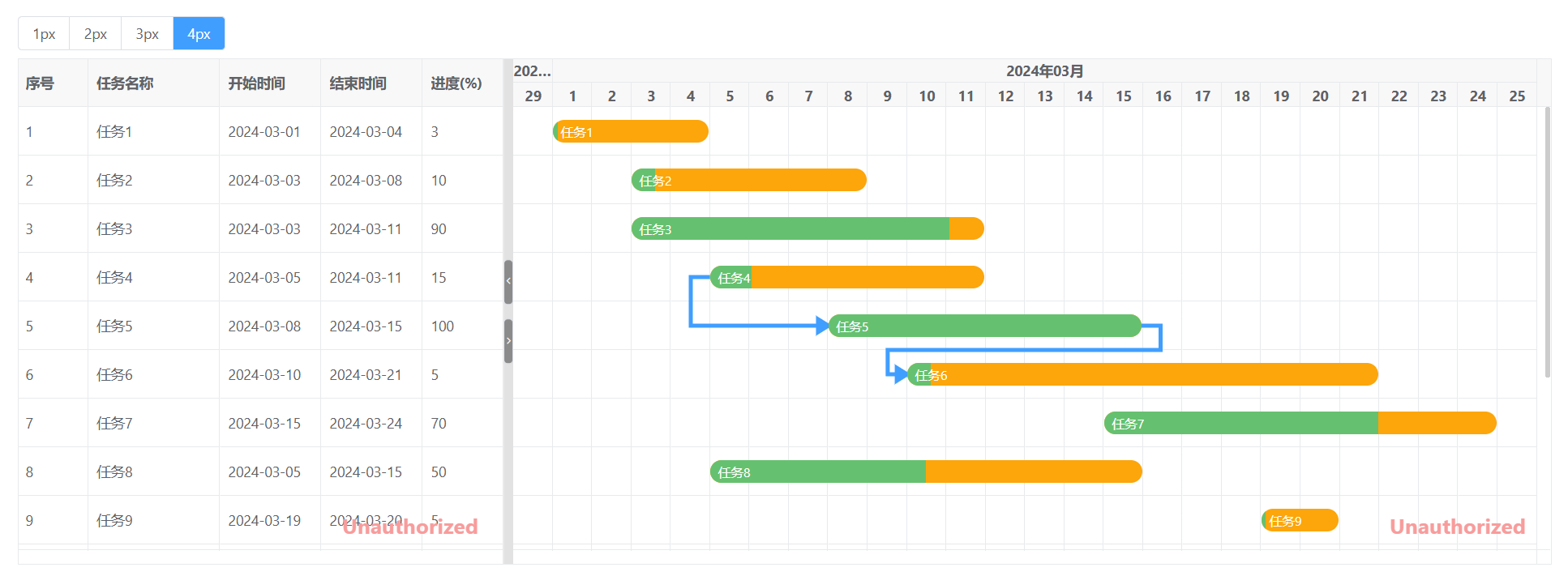
建议宽度不要超多 5px,不然容易造成渲染样式过粗叠加到一起
<template>
  <div>
    <div style="margin-bottom: 8px;">
      <vxe-radio-group v-model="taskLinkConfig.lineWidth">
        <vxe-radio-button :checked-value="1" content="1px"></vxe-radio-button>
        <vxe-radio-button :checked-value="2" content="2px"></vxe-radio-button>
        <vxe-radio-button :checked-value="3" content="3px"></vxe-radio-button>
        <vxe-radio-button :checked-value="4" content="4px"></vxe-radio-button>
      </vxe-radio-group>
    </div>

    <vxe-gantt v-bind="ganttOptions"></vxe-gantt>
  </div>
</template>

<script setup>
import { reactive } from 'vue'
import { VxeGanttDependencyType } from 'vxe-gantt'

const taskLinkConfig = reactive({
  lineWidth: 2 // 给所有线自定义宽度
})

const ganttOptions = reactive({
  border: true,
  height: 500,
  rowConfig: {
    keyField: 'id' // 行主键
  },
  taskBarConfig: {
    showProgress: true, // 是否显示进度条
    showContent: true, // 是否在任务条显示内容
    moveable: true, // 是否允许拖拽任务移动日期
    resizable: true, // 是否允许拖拽任务调整日期
    barStyle: {
      round: true, // 圆角
      bgColor: '#fca60b', // 任务条的背景颜色
      completedBgColor: '#65c16f' // 已完成部分任务条的背景颜色
    }
  },
  taskViewConfig: {
    tableStyle: {
      width: 480 // 表格宽度
    }
  },
  taskLinkConfig,
  links: [
    { from: 10001, to: 10002, type: VxeGanttDependencyType.FinishToFinish },
    { from: 10004, to: 10005, type: VxeGanttDependencyType.StartToStart },
    { from: 10005, to: 10006, type: VxeGanttDependencyType.FinishToStart },
    { from: 10013, to: 10012, type: VxeGanttDependencyType.StartToFinish }
  ],
  columns: [
    { type: 'seq', width: 70 },
    { field: 'title', title: '任务名称' },
    { field: 'start', title: '开始时间', width: 100 },
    { field: 'end', title: '结束时间', width: 100 },
    { field: 'progress', title: '进度(%)', width: 80 }
  ],
  data: [
    { id: 10001, title: '任务1', start: '2024-03-01', end: '2024-03-04', progress: 3 },
    { id: 10002, title: '任务2', start: '2024-03-03', end: '2024-03-08', progress: 10 },
    { id: 10003, title: '任务3', start: '2024-03-03', end: '2024-03-11', progress: 90 },
    { id: 10004, title: '任务4', start: '2024-03-05', end: '2024-03-11', progress: 15 },
    { id: 10005, title: '任务5', start: '2024-03-08', end: '2024-03-15', progress: 100 },
    { id: 10006, title: '任务6', start: '2024-03-10', end: '2024-03-21', progress: 5 },
    { id: 10007, title: '任务7', start: '2024-03-15', end: '2024-03-24', progress: 70 },
    { id: 10008, title: '任务8', start: '2024-03-05', end: '2024-03-15', progress: 50 },
    { id: 10009, title: '任务9', start: '2024-03-19', end: '2024-03-20', progress: 5 },
    { id: 10010, title: '任务10', start: '2024-03-12', end: '2024-03-20', progress: 10 },
    { id: 10011, title: '任务11', start: '2024-03-01', end: '2024-03-08', progress: 90 },
    { id: 10012, title: '任务12', start: '2024-03-03', end: '2024-03-06', progress: 60 },
    { id: 10013, title: '任务13', start: '2024-03-02', end: '2024-03-05', progress: 50 },
    { id: 10014, title: '任务14', start: '2024-03-04', end: '2024-03-15', progress: 0 },
    { id: 10015, title: '任务15', start: '2024-03-01', end: '2024-03-05', progress: 30 }
  ]
})
</script>
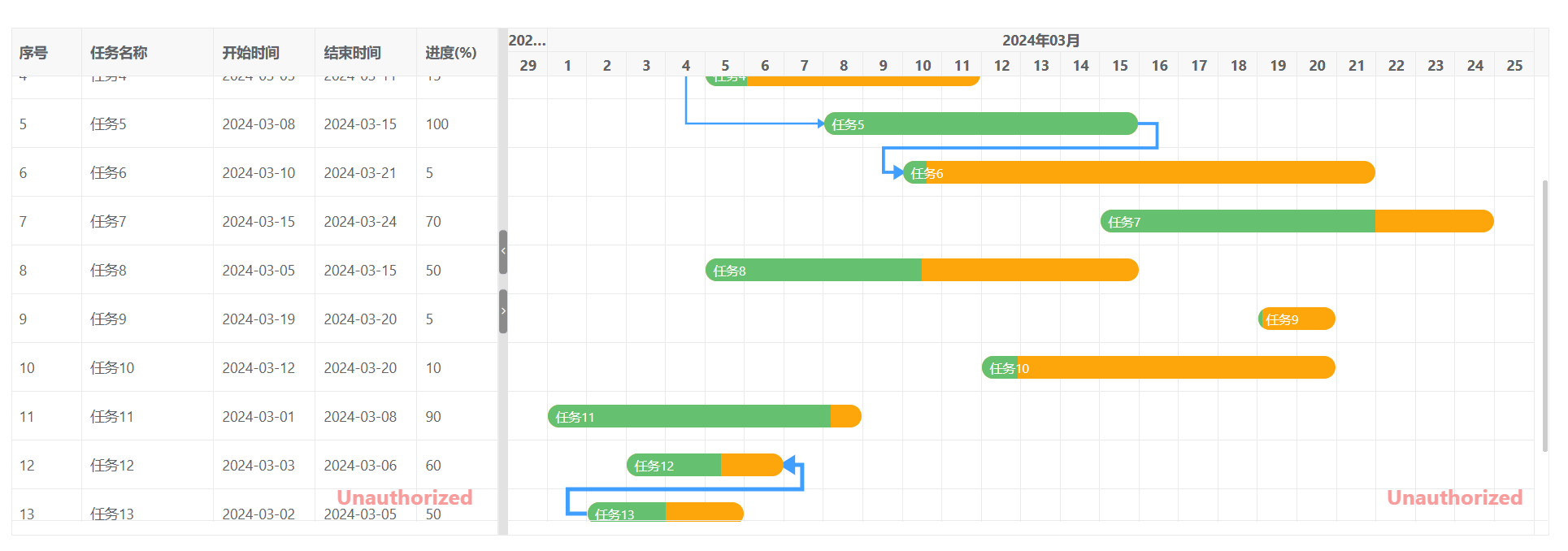
每条线单独自定义宽度
<template>
  <div>
    <vxe-gantt v-bind="ganttOptions"></vxe-gantt>
  </div>
</template>

<script setup>
import { reactive } from 'vue'
import { VxeGanttDependencyType } from 'vxe-gantt'

const ganttOptions = reactive({
  border: true,
  height: 500,
  rowConfig: {
    keyField: 'id' // 行主键
  },
  taskBarConfig: {
    showProgress: true, // 是否显示进度条
    showContent: true, // 是否在任务条显示内容
    move: true, // 是否允许拖拽任务移动日期
    resize: true, // 是否允许拖拽任务调整日期
    barStyle: {
      round: true, // 圆角
      bgColor: '#fca60b', // 任务条的背景颜色
      completedBgColor: '#65c16f' // 已完成部分任务条的背景颜色
    }
  },
  taskViewConfig: {
    tableStyle: {
      width: 480 // 表格宽度
    }
  },
  links: [
    { from: 10001, to: 10002, lineWidth: 1, type: VxeGanttDependencyType.FinishToFinish },
    { from: 10004, to: 10005, lineWidth: 2, type: VxeGanttDependencyType.StartToStart },
    { from: 10005, to: 10006, lineWidth: 3, type: VxeGanttDependencyType.FinishToStart },
    { from: 10013, to: 10012, lineWidth: 4, type: VxeGanttDependencyType.StartToFinish }
  ],
  columns: [
    { type: 'seq', width: 70 },
    { field: 'title', title: '任务名称' },
    { field: 'start', title: '开始时间', width: 100 },
    { field: 'end', title: '结束时间', width: 100 },
    { field: 'progress', title: '进度(%)', width: 80 }
  ],
  data: [
    { id: 10001, title: '任务1', start: '2024-03-01', end: '2024-03-04', progress: 3 },
    { id: 10002, title: '任务2', start: '2024-03-03', end: '2024-03-08', progress: 10 },
    { id: 10003, title: '任务3', start: '2024-03-03', end: '2024-03-11', progress: 90 },
    { id: 10004, title: '任务4', start: '2024-03-05', end: '2024-03-11', progress: 15 },
    { id: 10005, title: '任务5', start: '2024-03-08', end: '2024-03-15', progress: 100 },
    { id: 10006, title: '任务6', start: '2024-03-10', end: '2024-03-21', progress: 5 },
    { id: 10007, title: '任务7', start: '2024-03-15', end: '2024-03-24', progress: 70 },
    { id: 10008, title: '任务8', start: '2024-03-05', end: '2024-03-15', progress: 50 },
    { id: 10009, title: '任务9', start: '2024-03-19', end: '2024-03-20', progress: 5 },
    { id: 10010, title: '任务10', start: '2024-03-12', end: '2024-03-20', progress: 10 },
    { id: 10011, title: '任务11', start: '2024-03-01', end: '2024-03-08', progress: 90 },
    { id: 10012, title: '任务12', start: '2024-03-03', end: '2024-03-06', progress: 60 },
    { id: 10013, title: '任务13', start: '2024-03-02', end: '2024-03-05', progress: 50 },
    { id: 10014, title: '任务14', start: '2024-03-04', end: '2024-03-15', progress: 0 },
    { id: 10015, title: '任务15', start: '2024-03-01', end: '2024-03-05', progress: 30 }
  ]
})
</script>

 浙公网安备 33010602011771号