


MVC2 项目实践
MVC2 项目实践
使用MVC model2开发计科院新闻网站,实现新闻的发布,修改,查询等基本功能
1.删除新闻功能
在前一篇JSP显示新闻列表的博文的基础上对新闻列表中的新闻进行删除
在NewsService里面添加方法DeleteNews,根据定位新闻ID来删除一条新闻
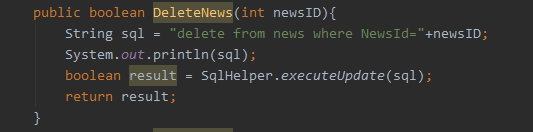
然后在Contorller包里面新增DeleteNewsServlet
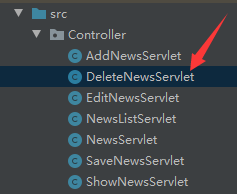


package Controller;

import Entity.News;
import Service.NewsService;

import javax.servlet.ServletException;
import javax.servlet.annotation.WebServlet;
import javax.servlet.http.HttpServlet;
import javax.servlet.http.HttpServletRequest;
import javax.servlet.http.HttpServletResponse;
import java.io.IOException;

@WebServlet(urlPatterns = "/DeleteNewsServlet")
public class DeleteNewsServlet extends HttpServlet {
    protected void doPost(HttpServletRequest request, HttpServletResponse response) throws ServletException, IOException {
        doGet(request,response);
    }

    protected void doGet(HttpServletRequest request, HttpServletResponse response) throws ServletException, IOException {
        int newsId = Integer.valueOf(request.getParameter("newid"));
        NewsService service = new NewsService();
        service.DeleteNews(newsId);
        request.getRequestDispatcher("NewsListServlet").forward(request,response);
    }
}
进入新闻列表页面点击删除按钮测试能否删除成功
删除前
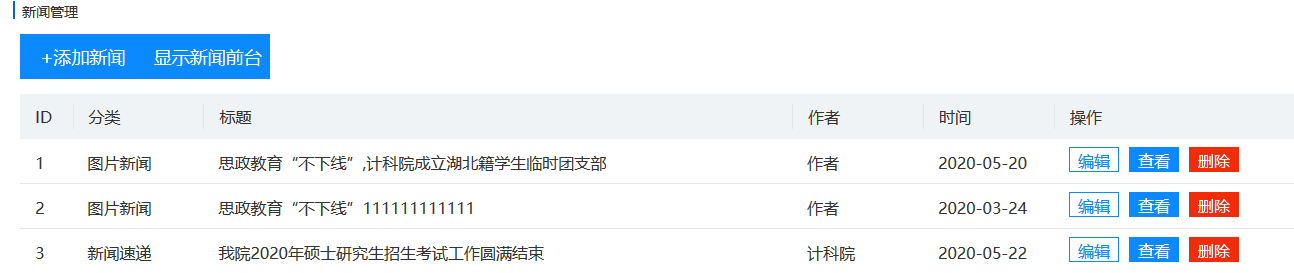
删除后

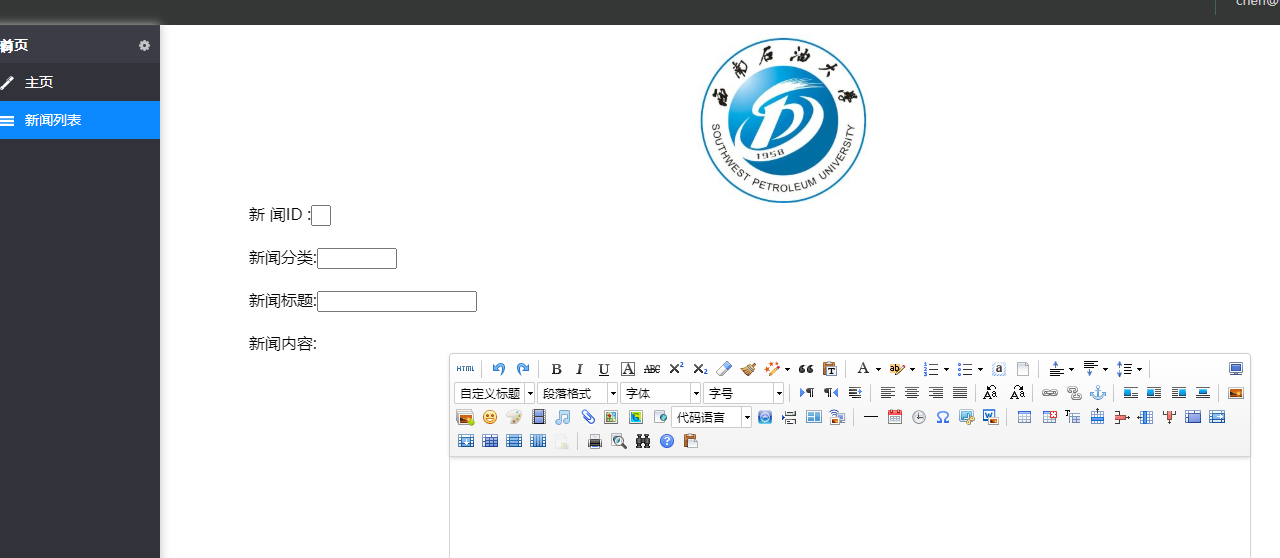
2.添加新闻功能
跟上面一样在NewsService里面新增方法AddNews
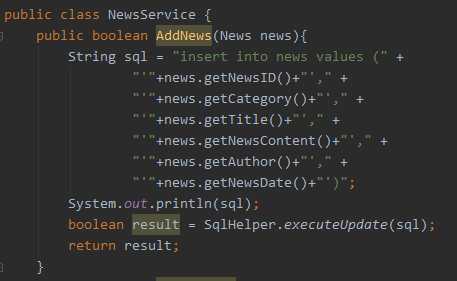
然后创建一个html表单页面用来添加新闻ID、标题、内容等
<%--
  Created by IntelliJ IDEA.
  User: 米兰的小铁匠
  Date: 2020/6/3
  Time: 14:58
  To change this template use File | Settings | File Templates.
--%>
<%@ page contentType="text/html;charset=UTF-8" language="java" %>
<html>
<head>
    <title>Title</title>
    <script type="text/javascript" src="ueditor/ueditor.config.js"></script>
    <script type="text/javascript" src="ueditor/ueditor.all.js"></script>
    <script type="text/javascript" charset="utf-8" src="ueditor/lang/zh-cn/zh-cn.js"></script>
</head>
<body>
<div class="logo-img">
    <img src="img/scimg.png">
</div>
<div class="bg">
<%--  <img src="img/index_bg.jpg">--%>
  <form action="AddNewsServlet"  method="post">
    <div class="newsID">
        新 闻ID :<input type="text" name="newid" />
    </div>
    <div class="category">
        新闻分类:<input type="text" name="category" />
    </div>
    <div class="newsTitle">
        新闻标题:<input type="text" name="title" />
    </div>
    <div class="newsContent">
        新闻内容:<textarea id="container" name="container" style="width: 800px; height: 400px; margin: 0 auto;"></textarea>
    </div>
    <div class="author">
        作 者:<input type="text" name="author"/>
    </div>
    <div class="newsDate">
        时 间:<input type="text" name="writedate"/>
    </div>
    <div class="addNews">
        <input type="submit" value="添加"/>
    </div>
  </form>
</div>
</body>
<script type="text/javascript">
    var ue = UE.getEditor("container");
</script>
<style>
    .logo-img{
        width: 170px;
        height: 170px;
        left: 0;
        right: 0;
        margin: auto;
    }
    .logo-img img{
        width: 170px;
        height: 170px;
    }
    .bg{
        width: 1200px;
        height: 500px;
        margin: 0 auto;
    }
    /*img{*/
    /*    width: 1200px;*/
    /*    height: 500px;*/
    /*}*/
    form{
        background-color: #fff;
        height:1000px ;
        width: 100%;
        top: 220px;
    }
    .newsID input{
        width: 20px;
        margin-bottom: 20px;
    }
    .category input{
        width: 80px;
        margin-bottom: 20px;
    }
    .newsTitle input{
        width: 160px;
        margin-bottom: 20px;
    }
    .newsContent textarea{
        margin-bottom: 20px;
        vertical-align: top
    }
    .author input{
        width: 80px;
        margin-bottom: 20px;
    }
    .newsDate input{
        width: 80px;
        margin-bottom: 20px;
    }
    .addNews input{
        width: 80px;
        height: 60px;
        float: right;
        margin-right: 15px;
        font-size: 18px;
    }
</style>
</html>
再新建一个AddNewsServlet
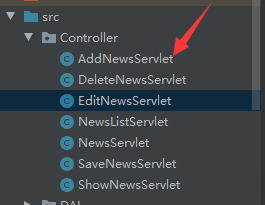
然后获取AddNews表单传过来的数据把他显示到新闻列表页面上面去
package Controller;

import Entity.News;
import Service.NewsService;

import javax.servlet.ServletException;
import javax.servlet.annotation.WebServlet;
import javax.servlet.http.HttpServlet;
import javax.servlet.http.HttpServletRequest;
import javax.servlet.http.HttpServletResponse;
import java.io.IOException;
import java.text.ParseException;
import java.text.SimpleDateFormat;
import java.util.Date;

@WebServlet(urlPatterns = "/AddNewsServlet")
public class AddNewsServlet extends HttpServlet {
    protected void doPost(HttpServletRequest request, HttpServletResponse response) throws ServletException, IOException {
        News news=new News();
        news.setNewsID(Integer.valueOf(request.getParameter("newid")));
        news.setCategory(request.getParameter("category"));
        news.setTitle(request.getParameter("title"));
        news.setNewsContent(request.getParameter("container"));
        news.setAuthor(request.getParameter("author"));
        String newsDate=request.getParameter("writedate");
        SimpleDateFormat sDateFormat=new SimpleDateFormat("yyyy-MM-dd"); //加上时间
        java.sql.Date sDate = null;
        try {
            java.util.Date jDate = sDateFormat.parse(newsDate);
            sDate = new java.sql.Date(jDate.getTime());
        } catch (ParseException e) {
            e.printStackTrace();
        }
        news.setNewsDate(sDate);
        NewsService service=new NewsService();
        service.AddNews(news);
        request.getRequestDispatcher("NewsListServlet").forward(request,response);
    }

    protected void doGet(HttpServletRequest request, HttpServletResponse response) throws ServletException, IOException {

    }
}
最后验证是否能够插入成功
进入新闻列表页面点击添加新闻进入表单页面
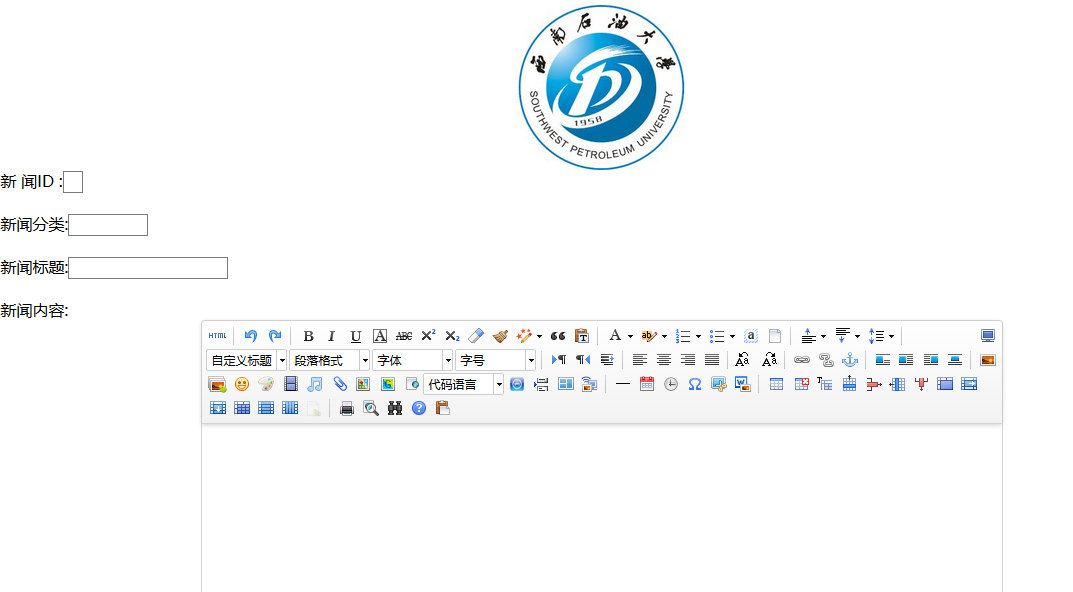
依次输入数据再点击添加回到新闻列表页面
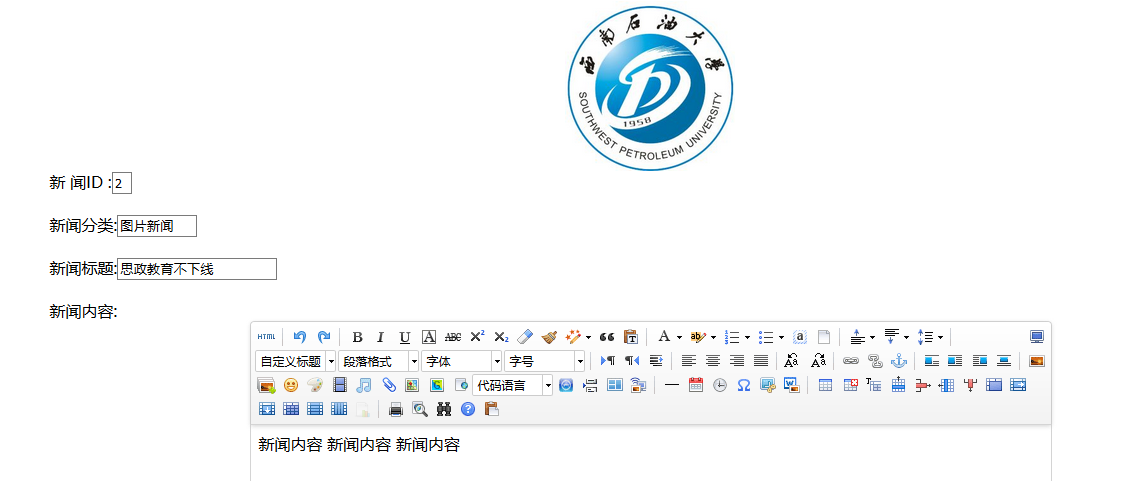

新闻数据就添加进去了
3.编辑新闻功能
还是同上在NewsService里面新增方法
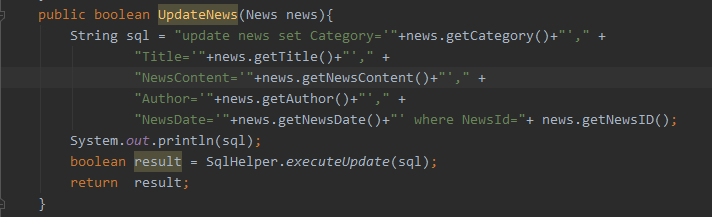
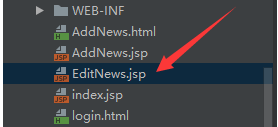
编辑新闻和上面比起来要麻烦一点 要先把新闻列表的数据放进一个JSP页面存储起来 然后在那个JSP页面上面对新闻进行修改后再返回新闻列表页面
首先新建个JSP页面
<%--
  Created by IntelliJ IDEA.
  User: 米兰的小铁匠
  Date: 2020/6/2
  Time: 16:43
  To change this template use File | Settings | File Templates.
--%>
<%@ page contentType="text/html;charset=UTF-8" language="java" %>
<html>
<head>
    <title>Title</title>
    <script type="text/javascript" src="ueditor/ueditor.config.js"></script>
    <script type="text/javascript" src="ueditor/ueditor.all.js"></script>
    <script type="text/javascript" charset="utf-8" src="ueditor/lang/zh-cn/zh-cn.js"></script>
</head>
<body>

<div class="logo-img">
    <img src="img/scimg.png">
</div>
<div class="bg">
<%--    <img src="img/index_bg.jpg">--%>
    <form action="SaveNewsServlet"  method="post">
        <div class="newsID">
            新 闻ID :<input type="text" name="newid" value="${news.newsID}" />
        </div>
        <div class="category">
            新闻分类:<input type="text" name="category" value="${news.category}"/>
        </div>
        <div class="NewsTitle">
            新闻标题:<input type="text" name="title" value="${news.title}"/>
        </div>
        <div class="newsContent">
            新闻内容:<textarea id="container" name="container" style="width: 800px; height: 400px; margin: 0 auto;"></textarea>
        </div>
        <div class="author">
            作 者:<input type="text" name="author" value="${news.author}"/>
        </div>
        <div class="newsDate">
            时 间:<input type="text" name="writedate" value="${news.newsDate}"/>
        </div>
        <div class="addNews">
            <input type="submit" value="更新"/>
        </div>
    </form>
</div>
</body>
<script type="text/javascript">
    var ue = UE.getEditor("container");
</script>
<style>
    .logo-img{
        width: 170px;
        height: 170px;
        left: 0;
        right: 0;
        margin: auto;
    }
    .logo-img img{
        width: 170px;
        height: 170px;
    }
    .bg{
        width: 1200px;
        height: 500px;
        margin: 0 auto;
    }
    img{
        width: 1200px;
        height: 500px;
    }
    form{
        background-color: #fff;
        height:1000px ;
        width: 100%;
        top: 220px;
    }
    .newsID input{
        width: 20px;
        margin-bottom: 20px;
    }
    .category input{
        width: 80px;
        margin-bottom: 20px;
    }
    .newsTitle input{
        width: 160px;
        margin-bottom: 20px;
    }
    .newsContent textarea{
        margin-bottom: 20px;
        vertical-align: top
    }
    .author input{
        width: 80px;
        margin-bottom: 20px;
    }
    .newsDate input{
        width: 80px;
        margin-bottom: 20px;
    }
    .addNews input{
        width: 80px;
        height: 60px;
        float: right;
        margin-right: 15px;
        font-size: 18px;
    }
</style>
</html>
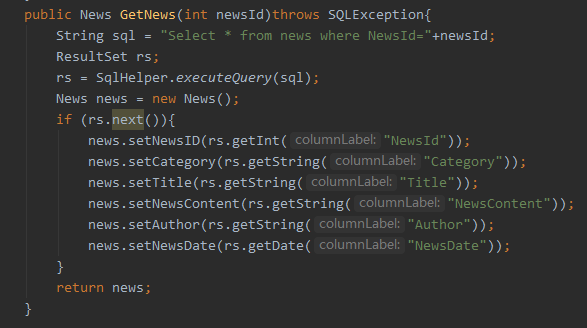
再在NewsService里面新建个方法GetNews来获取新闻
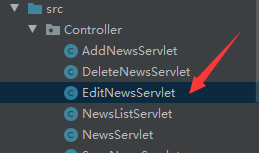
然后新建一个EditNewsServlet 获取新闻列表中的一条新闻显示到JSP页面上
package Controller;

import Entity.News;
import Service.NewsService;

import javax.servlet.ServletException;
import javax.servlet.annotation.WebServlet;
import javax.servlet.http.HttpServlet;
import javax.servlet.http.HttpServletRequest;
import javax.servlet.http.HttpServletResponse;
import java.io.IOException;
import java.sql.SQLException;

@WebServlet(urlPatterns = "/EditNewsServlet")
public class EditNewsServlet extends HttpServlet {
    protected void doPost(HttpServletRequest request, HttpServletResponse response) throws ServletException, IOException {
        doGet(request,response);
    }


    protected void doGet(HttpServletRequest request, HttpServletResponse response) throws ServletException, IOException {
        int newsID=Integer.valueOf( request.getParameter("newid"));
        NewsService service= new NewsService();
        try {
            News news=service.GetNews(newsID);
            request.setAttribute("news", news);
            request.getRequestDispatcher("EditNews.jsp").forward(request,response);
        } catch (SQLException e) {
            e.printStackTrace();
        }
    }
}
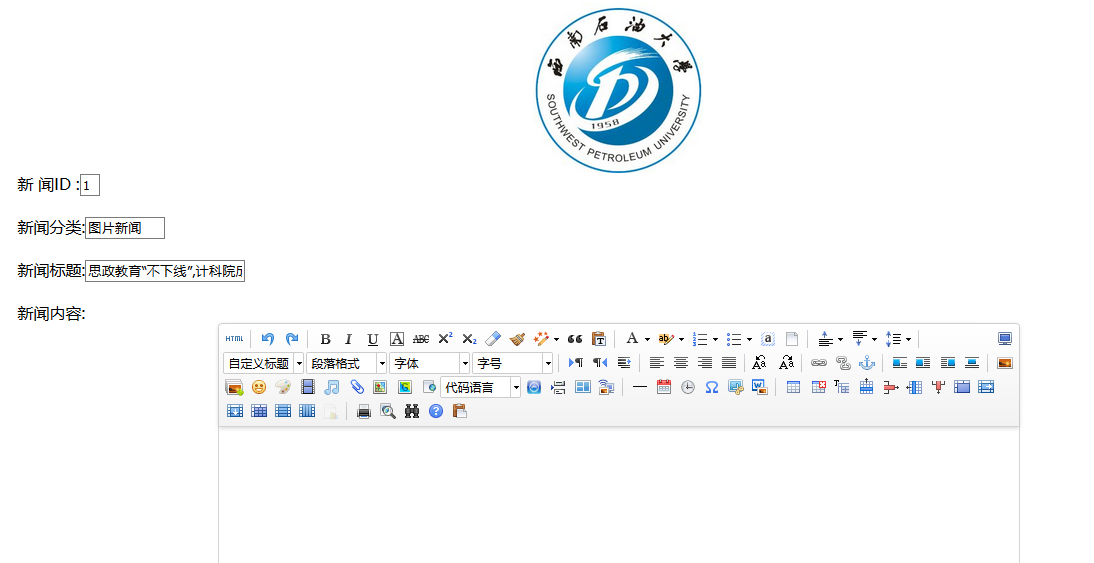
再新建一个SaveNewsServlet来获取JSP表单传过来的修改后的新闻数据并返回给新闻列表
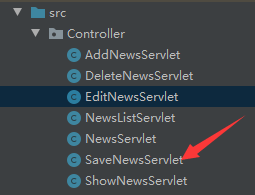
package Controller;

import Entity.News;
import Service.NewsService;

import javax.servlet.ServletException;
import javax.servlet.annotation.WebServlet;
import javax.servlet.http.HttpServlet;
import javax.servlet.http.HttpServletRequest;
import javax.servlet.http.HttpServletResponse;
import java.io.IOException;
import java.text.ParseException;
import java.util.Date;
import java.text.SimpleDateFormat;

@WebServlet(urlPatterns = "/SaveNewsServlet")
public class SaveNewsServlet extends HttpServlet {

    protected void doPost(HttpServletRequest request, HttpServletResponse response) throws ServletException, IOException {
        News news = new News();
        news.setNewsID(Integer.valueOf(request.getParameter("newid")));
        news.setCategory(request.getParameter("category"));
        news.setTitle(request.getParameter("title"));
        news.setNewsContent(request.getParameter("container"));
        news.setAuthor(request.getParameter("author"));
        String newsDate=request.getParameter("writedate");
        SimpleDateFormat sDateFormat=new SimpleDateFormat("yyyy-MM-dd"); //加上时间
        java.sql.Date sDate = null;
        try {
            java.util.Date jDate = sDateFormat.parse(newsDate);
            sDate = new java.sql.Date(jDate.getTime());
        } catch (ParseException e) {
            e.printStackTrace();
        }
        news.setNewsDate(sDate);
        NewsService service = new NewsService();
        service.UpdateNews(news);
        request.getRequestDispatcher("NewsListServlet").forward(request,response);
    }

    protected void doGet(HttpServletRequest request, HttpServletResponse response) throws ServletException, IOException {

    }
}
最终结果

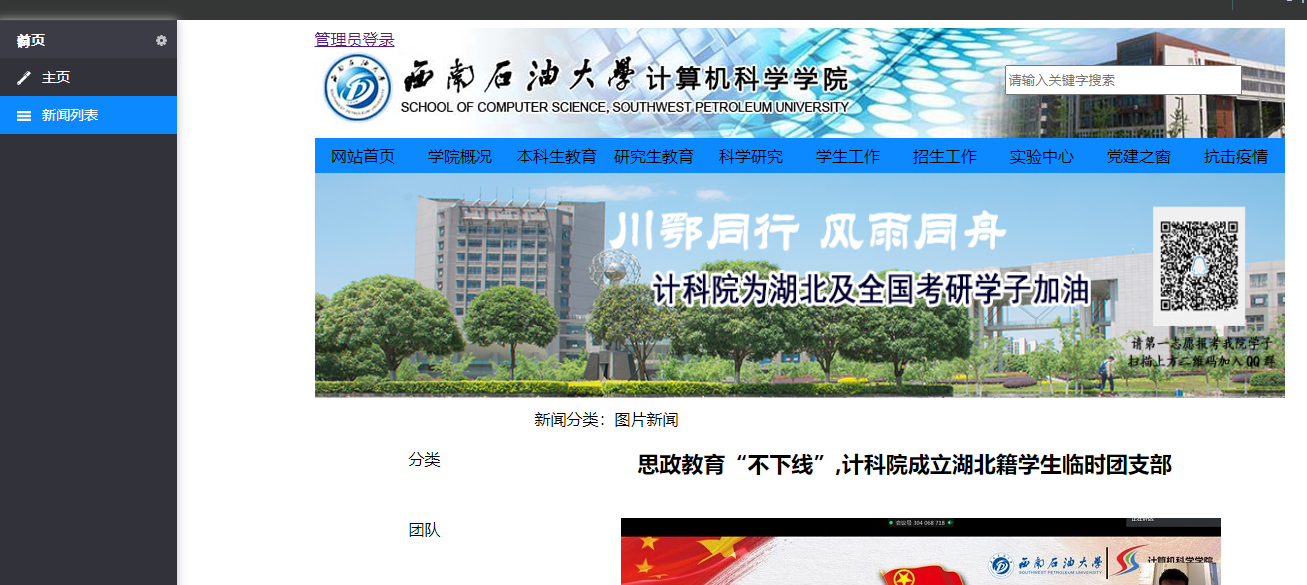
4.查看新闻
跟删除新闻差不多根据新闻ID来显示某条新闻
首先新建一个显示新闻的JSP页面
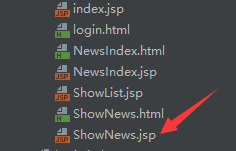
<%--
  Created by IntelliJ IDEA.
  User: 米兰的小铁匠
  Date: 2020/6/2
  Time: 19:22
  To change this template use File | Settings | File Templates.
--%>
<%@ page contentType="text/html;charset=UTF-8" language="java" %>
<html>
<head>
    <title>Title</title>
</head>
<body>
<!--头部-->
<header>
    <div class="logo">
        <a href="http://localhost:8080/login_war_exploded/login.html">管理员登录</a>
        <div class="logo_search">
            <div class="search_txt">
                <input type="text" placeholder="请输入关键字搜索">
                <div class="search_img"></div>
            </div>
        </div>
    </div>
    <ul>
        <li>网站首页</li><li>学院概况</li><li>本科生教育</li><li>研究生教育</li><li>科学研究</li>
        <li>学生工作</li><li>招生工作</li><li>实验中心</li><li>党建之窗</li><li>抗击疫情</li>
    </ul>
    <img src="img/colonavirus.jpg">
</header>
<!--中部-->
<main>
    <div class="main_left">
        <ul>
            <li>分类</li>
            <li>团队</li>
            <li>平台</li>
            <li>成果</li>
        </ul>
        <div class="search">
            <div class="search_head">站内搜索</div>
            <input type="text" placeholder="请输入关键词进行搜索">
        </div>
    </div>
    <div class="main_right">
        <div class="category" name="category">新闻分类:${news.category}</div>
        <div class="title" name="title">${news.title}</div>
        <div class="newscontent" name="newscontent">${news.newsContent}</div>
        <div class="author" name="author">作者:${news.author}</div>
        <div class="writedate" name="writedate">更新时间:${news.newsDate}</div>
    </div>
</main>

<!--底部-->
<footer>
    <div class="swpu">Copyright© 2018 All Rights Reserved. 西南石油大学计算机科学学院</div>
</footer>
</body>
<style>
    /*头部*/
    header{
        width: 970px;
        height: 370px;
        margin: 0 auto;
    }
    .logo{
        width: 970px;
        height: 110px;
        background: url("img/top-bg.jpg");
    }
    .logo a{
        float: left;
    }
    .logo_search .search_txt{
        width: 280px;
        height: 35px;
        float: right;
        margin-top: 37px;
    }
    .logo_search input{
        width: 237px;
        height: 30px;
    }
    .search_img{
        width: 35px;
        height: 35px;
        float: right;
    }
    header ul{
        width: 970px;
        height: 35px;
        list-style-type: none;
        margin: 0;
        padding: 0;
        overflow: hidden;
        background-color: #0c89ff;
    }
    header li{
        width: 97px;
        float: left;
        text-align: center;
        line-height: 35px;
    }
    header img{
        width: 970px;
        height: 225px;
        background-color: #2a6496;
    }
    /*中部*/
    main{
        width: 950px;
        height: 1000px;
        margin: 0 auto;
        padding: 10px;
    }
    .main_left{
        width: 200px;
        height: 400px;
        float: left;
        margin-right: 10px;
    }
    .main_left li{
        width: 200px;
        font-size: 16px;
        height: 70px;
        text-align: center;
        line-height: 70px;
        margin-left: -40px;
        list-style: none;
    }
    .search_head{
        width: 200px;
        height: 50px;
        line-height: 50px;
        font-size: 16px;
        font-weight: bold;
        background-color: #DDDDDD;
    }
    .search input{
        width: 195px;
        height: 40px;
    }
    .main_right{
        width: 740px;
        height: 1000px;
        float: left;
    }
    .title{
        width: 740px;
        text-align: center;
        font-size: 22px;
        font-weight: bold;
        margin-top: 20px;
    }
    .newscontent{
        text-indent: 2em;
        width: 740px;
        margin: 40px 0;
    }
    .author{
        width: 740px;
        text-align: center;
    }
    .writedate{
        float: right;
        margin-top: 40px;
    }

    /*底部*/
    footer{
        width: 100%;
        height: 80px;
        background-color: #2a6496;
    }
    .swpu{
        width: 400px;
        height: 80px;
        margin: 0 auto;
        line-height: 80px;
        font-size: 13px;
        color: white;
    }
</style>
</html>
然后就是将新闻列表的新闻数据传到JSP页面上面去
新建个ShowNewsServlet 用来存储新闻数据并显示到JSP页面上去
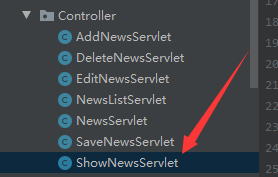
package Controller;

import Entity.News;
import Service.NewsService;

import javax.servlet.ServletException;
import javax.servlet.annotation.WebServlet;
import javax.servlet.http.HttpServlet;
import javax.servlet.http.HttpServletRequest;
import javax.servlet.http.HttpServletResponse;
import java.io.IOException;
import java.sql.SQLException;

@WebServlet(urlPatterns = "/ShowNewsServlet")
public class ShowNewsServlet extends HttpServlet {
    protected void doPost(HttpServletRequest request, HttpServletResponse response) throws ServletException, IOException {
        doGet(request,response);
    }

    protected void doGet(HttpServletRequest request, HttpServletResponse response) throws ServletException, IOException {
        int newsID=Integer.valueOf(request.getParameter("newid"));
        NewsService service= new NewsService();
        try {
            News news=service.GetNews(newsID);
            request.setAttribute("news", news);
            request.getRequestDispatcher("ShowNews.jsp").forward(request,response);
        } catch (SQLException e) {
            e.printStackTrace();
        }
    }
}
点击新闻列表页面的查看新闻按钮来查看最终结果
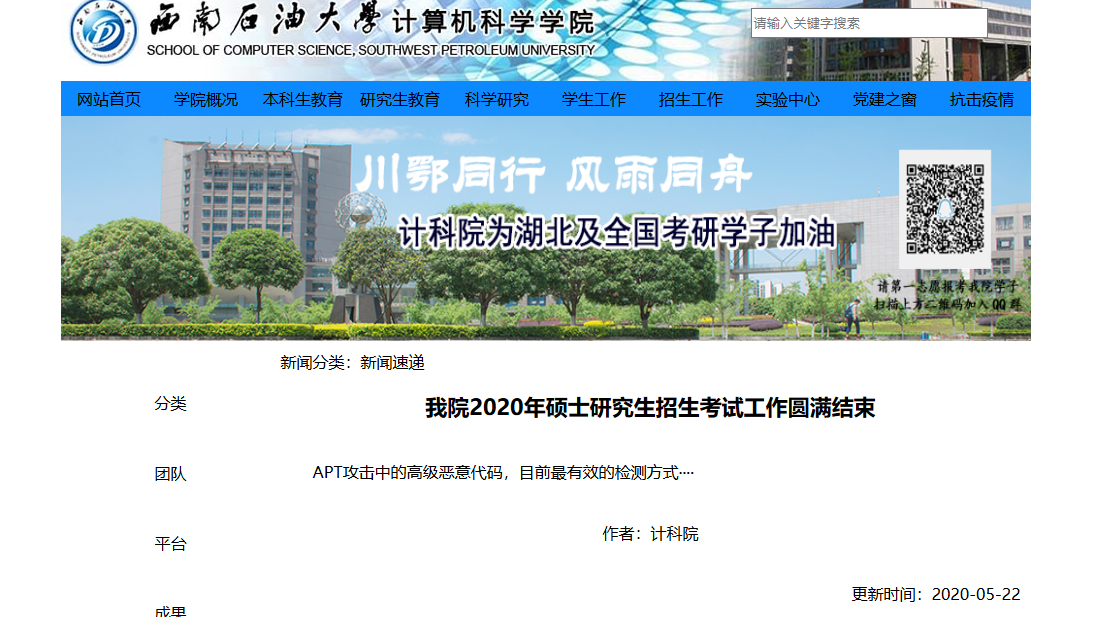
5.发布新闻
把后台的新闻数据通过Servlet渲染到JSP页面上,模仿计科院新闻网页做的一个简易的新闻前台页面。
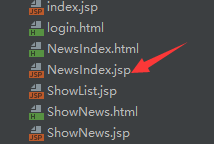
首先要做的就是新建一个前台JSP页面
<%--
  Created by IntelliJ IDEA.
  User: 米兰的小铁匠
  Date: 2020/6/9
  Time: 18:32
  To change this template use File | Settings | File Templates.
--%>
<%@ page contentType="text/html;charset=UTF-8" language="java" %>
<%@ taglib uri="http://java.sun.com/jsp/jstl/core" prefix="c"%>
<html>
<meta charset="UTF-8">
<head>
    <title>Title</title>
</head>
<link rel="stylesheet" href="utilLib/bootstrap.min.css" type="text/css" media="screen" />
<body>
<!--头部-->
<header>
    <div class="logo">
        <a href="http://localhost:8080/login_war_exploded/login.html">管理员登录</a>
        <div class="search">
            <div class="search_txt">
                <input type="text" placeholder="请输入关键字搜索">
                <div class="search_img"></div>
            </div>
        </div>
    </div>
    <ul>
        <li>网站首页</li><li>学院概况</li><li>本科生教育</li><li>研究生教育</li><li>科学研究</li>
        <li>学生工作</li><li>招生工作</li><li>实验中心</li><li>党建之窗</li><li>抗击疫情</li>
    </ul>
    <img src="img/colonavirus.jpg">
</header>

<!--中部-->
<main>
    <div class="left_news">
        <div class="tupian">
            <div class="left_daohang">
                <div>图片新闻</div>
                <div></div>
            </div>
            <div class="tupian_main">
                <img src="img/NewsImg.jpg">
                <ul>
                    <c:forEach var="news" items="${lstNews}" >
                        <c:choose>
                            <c:when test="${news.category == '图片新闻'}">
                                <div class="newsItem"><a href="ShowNewsServlet?newid=${news.newsID}" class="del_btn">
                                    <li>${news.title}</li>
                                    <div class="newsDate">${news.newsDate}</div>
                                </a></div>
                            </c:when>
                        </c:choose>
                    </c:forEach>
                </ul>
            </div>
        </div>
        <div class="sudi">
            <div class="left_daohang">
                <div>新闻速递</div>
                <div></div>
            </div>
            <div class="sudi_main">
                <div class="showNews">
                    <span>思政教育“不下线”,计科院成立湖北籍学生临时团支部</span></br>
                    <p>我宣誓,听从召唤,坚持抗疫,为打赢疫情防控阻击战贡献青春力量</p>
                </div>
                <ul>
                    <c:forEach var="news" items="${lstNews}" >
                        <c:choose>
                            <c:when test="${news.category == '新闻速递'}">
                                <div class="newsItem"><a href="ShowNewsServlet?newid=${news.newsID}" class="del_btn">
                                    <li>${news.title}</li>
                                    <div class="newsDate">${news.newsDate}</div>
                                </a></div>
                            </c:when>
                        </c:choose>
                    </c:forEach>
                </ul>
            </div>
        </div>
        <div class="gonggao">
            <div class="left_daohang">
                <div>通知公告</div>
                <div></div>
            </div>
            <div class="gonggao_main">
                <ul>
                    <c:forEach var="news" items="${lstNews}" >
                        <c:choose>
                            <c:when test="${news.category == '通知公告'}">
                                <div class="newsItem"><a href="ShowNewsServlet?newid=${news.newsID}" class="del_btn">
                                    <li>${news.title}</li>
                                    <div class="newsDate">${news.newsDate}</div>
                                </a></div>                            </c:when>
                        </c:choose>
                    </c:forEach>
                </ul>
            </div>
        </div>
    </div>
    <div class="right_news">
        <div class="xuesu">
            <div class="right_daohang">学术交流</div>
            <ul>
                <c:forEach var="news" items="${lstNews}" >
                    <c:choose>
                        <c:when test="${news.category == '学术交流'}">
                            <div class="newsItem"><a href="ShowNewsServlet?newid=${news.newsID}" class="del_btn">
                                <li>${news.title}</li>
                                <div class="newsDate">${news.newsDate}</div>
                            </a></div>                        </c:when>
                    </c:choose>
                </c:forEach>
            </ul>
        </div>
        <div class="dangjian">
            <div class="right_daohang">党建动态</div>
            <ul>
                <c:forEach var="news" items="${lstNews}" >
                    <c:choose>
                        <c:when test="${news.category == '党建动态'}">
                            <div class="newsItem"><a href="ShowNewsServlet?newid=${news.newsID}" class="del_btn">
                                <li>${news.title}</li>
                                <div class="newsDate">${news.newsDate}</div>
                            </a></div>                        </c:when>
                    </c:choose>
                </c:forEach>
            </ul>
        </div>
        <div class="zhuanti">
            <div class="right_daohang">专题列表</div>
            <ul>
                <c:forEach var="news" items="${lstNews}" >
                    <c:choose>
                        <c:when test="${news.category == '专题列表'}">
                            <div class="newsItem"><a href="ShowNewsServlet?newid=${news.newsID}" class="del_btn">
                                <li>${news.title}</li>
                                <div class="newsDate">${news.newsDate}</div>
                            </a></div>                        </c:when>
                    </c:choose>
                </c:forEach>
            </ul>
        </div>
    </div>
</main>
<%--底部--%>
<footer>
    <div class="swpu">Copyright© 2018 All Rights Reserved. 西南石油大学计算机科学学院</div>
</footer>
</body>
<style>
    /*头部*/
    header{
        width: 970px;
        height: 370px;
        margin: 0 auto;
    }
    .logo{
        width: 970px;
        height: 110px;
        background: url("img/top-bg.jpg");
    }
    .logo a{
        float: left;
    }
    .search_txt{
        width: 280px;
        height: 35px;
        float: right;
        margin-top: 37px;
    }
    .search_txt input{
        width: 237px;
        height: 30px;
    }
    .search_img{
        width: 35px;
        height: 35px;
        float: right;
    }
    header ul{
        width: 970px;
        height: 35px;
        list-style-type: none;
        margin: 0;
        padding: 0;
        overflow: hidden;
        background-color: #0c89ff;
    }
    header li{
        width: 97px;
        float: left;
        text-align: center;
        line-height: 35px;
    }
    header img{
        width: 970px;
        height: 225px;
        background-color: #2a6496;
    }
    /*中部*/
    main{
        width: 970px;
        height: 950px;
        margin: 0 auto;
    }
    .left_news{
        width: 640px;
        height: 900px;
        margin-top: 20px;
        float: left;
    }
    .tupian{
        width: 640px;
        height: 260px;
    }
    .left_daohang{
        width: 640px;
        height: 35px;
        background-color: #DDDDDD;
        line-height: 35px;
        margin-bottom: 10px;
        font-size: 16px;
        font-weight: bold;
    }
    .tupian_main img{
        width: 310px;
        height: 210px;
        float: left;
        margin-right: 38px;
    }
    .tupian_main ul{
        margin: 0;
        padding: 0;
        float: left;
        font-size: 14px;
    }

    .tupian_main li{
        width: 210px;
        height: 35px;
        color: black;
        text-overflow: ellipsis;
        overflow: hidden;
        white-space: nowrap;
        float: left;
    }
    .newsDate{
        width: 60px;
        height: 35px;
        margin-left: 10px;
        float: left;
        color: #b8b8b8;
    }
    .sudi{
        width: 640px;
        height: 320px;
    }
    .showNews{
        width: 640px;
        height: 60px;
    }
    .sudi_main ul{
        margin: 0;
        padding: 0;
        float: left;
        font-size: 14px;
    }
    .sudi_main li{
        width: 540px;
        height: 35px;
        margin-left: 20px;
        color: black;
        text-overflow: ellipsis;
        overflow: hidden;
        white-space: nowrap;
        float: left;
    }
    .gonggao_main ul{
        margin: 0;
        padding: 0;
        float: left;
        font-size: 14px;
    }
    .gonggao_main li{
        width: 540px;
        height: 35px;
        margin-left: 20px;
        color: black;
        text-overflow: ellipsis;
        overflow: hidden;
        white-space: nowrap;
        float: left;
    }
    .right_news{
        width: 300px;
        height: 770px;
        float: left;
        margin-top: 20px;
        margin-left: 20px;
    }
    .xuesu{
        width: 300px;
        height: 250px;
        margin-bottom: 10px;
    }
    .right_daohang{
        width: 300px;
        height: 35px;
        background-color: #DDDDDD;
        line-height: 35px;
        margin-bottom: 10px;
        font-size: 16px;
        font-weight: bold;
    }
    .xuesu ul{
        margin: 0;
        padding: 0;
        float: left;
        font-size: 14px;
    }
    .xuesu li{
        width: 200px;
        height: 35px;
        margin-left: 20px;
        color: black;
        text-overflow: ellipsis;
        overflow: hidden;
        white-space: nowrap;
        float: left;
    }
    .dangjian{
        width: 310px;
        height: 330px;
        margin-bottom: 10px;
    }
    .dangjian ul{
        margin: 0;
        padding: 0;
        float: left;
        font-size: 14px;
    }
    .dangjian li{
        width: 200px;
        height: 35px;
        margin-left: 20px;
        color: black;
        text-overflow: ellipsis;
        overflow: hidden;
        white-space: nowrap;
        float: left;
    }
    .zhuanti{
        width: 310px;
        height: 150px;
    }
    .zhuanti ul{
        margin: 0;
        padding: 0;
        float: left;
        font-size: 14px;
    }
    .zhuanti li{
        width: 200px;
        height: 35px;
        margin-left: 20px;
        color: black;
        text-overflow: ellipsis;
        overflow: hidden;
        white-space: nowrap;
        float: left;
    }
    /*底部*/
    footer{
        width: 100%;
        height: 80px;
        background-color: #2a6496;
    }
    .swpu{
        width: 400px;
        height: 80px;
        margin: 0 auto;
        line-height: 80px;
        font-size: 13px;
        color: white;
    }
</style>
</html>
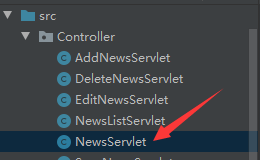
然后就是和上个博文JSP显示新闻差不多新建一个NewsServlet用来读取新闻数据并渲染到JSP页面上
package Controller;

import Entity.News;
import Service.NewsService;

import javax.servlet.ServletException;
import javax.servlet.annotation.WebServlet;
import javax.servlet.http.HttpServlet;
import javax.servlet.http.HttpServletRequest;
import javax.servlet.http.HttpServletResponse;
import java.io.IOException;
import java.sql.SQLException;
import java.util.List;

@WebServlet(urlPatterns = "/NewsServlet")
public class NewsServlet extends HttpServlet {
    protected void doPost(HttpServletRequest request, HttpServletResponse response) throws ServletException, IOException {
        doGet(request,response);
    }

    protected void doGet(HttpServletRequest request, HttpServletResponse response) throws ServletException, IOException {
        response.setContentType("text/html;charset=utf-8");
        request.setCharacterEncoding("utf-8");
        NewsService newsService = new NewsService();
        try {
            List<News> lstNews = newsService.QueryNews();
            for(News n:lstNews){
//                System.out.println(n.getNewsContent());
            }
            request.setAttribute("lstNews",lstNews);
            request.getRequestDispatcher("NewsIndex.jsp").forward(request,response);
        }
        catch (SQLException e){
            e.printStackTrace();
        }
    }
}
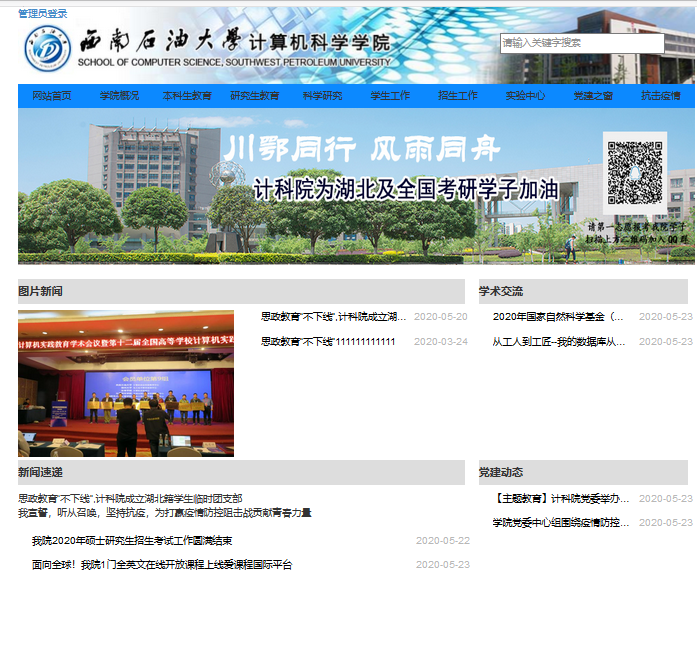
最后就是大致的页面效果,功能很简陋,只是能够把新闻数据显示出来而已
6.Ueditor富文本编辑器的简单应用
在这个新闻系统的项目中有个新闻内容,如果要对新闻内容进行添加或者编辑就需要用到这个Ueditor富文本编辑器。
什么是Ueditor呢?
UEditor是由百度web前端研发部开发的所见即所得的开源富文本编辑器,具有轻量、可定制、用户体验优秀等特点。基于MIT开源协议,所有源代码在协议允许范围内可自由修改和使用。百度UEditor的推出,可以帮助不少网站开发者在开发富文本编辑器所遇到的难题,节约开发者因开发富文本编辑器所需要的大量时间,有效降低了企业的开发成本。
引用Ueditor
首先下载Ueditor需要的文件
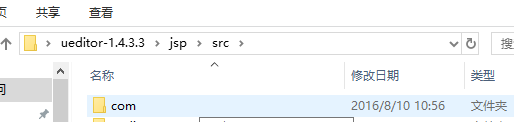
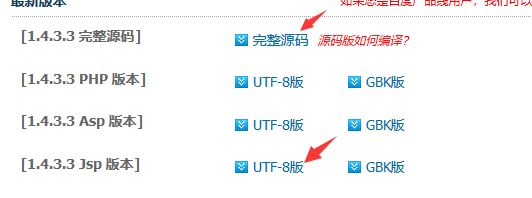 下好后先解压完整源码那个把里面的jsp/src目录下的com包复制下来放到自己项目的src文件夹目录里面
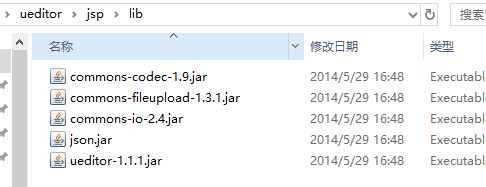
然后解压JSP版本把文件名改成ueditor放进项目的web文件夹目录里面,然后把ueditor\jsp\lib里面的文件复制到项目的lib文件夹里面并添加依赖。
编写JSP页面
因为只是简单应用所以JSP页面的代码也很简单
<%--
  Created by IntelliJ IDEA.
  User: 米兰的小铁匠
  Date: 2020/6/14
  Time: 18:08
  To change this template use File | Settings | File Templates.
--%>
<%@ page contentType="text/html;charset=UTF-8" language="java" %>
<html>
  <head>
    <script type="text/javascript" src="ueditor/ueditor.config.js"></script>
    <script type="text/javascript" src="ueditor/ueditor.all.js"></script>
  </head>
  <body>
  <form action="getInfoServlet" method="post">
<textarea id="container" name="container" style="width: 800px; height: 400px; margin: 0 auto;">
</textarea>
    <input type="submit" value="提交" style="float: right"/>
  </form>
  <script type="text/javascript">
    var ue = UE.getEditor("container");
  </script>
  <!--  <input type="text" id="word_type" style="display:none;" value="" name="word_type"/> </br>-->
  </body>
</html>
最后看看模板效果
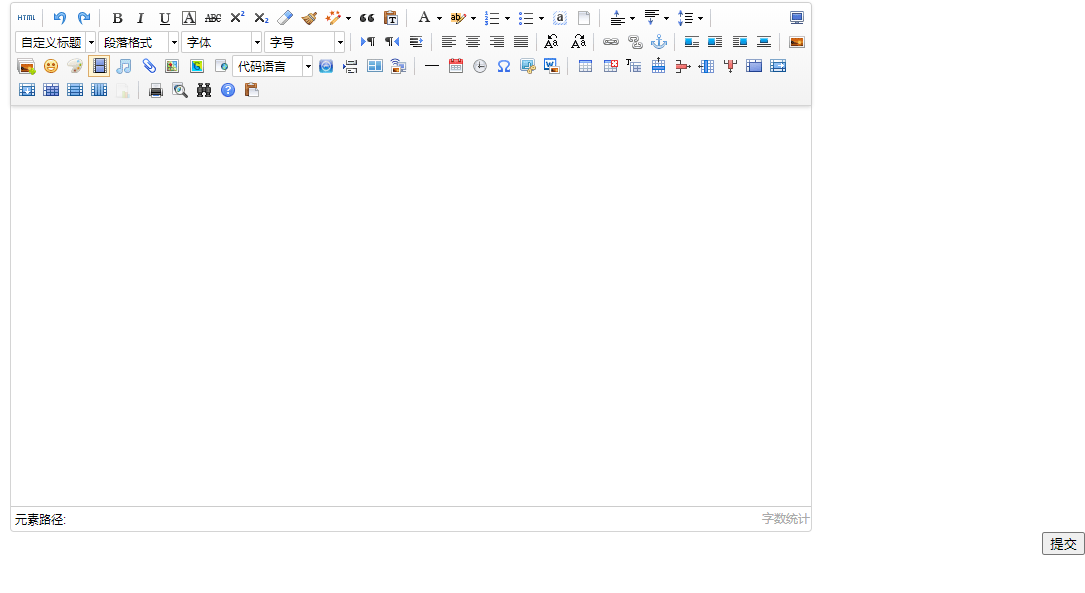
大致就是这个样子,把这个富文本框引入到自己项目里面就可以对新闻内容进行编辑了。
图片显示问题
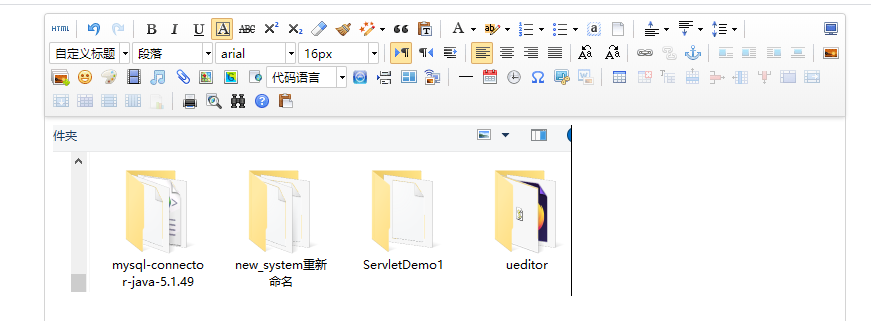
因为这个新闻系统里面有个图文新闻板块就涉及到新闻内容里面要插入图片的问题,而直接使用下载下来的ueditor插入图片的时候图片没办法显示在文本框里面。比如这样
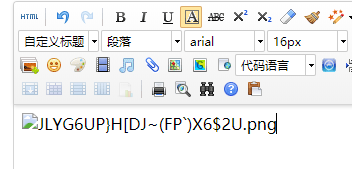 显示的就是一串图片的名字并没有把图片显示出来,查了网上资料发现是图片的路径问题需要自己配置,具体的配置方法如下。
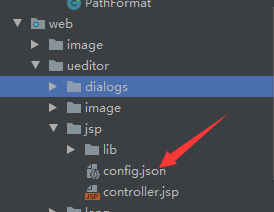
打开JSP版本那个ueditor然后打开jsp找到config.json并打开
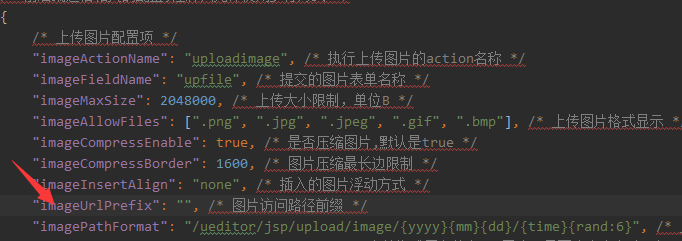
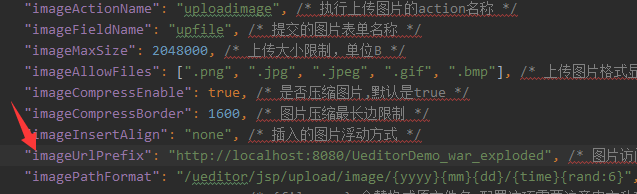
然后找到imageUrlPrefix,在双引号里面加上"http://localhost:8080/UeditorDemo_war_exploded "你项目配置的tomcat的路径
然后重启项目再插入图片就可以了
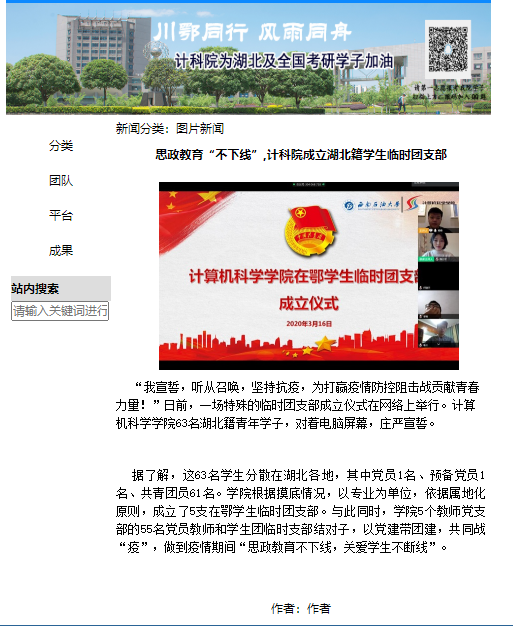
最后新闻显示效果:
7.完整项目展示
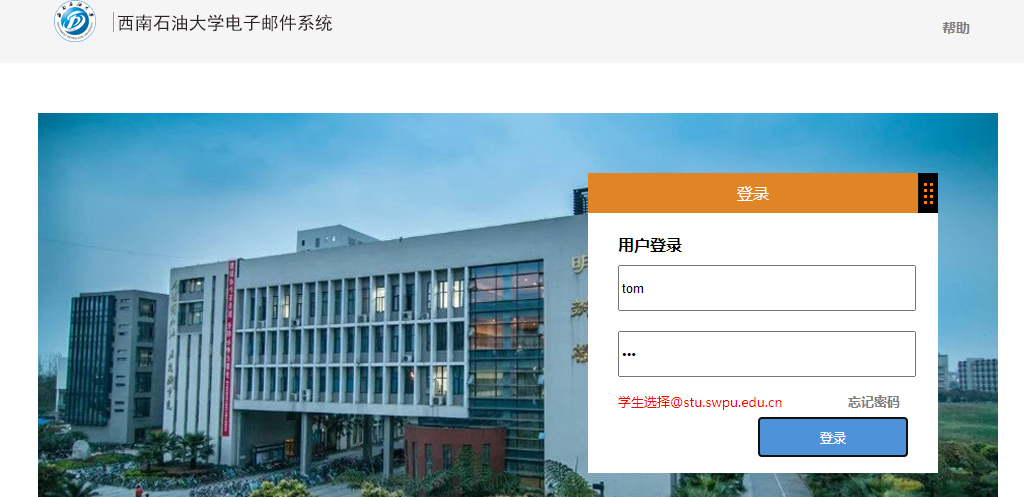
登录页面
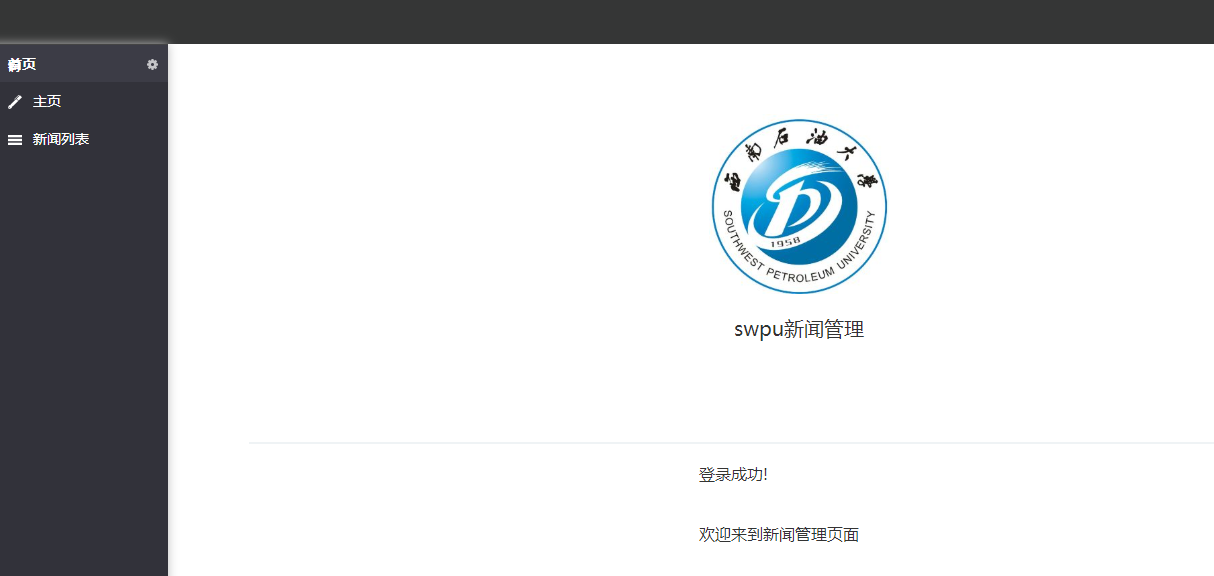
新闻管理主页
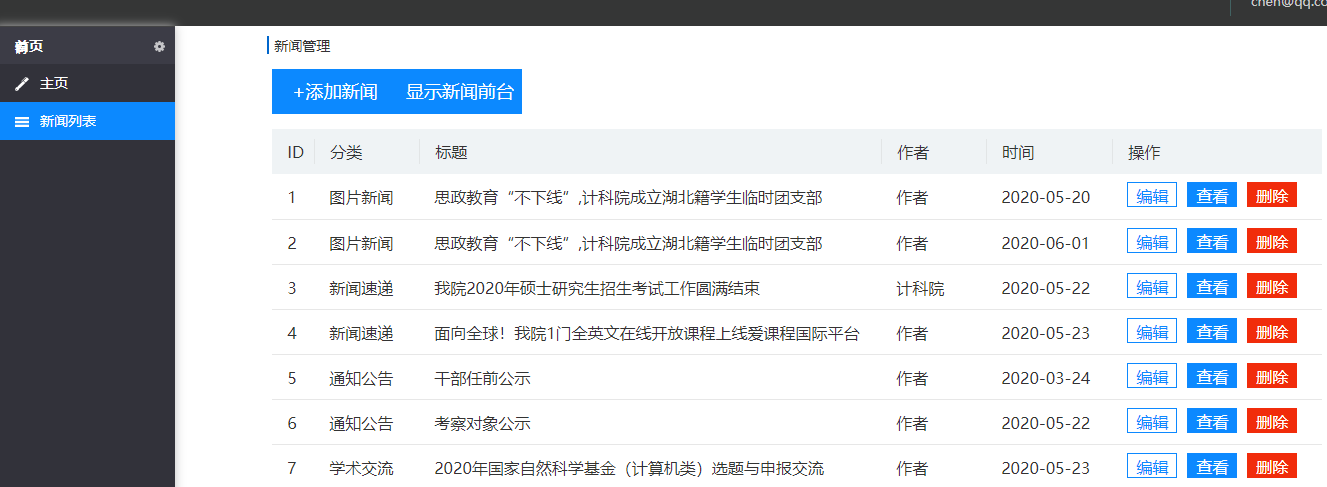
新闻列表
添加/编辑新闻
查看新闻
8.总结
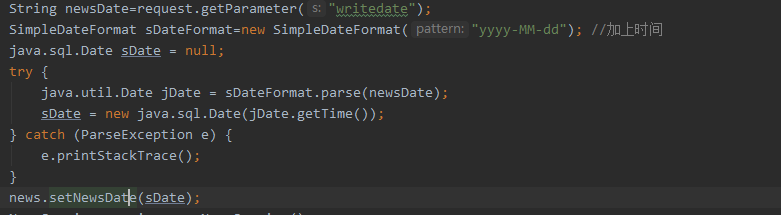
在做这个新闻管理系统的时候还是遇到了不少问题,比如数据库的日期格式和java的日期格式是不能够混用的,刚开始我就是直接把java的日期格式没有经过转换就直接填上数据传到数据库的数据表里面,结果一直报错。后来仔细看了报错信息才发现是java的日期格式不能用在数据库里面然后就通过网上查阅相关资料,把java的日期格式转换成数据库的日期格式就把问题解决了,ueditor工具栏乱码问题,是通过修改"/ueditor/lang/zh-cn/zh-cn.js"的编码格式改成ANSI然后再在页面文件开头加上
<script type="text/javascript" charset="utf-8" src="ueditor/lang/zh-cn/zh-cn.js"></script>然后清空页面缓存重新运行程序就可以了
当然还遇到了其他一些小问题就不一一说明了。总体来说,根据老师上课所教的东西和老师给的一部分代码实现这个简易的新闻管理系统还是不算太难,毕竟功能并不多,只有增删改查。需要改进的地方还有很多,比如发布新闻的图片新闻那里没有轮播图还有图片没有调用数据库里面的,还有就是页面美化这些。虽然有很多不足的地方但是这也算是我学习这门课以来一点小小的收获吧,毕竟学习是一点一滴的积累的。
最后附上那个数据库和java日期类型转换的代码:
Ueditor富文本编辑框的引用参考的是这篇博客:idea开发javaweb项目引用ueditor
https://blog.csdn.net/qq_37164847/article/details/79867690
码云地址:https://gitee.com/xiaotiejiang329/Servlet

 浙公网安备 33010602011771号