


JSP显示新闻
JSP显示新闻
在 mysql创建新闻表,用户登录时,用serverlet获取用户名密码,查询数据库是否存在,如果是正确的用户名密码,查询新闻表,将新闻数据传给JSP首页,JSP首页用EL表达式显示新闻标题列表。
1.mysql创建新闻表
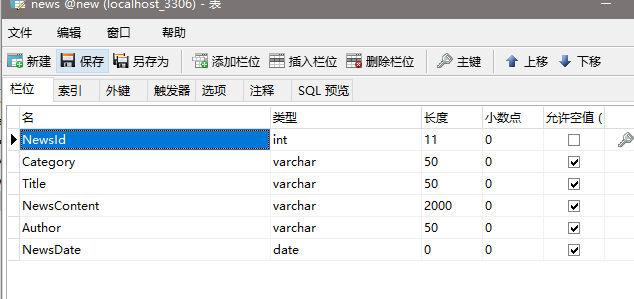
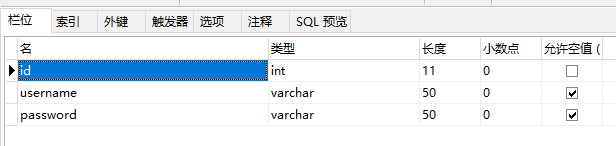
(1)打开mysql可视化工具找到新闻数据库创建新闻表以及用户表
新闻表
用户表
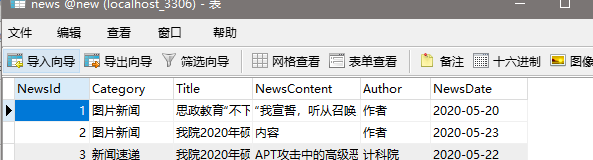
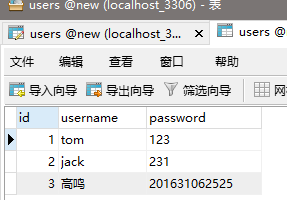
(2)在表中填入几条数据
新闻表内的数据
用户表内的数据
2.验证用户名和密码
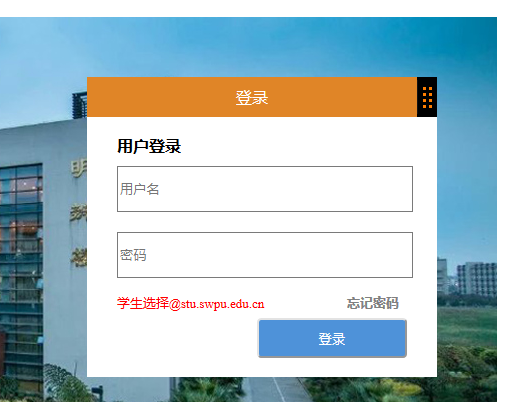
(1)设置登录页面
仿照邮件登录系统做的登录页面


<!DOCTYPE html>
<html lang="en">
<head>
    <meta charset="utf-8">
    <title>登录页面</title>
</head>
<!--<link rel="stylesheet" type="text/css" href="css/login.css"/>-->
<script type="text/javascript" src="js/login.js"></script>
<body>
<header>
    <div class="logo">
        <img src="img/login_logo.png">
    </div>
    <div><a href="" class="help">帮助</a></div>
</header>

<main>
    <form id="login_form" action="login" method="post">
        <div class="login_box">
        <div class="login-head">
            <div class="login-title">登录</div>
            <div class="icon"></div>
        </div>
        <div class="login-content">
            <div id="tip">
                <br>
                <div class="user-login">用户登录</div>
            </div>
            <div>
                <input type="text" name="username" placeholder="用户名"  id="username">
            </div>
            <div>
                <input type="password" name="password" placeholder="密码" id="password">
            </div>
            <div>
                <div class="choose">学生选择@stu.swpu.edu.cn</div>
                <div><a href="" class="forget">忘记密码</a></div>
            </div>
            <div>
                <input type="submit" name="submit" value="登录" class="login" >
            </div>
        </div>
        </div>
    </form>
</main>
<footer>
    <div class="foot">西南石油大学</div>

</footer>
<style>
    header{
        height: 80px;
        width: 100%;
        background-color: #F5F5F5;
    }
    .logo{
        margin-left: 200px;
        margin-top: 15px;
        float: left;
    }
    .help{
        text-align: center;
        font-size: 14px;
        height: 20px;
        width: 30px;
        margin-top: 35px;
        margin-right: 200px;
        float: right;
        font-weight: bolder;
        color: gray;
        text-decoration: none;
    }
    main{
        height: 340px;
        width: 840px;
        margin-left: 200px;
        margin-top: 50px;
        padding: 60px;
        background-image: url("img/login_bg_05.jpg");
    }
    .login_box{
        height: 300px;
        width: 350px;
        background-color: #fff;
        float: right;
    }
    .login-head{
        height: 40px;
        width: 350px;
        display: flex;
        justify-content: flex-end;
        background-color: #e08527;
    }
    .login-title{
        top: 0;
        right: 0;
        bottom: 0;
        left: 0;
        margin: auto;
        line-height: 40px;
        text-align: center;
        color: #fff;
    }
    .icon{
        height: 40px;
        width: 20px;
        background-color: black;
        background-image: url('img/dragbar.png');
    }
    .login-content{
        background-color: #fff;
        padding: 30px;
    }
    .user-login{
        text-align: left;
        font-weight: bolder;
        margin-top: -30px;
    }
    #username{
        height: 40px;
        width: 290px;
        margin-top: 10px;
        margin-bottom: 10px;
    }
    #password{
        height: 40px;
        width: 290px;
        margin-top: 10px;
        margin-bottom: 10px;
    }
    .choose{
        height: 30px;
        width: 220px;
        font-size: 13px;
        color: red;
        line-height: 30px;
        float: left;
    }
    .forget{
        height: 30px;
        width: 60px;
        line-height: 30px;
        font-size: 13px;
        text-decoration: none;
        color: gray;
        font-weight: bolder;
        float: right;
    }
    .login{
        height: 40px;
        width: 150px;
        background-color: #4e92d9;
        border-radius: 4px;
        float: right;
        color: #fff;
    }
    .foot{
        text-align: center;
        margin-top: 20px;
        color: gray;
        font-size: 12px;
    }
</style>
</body>
</html>
(2)连接数据库
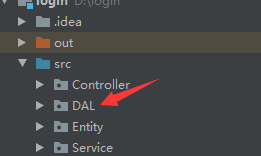
创建DAL包
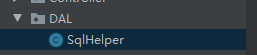
然后新建SqlHelper类
package DAL;

import java.sql.Connection;
import java.sql.DriverManager;
import java.sql.ResultSet;
import java.sql.Statement;

public class SqlHelper {
    public static Connection conn;
    private static String driverName = "com.mysql.jdbc.Driver";

    private static String dbURL = "jdbc:mysql://localhost:3306/new";

    private static String userName = "root";

    private static String userPwd = "123456";

    private static Connection getConnection(){
        try {
            Class.forName(driverName);
            conn = DriverManager.getConnection(dbURL,userName,userPwd);
            return conn;
        }
        catch (Exception e){
            e.printStackTrace();
            System.out.println("----------------连接失败");
        }
        return null;
    }
    public static ResultSet executeQuery(String SQL){
        try {
            Connection conn = getConnection();
            System.out.println("-----------------连接成功");
            Statement stmt = conn.createStatement();
            ResultSet rs = stmt.executeQuery(SQL);
            return rs;
        }
        catch (Exception e){
            e.printStackTrace();
            System.out.println("-----------------查询失败");
        }
        return null;
    }

    public static boolean executeUpdate(String SQL){
        try {
            Connection conn = getConnection();
            System.out.println("-----------------连接成功");
            Statement stmt = conn.createStatement();
            int result = stmt.executeUpdate(SQL);
            if (result>0)
                return true;
        }
        catch (Exception e){
            e.printStackTrace();
            System.out.println("-----------------更新失败");
        }
        return false;
    }
}
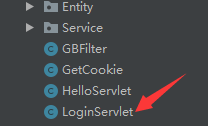
新建LoginServlet用来连接新闻数据库并验证数据库的用户表中用户名密码能否在登录页面登录成功
import DAL.SqlHelper;

import javax.servlet.ServletContext;
import javax.servlet.ServletException;
import javax.servlet.annotation.WebServlet;
import javax.servlet.http.*;
import javax.xml.transform.Result;
import java.io.IOException;
import java.io.PrintWriter;
import java.sql.*;

@WebServlet(name = "LoginServlet")
public class LoginServlet extends HttpServlet {
    protected void doPost(HttpServletRequest request, HttpServletResponse response) throws ServletException, IOException {
        response.setContentType("text/html;charset=utf-8");
        request.setCharacterEncoding("utf-8");
        PrintWriter out = response.getWriter();
        String uname = request.getParameter("username");
        String pwd = request.getParameter("password");

            String sql = "select * from users where username='"+uname+"' and password='"+pwd+"'";
            ResultSet resultSet = SqlHelper.executeQuery(sql);
        try {
            if (resultSet.next()) {

                System.out.println("表单输入数据:" + uname + " " + pwd);
                System.out.println("用户名:" + uname + " 密码:" + pwd);
                System.out.println("登录成功,欢迎你 "+uname);
                out.println("登录成功" + "<br>" + "您的用户名:" + uname + "<br>" + "您的密码:" + pwd + "<br>");

                Cookie cookieUser = new Cookie("username",uname);
                cookieUser.setMaxAge(60*60*24*30);
                response.addCookie(cookieUser);

                Cookie cookiePwd = new Cookie("password",pwd);
                cookiePwd.setMaxAge(60*60*24*30);
                response.addCookie(cookiePwd);

                HttpSession session = request.getSession();
                session.setMaxInactiveInterval(10);
                ServletContext servletContext = getServletContext();
                Object num = servletContext.getAttribute("number");
//                out.println("当前在线人数:" + num);
                request.setAttribute("username",uname);
                request.setAttribute("password",pwd);
                request.getRequestDispatcher("index.jsp").forward(request,response);
            }
            else{
                System.out.println("表单输入数据:" + uname + " " + pwd);
                System.out.println("用户名或者密码错误");
                out.println("登录失败" + "<br>" + "用户名或者密码错误");
            }
        } catch (SQLException e) {
            e.printStackTrace();
        }
    }

    protected void doGet(HttpServletRequest request, HttpServletResponse response) throws ServletException, IOException {

    }
}
登录成功后的页面
<%--
  Created by IntelliJ IDEA.
  User: 米兰的小铁匠
  Date: 2020/5/27
  Time: 9:59
  To change this template use File | Settings | File Templates.
--%>
<%@ page contentType="text/html;charset=UTF-8" language="java" %>
<%@ taglib uri="http://java.sun.com/jsp/jstl/core" prefix="c"%>
<html>
  <head>
    <title>主页面</title>
      <link rel="stylesheet" href="utilLib/bootstrap.min.css" type="text/css" media="screen" />
  </head>
  <body>
  <div class="logo-img">
    <img src="img/scimg.png">
  </div>
  <div class="manage-title">西南石油大学新闻管理系统</div>
  <div class="show_box">
    <img src="img/index_bg.jpg">
    <div class="infor">
      <div class="welcome">登录成功!  欢迎您,${username}</div>
      <div class="account">您的用户名是:${username}</br>密码是:${password}</div>
      <div class="online">当前网页在线人数是:${number}</div>
      <div class="management">
        <a href="http://localhost:8080/login_war_exploded/NewsListServlet">管理新闻</a>
      </div>
    </div>
  </div>
  </body>
<style>
  .manage-title{
    width: 1000px;
    margin: 0 auto;
    font-size: 16px;
    font-weight: bold;
  }
  .logo-img{
    width: 170px;
    height: 170px;
    left: 0;
    right: 0;
    margin: auto;
  }
  .logo-img img{
    width: 170px;
    height: 170px;
  }
  .show_box{
    width: 1200px;
    height: 400px;
    margin: 0 auto;
    padding: 50px 100px;
    font-size: 16px;
  }
  .show_box img{
    width: 1000px;
    height: 400px;
  }
  .infor{
    position: fixed;
    background-color: #fff;
    width: 240px;
    height: 250px;
    margin: 0 auto;
    top: 300px;
    right: 0;
    bottom: 0;
    left: 0;
    opacity: 0.7;
  }
  .welcome{
    width: 240px;
    text-align: center;
    margin: 10px 0;
  }
  .account{
    width: 240px;
    text-align: center;
    margin: 10px 0;
  }
  .online{
    width: 240px;
    text-align: center;
    margin: 10px 0;
  }
  .management{
    width: 240px;
    text-align: center;
    margin-top: 50px;
  }
</style>
</html>

输入用户表中数据用户名:高鸣,密码:201631062525
3.新闻列表
(1)连接新闻数据库并将新闻表中的数据
先新建个Entity包再在包里新建个新闻类
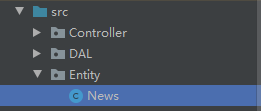
package Entity;

import java.util.Date;

public class News {
    private int newsID;
    private String category;
    private String title;
    private String newsContent;
    private String author;
    private Date newsDate;

    public int getNewsID() {
        return newsID;
    }

    public void setNewsID(int newsID) {
        this.newsID = newsID;
    }

    public String getCategory() {
        return category;
    }

    public void setCategory(String category) {
        this.category = category;
    }

    public String getTitle() {
        return title;
    }

    public void setTitle(String title) {
        this.title = title;
    }

    public String getNewsContent() {
        return newsContent;
    }

    public void setNewsContent(String newsContent) {
        this.newsContent = newsContent;
    }

    public String getAuthor() {
        return author;
    }

    public void setAuthor(String author) {
        this.author = author;
    }

    public Date getNewsDate() {
        return newsDate;
    }

    public void setNewsDate(Date newsDate) {
        this.newsDate = newsDate;
    }


    public News() {
    }

}
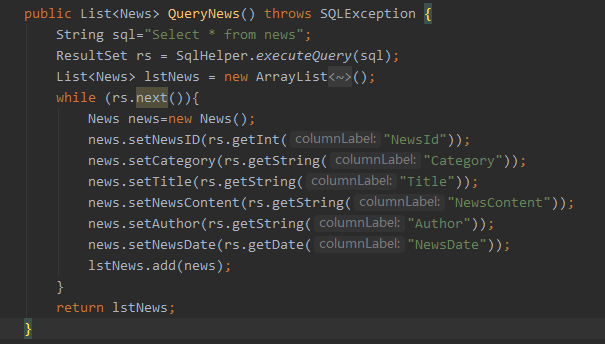
再新建个Service包并在包里新建个NewsService用来连接新闻数据库并读取新闻表中的数据并转换成列表形式
(2)用jsp页面来显示新闻列表
先新建个JSP文件并用CSS布局美化
<%--
  Created by IntelliJ IDEA.
  User: 米兰的小铁匠
  Date: 2020/5/28
  Time: 14:39
  To change this template use File | Settings | File Templates.
--%>
<%@ page contentType="text/html;charset=UTF-8" language="java" %>
<%@ taglib uri="http://java.sun.com/jsp/jstl/core" prefix="c"%>
<html>
<head>
    <title>Title</title>
    <link rel="stylesheet" type="text/css" href="css/Iframe.css" />
    <link rel="stylesheet" href="utilLib/bootstrap.min.css" type="text/css" media="screen" />
</head>
<body>
<span class="cp_title">新闻管理</span>
<div class="add_cp">
    <a href="http://localhost:8080/login_war_exploded/AddNews.jsp">+添加新闻</a>
    <a href="http://localhost:8080/login_war_exploded/NewsServlet">显示新闻前台</a>
</div>
<div class="table_con">
    <table>
        <tr class="tb_title">
            <td width="4%">ID</td>
            <td width="10%">分类</td>
            <td width="50%">标题</td>
<%--            <td width="34%">内容</td>--%>
            <td width="10%">作者</td>
            <td width="10%">时间</td>
            <td width="15%">操作</td>
        </tr>
        <c:forEach var="news" items="${lstNews}" >
            <tr>
                <td width="4%">${news.newsID}</td>
                <td width="10%">${news.category}</td>
                <td width="50%">${news.title}</td>
<%--                <td width="34%">${news.newsContent} </td>--%>
                <td width="10%">${news.author}</td>
                <td width="10%">${news.newsDate}</td>
                <td width="15%">
                    <a href="EditNewsServlet?newid=${news.newsID}" class="del_btn">编辑</a>
                    <a href="ShowNewsServlet?newid=${news.newsID}" class="del_btn">查看</a>
                    <a href="DeleteNewsServlet?newid=${news.newsID}" class="del_btn">删除</a>
                </td>
            </tr>
        </c:forEach>
    </table>
    <div class="logo-img">
      <img src="img/scimg.png">
    </div>
</div>
</body>
<style>
    .logo-img{
        width: 150px;
        height: 150px;
        float: right;
    }
    .logo-img img{
        width: 150px;
        height: 150px;
    }
</style>
</html>
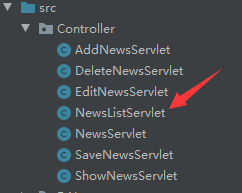
然后再新建Conrtorller包并在包内新建NewsListServlet用来把表中数据显示到JSP页面上
package Controller;

import Entity.News;
import Service.NewsService;

import javax.servlet.ServletException;
import javax.servlet.annotation.WebServlet;
import javax.servlet.http.HttpServlet;
import javax.servlet.http.HttpServletRequest;
import javax.servlet.http.HttpServletResponse;
import java.io.IOException;
import java.sql.SQLException;
import java.util.List;

@WebServlet(name = "NewsListServlet")
public class NewsListServlet extends HttpServlet {
    protected void doPost(HttpServletRequest request, HttpServletResponse response) throws ServletException, IOException {

        doGet(request,response);
    }

    protected void doGet(HttpServletRequest request, HttpServletResponse response) throws ServletException, IOException {
        NewsService newsService = new NewsService();
        try {
            List<News> lstNews = newsService.QueryNews();
            for(News n:lstNews){
//                System.out.println(n.getNewsContent());
            }
            request.setAttribute("lstNews",lstNews);
            request.getRequestDispatcher("ShowList.jsp").forward(request,response);
        }
        catch (SQLException e){
            e.printStackTrace();
        }
    }
}
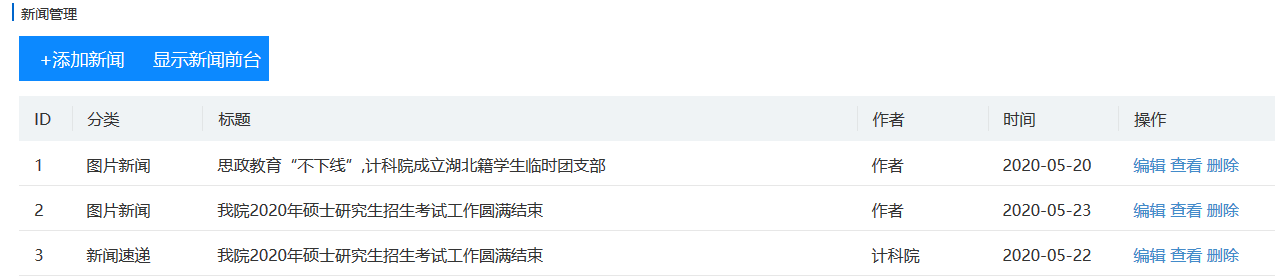
点击上面主页那个管理新闻按钮跳转到新闻管理页面查看最终显示结果
项目码云地址:https://gitee.com/xiaotiejiang329/Servlet

 浙公网安备 33010602011771号