1、封装一个生成二维码的类
public class QrCodeHelper {

    public File write(String content, int width, int height) throws WriterException, IOException {
        var file = File.createTempFile("qr-code", FORMAT);
        try (var stream = new FileOutputStream(file)) {
            write(stream, content, width, height);
        }
        return file;
    }

    public void write(OutputStream stream, String content, int width, int height) throws WriterException, IOException {
        var matrix = encode(content, width, height);
        MatrixToImageWriter.writeToStream(matrix, FORMAT, stream);
    }

    public BufferedImage create(String content, int width, int height) throws WriterException, IOException {
        var matrix = encode(content, width, height);
        return MatrixToImageWriter.toBufferedImage(matrix);
    }

    public BitMatrix encode(String content, int width, int height) throws WriterException {
        Map<EncodeHintType, Object> hints = new HashMap<>();
        hints.put(EncodeHintType.CHARACTER_SET, "utf-8");
        hints.put(EncodeHintType.ERROR_CORRECTION, ErrorCorrectionLevel.H);
        hints.put(EncodeHintType.MARGIN, 1);
        return new MultiFormatWriter().encode(content, BarcodeFormat.QR_CODE, width, height, hints);

    }

    private final static String FORMAT = "png";
}
2、使用生成二维码
关键代码
var img = Image.getInstance(qrCodeHelper.write(qr, 60, 60).getAbsolutePath());
        img.setAbsolutePosition(30, PageSize.A4.getWidth() - 70);
        document.add(img);
具体实例
/**
     *
     * @param document
     * @param btList 表头集合
     * @param views  数据集合
     * @param gzmbgl
     * @param bmrydygl
     * @param qj
     * @param pear1 字体
     * @param pear2 字体
     * @param grape 字体
     * @param orange 字体
     * @param qr 二维码信息
     * @throws IOException
     * @throws WriterException
     * @throws DocumentException
     */
    private void createHzbTable(Document document, List<RslGzmbnrView> btList, List<JjjtbmPdfView> views, Gzmbgl gzmbgl, Bmrydygl bmrydygl, String qj, Font pear1, Font pear2, Font grape, Font orange, String qr) throws IOException, WriterException, DocumentException {
        DecimalFormat df = new DecimalFormat("#,##0.00");
        double floor = Math.floor((double) (btList.size() + 3) / 2);
        double ceil = Math.ceil((double) (btList.size() + 3) / 2);
        List<JjjtbmHzbView> hzbList = getHzbList(btList, views);
        createHzbTable2(document, btList, hzbList, gzmbgl, bmrydygl, qj, floor, ceil, pear1, pear2, grape, orange, qr, df);
    }

    private void createHzbTable2(Document document, List<RslGzmbnrView> btList, List<JjjtbmHzbView> allJjjtbmHzbViews, Gzmbgl gzmbgl, Bmrydygl bmrydygl, String qj, double floor, double ceil, Font pear1, Font pear2, Font grape, Font orange, String qr, DecimalFormat df) throws IOException, WriterException, DocumentException {
        var img = Image.getInstance(qrCodeHelper.write(qr, 60, 60).getAbsolutePath());
        img.setAbsolutePosition(30, PageSize.A4.getWidth() - 70);
        document.add(img);
        var table = new PdfPTable(btList.size() + 3);
        table.setTotalWidth(PageSize.A4.getHeight() - 20f);
        table.setLockedWidth(true);
        table.setHorizontalAlignment(0);
        var dbt = new PdfPCell(new Phrase("【" + gzmbgl.getName() + "】汇总表", grape));
        dbt.setHorizontalAlignment(Element.ALIGN_CENTER);
        dbt.setColspan(btList.size() + 3);
        dbt.setPaddingBottom(25);
        dbt.disableBorderSide(15);
        table.addCell(dbt);

        var bt1 = new PdfPCell(new Phrase("车间名称:" + bmrydygl.getName(), pear1));
        bt1.setHorizontalAlignment(Element.ALIGN_LEFT);
        bt1.setColspan((int) floor);
        bt1.disableBorderSide(15);
        table.addCell(bt1);

        var bt2 = new PdfPCell(new Phrase("日期:" + qj, pear1));
        bt2.setHorizontalAlignment(Element.ALIGN_LEFT);
        bt2.setColspan((int) ceil);
        bt2.disableBorderSide(15);
        table.addCell(bt2);

        addCell(table, "工资类别", pear2, Element.ALIGN_CENTER);

        addCell(table, "部门名称", pear2, Element.ALIGN_CENTER);

        addCell(table, "人数", pear2, Element.ALIGN_CENTER);

        for (var xm : btList) {
            addCell(table, xm.getGzxm(), pear2, Element.ALIGN_CENTER);
        }

        for (int i = 0; i < allJjjtbmHzbViews.size(); i++) {
            addCell(table, allJjjtbmHzbViews.get(i).getGzlb(), orange, Element.ALIGN_CENTER);
            addCell(table, allJjjtbmHzbViews.get(i).getBm(), orange, Element.ALIGN_CENTER);
            addCell(table, allJjjtbmHzbViews.get(i).getRs() + ".00", orange, Element.ALIGN_RIGHT);
            for (var xm : btList) {
                addCell(table, df.format(allJjjtbmHzbViews.get(i).getXms().get(xm.getId())), orange, Element.ALIGN_RIGHT);
            }
            float totalHeight = table.getTotalHeight();if (totalHeight > 562.0) {
                table.deleteLastRow();
                setBw(table, pear1, floor, ceil);
                document.add(table);
                document.newPage();
                List<JjjtbmHzbView> jjjtbmHzbViews = allJjjtbmHzbViews.subList(i, allJjjtbmHzbViews.size());
                createHzbTable2(document, btList, jjjtbmHzbViews, gzmbgl, bmrydygl, qj, floor, ceil, pear1, pear2, grape, orange, qr, df);
                return;
            }
        }
        setBw(table, pear1, floor, ceil);
        document.add(table);
    }
private void setBw(PdfPTable table, Font pear1, double floor, double ceil) {
    var bw1 = new PdfPCell(new Phrase("部门负责人:", pear1));
    bw1.setHorizontalAlignment(Element.ALIGN_LEFT);
    bw1.setColspan((int) floor);
    bw1.disableBorderSide(15);
    table.addCell(bw1);

    var bw2 = new PdfPCell(new Phrase("制表人:", pear1));
    bw2.setHorizontalAlignment(Element.ALIGN_LEFT);
    bw2.setColspan((int) ceil);
    bw2.disableBorderSide(15);
    table.addCell(bw2);
}

private void addCell(PdfPTable table, String str, Font font, int alignCenter) {
    var c1 = new PdfPCell(new Phrase(str, font));
    c1.setHorizontalAlignment(alignCenter);
    table.addCell(c1);
}
@Resource
    QrCodeHelper qrCodeHelper;
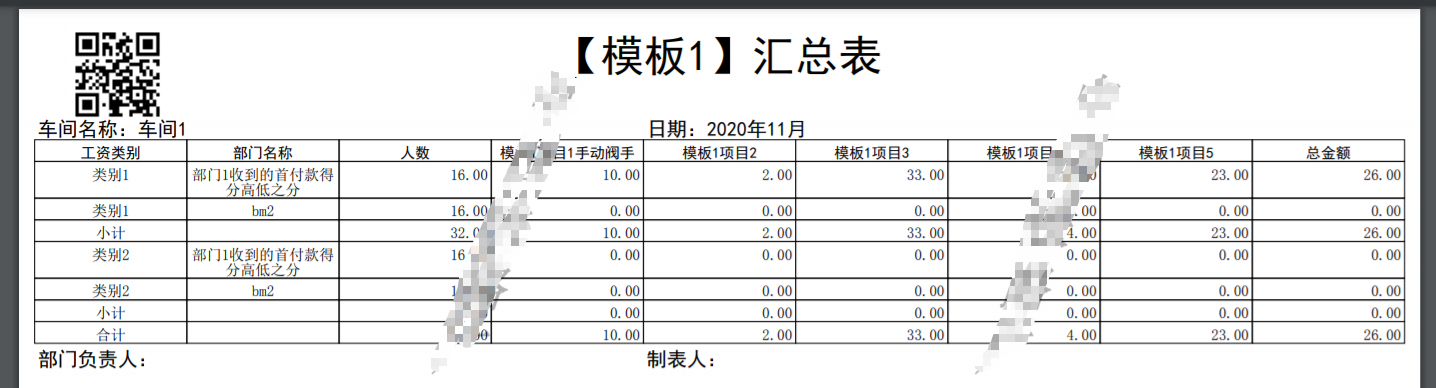
效果: