
Git subtree
关于子仓库或者说是仓库共用,git官方推荐的工具是git subtree。 我自己也用了一段时间的git subtree,感觉比git submodule好用,但是也有一些缺点,在可接受的范围内。所以对于仓库共用,在git subtree 与 git submodule之中选择的话,我推荐git subtree。
git subtree是什么?为什么使用git subtree?
git subtree 可以实现一个仓库作为其他仓库的子仓库。
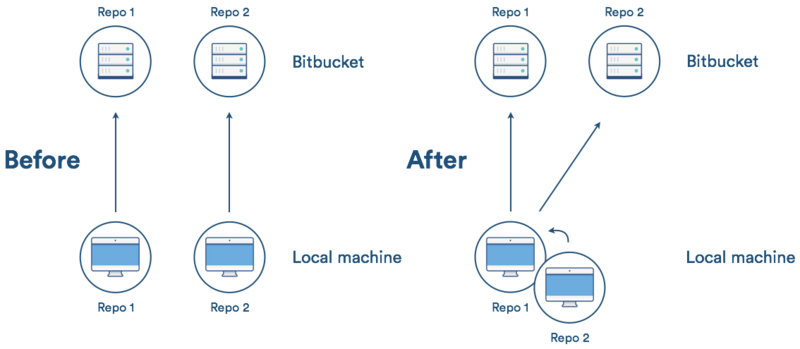
使用git subtree 有以下几个原因:
-
旧版本的git也支持(最老版本可以到 v1.5.2).
-
git subtree与git submodule不同,它不增加任何像
.gitmodule这样的新的元数据文件. -
git subtree对于项目中的其他成员透明,意味着可以不知道git subtree的存在.
当然,git subtree也有它的缺点,但是这些缺点还在可以接受的范围内:
-
必须学习新的指令(如:git subtree).
-
子仓库的更新与推送指令相对复杂。
git subtree的使用
git subtree的主要命令有:
git subtree add   --prefix=<prefix> <commit>
git subtree add   --prefix=<prefix> <repository> <ref>
git subtree pull  --prefix=<prefix> <repository> <ref>
git subtree push  --prefix=<prefix> <repository> <ref>
git subtree merge --prefix=<prefix> <commit>
git subtree split --prefix=<prefix> [OPTIONS] [<commit>]
准备
我们先准备一个仓库叫photoshop,一个仓库叫libpng,然后我们希望把libpng作为photoshop的子仓库。
photoshop的路径为https://github.com/test/photoshop.git,仓库里的文件有:
photoshop
    |
    |-- photoshop.c
    |-- photoshop.h
    |-- main.c
    \-- README.md
libPNG的路径为https://github.com/test/libpng.git,仓库里的文件有:
libpng
    |
    |-- libpng.c
    |-- libpng.h
    \-- README.md
以下操作均位于父仓库的根目录中。
在父仓库中新增子仓库
我们执行以下命令把libpng添加到photoshop中:
git subtree add --prefix=sub/libpng https://github.com/test/libpng.git master --squash
(--squash参数表示不拉取历史信息,而只生成一条commit信息。)
执行git status可以看到提示新增两条commit:

git log查看详细修改:

执行git push把修改推送到远端photoshop仓库,现在本地仓库与远端仓库的目录结构为:
photoshop
    |
    |-- sub/
    |   |
    |   \--libpng/
    |       |
    |       |-- libpng.c
    |       |-- libpng.h
    |       \-- README.md
    |
    |-- photoshop.c
    |-- photoshop.h
    |-- main.c
    \-- README.md
注意,现在的photoshop仓库对于其他项目人员来说,可以不需要知道libpng是一个子仓库。什么意思呢?
当你git clone或者git pull的时候,你拉取到的是整个photoshop(包括libpng在内,libpng就相当于photoshop里的一个普通目录);当你修改了libpng里的内容后执行git push,你将会把修改push到photoshop上。
也就是说photoshop仓库下的libpng与其他文件无异。
从源仓库拉取更新
如果源libpng仓库更新了,photoshop里的libpng如何拉取更新?使用git subtree pull,例如:
git subtree pull --prefix=sub/libpng https://github.com/test/libpng.git master --squash
推送修改到源仓库
如果在photoshop仓库里修改了libpng,然后想把这个修改推送到源libpng仓库呢?使用git subtree push,例如:
git subtree push --prefix=sub/libpng https://github.com/test/libpng.git master
简化git subtree命令
我们已经知道了git subtree 的命令的基本用法,但是上述几个命令还是显得有点复杂,特别是子仓库的源仓库地址,特别不方便记忆。
这里我们把子仓库的地址作为一个remote,方便记忆:
git remote add -f libpng https://github.com/test/libpng.git
然后可以这样来使用git subtree命令:
git subtree add --prefix=sub/libpng libpng master --squash
git subtree pull --prefix=sub/libpng libpng master --squash
git subtree push --prefix=sub/libpng libpng master
git subtree用法
一.使用场景
例如,在项目Game中有一个子目录AI。Game和AI分别是一个独立的git项目,可以分开维护。为了避免直接复制粘贴代码,我们希望Game中的AI子目录与AI的git项目关联,有3层意思:
1.AI子目录使用AI的git项目来填充,内容保持一致。
2.当AI的git项目代码有更新,可以拉取更新到Game项目的AI子目录来。
3.反过来,当Game项目的AI子目录有变更,还可以推送这些变更到AI的git项目。
用git subtree可以轻松满足上面的需求。
二.git subtree用法
针对第一段的3条需求,我分别说明具体的命令。
1. 第一次添加子目录,建立与git项目的关联
建立关联总共有2条命令。
语法:git remote add -f <子仓库名> <子仓库地址>
解释:其中-f意思是在添加远程仓库之后,立即执行fetch。
语法:git subtree add --prefix=<子目录名> <子仓库名> <分支> --squash
解释:–squash意思是把subtree的改动合并成一次commit,这样就不用拉取子项目完整的历史记录。–prefix之后的=等号也可以用空格。
$git remote add -f ai https://github.com/aoxu/ai.git
$git subtree add --prefix=ai ai master --squash
2. 从远程仓库更新子目录
更新子目录有2条命令。
语法:git fetch <远程仓库名> <分支>
语法:git subtree pull --prefix=<子目录名> <远程分支> <分支> --squash
$git fetch ai master
$git subtree pull --prefix=ai ai --squash
3. 从子目录push到远程仓库(确认你有写权限)
推送子目录的变更有1条命令。
语法:git subtree push --prefix=<子目录名> <远程分支名> 分支
$git subtree push --prefix=ai ai master

 浙公网安备 33010602011771号