
HTML (css基础样式)
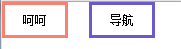
solid 边框加粗
border:5px 设置边像素
display:inline-block 横着显示块状的
line-height:40px 字体上下居中
text-align:center 字体左右居中
margin-right:20px 调整外界边框
<body style="margin: 0px">
    <!--默认8px-->
    <div style="width: 80px;height: 40px;border: 5px salmon solid;
    display: inline-block; line-height: 40px; text-align: center;
    margin-right:20px">呵呵</div>

    <div style="width: 80px; height: 40px;border: 5px slateblue solid;
    display: inline-block;line-height: 40px; text-align: center;
    margin-right: 60px">导航</div>
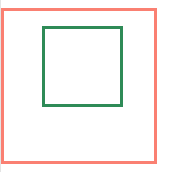
2. margin;边距,顺序是上 ,右, 下, 左 可以负数
    <div style="width: 200px;height: 200px;border: 5px salmon solid;">
        <div style="width: 100px;height: 100px;border: 5px seagreen solid;
        margin: 20px 30px 20px 50px"></div>
        <!--margin;边距,顺序是上 ,右, 下, 左  可以负数-->
    </div>
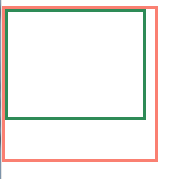
2.1 padding:内边距 顺序一样,上,左,下,右,从内边缘开始长胖
    <div style="width: 200px;height: 200px;border: 5px salmon solid;">
        <div style="width: 100px;height: 100px;border: 5px seagreen solid;
        padding: 20px 30px 20px 50px"></div>
        <!--padding:内边距 顺序一样,上,左,下,右,从内边缘开始长胖-->
    </div>
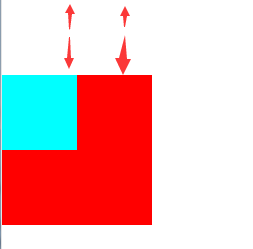
3.margin-top 设置元素的上外边距,如果有多个边距则选择最大值
    <div style="width: 200px;height: 200px;background-color: #FF0000;
    margin-top: 100px">
        <div style="width: 100px;height: 100px;background-color: aqua;
        margin-top: 30px"></div>
        <!--margin-top 设置设置元素的上外边距,如果有多个边距则选择最大值-->

    </div>
浮动调整
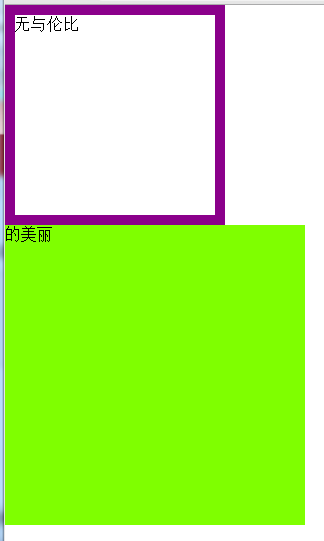
1.无浮动效果
    <div style="width: 200px; height: 200px;border: 10px darkmagenta solid">无与伦比</div>
    <div style="width: 300px;height: 300px;background-color: chartreuse">的美丽</div>
    <!--background-color:设置背景颜色  bordex设置边框-->
    <!--没有浮动的效果-->
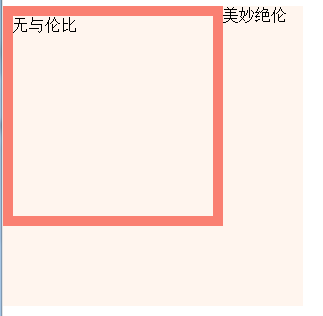
2.有浮动的效果
    <div style="width: 200px; height: 200px;border: 10px salmon solid;float:left">无与伦比</div>
    <div style="width: 300px; height: 300px;background-color: seashell">美妙绝伦</div>
    <!--有浮动效果-->
    <br>
3.清除浮动
    <div style="width: 200px;height: 200px;border: 10px darkgoldenrod solid;float: left">无与伦比</div>
    <div style="clear: left;width: 300px;height: 300px;background-color: chartreuse;">美妙绝伦</div>
    <!--clear:left 清除浮动,只可以清除左浮动
    clear:both 清除所有浮动
输出的结果是,和没写浮动是一样的

 浙公网安备 33010602011771号