itchat保存接收到的图片
import  itchat
from itchat.content import TEXT, MAP, CARD, NOTE, SHARING, PICTURE, RECORDING, ATTACHMENT, VIDEO, FRIENDS, SYSTEM
# 下载文件到本地
def download_files(msg):
    msg.download("C:\\360demo\\"+msg['FileName'])
    # itchat.send('@%s@%s' % (
    #     'img' if msg['Type'] == 'Picture' else 'fil', msg['FileName']),
    #     msg['FromUserName'])
    # return '%s received' % msg['Type']

@itchat.msg_register([TEXT,MAP,CARD,NOTE,SHARING,PICTURE,RECORDING,ATTACHMENT,VIDEO,FRIENDS,SYSTEM])
def reply_mseeage(msg):
    if msg['Type'] == TEXT:
       replyContent="我收到了文本消息"
    if msg['Type'] == MAP:
       replyContent = "我收到了位置内容"
    if msg['Type'] == CARD:
       replyContent = "我收到了推荐人信息"
    if msg['Type'] == NOTE:
       replyContent = "我收到了通知文本"
    if msg['Type'] == SHARING:
       replyContent = "我收到了分享消息"
    if msg['Type'] == PICTURE:
       replyContent = "我收到了图片"
       download_files(msg)
    if msg['Type'] == RECORDING:
       replyContent = "我收到了语音"
       download_files(msg)
    if msg['Type'] == ATTACHMENT:
       replyContent = "我收到了文件"
       download_files(msg)
    if msg['Type'] == VIDEO:
       replyContent = "我收到了视频"
       download_files(msg)
    if msg['Type'] == FRIENDS:
        itchat.add_friend(**msg['Text'])
        replyContent = "我收到了好友请求"
    if msg['Type'] == SYSTEM:
       replyContent = "我收到了一条系统消息"
    return replyContent;

itchat.auto_login(hotReload=True)
itchat.run()
python接收微信消息报'HTMLParser' object has no attribute 'unescape'错误
一直有个想法,想要弄个微信机器人,然而出师不利,刚开始就碰壁了
先上代码,这个是用来接收消息的,是个测试脚本

#!/usr/bin/python
# coding: utf-8

import itchat

def write_infomation(text_value):
  print(text_value)

@itchat.msg_register(itchat.content.TEXT)
def get_reply(msg):
  write_infomation(msg.text)

itchat.auto_login()
itchat.run()
我连接微信用的itchat
itchat.auto_login()正常跳出登陆二维码,用手机扫码后正常登陆,本来以为一切正常,尝试给自己发了个消息,这时候就弹出错误'HTMLParser' object has no attribute 'unescape',并且,每次发消息,都会弹一段错误出来,证明消息接收没问题,那么就看错误了,提示itchat的utils.py这个文件报错,于是定位到问题点
下面我把这个文件的重点代码放上来
from HTMLParser import HTMLParser

htmlParser = HTMLParser()

d[k]  = htmlParser.unescape(d[k]) #就是这里报错
在网上搜索了一下,这个报错的原因是因为高版本python废弃了HTMLParser().unescape()这个方法,所以提示找不到这个方法,可以用html.unescape()来替代
那么后面的事就简单了,把utils.py这个文件的关键代码替换下就行了
from HTMLParser import HTMLParser
import html #首先导入html

htmlParser = HTMLParser()

d[k]  = html.unescape(d[k]) #这里把htmlParser改成html
再次执行测试了一下
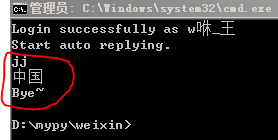
正常接收消息,那么接下来故事就这么开始了

 浙公网安备 33010602011771号