odoo中的PDF报表
1.定义PDF报表解析类.
模型类解析类代码
from odoo import api, models


class ParticularReport(models.AbstractModel):
    _name = 'report.hr_teacher.teacher_info_report_pdf'

    @api.model
    def _get_report_values(self, docids, data=None):
        print("进入pdf报表解析类")
        report_ids = self.env['school.hr.teacher'].browse(docids)
        docs = []
        for record in report_ids:
            education_dic = {
                "junior_high_school": '初中',
                "high_school": '高中',
                "specialty": '专科',
                "undergraduate": '本科',
                "graduate_student": '研究生',
            }
            sex_dic = {
                'male': '男',
                'female': '女',
            }
            record_dic = {
                "code": record.code,    # 教师编号
                "name": record.name,    # 教师姓名
                "birthday": record.birthday,    # 生日
                "education": education_dic[record.education],    # 学历
                "sex": sex_dic[record.sex],    # 性别
                "school": record.school,    # 毕业院校
                "teacher_sub": record.teacher_sub,    # 授课科目
                "entry_dep": record.entry_dep.dep_name,    # 入职部门
                "bank_card_number": record.bank_card_number,    # 银行卡号
                "id_number": record.id_number,    # 身份证号

                "dep_code": record.entry_dep.dep_code,    # 部门编号
                "dep_name": record.entry_dep.dep_name,    # 部门名称
                "address": record.entry_dep.address,    # 部门地址
                "telephone": record.entry_dep.telephone,    # 部门电话
                "emp_number": record.entry_dep.emp_number,    # 部门员工数量
            }
            docs.append(record_dic)
        docargs = {
            'doc_ids': docids,
            'doc_model': 'school.hr.teacher',
            'docs': docs
        }
        return docargs
- _name:解析类的名称是 有个固定的样子, 就是report.模块名.表名, report是固定要有的
-
@api.model
    def _get_report_values(self, docids, data=None):
        pass
这个方法是必须继承的,也就是必须要写的 ,return的值是给template里面来用的,可以i自己写,该方法里面一般写的就是报表的处理逻辑。
该方法中的参数:
① docids:是你打印时候选的几个数据,这块就是几个数据的id,组成的列表
②data是报表的类型,后台打印出这两个参数的值为
[1, 2]
{'report_type': 'pdf'}
2.定义report(声明报表动作)
<?xml version="1.0" encoding="UTF-8" ?>
<odoo>
    <data>
        <report
                id="hr_teacher_report"
                model="school.hr.teacher"
                string="教师信息1"
                name="hr_teacher.teacher_info_report_pdf"
                file="教师信息1"
                report_type="qweb-pdf"
        />
    </data>
</odoo>
report标签的属性解释
- id:外部记录id,改id保持唯一
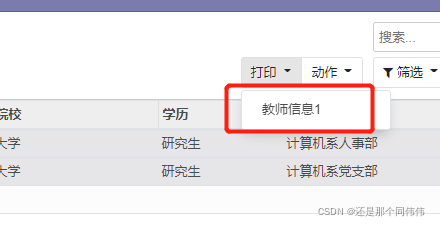
- string:是在系统中打印下拉后显示的值,也是文件下载的名字,如下图
![]()
-
-
file:这个file有争议,感觉没啥用,有知道的评论区说说
name:这个name很重要,name的取值是对应的解析类里面,report.后面的值,就是report点后面的全部的值,例如,下图,(仅在某种列表中查找内容时用于报表的助记内容/描述)
report.hr_teacher.teacher_info_report_pdf 红色的就是report中name的值
如上图的模型名称report.后面的所有
model:你的报表相关的模型,也就是说是你下载pdf中,pdf中数据的来源
report_type:PDF报表的qweb-pdf 或HTML的 qweb-html,就是下载的报表类型
groups:允许浏览/使用当前报表的组的Many2many 字段
attachment_use:若设置为True, 使用 attachment表达式所生成的名称存储为附件的报表;如果需要仅生成一次报表可以使用它 (例如出于法律原因)
attachment:定义报表名称的python 表达式;记录可作为 object变量访问
paperformat:纸张格式
3.报表模板(template)
报表模板在template标签中定义,定义的id的值不是随便定义的,要和report报表成映射关系,id的值为, 对应report中的name的值,除了模块名后面部分,如下:
如果report的值是 name="hr_teacher.teacher_info_report_pdf",那么id的值就取report的name里面的红色部分
<t t-call="web.html_container">
</t>
所有写的报表的模板需要写再该标签下,而且,t-call是固定的,web.html_container
扩展(调用external_layout 会在报表上添加头部和底部。)
PDF内容体是 <div class="page">内部的内容, 因为这是一个QWeb模板,你可以访问由模板接收的docs对象的所有字段。
有一些可在报表中访问的具体变量,主要有:
①docs针对当前报表的记录
②doc_ids针对 docs记录的id列表
③doc_model针对docs 记录的模型
④time对Python标准库 time的引用
⑤user打印报表的用户的res.user 记录
res_company当前 user的公司的记录
报表中定义页脚,div中class="footer"
<span class="page"/>表示的是一条数据所占的页数的当前页
<span class="topage"/>表示的一条数据所占的页数的总页数
<?xml version="1.0" encoding="UTF-8" ?>
<odoo>
    <data>
        <template id="teacher_info_report_pdf">
            <t t-call="web.html_container">
                <t t-foreach="docs" t-as="record">
                    <t t-call="web.internal_layout">
                        <div class="page">
                            <h2 style="text-align:center;">教师信息</h2>
                            <h5>基本信息</h5>
                            <table width="100%" style="text-align:center">
                                <tbody>
                                    <tr>
                                        <td style="border:1px solid black;vertical-align: middle;font-weight:bold">
                                            教师编号
                                        </td>
                                        <td style="border:1px solid black;">
                                            <t t-esc="record['code']"/>
                                        </td>
                                        <td style="border:1px solid black;vertical-align: middle;font-weight:bold">
                                            教师姓名
                                        </td>
                                        <td style="border:1px solid black;">
                                            <t t-esc="record['name']"/>
                                        </td>
                                        <td style="border:1px solid black;vertical-align: middle;font-weight:bold">生日
                                        </td>
                                        <td style="border:1px solid black;">
                                            <t t-esc="record['birthday']"/>
                                        </td>
                                        <td style="border:1px solid black;vertical-align: middle;font-weight:bold">学历
                                        </td>
                                        <td style="border:1px solid black;">
                                            <t t-esc="record['education']"/>
                                        </td>
                                    </tr>
                                    <tr>
                                        <td style="border:1px solid black;vertical-align: middle;font-weight:bold">性别
                                        </td>
                                        <td style="border:1px solid black;">
                                            <t t-esc="record['sex']"/>
                                        </td>
                                        <td style="border:1px solid black;vertical-align: middle;font-weight:bold">
                                            毕业院校
                                        </td>
                                        <td style="border:1px solid black;">
                                            <t t-esc="record['school']"/>
                                        </td>
                                        <td style="border:1px solid black;vertical-align: middle;font-weight:bold">
                                            授课科目
                                        </td>
                                        <td style="border:1px solid black;" colspan="3">
                                            <t t-esc="record['teacher_sub']"/>
                                        </td>
                                    </tr>
                                    <tr>
                                        <td style="border:1px solid black;vertical-align: middle;font-weight:bold">
                                            入职部门
                                        </td>
                                        <td style="border:1px solid black;" colspan="7">
                                            <t t-esc="record['entry_dep']"/>
                                        </td>
                                    </tr>
                                    <tr>
                                        <td style="border:1px solid black;vertical-align: middle;font-weight:bold">
                                            身份证号
                                        </td>
                                        <td style="border:1px solid black;" colspan="7">
                                            <t t-esc="record['id_number']"/>
                                        </td>
                                    </tr>
                                    <tr>
                                        <td style="border:1px solid black;vertical-align: middle;font-weight:bold">
                                            银行卡号
                                        </td>
                                        <td style="border:1px solid black;" colspan="7">
                                            <t t-esc="record['bank_card_number']"/>
                                        </td>
                                    </tr>
                                </tbody>
                            </table>
                            <h5>所属部门信息</h5>
                            <table width="100%" style="text-align:center">
                                <tbody>
                                    <tr>
                                        <td style="border:1px solid black;vertical-align: middle;font-weight:bold">
                                            部门编号
                                        </td>
                                        <td style="border:1px solid black;">
                                            <t t-esc="record['dep_code']"/>
                                        </td>
                                        <td style="border:1px solid black;vertical-align: middle;font-weight:bold">
                                            部门名称
                                        </td>
                                        <td style="border:1px solid black;" colspan="3">
                                            <t t-esc="record['dep_name']"/>
                                        </td>
                                    </tr>
                                    <tr>
                                        <td style="border:1px solid black;vertical-align: middle;font-weight:bold">
                                            部门地址
                                        </td>
                                        <td style="border:1px solid black;">
                                            <t t-esc="record['address']"/>
                                        </td>
                                        <td style="border:1px solid black;vertical-align: middle;font-weight:bold">
                                            部门电话
                                        </td>
                                        <td style="border:1px solid black;">
                                            <t t-esc="record['telephone']"/>
                                        </td>
                                        <td style="border:1px solid black;vertical-align: middle;font-weight:bold">
                                            部门员工数量
                                        </td>
                                        <td style="border:1px solid black;">
                                            <t t-esc="record['emp_number']"/>
                                        </td>
                                    </tr>
                                </tbody>
                            </table>
                        </div>
                        <!--页脚-->
                        <div style="margin:auto; height:auto; text-align: center; font-size: 16px;" class="footer">
                            <t>
                                <tr style="width:auto; text-align:center; margin-bottom:0px;">
                                    <span class="page"/>
                                    /
                                    <span class="topage"/>
                                </tr>
                            </t>
                        </div>
                    </t>
                </t>
            </t>
        </template>
    </data>
</odoo>
4.纸张格式
纸张格式是report.paperformat 记录并可包含如下属性:
id: id的取值和报表模板中的template的id一样,也就是相等的,相当于做的映射关联
name: 仅用于在某种列表中查看报表的助记内容/描述
description格式的简短描述
format是预定义格式(A0到A9, B0到 B10, 法律文书, 信件, 公报,…) 或 自定义;默认为 A4。你果定义页面大小时不能使用非自定义格式。
dpi输出DPI;默认为90
margin_top, margin_bottom, margin_left, margin_right单位为mm的边框大小page_height, page_width 单位为mm的页面大小
orientation横向或纵向,
header_line显示头部线的布尔值
header_spacing 单位为mm的头部间距
<?xml version="1.0" encoding="UTF-8" ?>
<odoo>
    <data>

        <!--纸张格式定义-->
        <record id="teacher_info_report_paper" model="report.paperformat">
            <field name="name">教师信息纸张定义</field>
            <field name="default" eval="True"/>
            <field name="format">A4</field>
            <!--横向打印-->
            <field name="orientation">Landscape</field>
            <!--纵向打印-->
            <!--<field name="orientation">Portrait</field>-->
            <field name="margin_top">30</field>
            <field name="margin_bottom">20</field>
            <field name="margin_left">20</field>
            <field name="margin_right">20</field>
            <field name="header_line" eval="False"/>
            <field name="header_spacing">20</field>
            <field name="dpi">90</field>
        </record>

    </data>
</odoo>
5.最终结果
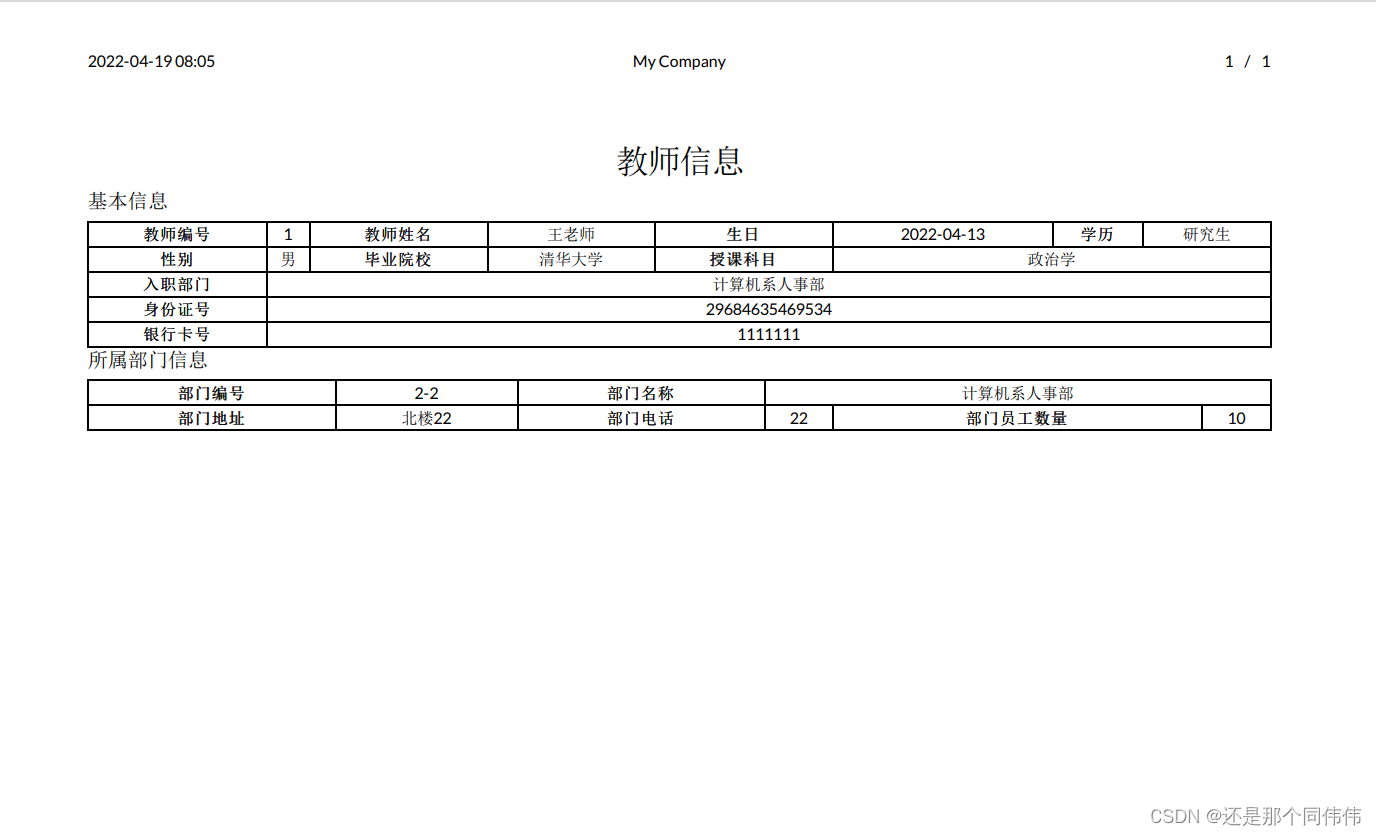
因为我只选择了两条数据,所以pdf中只有两页的数据

 浙公网安备 33010602011771号