
前端开发中js方法的解析
Js(三)
1.Math方法
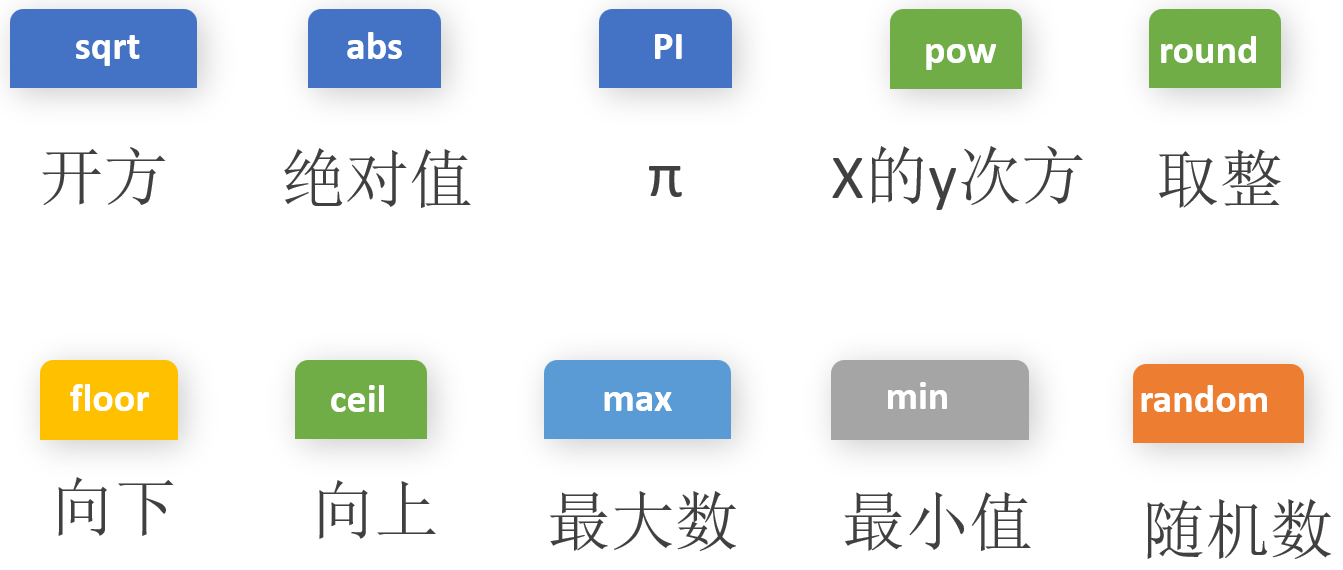
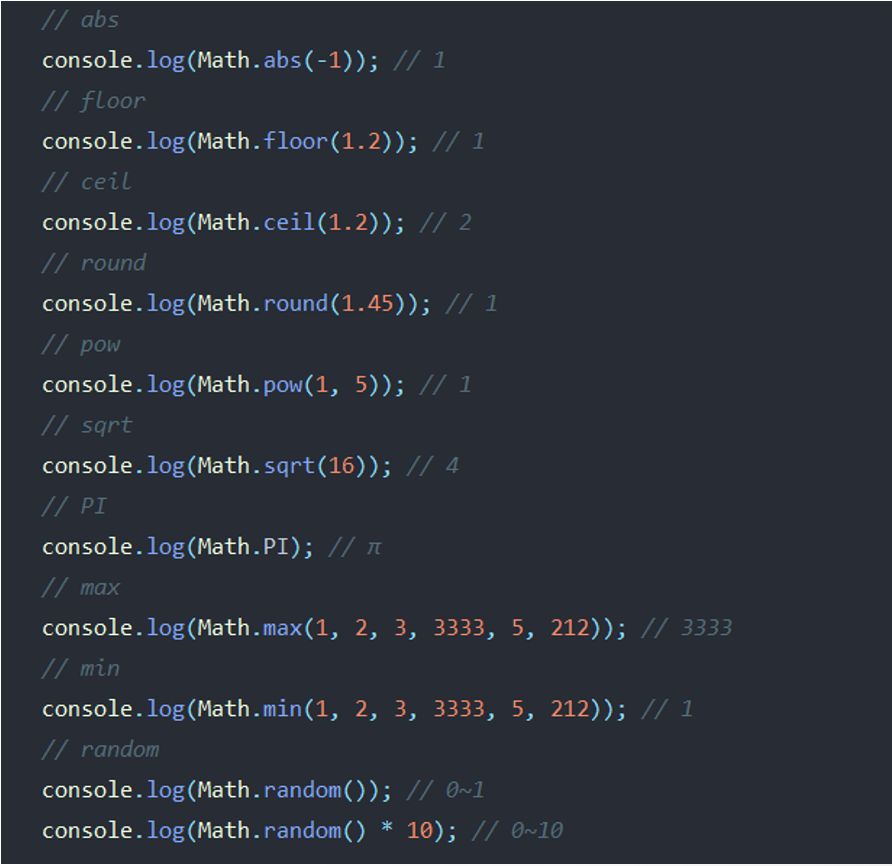
Math.random()后面可以接加减乘除法
2.日期对象
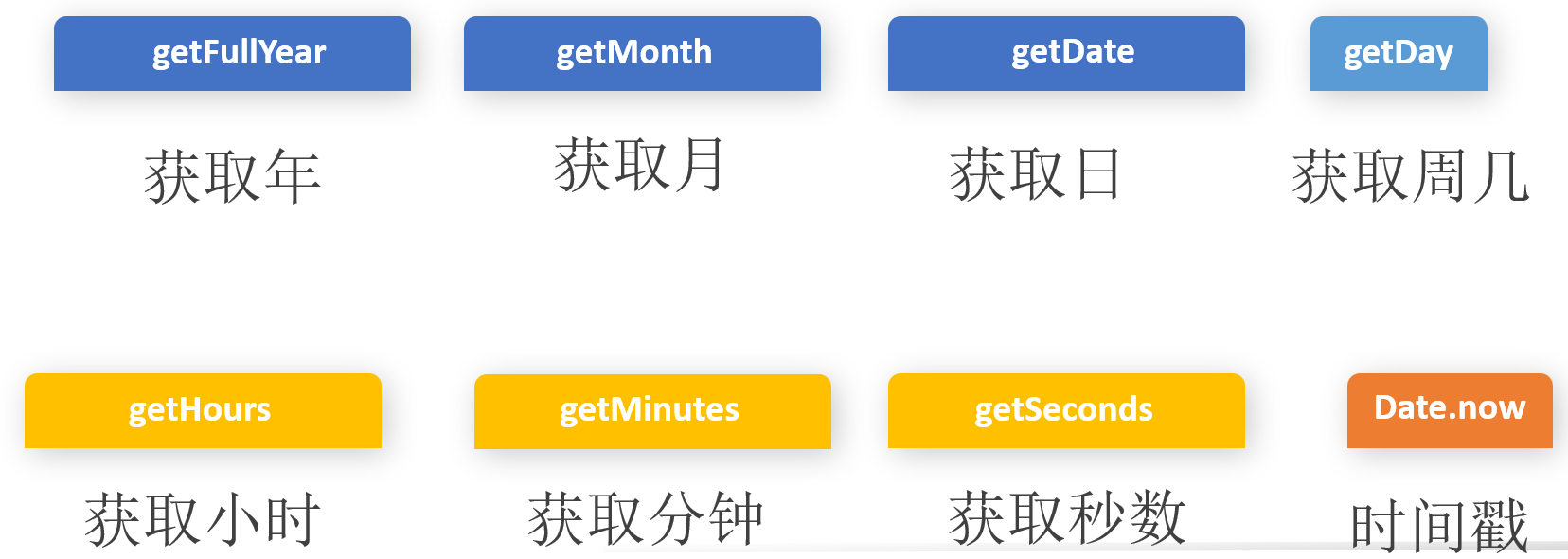
<!DOCTYPE html>
<html lang="en">
<head>
<meta charset="UTF-8">
<title>Title</title>
</head>
<body>
<script>
var data = new Date();
var year = data.getFullYear();
var mon = data.getMonth()+1; //月份是从0开始的,0-11,所以需要加上1
var date = data.getDate();
var hour = data.getHours();
var min = data.getMinutes();
var sec = data.getSeconds();
if (sec<10){sec = "0"+sec} //当时间为一位数时变为01、02、03...
var day = data.getDay();
document.body.innerText = year+ '年' + mon + '月' + date + '日' + hour + '时'+min+'分'+sec+'秒'+'星期'+day
//拼接
//这里的时间是死的,刷新一下才变一下,如果要实时的话需要用到定时器
</script>
</body>
</html>
效果:
2022年4月2日22时9分02秒星期6
3.函数
函数的定义
<!DOCTYPE html>
<html lang="en">
<head>
<meta charset="UTF-8">
<title>Title</title>
</head>
<body>
<script>
//定义函数
function func() {
alert("hello world")
}
func() //执行函数
func() //调用在上面也能执行函数
function func() {
alert("hello world")
}
</script>
</body>
</html>
也可以用如下方式执行函数,就不用func()调用去执行了:
<!DOCTYPE html>
<html lang="en">
<head>
    <meta charset="UTF-8">
    <title>Title</title>
    <style>
        *{
            margin: 0;
            padding: 0;
        }
        div{
            height: 40px;
            background: yellow;
            margin: 10px;
        }
    </style>
</head>
<body>
    <div></div>
    <div></div>
    <script>
        var aDiv = document.getElementsByTagName("div");
        function func() {
            alert("hello world")
        }
        aDiv[0].onclick = func;   //索引
        aDiv[1].onclick = func;
    </script>
</body>
<!DOCTYPE html>
<html lang="en">
<head>
    <meta charset="UTF-8">
    <title>Title</title>
</head>
<body>
<script>
    var fn1=function () {   //也可以这么定义,这么定义的话调用就必须在后面,不能在前面
       alert("hello world")
   }
   fn1()
</script>
</body>
</html>
匿名函数
<!DOCTYPE html>
<html lang="en">
<head>
    <meta charset="UTF-8">
    <title>Title</title>
</head>
<body>
<script>
   // () + - ! ~
    +function (){
       alert("hello world");
    }()       //自己调用
    !function (){
       alert("hello world");
    }()
    -function (){
       alert("hello world");
    }()
    ~function (){
       alert("hello world");
    }()
    (function (){
       alert("hello world");
    }())     //  ()的方式比较多
</script>
</body>
</html>
传参
<!DOCTYPE html>
<html lang="en">
<head>
    <meta charset="UTF-8">
    <title>Title</title>
</head>
<body>
    <script>
        //一
        function f(x){
            alert(x);
            alert(typeof x);
        }
        f('hello')   //传参
        //这么传参也可以:
        var a = 'hello'
        f(a)
        //二
        sum(1,2)   //这里传几个都可以,但是后面要几个,它就会取前几个
        function sum(x,y,z){
            alert(z)     //如果前面为function sum(x,y),这里要弹出z,它不会报错,会弹出undefined
            alert(x + y + z)  //前面sum(1,2)没有给z,这里要拼接的话会显示NaN(非数字)
            z = z || 18   //前面如果没有给z,可以通过这种方式给它值
            alert(x + y + z)
        }
    </script>
</body>
</html>
返回值
<!DOCTYPE html>
<html lang="en">
<head>
<meta charset="UTF-8">
<title>Title</title>
</head>
<body>
<input type="button" id="btn" value="改变样式">
<div id="box" >这是一个div</div>
<script>
//返回值
function f(a,b) {
var num = a+b;
alert(num)
return num
}
var qiye = f(1,6); //调用并传参
alert(qiye)
//改变样式的小案例
var oDiv = document.getElementById('box');
var oBtn = document.getElementById("btn");
function fnchange(sColor, sSize) {
oDiv.style.color = sColor;
oDiv.style.fontSize = sSize;
}
oBtn.onclick= function () {
fnchange("red", '30px')
}
</script>
</body>
</html>
不定长参数
<!DOCTYPE html>
<html lang="en">
<head>
<meta charset="UTF-8">
<title>Title</title>
</head>
<body>
<script>
// 全局作用域和局部作用域
//在script里面的--全局作用域
//在函数里面的--局部作用域
//全局变量 局部变量
// js块级作用域的一个概念---es6之前的版本
//不定长参数es5的用法,es5用的比较多
function sum() { //这里不需要传值
console.log(arguments.length)
console.log(arguments[3])
}
sum(1,2,3,4,5,6,7,8) //这里传值
//不定长参数es6的用法
function sum1(...args) {
console.log(args)
}
sum1(1,2,3,4,5,6,7,8)
</script>
</body>
</html>
作用域
这里介绍的是es6之前的
<!DOCTYPE html>
<html lang="en">
<head>
<meta charset="UTF-8">
<title>Title</title>
</head>
<body>
<script>
//全局作用域和局部作用域
//在script里面的--全局作用域
//在函数里面的--局部作用域
//定义在标签中的:全局变量 定义在函数中的:局部变量
// js块级作用域的一个概念---es6之前的版本
//就是说你在里面定义的变量在外面调用的话会报错
var num = 10;
function f1(){
var num;
function f2() {
console.log(num) //输出结果为undefined,因为没给值
}
f2()
}
f1()
//因为它会往上找一个最近的,即var num,就近原则,只找一个
//如果没有再继续找它的父级
</script>
</body>
</html>
预解析
<!DOCTYPE html>
<html lang="en">
<head>
<meta charset="UTF-8">
<title>Title</title>
</head>
<body>
<script>
//第一种
console.log(num); // num is not defined
//第二种
console.log(num);//undefined
var num= 4; //为什么?在后面解释
//就相当于
// var num;
// console.log(num);
// num = 4
//第三种
f() // 11 为什么f()在前在后都可以?
function f() {
console.log(11)
}
// f() //11
//无论f()在前在后都相当于
function f() {
console.log(11)
}
f()
//第四种
f() //f is not defined 为什么?
var f = function () {
console.log(100)
}
f() //100
//f()在前就相当于
var f;
f()
f = function () { //赋值在后
console.log(100)
}
//f()在后就相当于
var f; //按顺序往下排
f = function () { //赋值在后
console.log(100)
}
f()
//js代码执行的时候是分成了两步来进行的, 预解析 和 执行
//什么是预解析
// js引擎 会把js 里面所有的var和function 声明的东西 放到※※当前作用域※※的最前面
//什么是执行
// 然后执行, 按照代码的顺序从上向下执行
//
//变量预解析--把所有声明的变量提到当前作用域的最前面,不赋值,其余的按顺序在最后面往下排
</script>
</body>
</html>
预解析案例解析
案例一
<!DOCTYPE html>
<html lang="en">
<head>
<meta charset="UTF-8">
<title>Title</title>
</head>
<body>
<script>
var num = 100;
func();
function func() {
console.log(num) //undefined
var num = 20;
}
// 相当于
var num;
function func() {
var num;
console.log(num)
num = 20;
}
num = 100;
func()
</script>
</body>
</html>
案例二
<!DOCTYPE html>
<html lang="en">
<head>
<meta charset="UTF-8">
<title>Title</title>
</head>
<body>
<script>
var num = 100;
function func() {
console.log(num) //undefined
var num = 20;
console.log(num) //20
}
func();
//相当于
// var num;
// function func() {
// var num;
// console.log(num)
// num = 20;
// console.log(num)
// }
// num = 100
// func()
</script>
</body>
</html>
案例三
<!DOCTYPE html>
<html lang="en">
<head>
    <meta charset="UTF-8">
    <title>Title</title>
</head>
<body>
<script>
        var a = 10;
        f1();
        function f1() {
            var b = 8;
            console.log(a); //undefined
            console.log(b); //8
            var a = "hello world"
        }
        // 相当于
        var a;
        function f1() {
            var b;
            var a;
            b = 8;
            console.log(a);
            console.log(b);
            a = "hello world"
        }
        a = 10
        f1()
</script>
</body>
</html>
案例四※※※
<!DOCTYPE html>
<html lang="en">
<head>
    <meta charset="UTF-8">
    <title>Title</title>
</head>
<body>
<script>
        f1();
        console.log(c); //9
        console.log(b); //9
        console.log(a); //9
        function f1(){
            var a = b= c = 9; // var a = b= c = 9; ====>  var a = 9; b= 9; c =9;
            console.log(a); //9
            console.log(b); //9
            console.log(c); // a is not defined
        }
        //※※※※※※※
        //用var声明的是局部变量,直接赋值的是全局变量
        //※※※※※※※

        // 相当于
        function f1(){
            var a;
            a = 9;
            b = 9;
            c = 9;
            console.log(a);
            console.log(b);
            console.log(c);
        }
        f1()
        console.log(c);
        console.log(b);
        console.log(a);
</script>
</body>
</html>
4.定时器
一次性和循环定时器
<!DOCTYPE html>
<html lang="en">
<head>
    <meta charset="UTF-8">
    <title>Title</title>
</head>
<body>
    <script>
        setTimeout(function (){    //一次性定时器,到什么时间执行一次什么事
            console.log(1)
        },5000)    //过五秒控制器内打印1

        setInterval(function (){   //循环执行定时器
            console.log(qqq)
        },1000)    //隔一秒打印一下qqq
    </script>
</body>
</html>
清除定时器
<!DOCTYPE html>
<html lang="en">
<head>
    <meta charset="UTF-8">
    <title>Title</title>
</head>
<body>
    <div id="box">
        还有 <span id="wrap">10s</span>我们就下课了!!
    </div>
    <script>
        var wrap = document.getElementById('wrap')
        var num = 10;
        var times
        times = setInterval(function () {
            num --;
            wrap.innerHTML = num + "s";    //拼接
            if (num===0){        //否则会减到-1,-2,-3,-4,-5...
                clearInterval(times)      //清除定时器
                window.location.href = 'https://www.baidu.com' //到时间后跳转到网址
            }
        },1000)
    </script>
</body>
</html>

 浙公网安备 33010602011771号