
python之django实现出版社管理项目(含怎删改查)
工具pycharm,环境python不再过多叙述了。
1.利用pycharm创建django项目(项目django版本最好2.0的)

2.编辑modles.py进行数据库
from django.db import models

# Create your models here.

class Publisher(models.Model):
    name = models.CharField(max_length=32)
3.进行数据库迁移
# 制作迁移文件,表示之后要做的操作;会在migrations文件夹下生成一个0001_initial.py的文件
$ python3 manage.py makemigrations

# 执行具体的迁移动作
$ python3 manage.py migrate

# 数据库中会生成一个app01_publisher的表
4.手动插入几条数据到数据库中
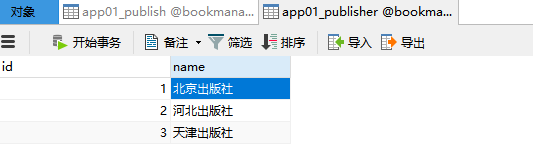
5.编辑urls.py,定义web访问的url与具体视图函数的对应关系
from django.contrib import admin
from django.urls import path

from app01 import views

urlpatterns = [
        path('admin/', admin.site.urls),
        path('publisher_list/', views.publisher_list),
        path('publisher_add/', views.publisher_add),
        path('publisher_del/', views.publisher_del),
        path('publisher_edit/', views.publisher_edit),
]
6.编辑views.py,通过OMR获取publisher表中所有对象,并返回给模版文件
from django.shortcuts import render, redirect
from app01 import models

# 展示出版社
def publisher_list(request):
    # 查询所有的出版社对象
    all_publishers = models.Publisher.objects.all()
    # 将结果返回给页面
    return render(request,'publisher_list.html',{'all_publishers':all_publishers})

# 增加出版社
def publisher_add(request):
    # POST请求方式的处理逻辑
    if request.method == 'POST':
        # 获取提交的数据
        pub_name = request.POST.get('pub_name')  # key名对应input标签中name字段的值

        # 校验提交数据是否为空
        if not pub_name:
            return render(request, 'publisher_add.html', {'error': '输入不能为空'})
        print(pub_name, type(pub_name))  # 太空出版社

        # 插入数据库
        ret = models.Publisher.objects.create(name=pub_name)  # 返回的是新插入的对象
        print(ret, type(ret))  # Publisher object
        # 跳转至展示页面
        return redirect('/publisher_list/')
    # 默认是get请求的处理逻辑
    return render(request, 'publisher_add.html')

# 删除出版社
def publisher_del(request):
    # 获取提交的数据
    pk = request.GET.get('pk')  # get中的pk是前端a标签中问号后面的键名
    # 删除对应的数据
    # models.Publisher.objects.get(pk=pk).delete()    # 单个对象删除
    models.Publisher.objects.filter(pk=pk).delete() # 删除所有满足条件的对象
    # 跳转至展示页面
    return redirect('/publisher_list/')

# 编辑出版社
def publisher_edit(request):
    # 获取提交的数据
    pk = request.GET.get('pk')
    # 查找要编辑的对象
    obj = models.Publisher.objects.get(pk=pk)

    if request.method == 'POST':
        # 获取编辑后的数据
        pub_name = request.POST.get('pub_name')
        obj.name = pub_name # 重新对以上对象的name属性赋值(在内存中修改的)
        obj.save()  # 向数据库中提交更新(相当于持久化操作)
        # 跳转到展示页面
        return redirect('/publisher_list/')

    return render(request,'publisher_edit.html',{'obj':obj})
7.在templates目录创建对应的定义模版文件html
publisher_list.html
 1 <html lang="en">
 2 <head>
 3     <meta charset="UTF-8">
 4     <title>出版社展示页面</title>
 5 </head>
 6 <body>
 7 <table border="1">
 8     <thead>
 9         <tr>
10             <th>序号</th>
11             <th>ID</th>
12             <th>出版社名称</th>
13             <th>操作</th>
14         </tr>
15     </thead>
16 {# tbody中应用到了模版中循环的语法(因为无法确定数据库中到底有几行数据)   #}
17     <tbody>
18         {% for publisher in all_publishers %}
19             <tr>
20             <td>{{ forloop.counter }}</td>  {# 是循环的计数,而不是数据库表中的id号 #}
21             <td>{{ publisher.id }}</td>     {# 是数据库中的id字段的内容 #}
22             <td>{{ publisher.name }}</td>
23             <td>
24                 <a href="/publisher_del/?pk={{ publisher.pk }}">删除</a>
25                 <a href="/publisher_edit/?pk={{ publisher.pk }}">编辑</a>
26             </td>
27             </tr>
28         {% endfor %}
29     </tbody>
30 </table>
31 </body>
32 </html>
publisher_add.html
 1 <html lang="en">
 2 <head>
 3     <meta charset="UTF-8">
 4     <title>新增出版社</title>
 5 </head>
 6 <body>
 7 <h>新增出版社</h>
 8 <form action="" method="post">
 9     <p>出版社名称:<input type="text" name="pub_name"> <span>{{ error }}</span></p>
10     <p><button>提交</button></p>
11 </form>
12 </body>
13 </html>
publisher_edit.html
 1 <html lang="en">
 2 <head>
 3     <meta charset="UTF-8">
 4     <title>修改出版社</title>
 5 </head>
 6 <body>
 7 <h>修改出版社</h>
 8 <form action="" method="post">
 9     {#<form action="/publisher_edit/" method="post">#}
10     <p>
11         {#<input type="hidden" name="id" value="{{ obj.pk }}">#}
12         新的出版社名称:<input type="text" name="pub_name" value="{{ obj.name }}"> <span>{{ error }}</span>
13     </p>
14     <p>
15         <button>提交</button>
16     </p>
17 </form>
18 </body>
19 </html>
8.如果看到这个标题,增删改查已完结,更炫酷的页面还需要自己去完成,加油!

 浙公网安备 33010602011771号