【Canvas】勾画二次曲线
效果:
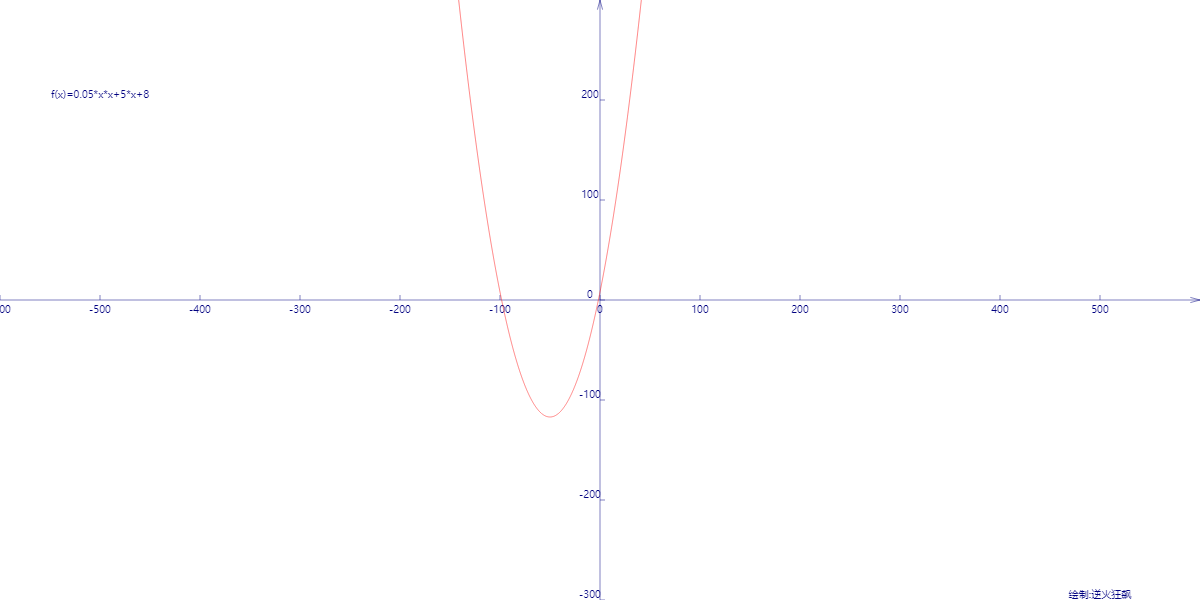
代码:

<!DOCTYPE html>
<html lang="utf-8">
<meta http-equiv="Content-Type" content="text/html; charset=utf-8"/>
<head>
<title>二次曲线控制板</title>
<style type="text/css">
.centerlize{
margin:0 auto;
border:0px solid red;
width:1200px;height:600px;
}
</style>
</head>
<body>
<div class="centerlize">
<canvas id="myCanvas" width="1200px" height="600px" style="border:1px dashed black;">
出现文字表示您的浏览器尚不支持HTML5 Canvas
</canvas>
<div>
<input id="aTxt" placeholder="a" type="text"/>
<input id="bTxt" placeholder="b" type="text"/>
<input id="cTxt" placeholder="c" type="text"/>
<button onclick="draw();">DRAW</button>
</div>
</div>
</body>
</html>
<script type="text/javascript">
<!--
// 画布宽度
const WIDTH=1200;
// 画布高度
const HEIGHT=600;
// 画布环境
var context=0;
// 取界面参数
function getParam(elmId){
var retval=parseFloat(document.getElementById(elmId).value);
if(isNaN(retval)==true){
retval=0;
}
return retval;
}
// 画图前初始化
function draw(){
let a=getParam("aTxt");
let b=getParam("bTxt");
let c=getParam("cTxt");
var canvas=document.getElementById('myCanvas');
canvas.width=WIDTH;
canvas.height=HEIGHT;
context=canvas.getContext('2d');
// 进行屏幕坐标系到笛卡尔坐标系的变换,原点移动到画布中央,右方为X正向,上方为Y的正向
context.translate(WIDTH/2,HEIGHT/2);
context.rotate(getRad(180));
context.scale(-1,1);
slot=new Slot();
slot.update(a,b,c);
animate();
};
//-------------------------------
// 画图
//-------------------------------
function animate(){
slot.paintBg(context);
slot.paint(context);
}
//-------------------------------
// Slot对象定义处
//-------------------------------
function Slot(){
var obj=new Object;
obj.cds=[];
obj.formula="";
// 把曲线上的点存入数组
obj.update=function(a,b,c){
var x,y;
for(x=-WIDTH/2;x<=WIDTH/2;x+=0.1){
y=a*x*x+b*x+c;
var arr={"x":x,"y":y};
this.cds.push(arr);
}
this.formula="f(x)=";
if(a!=0){
this.formula+=a+"*x*x+";
}
if(b!=0){
this.formula+=b+"*x+";
}
if(c!=0){
this.formula+=c+"";
}
};
// 画固定件
obj.paintBg=function(ctx){
// 清屏
ctx.clearRect(-WIDTH/2,-HEIGHT/2,WIDTH,HEIGHT);
drawAxisX(ctx,-WIDTH/2,WIDTH/2,100);
drawAxisY(ctx,-HEIGHT/2,HEIGHT/2,100);
drawText(ctx,this.formula,-500,200);
drawText(ctx,"绘制:逆火狂飙",500,-300);
};
// 画活动件
obj.paint=function(ctx){
paintCurve(ctx,"red",this.cds);
};
return obj;
}
// 连点成线画曲线
function paintCurve(ctx,color,cds){
var SU=1;// Scale Unit
ctx.strokeStyle = color;
ctx.beginPath();
for(var i=0; i<cds.length; i++){
ctx.lineTo(cds[i].x*SU,cds[i].y*SU);
}
ctx.stroke();
ctx.closePath();
}
// 画横轴
function drawAxisX(ctx,start,end,step){
ctx.save();
ctx.lineWidth=0.5;
ctx.strokeStyle='navy';
ctx.fillStyle='navy';
// 画轴
ctx.beginPath();
ctx.moveTo(start, 0);
ctx.lineTo(end, 0);
ctx.stroke();
ctx.closePath();
// 画箭头
ctx.beginPath();
ctx.moveTo(end-Math.cos(getRad(15))*10, Math.sin(getRad(15))*10);
ctx.lineTo(end, 0);
ctx.lineTo(end-Math.cos(getRad(15))*10, -Math.sin(getRad(15))*10);
ctx.stroke();
ctx.closePath();
// 画刻度
var x,y;
y=5;
for(x=start;x<end;x+=step){
ctx.beginPath();
ctx.moveTo(x, 0);
ctx.lineTo(x, y);
ctx.stroke();
ctx.closePath();
drawText(ctx,x+"",x,y-20);
}
ctx.restore();
}
// 画纵轴
function drawAxisY(ctx,start,end,step){
ctx.save();
ctx.lineWidth=0.5;
ctx.strokeStyle='navy';
ctx.fillStyle='navy';
var start=-300;
var end=300;
// 画轴
ctx.beginPath();
ctx.moveTo(0, start);
ctx.lineTo(0, end);
ctx.stroke();
ctx.closePath();
// 画箭头
ctx.beginPath();
ctx.moveTo(Math.sin(getRad(15))*10, end-Math.cos(getRad(15))*10);
ctx.lineTo(0, end);
ctx.lineTo(-Math.sin(getRad(15))*10, end-Math.cos(getRad(15))*10);
ctx.stroke();
ctx.closePath();
// 画刻度
var x,y;
x=5;
for(y=start;y<end;y+=step){
ctx.beginPath();
ctx.moveTo(x, y);
ctx.lineTo(0, y);
drawText(ctx,y+"",x-15,y);
ctx.stroke();
ctx.closePath();
}
}
//-------------------------------
// 角度得到弧度
//-------------------------------
function getRad(degree){
return degree/180*Math.PI;
}
//-------------------------------
// 得到颜色
//-------------------------------
function getColor(index){
var arr=["green","skyblue","purple","#aa0000",
"orange","yellow","maroon","navy",
"red","blue","lime","teal","fuchsia",
"aqua","black"];
if(index>arr.length){
index=index % arr.length;
}
return arr[index];
}
//-------------------------------
// 在笛卡尔坐标系中绘制文字
//-------------------------------
function drawText(ctx,text,x,y){
ctx.save();
ctx.translate(x,y)
ctx.rotate(getRad(180))
ctx.scale(-1,1)
ctx.textBaseline="bottom";
ctx.textAlign="center";
ctx.fillText(text,0,0);
ctx.restore();
}
//-->
</script>
以上代码不复杂,本来我都没动力去写的,后来想想不积跬步无以至千里,还是写了。代码不难,懂的都懂,就不赘述了。
END

 浙公网安备 33010602011771号