
窗口实训1
package s;
import java.awt.*;
import javax.swing.;
public class Computer {
JFrame f;
JPanel p;
JTextField t;
BorderLayout bl;
GridLayout gl;
JButton b1;
String b[]={"7","8","9","/","4","5","6","","1","2","3","-","0",".","=","+"};
public Computer(){
f=new JFrame("计算器");
t=new JTextField(35);
p=new JPanel();
gl=new GridLayout(4,4,3,3);
f.setBounds(760, 440, 400, 200);
f.add(p);
f.add(t,BorderLayout.NORTH);
f.add(p,BorderLayout.CENTER);
p.setLayout(gl);
for(int i=0;i<16;i++){
p.add(new JButton(b[i]));
}
f.setVisible(true);
}
public static void main(String []args){
new Computer();
}
}

package bbb;
import java.awt.;
import java.awt.event.ActionEvent;
import java.awt.event.ActionListener;
import javax.swing.;
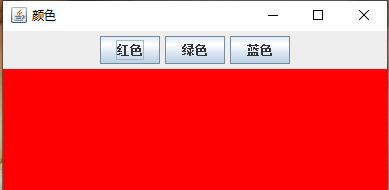
public class color implements ActionListener{
JFrame f;
JPanel p1,p2;
BorderLayout bl;
GridLayout gl;
JButton b1,b2,b3;
public color(){
f=new JFrame("颜色");
p1=new JPanel();
p2=new JPanel();
b1=new JButton("红色");
b2=new JButton("绿色");
b3=new JButton("蓝色");
f.setBounds(760, 440, 400, 200);
f.add(p1,BorderLayout.NORTH);
f.add(p2,BorderLayout.CENTER);
p1.add(b1);
p1.add(b2);
p1.add(b3);
b1.addActionListener(this);
b2.addActionListener(this);
b3.addActionListener(this);
f.setVisible(true);
}
public static void main(String[] args) {
new color();
}
public void actionPerformed(ActionEvent e){
if(e.getSource()b1)
p2.setBackground(Color.red);
else if(e.getSource()b2)
p2.setBackground(Color.green);
else if(e.getSource()==b3)
p2.setBackground(Color.blue);
}
}


 浙公网安备 33010602011771号