nodejs(01-http服务器与简单后台交互)
1、nodejs创建基本服务器:
var http = require('http');
http.createServer(function (req, res) {
  res.writeHead(200, {'Content-Type': 'text/plain'});  //解决跨域问题
  res.end('Hello World\n');
}).listen(8080);
console.log('Server running on port 8080.');
运行该XX.js文件,使用浏览器打开“http://localhost:8080”
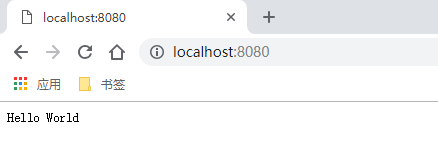
1.1前后端简单交互:
<html>
    <body>
        <input id="name" type="text"  placeholder="输入你的姓名"/>"
        <input type="submit" value="发送" id="btn" />
    </body>

<script type="text/javascript">
var test = document.getElementById('test');
var bt = document.getElementById('bt');

bt.onclick = function () {
    var value = document.getElementById('username').value;
    var xmlHttp = new XMLHttpRequest();
    xmlHttp.onreadystatechange=function()
    {
        if (xmlHttp.readyState==4 && xmlHttp.status==200)
        {
            test.innerHTML = xmlHttp.responseText;
        }
    };

    xmlHttp.open('POST', 'http://127.0.0.1:8080/', true);
    xmlHttp.send(value);
};

<script>

</html>
ar http = require('http');

var server = http.createServer(function (req, res) {
    var body = '';
    req.on('data', function(data) {      // 接收客户端发送过来的数据, 也就是 xmlHttp.send(value);
        body += data;  //通过req的data事件监听函数,每当接受到请求体的数据,就累加到post变量中
    });

    req.on('end', function() {     //在end事件触发后,通过querystring.parse将post解析为真正的POST请求格式,然后向客户端返回。
        res.writeHeader(200, {
            'Content-Type': 'text/plain',
            'Access-Control-Allow-Origin': '*'
        });
        res.write("hello:" + body);
        res.end();
    })
});

server.listen(8080, function () {  //前后端 端口号应保持一致。
    console.log('server start at localhost:8080');
});
1,创建XMLHttpRequest对象:
var xmlHttp = new XMLHttpRequest();
2, 向服务器发送请求:
xmlHttp.setRequestHeader(header,value)   //向请求添加http头
xmlHttp.open(method, url, async)   //async:true(异步) false(同步)
xmlHttp.end(string)   //string仅用于POST请求
3, 服务器响应
获得来自服务器的响应,可以使用 XMLHttpRequest 对象的 responseText 或 responseXML 属性。
responseText 获得字符串形式的响应数据。
responseXML 获得 XML 形式的响应数据。
4, onreadystatechange 事件。
每当 readyState 值改变时,就会触发onreadystatechange 事件。
readyState 属性值为 XMLHttpRequest 的状态信息。
XMLHttpRequest 的状态为 0 到 4 :
0: 请求未初始化
1: 服务器连接已建立
2: 请求已接收
3: 请求处理中
4: 请求已完成,且响应已就绪
2、Express框架创建服务器:
Express框架使用前需使用npm进行安装:在nodejs根目录下$ npm install express,Express依赖包默认存储在nodejs根目录下“node_modules”文件夹中。
var express = require('express'),
 app = express();
 app.use(express.static(__dirname + '/public'));
 app.listen(8080);
可以通过浏览器请求访问 “public” 文件夹中任何文件,并进行其他操作(在浏览器中输入“http://localhost:8080/文件.后缀”来访问该文件......)

 浙公网安备 33010602011771号