
16GB macOS 本地部署oMLX+QwenPaw实践
 本文总结了oMLX+QwenPaw部署AI工具的经验,比较全面地对比了Qwen3.5-4B和Gemma4-E2B两个模型。
一 安装软件
1 oMLX
oMLX须从官网或Github下载最新版安装,要求macOS 15.0+,也可以通过pip安装更为强大的flyto-mlx,它基于oMLX但功能更强大,支持语音对话,视频与图像生成,以及多机集群路由等功能,flyto-mlx目前发布的版本为v0.6.0即oMLX-v0.4.4,从 v0.6.0 起 PyPI 通道已开通,要求Python 3.10~3.13,这里通告PyPI通道安装。先创建conda虚拟环境并指定python版本为3.12,然后pip安装:
(base) U@MacBook ~ % conda create -n llm 'python<3.13'
(base) U@MacBook ~ % conda activate llm
(llm) U@MacBook ~ % pip install 'flyto-mlx[modelscope]'
(llm) U@MacBook ~ % omlx -h  #或者 fmlx -h
usage: cli.py [-h] [--version] {start,stop,restart,serve,launch,diagnose} ...

omlx: Production-ready LLM server for Apple Silicon

positional arguments:
  {start,stop,restart,serve,launch,diagnose}
                        Commands
    start               Start oMLX as a managed background server
    stop                Stop the managed background oMLX server
    restart             Restart the managed background oMLX server
    serve               Start multi-model OpenAI-compatible server
    launch              Launch an external tool with oMLX integration
    diagnose            Diagnose installation or runtime issues

options:
  -h, --help            show this help message and exit
  --version             Print the oMLX version and exit

Examples:
  omlx serve mlx-community/Llama-3.2-3B-Instruct-4bit --port 8000
  omlx launch codex --model qwen3.5
显示以上信息及表示安装成功,通过omlx start或者omlx serve命令即可启动:
(llm) U@MacBook ~ % omlx serve
oMLX - LLM inference, optimized for your Mac
├─ https://github.com/jundot/omlx
├─ Version: 0.4.4
└─ Build: 260616183743-macos26-tahoe

Log directory: /Users/U/.omlx/logs
Binding server at http://127.0.0.1:8000
INFO:     Uvicorn running on http://127.0.0.1:8000 (Press CTRL+C to quit)
...
INFO:     Application startup complete.
2 QwenPaw
QwenPaw的安装很简单,官网agentscope有很详细的教程,可以在官网或GitHub下载最新的安装包,也可以通告PyPI通道安装,最新版v1.1.12.post2要求Python >= 3.10, < 3.14。这里也是用conda创建虚拟环境,然后pip安装:
(base) U@MacBook ~ % conda create -n bot 'python<3.13'
(base) U@MacBook ~ % conda activate bot
(bot) U@MacBook ~ % pip install qwenpaw
(bot) U@MacBook ~ % qwenpaw -h
Usage: qwenpaw [OPTIONS] COMMAND [ARGS]...

  QwenPaw CLI.

Options:
  --version       Show the version and exit.
  --host TEXT     API Host
  --port INTEGER  API Port
  -h, --help      Show this message and exit.

Commands:
  acp        Start QwenPaw as an ACP agent (stdio).
  agent      Manage agents and inter-agent communication.
  agents     Manage agents and inter-agent communication.
  app        Run QwenPaw FastAPI app.
  auth       Manage web authentication.
  channel    Manage channel configuration...
  channels   Manage channel configuration...
  chat       Manage chat sessions via the HTTP API (/chats).
  chats      Manage chat sessions via the HTTP API (/chats).
  clean      Clear QwenPaw WORKING_DIR (~/.qwenpaw by default).
  cron       Manage scheduled cron jobs via the HTTP API (/cron).
  daemon     Daemon commands: status, restart, reload-config, version, logs.
  desktop    Run QwenPaw app on an auto-selected free port in a webview...
  doctor     Local sanity checks.
  env        Manage environment variables.
  init       Create working dir with config.json and HEARTBEAT.md...
  models     Manage LLM models and provider configuration.
  plugin     Plugin management commands.
  shutdown   Force stop the running QwenPaw app processes.
  skills     Manage skills (list / configure).
  task       Run a single task instruction headlessly (no web server).
  uninstall  Remove QwenPaw environment, CLI wrapper, and shell PATH...
  update     Upgrade QwenPaw in the current Python environment.
显示以上信息及表示安装成功。通过初始化即可运行:
(bot) U@MacBook ~ % qwenpaw init --defaults #去掉--defaults为交互式初始化
(bot) U@MacBook ~ % qwenpaw app
....
INFO:     Uvicorn running on http://127.0.0.1:8088 (Press CTRL+C to quit)
...

──────────────────────────────────────

  ✓ QwenPaw
  ├── Status:  Ready
  ├── Address: http://127.0.0.1:8088
  └── Startup: 5.679s

──────────────────────────────────────
...
后期升级只需在CTRL+C退出后运行qwenpaw update:
(bot) U@MacBook ~ % qwenpaw update
Current version: 1.1.12.post1
Latest version:  1.1.12.post2
Python:          /Users/U/Software/miniconda3/envs/bot/bin/python3.12
Environment:     system (/Users/U/Software/miniconda3/envs/bot)
Install path:    /Users/U/Software/miniconda3/envs/bot/lib/python3.12/site-packages/qwenpaw
Installer:       pip
Update QwenPaw to 1.1.12.post2 in the current environment? [Y/n]: y

Starting QwenPaw update...

[qwenpaw] Updating QwenPaw 1.1.12.post1 -> 1.1.12.post2...
[qwenpaw] Using installer: pip
Looking in indexes: https://mirrors.aliyun.com/pypi/simple/
Collecting qwenpaw==1.1.12.post2
  Downloading qwenpaw-1.1.12.post2-py3-none-any.whl (11.8 MB)
     ━━━━━━━━━━━━━━━━━━━━━━━━━━━━━━━━━━━━━━━━ 11.8/11.8 MB 2.3 MB/s  0:00:05
...
Installing collected packages: qwenpaw
  Attempting uninstall: qwenpaw
    Found existing installation: qwenpaw 1.1.12.post1
    Uninstalling qwenpaw-1.1.12.post1:
      Successfully uninstalled qwenpaw-1.1.12.post1
Successfully installed qwenpaw-1.1.12.post2
二 模型下载
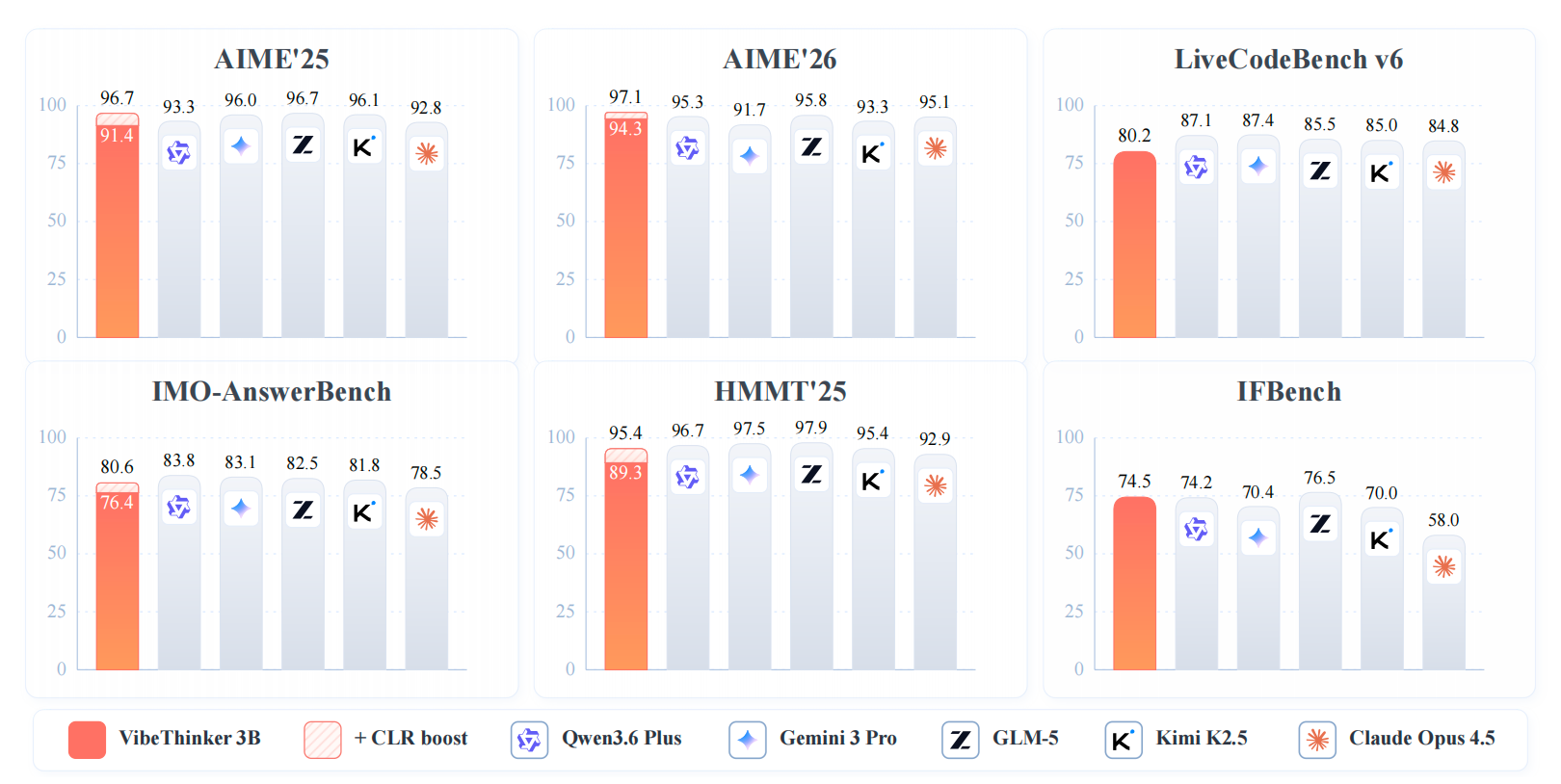
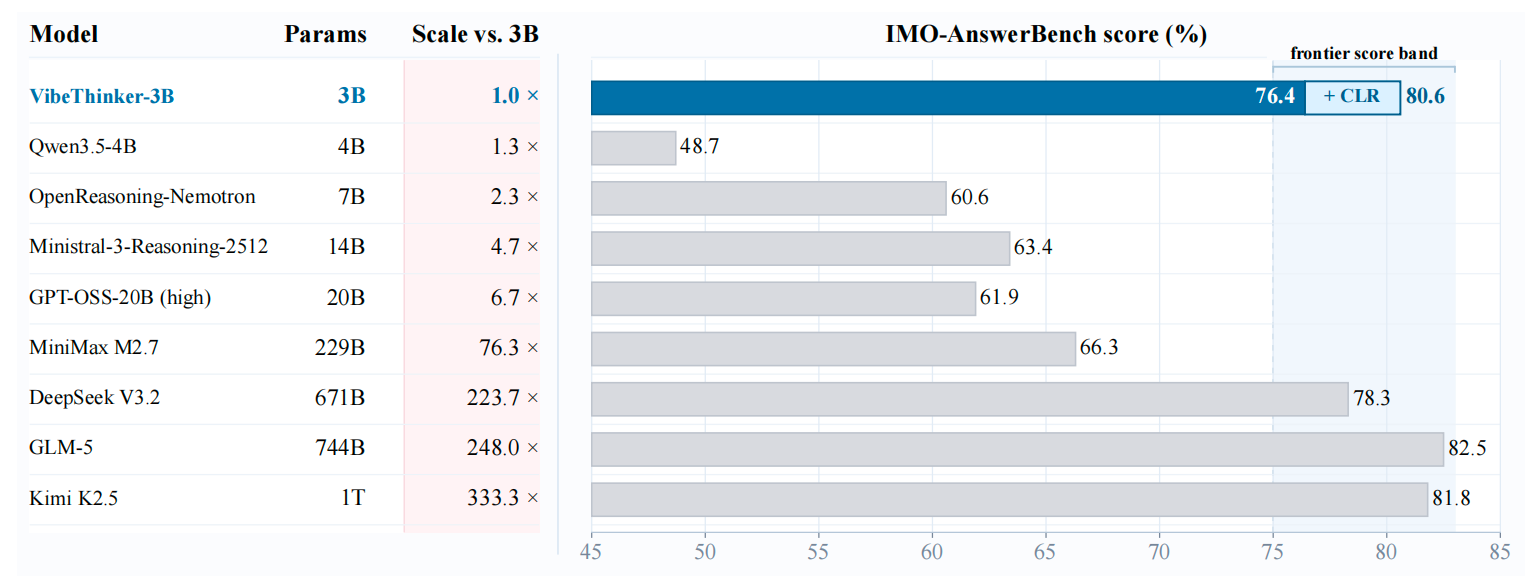
oMLX的模型下载器支持从国外的Hungging Face(简称HF)和国内阿里的魔搭社区(ModelScope,简称MS)下载模型,考虑到16 GB的统一内存的极限是9B模型[1][2],而且9B模型跑起来的前提是关闭推理简单聊天。考虑到QwenPaw Agent要流畅运行,需要较高的Token吞吐量,所以重点考虑Qwen3.5-4B和Gemma4-E2B(总参数5B)两个模型,两者都是多模态,Qwen3.5-4B节能,Gemma4-E2B高效[3],此外最近新浪WeboAI最近发布的基于Qwen2.5-3B微调的VibeThinker-3B,其推理能力媲美超大参数的前沿大模型(详见下图和ArXiv论文)。
这些模型在HF和MS上都有,一般优先在国内MS上下载,速度更快,国外的Hungging Face上模型更多一些,所以如果MS上找不到再去HF下载,oMLX上可以切换这两个下载源(HF可能会提示连接超时,MS刚开始可能提示缺少模块),也可以直接从网页端或者通过HF和MS各自的Python包下载。
#下载完整模型库
(llm) U@MacBook ~/models % modelscope download --model bunpai/CoPaw-Flash-4B-mlx-oQ4
#下载单个文件到指定本地文件夹(以下载README.md到“~/models”目录为例)
(llm) U@MacBook ~/models % modelscope download --model bunpai/CoPaw-Flash-4B-mlx-oQ4 README.md --local_dir ~/models
三 模型对比
在oMLX自带的工具里测试了Gemma-4-E2B-it-TurboQuant-MLX-4bit和Qwen3.5-4B-MLX-4bit的智力和速度。
1 智力
Intelligence Benchmark Comparison

              Mode    Sampled         gemma-4-E2B-it-TurboQuant-MLX-4bit         Qwen3.5-4B-MLX-4bit
----------------------------------------------------------------------------------------------------
MMLU          Sample  50/14042                                     64.0%                       64.0%
TRUTHFULQA    Sample  30/817                                       36.7%                       60.0%
MATHQA        Sample  30/2985                                      16.7%                       36.7%
SAFETYBENCH   Sample  30/11435                                     73.3%                       76.7%
结果显示Qwen3.5-4B-MLX-4bit好一点,TRUTHFULQA和MATHQA得分几乎是Gemma-4-E2B-it-TurboQuant-MLX-4bit的2倍。
2 速度
2.1 Qwen3.5-4B
oMLX - LLM inference, optimized for your Mac
https://github.com/jundot/omlx
Benchmark Model: Qwen3.5-4B-MLX-4bit (3.0GB)
================================================================================

Single Request Results
--------------------------------------------------------------------------------
Test                TTFT(ms)    TPOT(ms)        pp TPS        tg TPS      E2E(s)    Throughput    Peak Mem
pp1024/tg128          4236.0       20.50   241.7 tok/s    49.2 tok/s       6.840   168.4 tok/s     3.38 GB
pp4096/tg128         16115.6       22.09   254.2 tok/s    45.6 tok/s      18.921   223.2 tok/s     4.11 GB
pp8192/tg128         32440.7       22.92   252.5 tok/s    44.0 tok/s      35.351   235.4 tok/s     4.47 GB
pp16384/tg128        67282.6       25.61   243.5 tok/s    39.4 tok/s      70.535   234.1 tok/s     4.86 GB
pp32768/tg128       147400.3       31.18   222.3 tok/s    32.3 tok/s     151.361   217.3 tok/s     4.82 GB

Continuous Batching
pp1024 / tg128
--------------------------------------------------------------------------------
Batch           tg TPS   Speedup        pp TPS    pp TPS/req    TTFT(ms)      E2E(s)
2x          98.2 tok/s         -   184.9 tok/s    92.5 tok/s      7647.8      13.682
4x         199.6 tok/s         -   167.0 tok/s    41.8 tok/s     14367.8      27.094
2.2 Gemma4-E2B
oMLX - LLM inference, optimized for your Mac
https://github.com/jundot/omlx
Benchmark Model: gemma-4-E2B-it-TurboQuant-MLX-4bit (3.5GB)
================================================================================

Single Request Results
--------------------------------------------------------------------------------
Test                TTFT(ms)    TPOT(ms)        pp TPS        tg TPS      E2E(s)    Throughput    Peak Mem
pp1024/tg128          1190.3       16.82   860.3 tok/s    59.9 tok/s       3.327   346.3 tok/s     3.97 GB
pp4096/tg128          3016.8       17.65  1357.7 tok/s    57.1 tok/s       5.258   803.3 tok/s     4.03 GB
pp8192/tg128          5861.5       17.67  1397.6 tok/s    57.0 tok/s       8.106  1026.4 tok/s     4.07 GB
pp16384/tg128        12820.0       20.19  1278.0 tok/s    49.9 tok/s      15.384  1073.4 tok/s     4.15 GB
pp32768/tg128        29374.9       24.30  1115.5 tok/s    41.5 tok/s      32.461  1013.4 tok/s     4.45 GB

Continuous Batching
pp1024 / tg128
--------------------------------------------------------------------------------
Batch           tg TPS   Speedup        pp TPS    pp TPS/req    TTFT(ms)      E2E(s)
1x          59.9 tok/s     1.00x   860.3 tok/s   860.3 tok/s      1190.3       3.327
2x         123.4 tok/s     2.06x   510.0 tok/s   255.0 tok/s      2627.7       6.091
4x         245.8 tok/s     4.10x   474.6 tok/s   118.7 tok/s      4416.3      10.714
很明显,Gemma-4-E2B-it-TurboQuant-MLX-4bit的吞吐量是Qwen3.5-4B-MLX-4bit的4-5倍。从以上结果来看,Gemma-4-E2B是首选,Qwen3.5-4B是备选。
四 参数调优
模型优化主要包括两大类方法:一类是量化策略,包括模型权重量化和KV缓存量化,主要解决内/显存占用问题,也会使模型变得更快,基于不同的量化技术Qwen3.5-4B和Gemma4-E2B都有很多衍生版本。

另一类是加速策略,包括预填充 (Prefill) 阶段(如: SpecPrefill)和解码 (Decoding) 阶段(如:DFlash和MTP),主要提升模型提示词处理速度和Token输出速度。
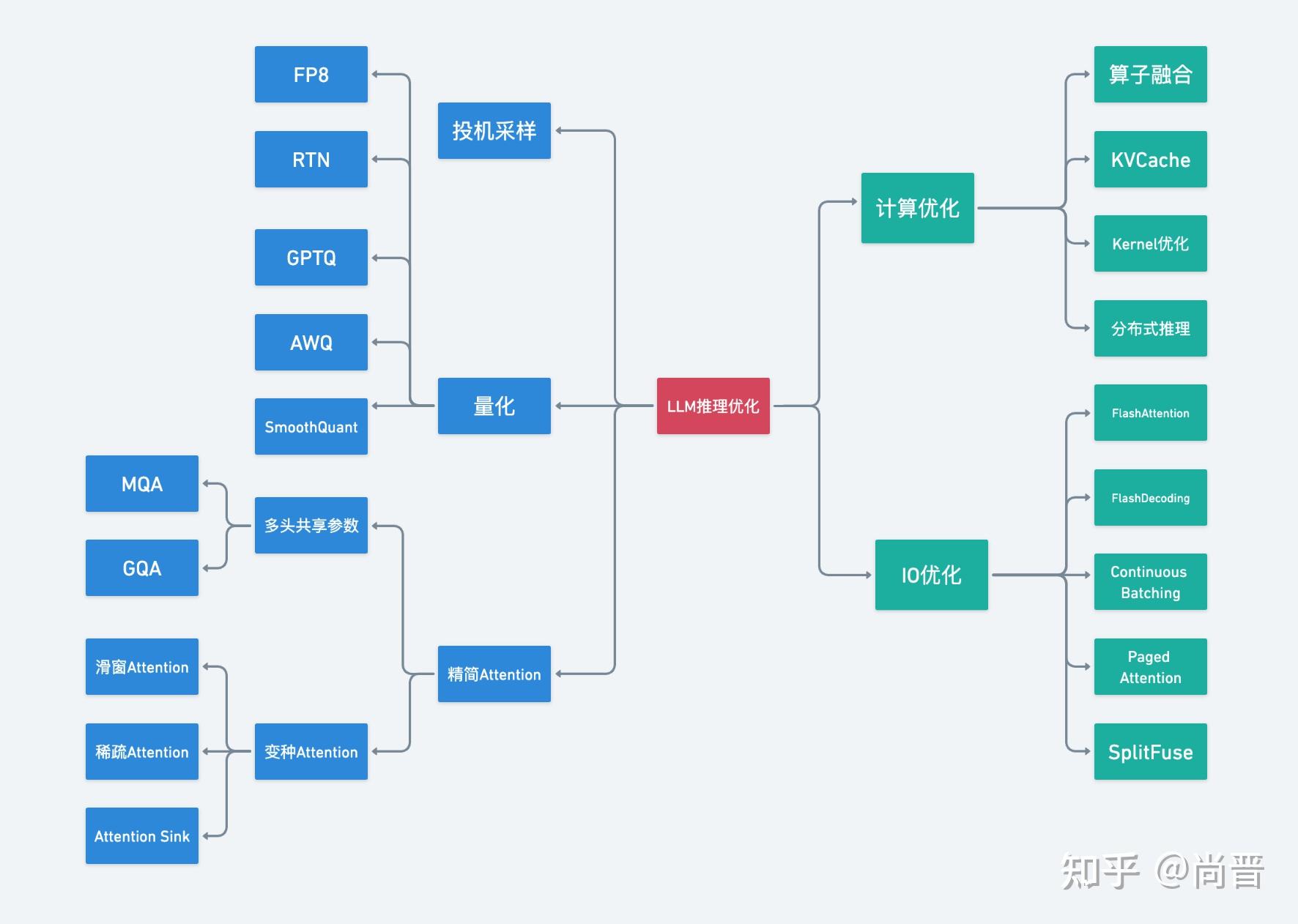
此外,还有一些架构创新(如 MoE),有效降低了推理成本,也为加速提供了基础。
模型权重的量化方式和加速方式都会影响模型推理的智力和速度,所以要挑选一个性能最佳的版本用来部署QwenPaw。
1 Qwen3.5-4B
1.1 量化策略
oQ & ParoQuant
oQ (oMLX Universal Dynamic Quantization) 是 oMLX 内置的通用动态混合精度量化系统,专为苹果芯片和大模型本地部署优化,可显著压缩模型体积并提升推理效率。
ParoQuant (Pairwise Rotation Quantization) 基于PAROAttention,是当前最先进的大语言模型(LLM)INT4 量化方法。它在推理速度接近 AWQ 的同时,显著缩小了与 FP16 的精度差距[4]。支持 NVIDIA GPU(vLLM Transformers)和 Apple Silicon(MLX)。

接下来我们首先对比一下这两种方式量化得到的Qwen3.5-4B模型的运行速度:
oQ
oMLX - LLM inference, optimized for your Mac
https://github.com/jundot/omlx
Benchmark Model: CoPaw-Flash-4B-mlx-oQ4 (3 GB)
Engine: Auto
================================================================================

Single Request Results
--------------------------------------------------------------------------------
Test                TTFT(ms)    TPOT(ms)        pp TPS        tg TPS      E2E(s)    Throughput    Peak Mem
pp1024/tg128          4210.2       21.36   243.2 tok/s    47.2 tok/s       6.923   166.4 tok/s     3.49 GB
pp4096/tg128         16232.7       22.33   252.3 tok/s    45.1 tok/s      19.069   221.5 tok/s     4.21 GB
pp8192/tg128         33685.7       24.53   243.2 tok/s    41.1 tok/s      36.801   226.1 tok/s     4.59 GB
pp16384/tg128        69431.1       26.69   236.0 tok/s    37.8 tok/s      72.821   226.7 tok/s     4.96 GB
pp32768/tg128       149589.2       30.93   219.1 tok/s    32.6 tok/s     153.518   214.3 tok/s     6.66 GB
ParoQuant
oMLX - LLM inference, optimized for your Mac
https://github.com/jundot/omlx
Benchmark Model: Qwen3.5-4B-PARO (3.5 GB)
Engine: Auto
================================================================================

Single Request Results
--------------------------------------------------------------------------------
Test                TTFT(ms)    TPOT(ms)        pp TPS        tg TPS      E2E(s)    Throughput    Peak Mem
pp1024/tg128          2679.6       17.36   382.2 tok/s    58.0 tok/s       4.885   235.8 tok/s     3.44 GB
pp4096/tg128         10051.2       18.30   407.5 tok/s    55.1 tok/s      12.375   341.3 tok/s     4.00 GB
pp8192/tg128         20862.4       19.48   392.7 tok/s    51.7 tok/s      23.337   356.5 tok/s     4.38 GB
pp16384/tg128        43732.3       21.33   374.6 tok/s    47.2 tok/s      46.441   355.5 tok/s     4.75 GB
pp32768/tg128        96256.5       25.96   340.4 tok/s    38.8 tok/s      99.553   330.4 tok/s     6.44 GB
很明显,ParoQuant量化版本的速度全面领先oQ 4bit量化版本,在提示词处理阶段领先50%左右,在Token生成阶段领先20%左右。我们也简单测试了,两个版本的实际运行效果,ParoQuant量化版本的输出质量的确要高一些,处理16k的makrdown文档并生成2k的总结没有出现任何格式错乱,表格和加粗都能正确渲染,而oQ量化版本会出现格式,会出现输出错乱无法渲染的情况。
1.2 加速策略
oMLX目前还不支持ParoQuant量化版本进一步使用加速策略:
Not supported on paroquant models yet (compatibility not verified)
所以以上结果便是ParoQuant量化版本在oMLX中运行的最高速度。但是对于非ParoQuant量化版本,可以通过使用不同的加速策略。Qwen3.5-4B系列内置MTP,可以加速Token输出速度,也可以通过DFlash草稿模型(Qwen3.5-4B-DFlash-oQ8-fp16, 0.6 GB) 加速Token输出。在解码阶段可以用0.8B的Qwen3.5 (Qwen3.5-0.8B-MLX-4bit, 0.6 GB)进行SpecFrefill加速:
MTP & SpecPrefill
MTP OFF
oMLX - LLM inference, optimized for your Mac
https://github.com/jundot/omlx
Benchmark Model: Qwen3.5-4B-oQ4-mtp (3.2 GB)
SpecPrefill (Qwen3.5-0.8B-MLX-4bit)
Engine: Auto
================================================================================

Single Request Results
--------------------------------------------------------------------------------
Test                TTFT(ms)    TPOT(ms)        pp TPS        tg TPS      E2E(s)    Throughput    Peak Mem
pp1024/tg128          4206.5       20.54   243.4 tok/s    49.1 tok/s       6.815   169.0 tok/s     3.91 GB
pp4096/tg128         16274.0       21.42   251.7 tok/s    47.1 tok/s      18.994   222.4 tok/s     4.64 GB
pp8192/tg128         32698.0       22.40   250.5 tok/s    45.0 tok/s      35.543   234.1 tok/s     5.02 GB
pp16384/tg128        22297.5       25.88   734.8 tok/s    38.9 tok/s      25.584   645.4 tok/s     6.15 GB
pp32768/tg128        48430.4       29.01   676.6 tok/s    34.7 tok/s      52.115   631.2 tok/s     6.59 GB
MTP ON
oMLX - LLM inference, optimized for your Mac
https://github.com/jundot/omlx
Benchmark Model: Qwen3.5-4B-oQ4-mtp (3.2 GB)
Native MTP+SpecPrefill (Qwen3.5-0.8B-MLX-4bit)
Engine: Auto
================================================================================

Single Request Results
--------------------------------------------------------------------------------
Test                TTFT(ms)    TPOT(ms)        pp TPS        tg TPS      E2E(s)    Throughput    Peak Mem
pp1024/tg128          4206.5       20.54   243.4 tok/s    49.1 tok/s       6.815   169.0 tok/s     3.91 GB
pp4096/tg128         16274.0       21.42   251.7 tok/s    47.1 tok/s      18.994   222.4 tok/s     4.64 GB
pp8192/tg128         32698.0       22.40   250.5 tok/s    45.0 tok/s      35.543   234.1 tok/s     5.02 GB
pp16384/tg128        22297.5       25.88   734.8 tok/s    38.9 tok/s      25.584   645.4 tok/s     6.15 GB
pp32768/tg128        48430.4       29.01   676.6 tok/s    34.7 tok/s      52.115   631.2 tok/s     6.59 GB
很明显,SpecPrefill其作用了,在长上下文情况下,解码速度是原来的2-3倍,但在这种情况下,MTP没有其作用。
DFlash & SpecPrefill
DFlash OFF
oMLX - LLM inference, optimized for your Mac
https://github.com/jundot/omlx
Benchmark Model: CoPaw-Flash-4B-mlx-oQ4
SpecPrefill (Qwen3.5-0.8B-MLX-4bit)
Engine: Auto
================================================================================

Single Request Results
--------------------------------------------------------------------------------
Test                TTFT(ms)    TPOT(ms)        pp TPS        tg TPS      E2E(s)    Throughput    Peak Mem
pp1024/tg128          4048.4       24.04   252.9 tok/s    41.9 tok/s       7.124   161.7 tok/s     3.89 GB
pp4096/tg128         16246.2       25.34   252.1 tok/s    39.8 tok/s      19.515   216.4 tok/s     4.42 GB
pp8192/tg128         33962.1       26.88   241.2 tok/s    37.5 tok/s      37.411   222.4 tok/s     4.64 GB
pp16384/tg128        24620.9       28.65   665.5 tok/s    35.2 tok/s      28.291   583.6 tok/s     6.01 GB
pp32768/tg128        59014.8       32.16   555.3 tok/s    31.3 tok/s      63.133   521.1 tok/s     6.62 GB

Continuous Batching
pp1024 / tg128
--------------------------------------------------------------------------------
Batch           tg TPS   Speedup        pp TPS    pp TPS/req    TTFT(ms)      E2E(s)
1x          41.9 tok/s     1.00x   252.9 tok/s   252.9 tok/s      4048.4       7.124
2x          40.5 tok/s     0.97x   247.7 tok/s   123.8 tok/s      8267.7      14.595
4x         147.9 tok/s     3.53x   162.3 tok/s    40.6 tok/s     15559.5      28.693
DFlash ON
oMLX - LLM inference, optimized for your Mac
https://github.com/jundot/omlx
Benchmark Model: CoPaw-Flash-4B-mlx-oQ4
SpecPrefill (Qwen3.5-0.8B-MLX-4bit)+DFlash (Qwen3.5-4B-DFlash-oQ8-fp16)
Engine: Auto
================================================================================

Single Request Results
--------------------------------------------------------------------------------
Test                TTFT(ms)    TPOT(ms)        pp TPS        tg TPS      E2E(s)    Throughput    Peak Mem
pp1024/tg128          4232.0       10.60   242.0 tok/s    95.1 tok/s       5.578   206.5 tok/s     4.06 GB
pp8192/tg128         34249.8       11.69   239.2 tok/s    86.2 tok/s      35.734   232.8 tok/s     5.33 GB
pp32768/tg128       154092.8       18.65   212.7 tok/s    54.0 tok/s     156.461   210.3 tok/s     7.82 GB
DFlash和SpecPrefill也有冲突,开启DFlash时,Token输出速度会翻倍,但SpecPrefill会失效。
通过测试发现最快的是小模型预填充,而且SpecPrefill的优先级强于MTP弱于DFlash。因此使用Qwen3.5-4B时,开启SpecPrefill即可,如果内/显存紧张,再开启TurboQuant KV cache即可,模型可以选专为QwenPaw微调的版本:Copaw/QwenPaw-Flash-4B。
2 Gemma4-E2B
对于Gemma4-E2B,其指令微调版本Gemma4-E2B-it,更擅长理解和遵循人类的指令,适合用作聊天 问答、编程等任务的AI助手。谷歌官方已经提供了经量化感知训练(QAT)优化后的Gemma 4系列新版本google/gemma-4-E2B-it-qat-q4_0-unquantized及对应的Assistant草稿模型google/gemma-4-E2B-it-qat-q4_0-unquantized-assistant,其经过4bit量化后依旧保持比肩未量化模型的智力[5]。
2.1 量化策略
QAT-Q4
oMLX - LLM inference, optimized for your Mac
https://github.com/jundot/omlx
Benchmark Model: gemma-4-E2B-it-qat-4bit (4.3 GB)
================================================================================

Single Request Results
--------------------------------------------------------------------------------
Test                TTFT(ms)    TPOT(ms)        pp TPS        tg TPS      E2E(s)    Throughput    Peak Mem
pp1024/tg128          1040.6       20.18   984.1 tok/s    49.9 tok/s       3.604   319.7 tok/s     3.79 GB
pp4096/tg128          3135.7       20.74  1306.2 tok/s    48.6 tok/s       5.770   732.1 tok/s     3.83 GB
pp8192/tg128          6039.3       21.96  1356.5 tok/s    45.9 tok/s       8.828   942.5 tok/s     3.88 GB

Continuous Batching
pp1024 / tg128
--------------------------------------------------------------------------------
Batch           tg TPS   Speedup        pp TPS    pp TPS/req    TTFT(ms)      E2E(s)
1x          49.9 tok/s     1.00x   984.1 tok/s   984.1 tok/s      1040.6       3.604
2x          98.8 tok/s     1.98x   410.8 tok/s   205.4 tok/s      3079.5       7.577
4x         200.2 tok/s     4.01x   345.9 tok/s    86.5 tok/s      6331.6      14.399
ParoQuant
oMLX - LLM inference, optimized for your Mac
https://github.com/jundot/omlx
Benchmark Model: gemma-4-E2B-it-PARO (7 GB)
Engine: Auto
================================================================================

Single Request Results
--------------------------------------------------------------------------------
Test                TTFT(ms)    TPOT(ms)        pp TPS        tg TPS      E2E(s)    Throughput    Peak Mem
pp1024/tg128           749.5       13.72  1366.2 tok/s    73.5 tok/s       2.492   462.4 tok/s     6.29 GB
pp32768/tg128        23824.1       19.49  1375.4 tok/s    51.7 tok/s      26.300  1250.8 tok/s     6.68 GB
和Qwen3.5模型一样,ParoQuant量化版本会比普通量化版本看起来快一点,但对于2B激活参数的Gemma4模型,差别没有像Qwen3.5-4B那样大,而且ParoQuant量化版本无法用Assistant。在考虑到ParoQuant量化版本文件大小达到了7 GB,MacBook 16 GB优先选QAT版本的4bit量化模型。
2.2 加速策略
这里简单测试一下Gemma-4-E2B-it-qat版本用Assistant Draft后的速度是否能超越ParoQuant量化版:
oMLX - LLM inference, optimized for your Mac
https://github.com/jundot/omlx
Benchmark Model: gemma-4-E2B-it-qat-oQ4-fp16 (4.5 GB)
Engine: Auto
================================================================================

Single Request Results
--------------------------------------------------------------------------------
Test                TTFT(ms)    TPOT(ms)        pp TPS        tg TPS      E2E(s)    Throughput    Peak Mem
pp1024/tg128           841.2       12.90  1217.4 tok/s    78.1 tok/s       2.479   464.7 tok/s     3.16 GB
pp4096/tg128          2621.7       13.34  1562.3 tok/s    75.5 tok/s       4.316   978.7 tok/s     3.24 GB
pp8192/tg128          5210.2       14.23  1572.3 tok/s    70.8 tok/s       7.018  1185.5 tok/s     3.28 GB
pp16384/tg128        10659.1       15.64  1537.1 tok/s    64.5 tok/s      12.645  1305.8 tok/s     3.34 GB
pp32768/tg128        24111.4       20.17  1359.0 tok/s    50.0 tok/s      26.673  1233.3 tok/s     3.65 GB

Continuous Batching
pp1024 / tg128
--------------------------------------------------------------------------------
Batch           tg TPS   Speedup        pp TPS    pp TPS/req    TTFT(ms)      E2E(s)
1x          78.1 tok/s     1.00x  1217.4 tok/s  1217.4 tok/s       841.2       2.479
2x          99.4 tok/s     1.27x  1057.4 tok/s   528.7 tok/s      1936.6       4.511
4x         304.0 tok/s     3.89x   669.1 tok/s   167.3 tok/s      2614.5       7.806
Gemma4-E2B-it-QAT用Assistant Draft后的速度进一步得到提升,整体运行速度优于ParoQuant量化版本。整体而言Gemma4-E2B性能,全面碾压Qwen3.5-4B,但是oMLX目前对Gemma4-E2B的多模态支持欠佳:

所以,如果要用Gemma4-E2B,需采用其他方式部署。
另外,相比于Qwen3.5的原生支持工具调用,Gemma4-E2B的工具调用不是很稳定,视觉识别方面也是Qwen3.5更好[6]。
五 总结
通过oMLX部署部署大模型连接QwenPaw要求工具调用和多模态,眼下Qwen3.5-4B比较适合。
如果通过修复后的oMLX或其他支持多模态的工具部署大模型连接QwenPaw时Gemma4-E2B更适合,纯文本场景也是Gemma4-E2B优先,速度非常快,能节约一半以上时间。
推理要求较高的场景可以用VibeThinker-3B模型。
另外还有个1.3B的小模型MiniCPM-V-4.6,由OpenBMB基于 SigLIP2-400M 和 Qwen3.5-0.8B 大语言模型(LLM)构建而成,引入了混合 4x/16x 视觉 token 压缩技术,具备强大的单图、多图及视频理解能力,同时显著提升了计算效率。
oMLX - LLM inference, optimized for your Mac
https://github.com/jundot/omlx
Benchmark Model: MiniCPM-V-4.6-bf16
Engine: Auto
================================================================================

Single Request Results
--------------------------------------------------------------------------------
Test                TTFT(ms)    TPOT(ms)        pp TPS        tg TPS      E2E(s)    Throughput    Peak Mem
pp1024/tg128           454.6       13.67  2252.4 tok/s    73.7 tok/s       2.207   521.9 tok/s     3.36 GB
pp8192/tg128          4853.2       14.57  1688.0 tok/s    69.2 tok/s       6.725  1237.3 tok/s     3.75 GB
pp16384/tg128        11510.7       16.08  1423.4 tok/s    62.7 tok/s      13.575  1216.3 tok/s     3.98 GB
测评显示其整体智能水平均领先Gemma4-E2B-it。


 浙公网安备 33010602011771号