HowTo: Check Swap Usage in Linux
Option #1: /proc/swaps file
Type the following command to see total and used swap size:# cat /proc/swaps
Sample outputs:
Filename				Type		Size	Used	Priority
/dev/sda3                               partition	6291448	65680	0
Option #2: swapon command
Type the following command:# swapon -s
Sample outputs:
Filename				Type		Size	Used	Priority
/dev/sda3                               partition	6291448	65680	0
Option #3: free command
Use the free command as follows:# free -g
# free -k
# free -m
Sample outputs:
             total       used       free     shared    buffers     cached
Mem:         11909      11645        264          0        324       8980
-/+ buffers/cache:       2341       9568
Swap:         6143         64       6079
Option #4: vmstat command
Type the following vmstat command:# vmstat
# vmstat 1 5
Sample outputs:
procs -----------memory---------- ---swap-- -----io---- -system-- ----cpu----
 r  b   swpd   free   buff  cache   si   so    bi    bo   in   cs us sy id wa
 1  9 1209512 101352   1504 127980    0    3    11    20   60   55  3  1 95  1
 2 11 1209640 101292   1508 134132  844  424  5608   964 23280 15012  2  8 20 70
 0 10 1210052 108132   1532 125764  648  660 10548   916 22237 18103  3 10 11 77
 1 13 1209892 106484   1500 128052  796  240 10484   980 24024 12692  2  8 24 67
 1  9 1209332 113412   1500 124028 1608  168  2472   620 28854 13761  2  8 20 70
Note down the following output from swap field:
- si: Amount of memory swapped in from disk (/s).
- so: Amount of memory swapped to disk (/s).
Option #5: top/atop/htop command
Type the following commands:# atop
# htop
# top
Sample outputs (from top command):
top - 02:54:24 up 15:24,  4 users,  load average: 0.45, 4.84, 6.75
Tasks: 266 total,   1 running, 264 sleeping,   0 stopped,   1 zombie
Cpu(s):  3.2%us,  1.4%sy,  0.0%ni, 94.4%id,  1.0%wa,  0.0%hi,  0.1%si,  0.0%st
Mem:   8120568k total,  7673584k used,   446984k free,     4516k buffers
Swap: 15859708k total,  1167408k used, 14692300k free,  1151972k cached
  PID USER      PR  NI  VIRT  RES  SHR S %CPU %MEM    TIME+  COMMAND
13491 vivek     20   0 1137m 279m 6692 S   10  3.5  19:17.47 firefox
 5663 vivek     10 -10 1564m 1.1g  59m S    8 14.5   5:10.94 vmware-vmx
 2661 root      20   0  352m 185m 8604 S    6  2.3  65:40.17 Xorg
 3752 vivek     20   0 3566m 2.6g  12m S    6 33.6  63:44.35 compiz
 4798 vivek     20   0  900m  50m 4992 S    2  0.6   0:11.04 chrome
 5539 vivek     20   0 1388m 838m 780m S    2 10.6   1:45.78 VirtualBox
 6297 root      20   0     0    0    0 S    2  0.0   0:00.15 kworker/2:0
 6646 root      20   0 19252 1404  936 R    2  0.0   0:00.01 top
    1 root      20   0  8404  644  608 S    0  0.0   0:03.32 init
    2 root      20   0     0    0    0 S    0  0.0   0:00.03 kthreadd
    3 root      20   0     0    0    0 S    0  0.0   0:02.30 ksoftirqd/0
    6 root      RT   0     0    0    0 S    0  0.0   0:00.00 migration/0
    7 root      RT   0     0    0    0 S    0  0.0   0:00.24 watchdog/0
   37 root       0 -20     0    0    0 S    0  0.0   0:00.00 cpuset
   38 root       0 -20     0    0    0 S    0  0.0   0:00.00 khelper
   39 root      20   0     0    0    0 S    0  0.0   0:00.00 kdevtmpfs
   40 root       0 -20     0    0    0 S    0  0.0   0:00.00 netns
Sample outputs from htop command:
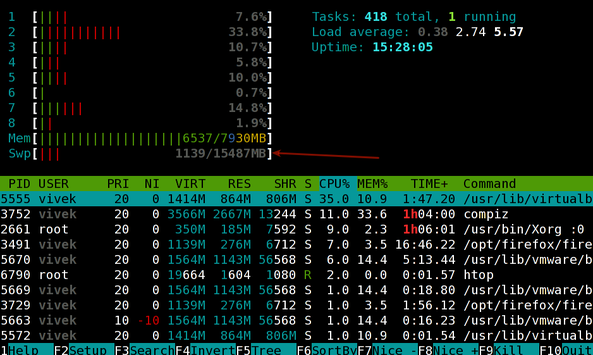
Fig.01: Linux: Swap Memory Usage Command
See man pages - swapon(8), free(1), top(1), vmstat(8), for more information.
小小菜鸟一枚

 浙公网安备 33010602011771号