DBMS_APPLICATION_INFO : For Code Instrumentation
转自 http://www.oracle-base.com/articles/8i/dbms_application_info.php#end_to_end_tracing_java
he DBMS_APPLICATION_INFO package allows programs to add information to the V$SESSION and V$SESSION_LONGOPS views to make tracking of session activities more accurate. Later releases of Oracle can make use of this information in auditing, SQL tracing and performance tuning.
The dynamic performance views are not conventional views against tables, but wrappers over memory structures in the Oracle kernel, so the DBMS_APPLICATION_INFO package is writing the data to memory, which means there is very little overhead in using this functionalty.
- SET_MODULE
- SET_ACTION
- SET_CLIENT_INFO
- V$SESSION View
- Performance Analysis
- SET_SESSION_LONGOPS
- V$SESSION_LONGOPS View
- End-To-End Tracing From Java
- Instrumentation Library for Oracle (ILO)
Related articles.
- SQL trace, 10046, trcsess and tkprof in Oracle
- DBMS_SESSION : Managing Sessions From a Connection Pool in Oracle Databases
SET_MODULE
Once a program makes a connection to the database it should register itself as a module using the SET_MODULE procedure. In doing so it also sets the initial action. The following code shows how to register a program called "add_order" and indicate it is currently attempting to add records to the "order" table.
BEGIN
  DBMS_APPLICATION_INFO.set_module(module_name => 'add_order',
                                   action_name => 'insert into orders');

  -- Do insert into ORDERS table.
END;
/
SET_ACTION
Subsequent processing should use the SET_ACTION procedure to reflect the current status or action of the session. Following on from the previous example, the program continues by adding records to the "order_lines" table, so the action is altered reflect this status change.
BEGIN
  DBMS_APPLICATION_INFO.set_action(action_name => 'insert into order_lines');

  -- Do insert into ORDER_LINES table.
END;
/
SET_CLIENT_INFO
The SET_CLIENT_INFO procedure can be used if any additional information is needed. It is useful to adding a little more context to the action, as shown in the example below. This should not be confused with the CLIENT_IDENTIFIER column, set using the DBMS_SESSION package.
BEGIN
  DBMS_APPLICATION_INFO.set_action(action_name => 'insert into orders');
  DBMS_APPLICATION_INFO.set_client_info(client_info => 'Issued by Web Client');

  -- Do insert into ORDERS table.
END;
/
V$SESSION View
The information set by these procedures can be read from the MODULE, ACTION and CLIENT_INFO columns of the V$SESSION view.
SET LINESIZE 500
SELECT sid,
       serial#,
       username,
       osuser,
       module,
       action,
       client_info
FROM   v$session;
As well as being useful in its own right, this extra information in the V$SESSION view is very useful for later versions of the database. The DBMS_MONITOR package, introduced in 10g, can use specific combinations of the MODULE and ACTION columns to enable and disable SQL trace.
Performance Analysis
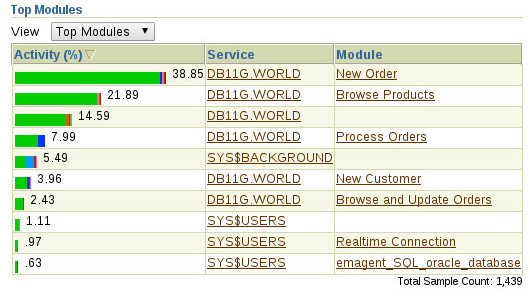
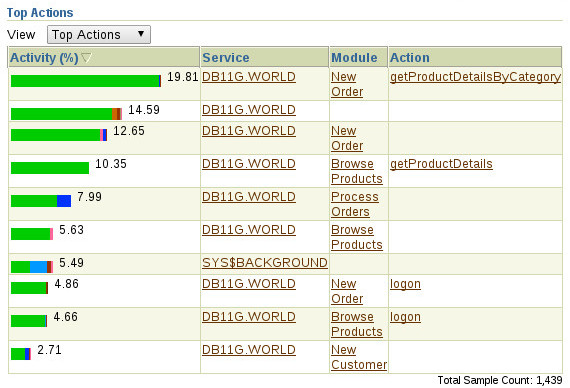
In later releases of the database, the instrumentation provided by the DBMS_APPLICATION_INFO package comes into its own during performance analysis, because the module and action information is visible in a number of locations, including Enterprise Manager performance graphs, ASH and AWR reports.
The following image is taken from the Enterprise Manager Top Activity screen, where the activity is broken down by module.
The following image is taken from the Enterprise Manager Top Activity screen, where the activity is broken down by action.
The ASH Report includes a breakdown of activity based on Service/Module. The AWR Report includes the module in all the reported SQL statistics. You can see examples of those reports below.
SET_SESSION_LONGOPS
The SET_SESSION_LONGOPS procedure can be used to show the progress of long operations by inserting rows in the V$SESSION_LONGOPS view. For it to work effectively, you must know the total amount of work you are planning to do and how much work you have done so far.
DECLARE
  v_rindex     PLS_INTEGER;
  v_slno       PLS_INTEGER;
  v_totalwork  NUMBER;
  v_sofar      NUMBER;
  v_obj        PLS_INTEGER;
BEGIN
  v_rindex     := DBMS_APPLICATION_INFO.set_session_longops_nohint;
  v_sofar     := 0;
  v_totalwork := 10;

  WHILE v_sofar < 10 LOOP
    -- Do some work
    DBMS_LOCK.sleep(5);

    v_sofar := v_sofar + 1;
    DBMS_APPLICATION_INFO.set_session_longops(rindex      => v_rindex,
                                              slno        => v_slno,
                                              op_name     => 'Batch Load',
                                              target      => v_obj,
                                              context     => 0,
                                              sofar       => v_sofar,
                                              totalwork   => v_totalwork,
                                              target_desc => 'BATCH_LOAD_TABLE',
                                              units       => 'rows processed');
  END LOOP;
END;
/
V$SESSION_LONGOPS View
The information written by the SET_SESSION_LONGOPS procedure can be read using the the V$SESSION_LONGOPS view as follows.
SELECT  opname,
        target_desc,
        sofar,
        totalwork,
        units
FROM    v$session_longops;
Some of the diagnostics features of Enterprise Manager use the contents of the V$SESSION_LONGOPS view when generating progress bars for existing processing.
End-To-End Tracing From Java
Java programs connecting to the database using JDBC can set the MODULE, ACTION and CLIENT_IDENTIFIER columns of the V$SESSION view without calls to the DBMS_APPLICATION_INFO or DBMS_SESSIONpackages. This make it a more scalable solution, since extra calls to the database are not required.
When a new connection (conn) is made, or a connection is pulled from the connection pool, the details are set using the following type of code.
try {
  String e2eMetrics[] = new String[OracleConnection.END_TO_END_STATE_INDEX_MAX];
  e2eMetrics[OracleConnection.END_TO_END_ACTION_INDEX]   = "Starting";
  e2eMetrics[OracleConnection.END_TO_END_MODULE_INDEX]   = "MyProgram";
  e2eMetrics[OracleConnection.END_TO_END_CLIENTID_INDEX] = "tim_hall";
  ((OracleConnection) conn).setEndToEndMetrics(e2eMetrics, (short) 0);
} catch (SQLException sqle) {
  // Do something...
}
Before releasing a connection back to the connection pool, the details should be blanked.
try {
  String e2eMetrics[] = new String[OracleConnection.END_TO_END_STATE_INDEX_MAX];
  e2eMetrics[OracleConnection.END_TO_END_ACTION_INDEX]   = null;
  e2eMetrics[OracleConnection.END_TO_END_MODULE_INDEX]   = null;
  e2eMetrics[OracleConnection.END_TO_END_CLIENTID_INDEX] = null;
  ((OracleConnection) conn).setEndToEndMetrics(e2eMetrics, Short.MIN_VALUE);
} catch (SQLException sqle) {
  // Do something...
}
Instrumentation Library for Oracle (ILO)
Those kind folks at Method-R have produced a wrapper API that adds some nice functionality to DBMS_APPLICATION_INFO. You can find it here.
For more information see:

 浙公网安备 33010602011771号