
Android开发笔记(一)View基础
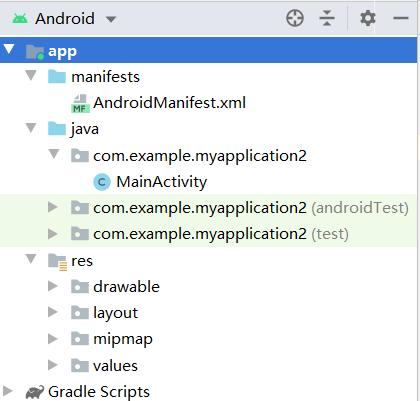
res 物件
- .app\res\drawable:
位图文件 or 9 Patch文件 or Drawable对象等XML资源文件 -
.app\res\layout
布局文件 -
.app\res\mipmap
需要适应分辨率的文件放置处
m<h<xh<xxh<xxxh
拷贝图片直接放mipmap文件夹C+V,会有选项 -
.app\res\values
用来存放安卓资源的资源的文件其中包括四个个XML文件:
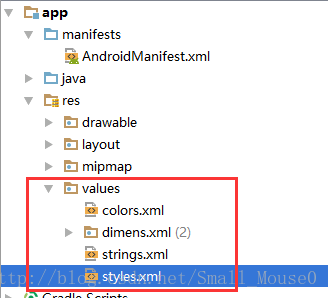
. dimens.xml 尺寸控制
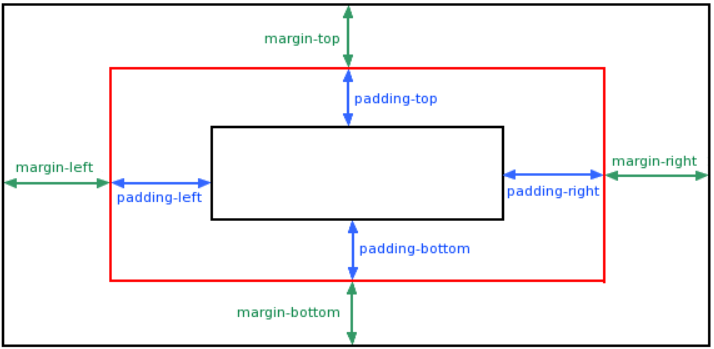
padding:内边距 属性用于在任何定义的边界内的元素内容周围生成空间
margin:外边距 属性用于在任何定义的边框之外,为元素周围创建空间。
View类常用属性:
android:id = "@+id/user"
android:background = "@mipmap/bg" // 图片
android:background = "#FF00FF" // 单色
android:padding = "16dp" // 组件内边距四个方向一样
android:padding = "@dimen/activity_margin" // 组件offset 用资源变量标识
android:paddingLeft // 不同方向边距
android:paddingTop
android:paddingRight
android:paddingBottom
android:paddingStart // 同Left
android:paddingEnd // 同Right
ViewGroup.LayoutParams类:
组件大小
android:layout_width="229dp"
android:layout_height="80dp"
FILL_PARENT // 与父容器相同 或 匹配父对象
MATCH_PARENT // 功能同上
WRAP_CONTENT // 自适应 或 包裹其自身


ViewGroup.MarginLayoutParams类:

即外边距
android:layout_marginTop
android:layout_marginBottom
android:layout_marginLeft // Start
android:layout_marginRight // End
- UI界面开发方式:
1.XML
2.JAVA
3.XML+JAVA
4.自定义view
在Activity中使用下述代码显示XML布局文件内容
setContentView(R.layout.activity_main);setContentView设置内容视图 - 使用JAVA编写布局管理器
-
        FrameLayout myframeLayout = new FrameLayout(this);
        myframeLayout.setBackgroundResource(R.mipmap.bg);
        setContentView(myframeLayout);
        TextView text1 = new TextView(this);
        text1.setText("Text1");
        text1.setTextSize(TypedValue.COMPLEX_UNIT_SP, 18);
        text1.setTextColor(Color.rgb(11,85,114));
        FrameLayout.LayoutParams params = new FrameLayout.LayoutParams(ViewGroup.LayoutParams.WRAP_CONTENT, ViewGroup.LayoutParams.WRAP_CONTENT);
        params.gravity = Gravity.CENTER;
        text1.setLayoutParams(params);
        text1.setOnClickListener(new View.OnClickListener(){
            @Override
            public void onClick(View v){
                new AlertDialog.Builder(MainActivity.this).setTitle("Tip").setMessage("Mess").setPositiveButton("Sure", new DialogInterface.OnClickListener() {
                    @Override
                    public void onClick(DialogInterface dialog, int which) {
                        Log.i("Get in","In");
                    }
                }).setNegativeButton("Exit", new DialogInterface.OnClickListener() {
                    @Override
                    public void onClick(DialogInterface dialog, int which) {
                        Log.i("suss Exit","Exit");
                        finish();
                    }
                }).show();
            }

        });
        myframeLayout.addView(text1);
JAVA和XML混合:
MainActivity:
    private ImageView[] img=new ImageView[12];
    private int[] imagePath=new int[]{
            R.mipmap.i0,R.mipmap.i1,R.mipmap.i2,R.mipmap.i3,
            R.mipmap.i4,R.mipmap.i5,R.mipmap.i6,R.mipmap.i7,
            R.mipmap.i8,R.mipmap.i9,R.mipmap.i10,R.mipmap.i11
    };

    @Override
    protected void onCreate(Bundle savedInstanceState) {
        super.onCreate(savedInstanceState);
        setContentView(R.layout.activity_main);
        GridLayout layout=(GridLayout)findViewById(R.id.layout);
        for(int i=0;i<imagePath.length;i++) {
            img[i] = new ImageView(MainActivity.this);
            img[i].setImageResource(imagePath[i]);
            img[i].setPadding(2,2,2,2);
            ViewGroup.LayoutParams params = new ViewGroup.LayoutParams(116,68);
            img[i].setLayoutParams(params);
            layout.addView(img[i]);

        };
        }
activity_main.xml中加入:
    android:id="@+id/layout"
    android:orientation="horizontal"
    android:rowCount="3"
    android:columnCount="4"
    android:id="@+id/layout"
    android:orientation="horizontal"
    android:rowCount="3"
    android:columnCount="4"
·开发自定义View
 MainActivity:
public class MainActivity extends AppCompatActivity {

    @Override
    protected void onCreate(Bundle savedInstanceState) {
        super.onCreate(savedInstanceState);
        setContentView(R.layout.activity_main);
        FrameLayout frameLayout = findViewById(R.id.mylayout);
        final MyView myView = new MyView(this);
        myView.setOnTouchListener(new View.OnTouchListener(){
            @Override
            public boolean onTouch(View v, MotionEvent event){
                myView.bitmapX = event.getX();
                myView.bitmapY = event.getY();
                myView.invalidate();
                return true;
            }
        });
        frameLayout.addView(myView);
    }
}
创建MyView.java:
public class MyView extends View {
    public float bitmapX;
    public float bitmapY;
    public MyView(Context context) {
        super(context);
        bitmapX = 290;
        bitmapY = 130;
    }

    @Override
    protected void onDraw(Canvas canvas) {
        super.onDraw(canvas);
        Paint paint = new Paint();
        Bitmap bitmap = BitmapFactory.decodeResource(this.getResources(),R.mipmap.m);
        canvas.drawBitmap(bitmap, bitmapX, bitmapY, paint);
        if(bitmap.isRecycled()){
            bitmap.recycle();
        }
    }
}

activity_main.xml中加入
    android:background="@mipmap/bg"
    android:id="@+id/mylayout"

 浙公网安备 33010602011771号