
4.spring-security基于数据库实现认证功能
spring-security基于数据库实现认证功能
之前我们所使用的用户名和密码是来源于框架自动生成的, 现在我们需要实现基于数据库中的用户名和密码功能,首先得需要实现security的一个UserDetailsService 接口, 重写这个接口里面 loadUserByUsername;
package com.po.service.impl;

import com.po.domain.User;
import com.po.service.UserService;
import org.springframework.beans.factory.annotation.Autowired;
import org.springframework.security.core.GrantedAuthority;
import org.springframework.security.core.userdetails.UserDetails;
import org.springframework.security.core.userdetails.UserDetailsService;
import org.springframework.security.core.userdetails.UsernameNotFoundException;
import org.springframework.stereotype.Service;

import java.util.ArrayList;
import java.util.Collection;

@Service
public class MyUserDetailsService implements UserDetailsService {
    @Autowired
    private UserService userService;
    /**
     * 根据用户名查询用户
     * @param username 前端传入的用户名
     * @return
     * @throws UsernameNotFoundException
     */
    @Override
    public UserDetails loadUserByUsername(String username) throws UsernameNotFoundException {
        User user = userService.findByUsername(username);
        if (user == null) {
            throw new UsernameNotFoundException("user is ==>" + username);
        }
        Collection<? extends GrantedAuthority> authorities = new ArrayList<>();
        UserDetails userDetails = new org.springframework.security.core.userdetails.User(username,
                "{noop}"+user.getPassword(),//不使用密码加密
                true, //用户是否启用 (true:启用)
                true,//用户是否过期 (true:没有过期)
                true, //用户凭证是否过期 (true:没有过期)
                true, // 用户是否锁定 (true:没有锁定)
                authorities);
        return userDetails;
    }

}
在SecurityConfiguration配置类中指定自定义用户认证
package com.po.config;

import com.po.service.impl.MyUserDetailsService;
import org.springframework.beans.factory.annotation.Autowired;
import org.springframework.context.annotation.Configuration;
import org.springframework.security.config.annotation.authentication.builders.AuthenticationManagerBuilder;
import org.springframework.security.config.annotation.web.builders.HttpSecurity;
import org.springframework.security.config.annotation.web.builders.WebSecurity;
import org.springframework.security.config.annotation.web.configuration.WebSecurityConfigurerAdapter;


@Configuration
public class SecurityConfiguration extends WebSecurityConfigurerAdapter {
    @Autowired
    private MyUserDetailsService myUserDetailsService;
    /**
     * http请求方法
     *
     * @param http
     * @throws Exception
     */
    @Override
    protected void configure(HttpSecurity http) throws Exception {
        /** http.httpBasic() //开启httpBasic认证
         .and().authorizeRequests().anyRequest().authenticated(); //所有请求都需要认证之后访问
         */
/*        http.formLogin().loginPage("/login.html")//开启表单认证
              //  .and().authorizeRequests() //放行登录页面
            //    .anyRequest().authenticated();
             //   .and().authorizeRequests().antMatchers("/login.html").permitAll() //放行登录页面
                .and().authorizeRequests().antMatchers("/toLoginPage").permitAll() //放行登录页面
                .anyRequest().authenticated();*/
                 http.formLogin() //开启表单认证
                .loginPage("/toLoginPage") // 自定义登陆页面
                .loginProcessingUrl("/login") //表单提交路径
                .usernameParameter("username").passwordParameter("password") //自定义input额name值和password
                .successForwardUrl("/") //登录成功之后跳转的路径
                .and().authorizeRequests().antMatchers("/toLoginPage").permitAll() //放行登录页面
                .anyRequest().authenticated()
                 .and().headers().frameOptions().sameOrigin() //加载同源域名下iframe页面
                .and().csrf().disable();//关闭csrf防护
    }

    @Override
    public void configure(WebSecurity web) throws Exception {
        //解决静态资源被拦截的问题
        web.ignoring().antMatchers("/css/**","/images/**","/js/**");
    }

    /**
     *身份安全管理器
     * @param auth
     * @throws Exception
     */
    @Override
    protected void configure(AuthenticationManagerBuilder auth) throws Exception {
        auth.userDetailsService(myUserDetailsService);
    }
}
此时,控制台也不会生成随机密码,现在走的是数据库的认证方式;
在数据库加入一条数据 密码是明文
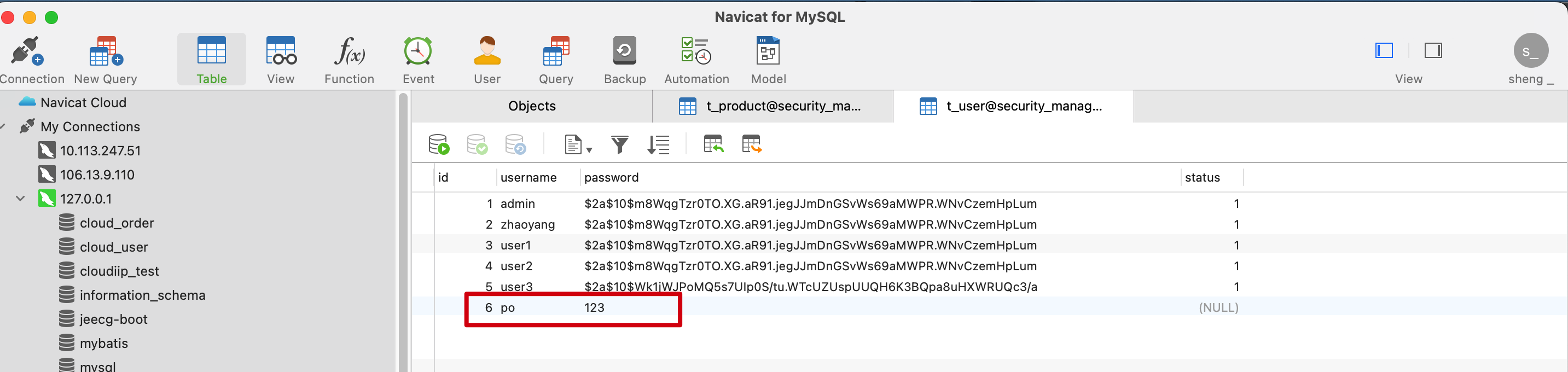
在基于数据库完成用户登录的过程中,我们所是使用的密码是明文的,规则是通过对密码明文添加 {noop} 前缀。
输入用户名po 密码123
可以验证登录成功。
密码加密认证
那么下面 Spring Security 中的密码编码进行一些探讨。
Spring Security 中 PasswordEncoder 就是我们对密码进行编码的工具接口。该接口只有两个功能: 一个是匹配验证(matches)。另一个是密码加密(encode)。
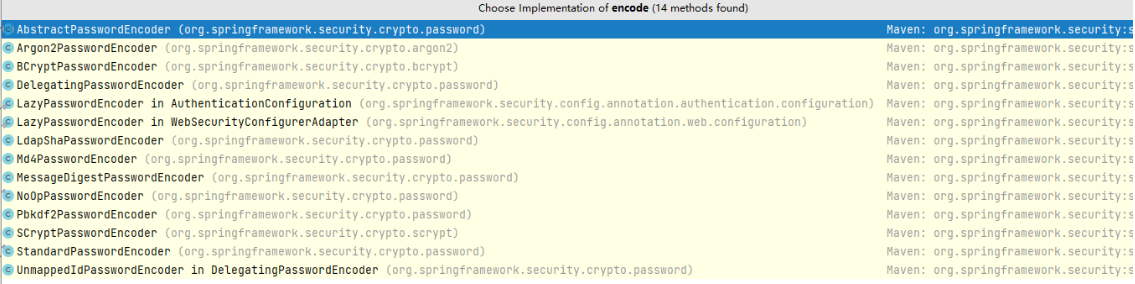
Spring Security主流用法就是 BCryptPasswordEncoder
BCrypt算法介绍:
任何应用考虑到安全,绝不能明文的方式保存密码。密码应该通过哈希算法进行加密。 有很多标准的算法比如SHA或者MD5,结合salt(盐)是一个不错的选择。Spring Security 提供了 BCryptPasswordEncoder类,实现Spring的PasswordEncoder接口使用BCrypt强哈希方法来加密密码。BCrypt强哈希方法 每次加密的结果都不一样,所以更加的安全。
bcrypt加密后的字符串形如:$2a$10$wouq9P/HNgvYj2jKtUN8rOJJNRVCWvn1XoWy55N3sCkEHZPo3lyWq
其中$是分割符,无意义;2a是bcrypt加密版本号;10是const的值;而后的前22位是salt值;再然后的字符串就是密码的密文了;这里的const值即生成salt的迭代次数,默认值是10,推荐值 12。
下面在项目中使用BCrypt算法进行加密
首先先看一个 PasswordEncoderFactories,它是密码器工厂
//
// Source code recreated from a .class file by IntelliJ IDEA
// (powered by FernFlower decompiler)
//

package org.springframework.security.crypto.factory;

import java.util.HashMap;
import java.util.Map;
import org.springframework.security.crypto.argon2.Argon2PasswordEncoder;
import org.springframework.security.crypto.bcrypt.BCryptPasswordEncoder;
import org.springframework.security.crypto.password.DelegatingPasswordEncoder;
import org.springframework.security.crypto.password.LdapShaPasswordEncoder;
import org.springframework.security.crypto.password.Md4PasswordEncoder;
import org.springframework.security.crypto.password.MessageDigestPasswordEncoder;
import org.springframework.security.crypto.password.NoOpPasswordEncoder;
import org.springframework.security.crypto.password.PasswordEncoder;
import org.springframework.security.crypto.password.Pbkdf2PasswordEncoder;
import org.springframework.security.crypto.password.StandardPasswordEncoder;
import org.springframework.security.crypto.scrypt.SCryptPasswordEncoder;

public class PasswordEncoderFactories {
    public static PasswordEncoder createDelegatingPasswordEncoder() {
        String encodingId = "bcrypt";
        Map<String, PasswordEncoder> encoders = new HashMap();
        encoders.put(encodingId, new BCryptPasswordEncoder());
        encoders.put("ldap", new LdapShaPasswordEncoder());
        encoders.put("MD4", new Md4PasswordEncoder());
        encoders.put("MD5", new MessageDigestPasswordEncoder("MD5"));
        encoders.put("noop", NoOpPasswordEncoder.getInstance());
        encoders.put("pbkdf2", new Pbkdf2PasswordEncoder());
        encoders.put("scrypt", new SCryptPasswordEncoder());
        encoders.put("SHA-1", new MessageDigestPasswordEncoder("SHA-1"));
        encoders.put("SHA-256", new MessageDigestPasswordEncoder("SHA-256"));
        encoders.put("sha256", new StandardPasswordEncoder());
        encoders.put("argon2", new Argon2PasswordEncoder());
        return new DelegatingPasswordEncoder(encodingId, encoders);
    }

    private PasswordEncoderFactories() {
    }
}
之前我们在项目中密码使用的是明文的是 noop , 代表不加密使用明文密码, 现在用BCrypt只需要将 noop 换成 bcrypt 即可,如下
package com.po.service.impl;

import com.po.domain.User;
import com.po.service.UserService;
import org.springframework.beans.factory.annotation.Autowired;
import org.springframework.security.core.GrantedAuthority;
import org.springframework.security.core.userdetails.UserDetails;
import org.springframework.security.core.userdetails.UserDetailsService;
import org.springframework.security.core.userdetails.UsernameNotFoundException;
import org.springframework.stereotype.Service;

import java.util.ArrayList;
import java.util.Collection;

@Service
public class MyUserDetailsService implements UserDetailsService {
    @Autowired
    private UserService userService;
    /**
     * 根据用户名查询用户
     * @param username 前端传入的用户名
     * @return
     * @throws UsernameNotFoundException
     */
    @Override
    public UserDetails loadUserByUsername(String username) throws UsernameNotFoundException {
        User user = userService.findByUsername(username);
        if (user == null) {
            throw new UsernameNotFoundException("user is ==>" + username);
        }
        Collection<? extends GrantedAuthority> authorities = new ArrayList<>();
        UserDetails userDetails = new org.springframework.security.core.userdetails.User(username,
                "{bcrypt}"+user.getPassword(),//不使用密码加密
                true, //用户是否启用 (true:启用)
                true,//用户是否过期 (true:没有过期)
                true, //用户凭证是否过期 (true:没有过期)
                true, // 用户是否锁定 (true:没有锁定)
                authorities);
        return userDetails;
    }

}
再次启动 发现输入po 123 不能登录成功了
我们可以写个main方法测试一下
package com.po.test;

import org.springframework.security.crypto.bcrypt.BCryptPasswordEncoder;

public class TestBcrypt {

    public static void main(String[] args) {
        BCryptPasswordEncoder bCryptPasswordEncoder = new BCryptPasswordEncoder();
        String encode = bCryptPasswordEncoder.encode("123");
        System.out.println(encode);
        String encode1 = bCryptPasswordEncoder.encode("123");
        System.out.println(encode1);
    }
}
运行打印结果:
$2a$10$cOSDRbSY/I9/33mx86otqu.Sdvcc6O.X54nadrgoeYMXhk/s6EfDq
$2a$10$X.05M/HB373NLiNoaO/Z..M41wp4EMuvP4f5NWsdMtHS2.lg0Rmq2
由于BCrypt是强哈希算法,可见加密结果是不一样的;
我们把其中的一个结果 复制到数据库里
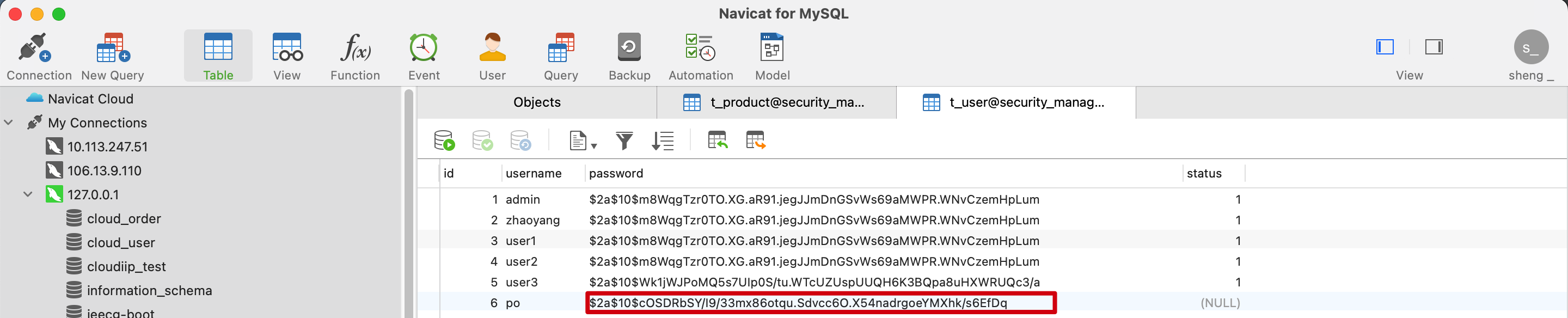
再次启动 输入 po 123
发现登录成功

 浙公网安备 33010602011771号