Delphi主窗体打开窗体及调用其他单元中的方法
Delphi主窗体打开窗体及调用其他单元中的方法
1、建立窗体
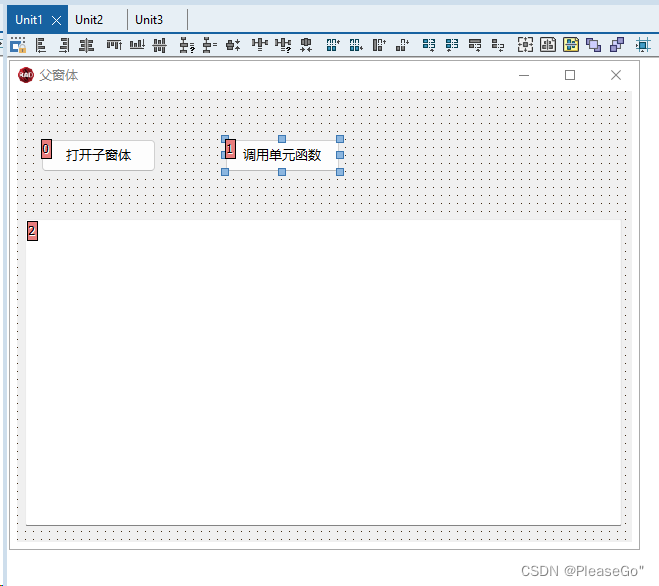
父窗体
实现父窗体点击 “打开子窗体” 按钮打开子窗体。
点击“调用单元函数”按钮将单元方法返回信息填充到MEMO控件中。
子窗体

2、父窗体代码
unit Unit1;

interface

uses
  Winapi.Windows, Winapi.Messages, System.SysUtils, System.Variants, System.Classes, Vcl.Graphics,
  Vcl.Controls, Vcl.Forms, Vcl.Dialogs, Vcl.StdCtrls;

type
  TForm1 = class(TForm)
    btn1: TButton;
    btn3: TButton;
    mmo1: TMemo;
    procedure btn1Click(Sender: TObject);
    procedure btn3Click(Sender: TObject);
  private
    { Private declarations }
  public
    { Public declarations }
  end;

var
  Form1: TForm1;

implementation

{$R *.dfm}
 uses
   Unit2,Unit3;

procedure TForm1.btn1Click(Sender: TObject);
var
 AForm2 : TForm2;//子窗体
begin
     AForm2 := TForm2.Create(Self);
     try
          AForm2.ShowModal;
     finally
       AForm2.Free;
     end;
end;

procedure TForm1.btn3Click(Sender: TObject);
var
 ATestClass : TTestClass;//unit3单元
 AResultStr : string;//返回字符串
begin
   ATestClass :=  TTestClass.Create;
   try
      AResultStr := ATestClass.TestResult;
      mmo1.text := AResultStr;
   finally
     ATestClass.Free;
   end;
end;

end.
3、子窗体代码
unit Unit2;

interface

uses
  Winapi.Windows, Winapi.Messages, System.SysUtils, System.Variants, System.Classes, Vcl.Graphics,
  Vcl.Controls, Vcl.Forms, Vcl.Dialogs, Vcl.StdCtrls;
type
  TForm2 = class(TForm)
    btn1: TButton;
    procedure btn1Click(Sender: TObject);
  private
    { Private declarations }
  public
    { Public declarations }
  end;
var
  Form2: TForm2;

implementation
{$R *.dfm}

procedure TForm2.btn1Click(Sender: TObject);
begin
  ShowMessage('这是子窗体');
end;

end.
4、unit3单元代码
unit Unit3;

interface
uses
  System.SysUtils, System.Variants, System.Classes;
type
  TTestClass = class(TObject)
     public
      function TestResult() : string;
  end;
implementation
{ TTestClass }
function TTestClass.TestResult: string;
begin
   Result := 'Unit3中TTestClass类中的TestResult()方法。';
end;
end.
5、最后效果


 浙公网安备 33010602011771号